


What is this?
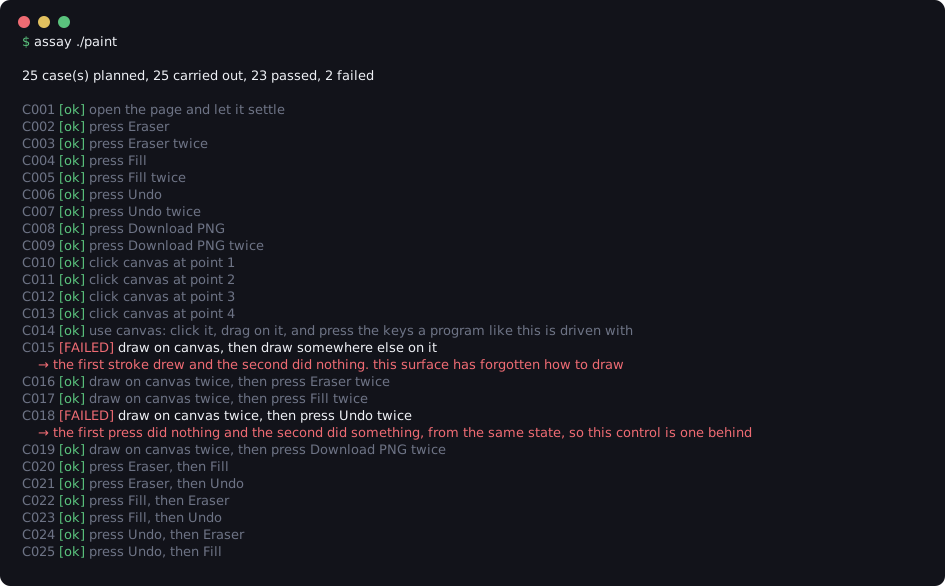
 'assay' is a tool that opens your web page in a real Chromium browser, automatically presses every button, fills every field and uses every control it finds, then reports what contradicted itself — no tests to write, no LLM involved.
'assay' is a tool that opens your web page in a real Chromium browser, automatically presses every button, fills every field and uses every control it finds, then reports what contradicted itself — no tests to write, no LLM involved.Is this the same kind of thing as Playwright or Cypress?No — Playwright and Cypress run tests a human writes, while assay builds its own checks by discovering the controls on the page, so there's nothing for you to script.
No — Playwright and Cypress run tests a human writes, while assay builds its own checks by discovering the controls on the page, so there's nothing for you to script.How do I install and run it?Install with 'pip install assay-ui' (or 'python3 -m pip install assay-ui' if pip isn't found); the first run automatically downloads Chromium if it's missing, then you point it at a folder serving your page.
Install with 'pip install assay-ui' (or 'python3 -m pip install assay-ui' if pip isn't found); the first run automatically downloads Chromium if it's missing, then you point it at a folder serving your page.Do I need an API key or an LLM to use it?No — assay has no LLM, no API key and no usage cost, and every run on the same page gives the same result.
No — assay has no LLM, no API key and no usage cost, and every run on the same page gives the same result.Will it catch every bug in my page?No — it can't judge intent, so a page that runs fine but computes the wrong result (like a total adding wrongly) usually passes; it also only checks one locally-served page at a time with no login, live network calls or build step.
No — it can't judge intent, so a page that runs fine but computes the wrong result (like a total adding wrongly) usually passes; it also only checks one locally-served page at a time with no login, live network calls or build step.How accurate is assay at catching real bugs?On 225 AI-written mini apps, it found the real bug in 15 of 20 broken pages with zero false alarms on the 205 working ones; on apps with bugs added on purpose, it found 12 of 50 added bugs with zero false alarms on the originals.
On 225 AI-written mini apps, it found the real bug in 15 of 20 broken pages with zero false alarms on the 205 working ones; on apps with bugs added on purpose, it found 12 of 50 added bugs with zero false alarms on the originals.Does it work automatically with coding agents like Claude Code?Yes — a skill lets it run after any of 15 supported harnesses (Claude Code, DeepSeek Harness, opencode, Codex, Cursor, Gemini CLI, and more) write a page, and a plugin for Claude Code and DeepSeek Harness runs the check automatically after every turn that changes a page.
Yes — a skill lets it run after any of 15 supported harnesses (Claude Code, DeepSeek Harness, opencode, Codex, Cursor, Gemini CLI, and more) write a page, and a plugin for Claude Code and DeepSeek Harness runs the check automatically after every turn that changes a page.What kind of problems does it actually flag?It looks for the page contradicting itself: thrown errors, an Undo button that does nothing then suddenly works, an item count showing 1 when the list is empty, totals that rise but don't fall, stray NaN values, or nothing on the page responding at all.
It looks for the page contradicting itself: thrown errors, an Undo button that does nothing then suddenly works, an item count showing 1 when the list is empty, totals that rise but don't fall, stray NaN values, or nothing on the page responding at all.Why not just ask an LLM to review the code instead?Reading code tells you what it's supposed to do, not what it actually does when run; assay instead serves the page, interacts with it in a real browser, and reports observed inconsistencies with no model and no API cost.
Reading code tells you what it's supposed to do, not what it actually does when run; assay instead serves the page, interacts with it in a real browser, and reports observed inconsistencies with no model and no API cost.What are similar projects?testsprite-cli, playwright, SeleniumBase, agentic-playwright, playwright-cli, ouroboros, pstack-claude, reverse-api-engineer
testsprite-cli, playwright, SeleniumBase, agentic-playwright, playwright-cli, ouroboros, pstack-claude, reverse-api-engineerWhich topics is it in?end-to-end-testing, qa, pip, testing-tools, test-automation, codex-cli, chrome, gemini-cli, github-copilot, code-generation, playwright, opencode
end-to-end-testing, qa, pip, testing-tools, test-automation, codex-cli, chrome, gemini-cli, github-copilot, code-generation, playwright, opencode