
Tiling window management for the Mac.





About
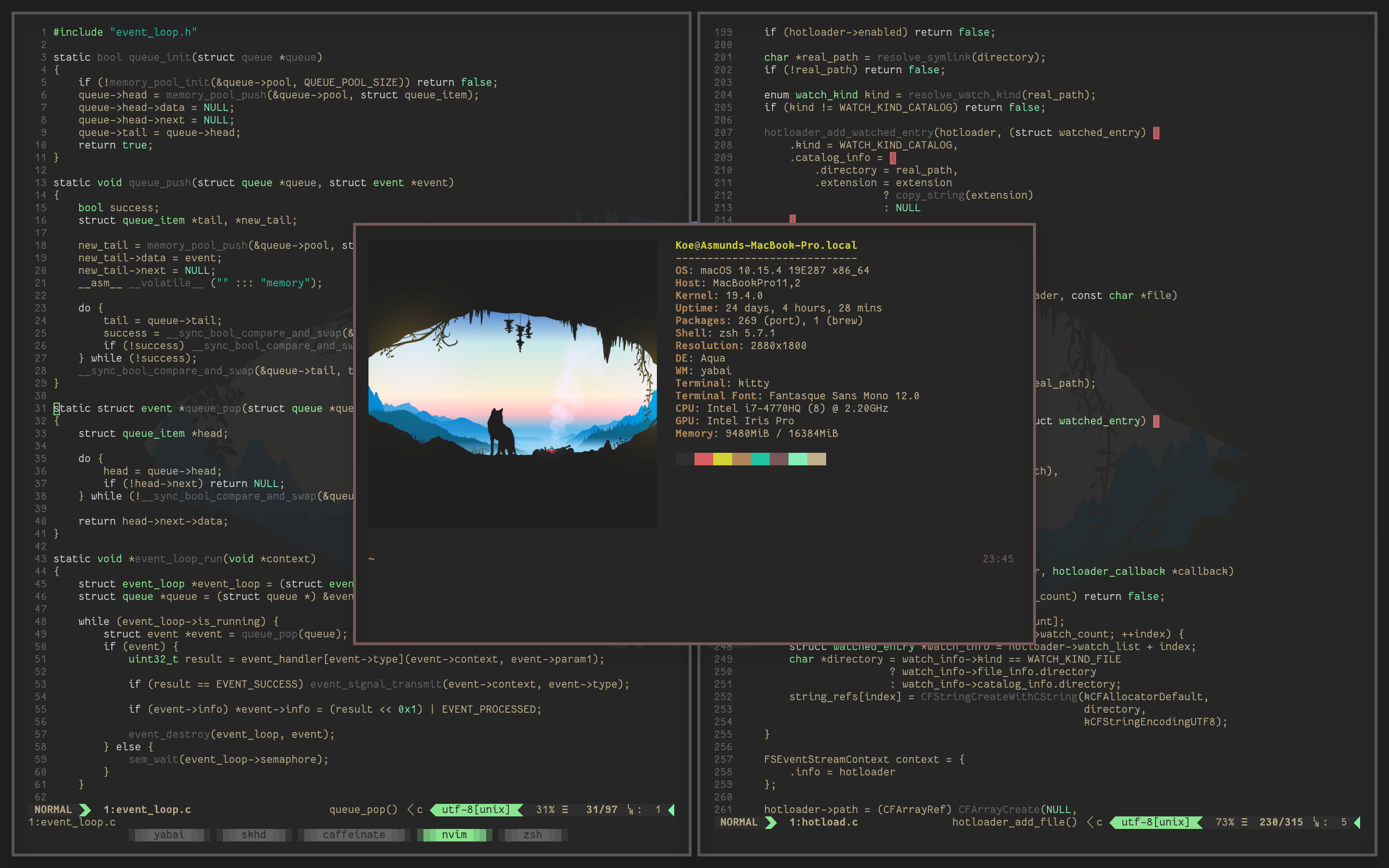
yabai is a window management utility that is designed to work as an extension to the built-in window manager of macOS.
yabai allows you to control your windows, spaces and displays freely using an intuitive command line interface and optionally set user-defined keyboard shortcuts using ↗ skhd and other third-party software.
The primary function of yabai is tiling window management; automatically modifying your window layout using a binary space partitioning algorithm to allow you to focus on the content of your windows without distractions.
Additional features of yabai include focus-follows-mouse, disabling animations for switching spaces, creating spaces past the limit of 16 spaces, and much more.
Installation and Configuration
- The ↗ yabai wiki has both brief and detailed installation instructions for multiple installation methods, and also explains how to uninstall yabai completely.
- Sample configuration files can be found in the ↗ examples directory. Refer to the ↗ documentation or the wiki for further information.
- Keyboard shortcuts can be defined with ↗ skhd or any other suitable software you may prefer.
Requirements and Caveats
Please read the below requirements carefully.
Make sure you fulfil all of them before filing an issue.
| Requirement |
Note |
| Operating System Intel x86-64 |
Big Sur 11.0.0+, Monterey 12.0.0+, Ventura 13.0.0+, Sonoma 14.0.0+, Sequoia 15.0+, and Tahoe 26.0+ is supported. |
| Operating System Apple Silicon |
Monterey 12.0.0+, Ventura 13.0.0+, Sonoma 14.0.0+, Sequoia 15.0+, and Tahoe 26.0+ is supported. |
| Accessibility API |
yabai must be given permission to utilize the Accessibility API and will request access upon launch. The application must be restarted after access has been granted. |
| Screen Recording |
yabai must be given Screen Recording permission if and only if you want to enable window animations, and will request access when necessary. The application must be restarted after access has been granted. |
| System Preferences (macOS 11.x, 12.x) |
In the Mission Control pane, the setting "Displays have separate Spaces" must be enabled. |
| System Settings (macOS 13.x, 14.x, 15.x, 26.x) |
In the Desktop & Dock tab, inside the Mission Control pane, the setting "Displays have separate Spaces" must be enabled. |
Please also take note of the following caveats.
| Caveat |
Note |
| System Integrity Protection (Optional) |
System Integrity Protection can be (partially) disabled for yabai to inject a scripting addition into Dock.app for controlling windows with functions that require elevated privileges. This enables control of the window server, which is the sole owner of all window connections, and enables additional features of yabai. |
| Code Signing |
When building from source (or installing from HEAD), it is necessary to codesign the binary so it retains its accessibility and automation privileges when updated or rebuilt. |
| Finder Desktop |
Some people disable the Finder Desktop window using an undocumented defaults write command. This breaks focusing of empty spaces and should be avoided when using yabai. To re-activate the Finder Desktop, run: "defaults write com.apple.finder CreateDesktop -bool true". |
| NSDocument-based Applications |
Windows that utilize native macOS tabs such as Terminal and Finder, do not behave correctly when creating tabs. Avoid creating tabs in these applications, consider alternatives that do not use NSDocument's tab system, or make these windows float using rules. |
| System Preferences (macOS 11.x, 12.x) |
In the Mission Control pane, the setting "Automatically rearrange Spaces based on most recent use" should be disabled for commands that rely on the ordering of spaces to work reliably. |
| System Settings (macOS 13.x, 14.x, 15.x, 26.x) |
In the Desktop & Dock tab, inside the Mission Control pane, the setting "Automatically rearrange Spaces based on most recent use" should be disabled for commands that rely on the ordering of spaces to work reliably. |
| System Settings (macOS 14.x, 15.x, 26.x) |
In the Desktop & Dock tab, inside the Desktop & Stage Manager pane, the setting "Show Items On Desktop" should be enabled for display and space focus commands to work reliably in multi-display configurations. |
| System Settings (macOS 14.x, 15.x, 26.x) |
In the Desktop & Dock tab, inside the Desktop & Stage Manager pane, the setting "Click wallpaper to reveal Desktop" should be set to "Only in Stage Manager" for display and space focus commands to work reliably. |
License and Attribution
yabai is licensed under the ↗ MIT License, a short and simple permissive license with conditions only requiring preservation of copyright and license notices.
Licensed works, modifications, and larger works may be distributed under different terms and without source code.
Thanks to @fools-mate for creating a logo and banner for this project and making them available for free.
Thanks to @dominiklohmann for contributing great documentation, support, and more, for free.
Disclaimer
Use at your own discretion.
I take no responsibility if anything should happen to your machine while trying to install, test or otherwise use this software in any form.
You acknowledge that you understand the potential risk that may come from disabling ↗ System Integrity Protection on your system, and I make no recommendation as to whether you should or should not disable System Integrity Protection.

 Yabai 是一款适用于 macOS 的平铺式窗口管理器,它扩展了系统自带的窗口管理功能,并使用二叉空间分割算法自动排列窗口。