250 ·GitHub
What is this?
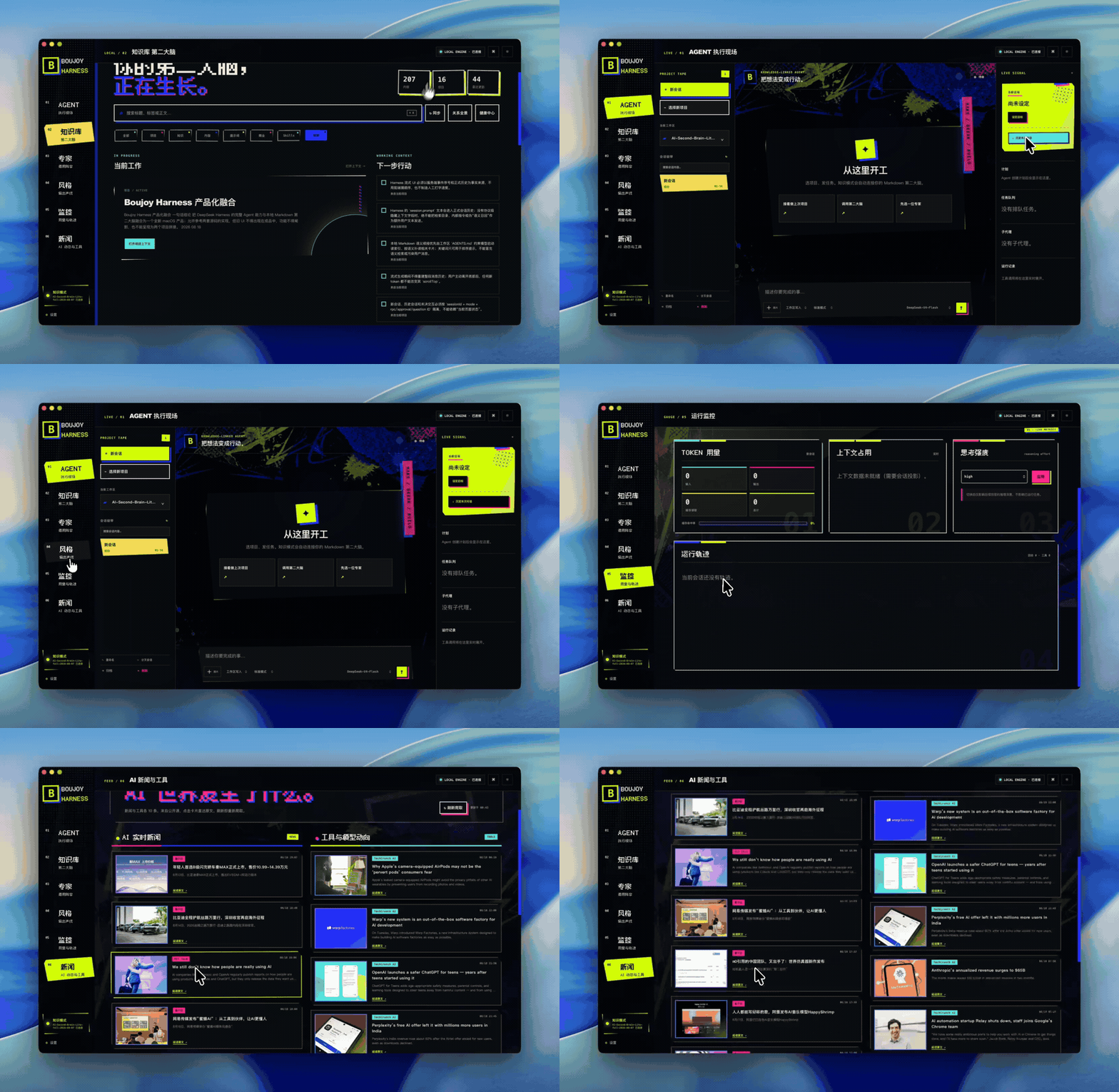
 A local desktop client for DeepSeek Harness: upstream stays the agent runtime handling models, tools, event frames and RPC, while Boujoy adds the desktop host, a local gateway, a chat UI and a Markdown knowledge workspace.
A local desktop client for DeepSeek Harness: upstream stays the agent runtime handling models, tools, event frames and RPC, while Boujoy adds the desktop host, a local gateway, a chat UI and a Markdown knowledge workspace.Is this an official DeepSeek product, or an independent layer on top?It's independent and unofficial — a separate open-source layer on top of DeepSeek Harness, not supported or endorsed by DeepSeek AI. Upstream keeps owning the runtime; Boujoy only adds the local desktop experience.
It's independent and unofficial — a separate open-source layer on top of DeepSeek Harness, not supported or endorsed by DeepSeek AI. Upstream keeps owning the runtime; Boujoy only adds the local desktop experience.How do I get it running on macOS?With DeepSeek Harness already built, run the bootstrap at the repo root: it finds Python, your config and common DeepSeek paths, builds, installs and opens the app. Use ./macos/setup.command for source installs and ./macos/doctor.command to diagnose problems.
With DeepSeek Harness already built, run the bootstrap at the repo root: it finds Python, your config and common DeepSeek paths, builds, installs and opens the app. Use ./macos/setup.command for source installs and ./macos/doctor.command to diagnose problems.What do I need to have installed before it will run?On macOS 13+ Apple Silicon: a separately built DeepSeek Harness (with its dsh executable under node_modules/.bin), Python 3, and a local Markdown vault folder. Boujoy hosts no models or API keys — provider and tool permissions come from your Harness config.
On macOS 13+ Apple Silicon: a separately built DeepSeek Harness (with its dsh executable under node_modules/.bin), Python 3, and a local Markdown vault folder. Boujoy hosts no models or API keys — provider and tool permissions come from your Harness config.Any gotchas when launching the packaged macOS app?Yes — unsigned apps opened straight from a ZIP can trigger macOS App Translocation, which hides sibling vault and runtime folders. Keep the package intact and launch via the Start command at the package root, not the app bundle; the app detects abnormal paths and guides you.
Yes — unsigned apps opened straight from a ZIP can trigger macOS App Translocation, which hides sibling vault and runtime folders. Keep the package intact and launch via the Start command at the package root, not the app bundle; the app detects abnormal paths and guides you.Does it work on Windows too, or is it Mac-only?macOS 13+ Apple Silicon gets the native desktop host; Windows 10/11 x64 is a Beta browser-host adapter (PowerShell service host, Edge app mode). The Windows runtime must be prepared on a real Windows x64 machine — the macOS runtime can't be copied over.
macOS 13+ Apple Silicon gets the native desktop host; Windows 10/11 x64 is a Beta browser-host adapter (PowerShell service host, Edge app mode). The Windows runtime must be prepared on a real Windows x64 machine — the macOS runtime can't be copied over.What is Knowledge Mode vs Pure Mode?Knowledge Mode connects your own Markdown vault so project cards, notes and prompts are served to the agent on demand through an index — it never dumps the whole vault into the model. Pure Mode runs just the Harness and never reads your vault at all.
Knowledge Mode connects your own Markdown vault so project cards, notes and prompts are served to the agent on demand through an index — it never dumps the whole vault into the model. Pure Mode runs just the Harness and never reads your vault at all.What does the chat UI handle during long agent sessions?Long histories load page by page, streaming text never hijacks your scrolling, and images or local videos preview right inside messages. RPCs that need confirmation, input or approval are queued, and stale or timed-out prompts collapse automatically instead of hanging forever.
Long histories load page by page, streaming text never hijacks your scrolling, and images or local videos preview right inside messages. RPCs that need confirmation, input or approval are queued, and stale or timed-out prompts collapse automatically instead of hanging forever.Why use Boujoy if DeepSeek Harness already runs agents?Upstream makes the agent act; Boujoy wraps that in a resumable desktop experience with media previews and a run-status panel, while keeping long-term project context in plain Markdown files you own rather than chat history.
Upstream makes the agent act; Boujoy wraps that in a resumable desktop experience with media previews and a run-status panel, while keeping long-term project context in plain Markdown files you own rather than chat history.What are similar projects?easyread, EverOS, dsh-dafeiyu, EnvoyMesh, deepseek-harness-desktop, ambient-context, WeChatBridge, Minke
easyread, EverOS, dsh-dafeiyu, EnvoyMesh, deepseek-harness-desktop, ambient-context, WeChatBridge, MinkeWhich topics is it in?rpc, powershell, chat, deepseek-harness, websocket, knowledge-base, apple-silicon, deepseek, local-first, markdown, privacy, desktop-app
rpc, powershell, chat, deepseek-harness, websocket, knowledge-base, apple-silicon, deepseek, local-first, markdown, privacy, desktop-app