



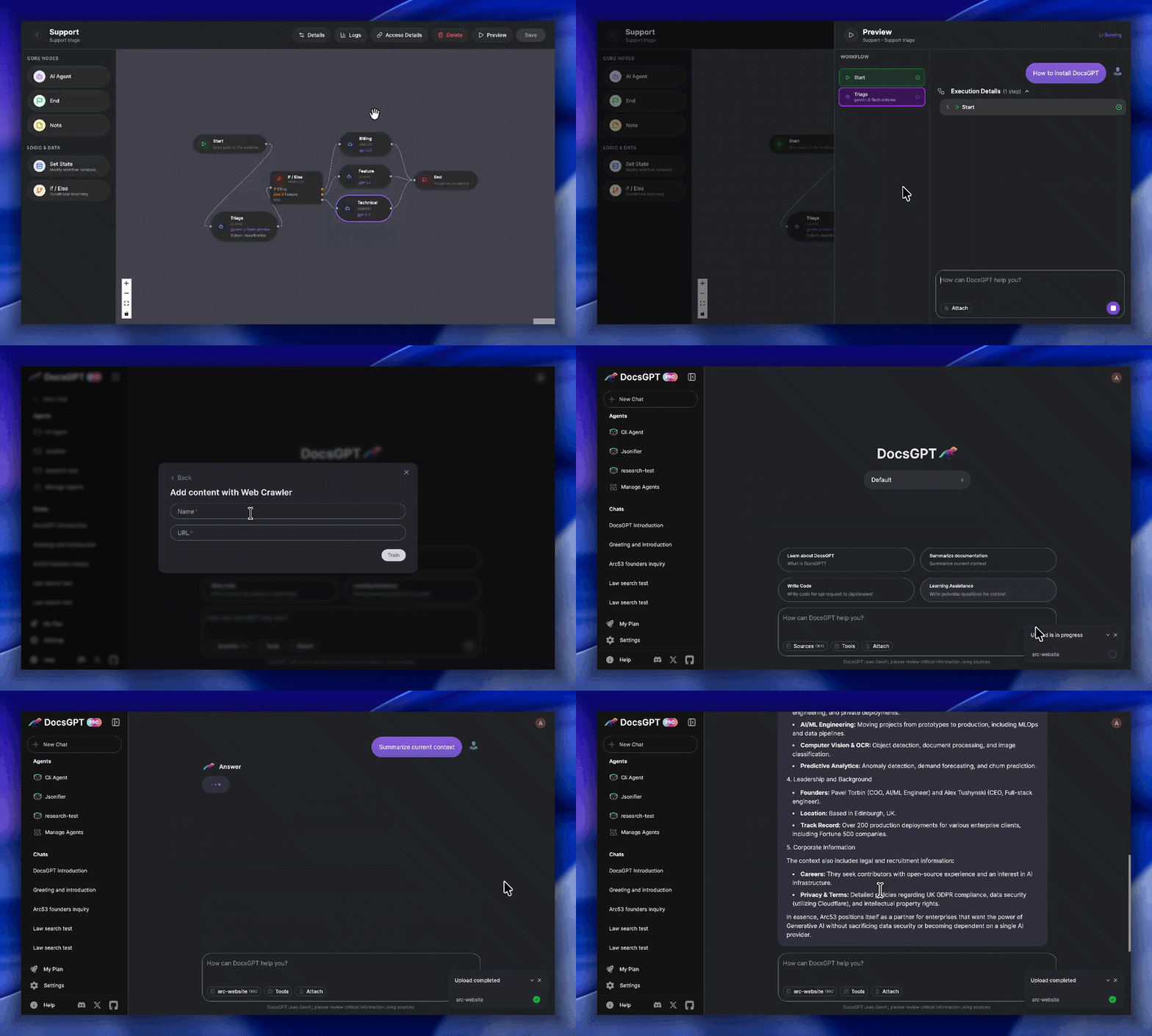

这是什么?
 DocsGPT 是一个私有的、可自行部署的 AI 平台,用于构建智能体、助手和企业搜索工具。它内置 Agent Builder、文档分析和深度研究模式,并支持多种大语言模型服务商。
DocsGPT 是一个私有的、可自行部署的 AI 平台,用于构建智能体、助手和企业搜索工具。它内置 Agent Builder、文档分析和深度研究模式,并支持多种大语言模型服务商。这是托管服务,还是需要我自己运行的软件?这是一个需要你自行部署的自托管应用(后端使用 Flask,前端使用 React,基于 Docker 进行配置),而不是 SaaS 产品。它为私有且安全的运行而设计,并支持用于生产环境的 Kubernetes。
这是一个需要你自行部署的自托管应用(后端使用 Flask,前端使用 React,基于 Docker 进行配置),而不是 SaaS 产品。它为私有且安全的运行而设计,并支持用于生产环境的 Kubernetes。我该如何让它运行起来?先克隆仓库,然后运行随附的安装脚本(macOS/Linux 使用 shell 脚本,Windows 使用 PowerShell 脚本)。脚本会引导你完成五个选项:公共 API、本地运行、连接本地推理引擎、使用云端 API 服务商,或自行构建 Docker 镜像。
先克隆仓库,然后运行随附的安装脚本(macOS/Linux 使用 shell 脚本,Windows 使用 PowerShell 脚本)。脚本会引导你完成五个选项:公共 API、本地运行、连接本地推理引擎、使用云端 API 服务商,或自行构建 Docker 镜像。开始之前需要先安装 Docker 吗?需要。运行安装脚本之前必须先安装 Docker。随后,脚本会根据你选择的选项自动配置 .env 文件,并处理所需的任何下载。
需要。运行安装脚本之前必须先安装 Docker。随后,脚本会根据你选择的选项自动配置 .env 文件,并处理所需的任何下载。这个东西能直接用于正式生产环境吗?核心平台是开源的,可以自行部署,但对于正式的企业部署,团队明确提供个性化的部署帮助。另外,OIDC/SSO、RBAC 和团队范围内共享等主要管理与安全功能,直到 2026 年年中才完成。
核心平台是开源的,可以自行部署,但对于正式的企业部署,团队明确提供个性化的部署帮助。另外,OIDC/SSO、RBAC 和团队范围内共享等主要管理与安全功能,直到 2026 年年中才完成。它也能在 Windows 上运行吗,而不只是 Linux/macOS?可以。除了适用于 macOS 和 Linux 的 shell 脚本外,还专门提供了 Windows 的 PowerShell 安装脚本;它也支持用于更大规模部署的 Kubernetes。
可以。除了适用于 macOS 和 Linux 的 shell 脚本外,还专门提供了 Windows 的 PowerShell 安装脚本;它也支持用于更大规模部署的 Kubernetes。如果我使用它,我的数据能保持私密吗?能。DocsGPT 设计为私密且安全地运行,你还可以将它与 Ollama 或 llama.cpp 等本地模型搭配使用,使文档无需离开你自己的基础设施。
能。DocsGPT 设计为私密且安全地运行,你还可以将它与 Ollama 或 llama.cpp 等本地模型搭配使用,使文档无需离开你自己的基础设施。我可以接入哪些大语言模型服务商?它支持主流云端大语言模型(OpenAI、Google、Anthropic),也支持 Ollama 和 llama.cpp 等本地推理引擎,并包括「自带模型」(Bring Your Own Model)选项。
它支持主流云端大语言模型(OpenAI、Google、Anthropic),也支持 Ollama 和 llama.cpp 等本地推理引擎,并包括「自带模型」(Bring Your Own Model)选项。它可以导入哪些类型的文件和数据源?它可以读取 PDF、DOCX、CSV、XLSX、EPUB、MD、RST、HTML、MDX、JSON、PPTX 格式的文件,以及图片和音频文件,还可以抓取 URL、站点地图(sitemap)、Reddit、GitHub 和网络爬虫获取的内容。
它可以读取 PDF、DOCX、CSV、XLSX、EPUB、MD、RST、HTML、MDX、JSON、PPTX 格式的文件,以及图片和音频文件,还可以抓取 URL、站点地图(sitemap)、Reddit、GitHub 和网络爬虫获取的内容。内置了哪些集成功能?DocsGPT 自带现成的 HTML/React 聊天组件、搜索工具和 Discord/Telegram 机器人,还提供 SharePoint 和 Confluence 的连接器。
DocsGPT 自带现成的 HTML/React 聊天组件、搜索工具和 Discord/Telegram 机器人,还提供 SharePoint 和 Confluence 的连接器。Agent Builder 具体能让我做什么?它是一个可视化工作流构建器,带有条件节点,可以把工具、数据源和大语言模型调用串联起来,无需编写后端代码即可构建自定义智能体。
它是一个可视化工作流构建器,带有条件节点,可以把工具、数据源和大语言模型调用串联起来,无需编写后端代码即可构建自定义智能体。What are similar projects?production-agentic-rag-course, bisheng, onyx, open-webui, txtai, WeKnora, jevbox, quivr
production-agentic-rag-course, bisheng, onyx, open-webui, txtai, WeKnora, jevbox, quivrWhich topics is it in?information-retrieval, flask, language-model, sso, rbac, discord, natural-language-processing, transformers, semantic-search, telegram, document-processing, search
information-retrieval, flask, language-model, sso, rbac, discord, natural-language-processing, transformers, semantic-search, telegram, document-processing, search