Shapeshift
An input that becomes what you mean. One text box that morphs into the right UI as you type — an event card, a checklist, a timer, a color picker, a bill splitter, a poll, a converter and more.
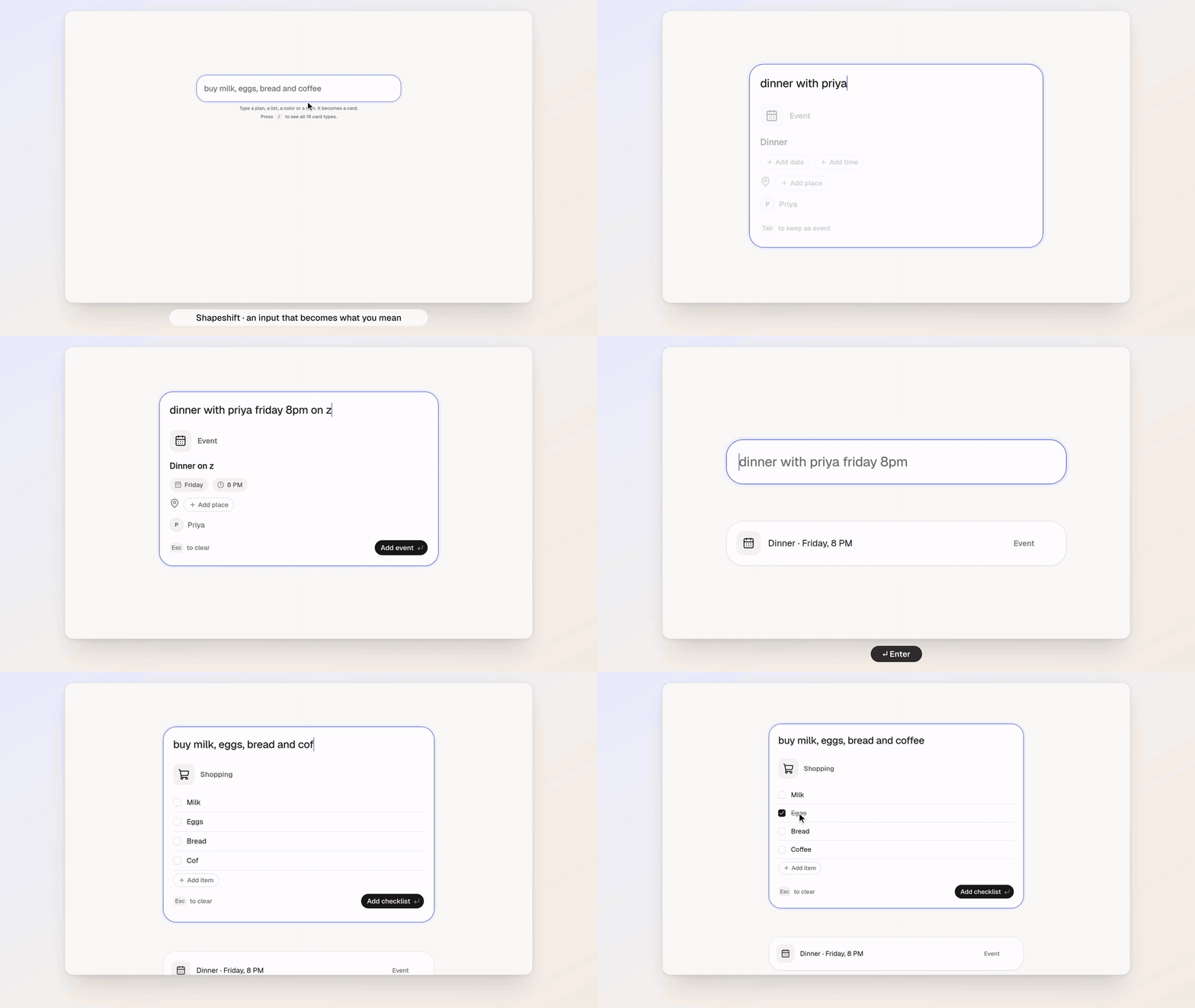
Try it live · Watch the full 60-second demo (1080p60)
dinner with priya friday 8pm on zoom   →  Event card · Friday · 8 PM · Priya · Video call
buy milk, eggs, bread and coffee       →  Shopping checklist
split 2400 between 3                   →  ₹800 each
minecraft diamond                      →  #4AEDD9
Intent is classified by TypeSafe AI's Jev model: one call answers 14 typed questions in parallel (which card, plus signals like "is it a video call?", "is it urgent?"). Everything else — dates, amounts, units, math — is deterministic code. Jev decides, code computes.
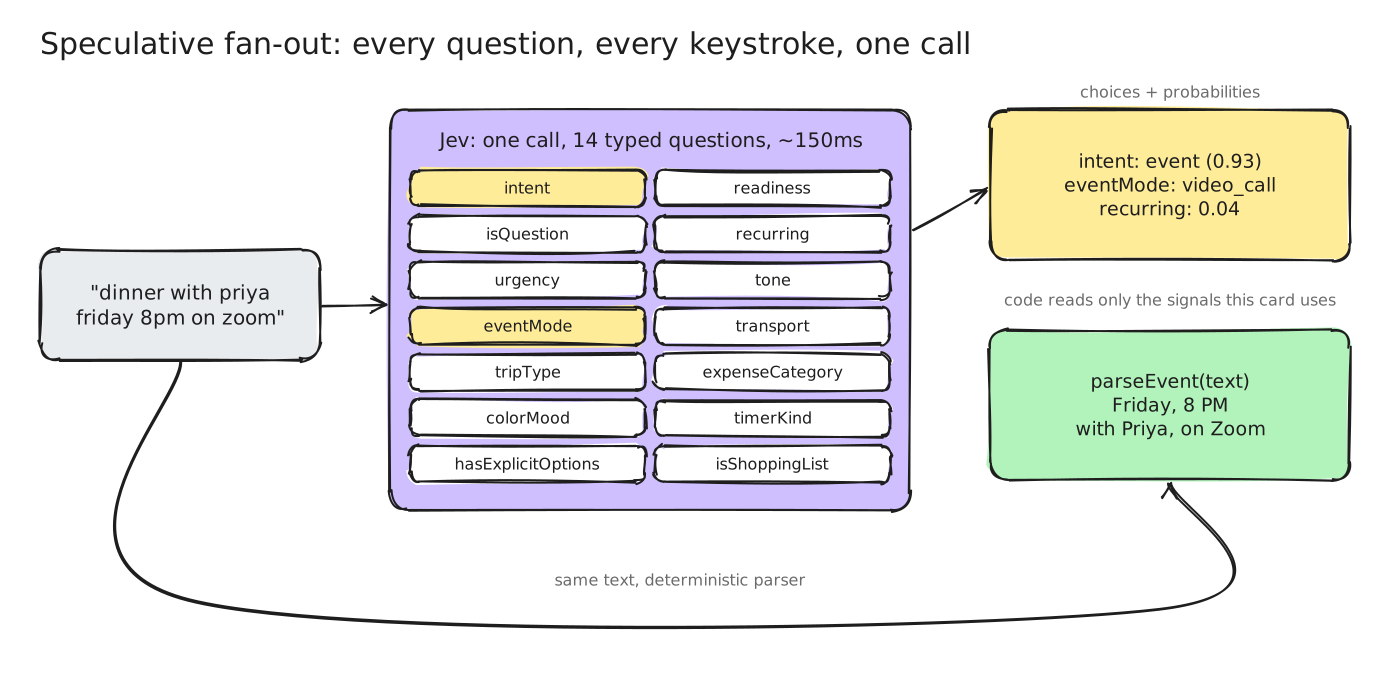
It works fully offline by default with a built-in keyword classifier, so you can run it without an account.
Quick start
Requires Bun 1.2+.
bun install
bun dev
Open http://localhost:3000 and start typing. Press / to see every card type.
Use the online Jev model (optional)
cp .env.example .env.local
# then set TYPESAFE_API_KEY=... (get one at https://console.typesafe.ai/keys)
Restart bun dev. The latency readout in the bottom-right corner switches from jev-offline to jev-1.13.0. The key is only ever read on the server (/api/intent); it never reaches the browser. If the API is unreachable or rate-limited, Shapeshift quietly falls back to offline mode.
| Variable |
Default |
What it does |
TYPESAFE_API_KEY |
(empty) |
Enables the online model. Empty or placeholder values keep you offline. |
JEV_MODEL |
jev-1.13.0 |
Pinned model version. |
NEXT_PUBLIC_USE_MOCK |
false |
true forces offline even with a key. |
NEXT_PUBLIC_SITE_URL |
http://localhost:3000 |
Used for Open Graph metadata. |
Card types
| Card |
Try |
| Event |
lunch with rahul and anna tomorrow |
| Reminder |
remind me to pay rent tomorrow urgent |
| Checklist |
buy milk, eggs, bread and coffee |
| Timer |
25 min focus |
| Habit |
gym 3x a week |
| Color |
#ff6b35, tiffany blue, minecraft diamond |
| Split |
split 2400 between 3 |
| Expense |
spent 450 on uber |
| Convert |
5 miles in km, 72f to c |
| Calculate |
18% of 3450 |
| Trip |
flight to goa next weekend |
| Poll |
pizza or burgers for friday? |
| Contact |
rahul 98200 12345 [email protected] |
| Bookmark |
https://vercel.com/blog check later |
| Countdown |
days until christmas |
| Time zone |
3pm pst in ist, what time is it in tokyo |
| Random |
roll 2d6, flip a coin, pick one: tacos, sushi or pizza |
| Goal |
read 12 books this year, 4 done |
| Note |
anything else |
Saved cards live in your browser (localStorage) until you delete them. Click one to edit it.
Keyboard
| Key |
Action |
| Enter |
Save the card |
| Esc |
Clear (or cancel an edit) |
| Tab |
Keep a faint preview |
| ← → |
Choose between "Did you mean" chips |
| / |
Open every card type |
URL flags: ?debug=1 shows every probability; ?demo=1&loop=1 plays a scripted demo.
How it works
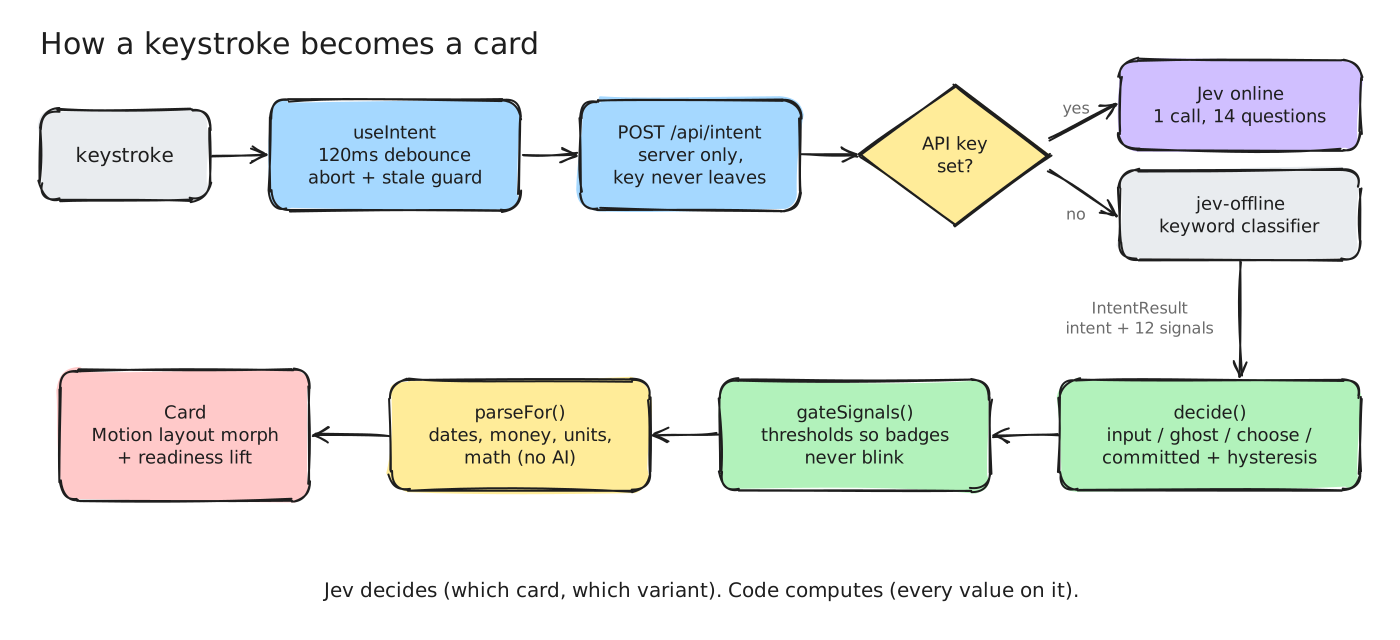
Raw model output flickers as you type, so a small state machine turns confidence into calm UI states. A card only changes when a challenger wins twice in a row (or is very sure), and signal badges use an on/off hysteresis band.
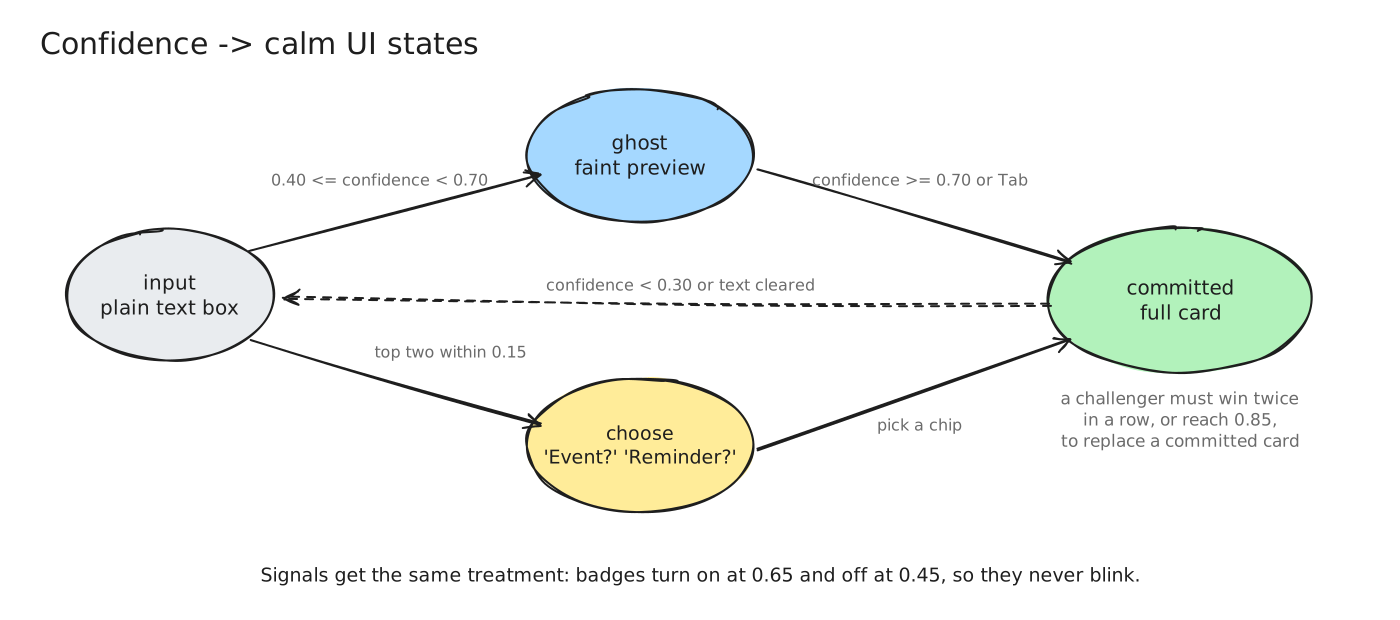
The diagrams are Excalidraw files — open any docs/diagrams/*.excalidraw at excalidraw.com to edit them.
| Path |
What lives there |
src/components/intents/registry.ts |
The extension point. One entry per card type. |
src/lib/jev/questions.ts |
The Jev question schema |
src/lib/jev/mock.ts |
Offline keyword classifier (same output shape) |
src/lib/parse/ |
One deterministic parser per card type |
src/lib/decide.ts, src/lib/signals.ts |
The calm-UI state machine |
src/components/shapeshift/ |
Shell, chips, palette, saved list, HUD |
Adding a card type
- Add the key to
INTENT_KEYS in src/lib/jev/types.ts.
- Add a non-overlapping criterion to
intent in src/lib/jev/questions.ts.
- Write a parser in
src/lib/parse/ and register it in src/lib/parse/index.ts.
- Write a card component in
src/components/intents/ and add a registry entry.
- Teach the offline classifier in
src/lib/jev/mock.ts, and add tests.
TypeScript will point at anything you missed.
Development
bun run check    # typecheck + lint + tests
bun test         # parser, decision, signal and classifier tests
bun run build
Stack: Next.js (App Router) · React 19 · TypeScript (strict) · Tailwind CSS v4 · shadcn/ui · Motion · chrono-node · zod.
License
MIT

 Shapeshift 是一个单一的文本输入框,会根据它对你意图的理解,随着你的输入变成合适的 UI 控件——日程卡片、清单、计时器、取色器、账单分摊、投票、换算器等等。