





























11.9K ·GitHub
Что это такое?
 TranslationPlugin — это плагин для перевода в IDE на базе IntelliJ и в Android Studio. Он позволяет переводить текст, документацию и символы кода прямо в редакторе, используя несколько движков перевода.
TranslationPlugin — это плагин для перевода в IDE на базе IntelliJ и в Android Studio. Он позволяет переводить текст, документацию и символы кода прямо в редакторе, используя несколько движков перевода.Это отдельное приложение или плагин внутри моей IDE?Это плагин, который устанавливается в уже существующую IDE семейства JetBrains (или в Android Studio/DevEco Studio). Отдельного собственного приложения у него нет.
Это плагин, который устанавливается в уже существующую IDE семейства JetBrains (или в Android Studio/DevEco Studio). Отдельного собственного приложения у него нет.Нужен ли мне ключ API, чтобы им пользоваться?Большинство движков работают сразу после установки, но некоторым сервисам, например OpenAI, DeepL и Youdao Translate, перед использованием нужна регистрация и привязка Authentication Key в настройках плагина.
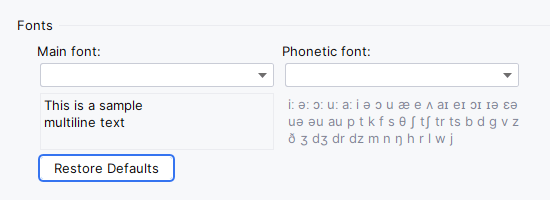
Большинство движков работают сразу после установки, но некоторым сервисам, например OpenAI, DeepL и Youdao Translate, перед использованием нужна регистрация и привязка Authentication Key в настройках плагина.Есть ли частые проблемы при установке или работе?Переведённый текст может отображаться искажённо, если в настроенном шрифте нет нужных символов. Ключи приложений иногда не сохраняются, пока в настройках IDE вы не переключите хранилище паролей на KeePass. Сочетания клавиш также могут конфликтовать с другими плагинами.
Переведённый текст может отображаться искажённо, если в настроенном шрифте нет нужных символов. Ключи приложений иногда не сохраняются, пока в настройках IDE вы не переключите хранилище паролей на KeePass. Сочетания клавиш также могут конфликтовать с другими плагинами.С какими IDE он работает?Он работает со всем семейством IDE JetBrains, а также с Android Studio и Huawei DevEco Studio, включая IntelliJ IDEA, PyCharm, WebStorm, GoLand, CLion, PhpStorm, Rider, RubyMine, RustRover, DataGrip и другие.
Он работает со всем семейством IDE JetBrains, а также с Android Studio и Huawei DevEco Studio, включая IntelliJ IDEA, PyCharm, WebStorm, GoLand, CLion, PhpStorm, Rider, RubyMine, RustRover, DataGrip и другие.Мой текст отправляется на сторонние серверы?Да. Запросы на перевод уходят в тот внешний движок, который вы выберете (Microsoft, Google, DeepL, OpenAI, Youdao, Baidu или Alibaba), поэтому текст для перевода покидает ваш компьютер.
Да. Запросы на перевод уходят в тот внешний движок, который вы выберете (Microsoft, Google, DeepL, OpenAI, Youdao, Baidu или Alibaba), поэтому текст для перевода покидает ваш компьютер.Какие движки перевода можно выбрать?Microsoft Translator, Google Translate, DeepL Translator, OpenAI Translator, Youdao Translate, Baidu Translate и Alibaba Translate, а также озвучивание (TTS) от Microsoft Edge, Google и OpenAI.
Microsoft Translator, Google Translate, DeepL Translator, OpenAI Translator, Youdao Translate, Baidu Translate и Alibaba Translate, а также озвучивание (TTS) от Microsoft Edge, Google и OpenAI.Может ли он переводить больше, чем выделенный текст?Да. Помимо выделенного текста или текста под курсором, он может переводить Quick Documentation, встроенную документацию (включая пакетный перевод всей встроенной документации в файле) и целые документы. Также он поддерживает Word Book для сохранения слов.
Да. Помимо выделенного текста или текста под курсором, он может переводить Quick Documentation, встроенную документацию (включая пакетный перевод всей встроенной документации в файле) и целые документы. Также он поддерживает Word Book для сохранения слов.Можно ли заменить идентификаторы кода переведённым текстом?Да. Действие «Replace with Translation» переводит выделенный текст и может вывести его в camelCase с настраиваемым разделителем слов или в исходном формате. Это удобно для именования переменных.
Да. Действие «Replace with Translation» переводит выделенный текст и может вывести его в camelCase с настраиваемым разделителем слов или в исходном формате. Это удобно для именования переменных.Как быстро переключаться между движками перевода?Нажмите виджет движка в строке состояния или сочетание Ctrl+Shift+S (Control+Meta+Y на macOS), чтобы переключаться между движками перевода и TTS, не открывая настройки.
Нажмите виджет движка в строке состояния или сочетание Ctrl+Shift+S (Control+Meta+Y на macOS), чтобы переключаться между движками перевода и TTS, не открывая настройки.What are similar projects?ideavim, intellij-community, pot-desktop, p3c, kotlin, IntelliJ-IDEA-Tutorial, zotero-pdf-translate, Easydict
ideavim, intellij-community, pot-desktop, p3c, kotlin, IntelliJ-IDEA-Tutorial, zotero-pdf-translate, EasydictWhich topics is it in?android-studio, translate, intellij, ide, tts, text-to-speech, translation, kotlin, chatgpt, java, plugin, openai
android-studio, translate, intellij, ide, tts, text-to-speech, translation, kotlin, chatgpt, java, plugin, openai