



Что это такое?
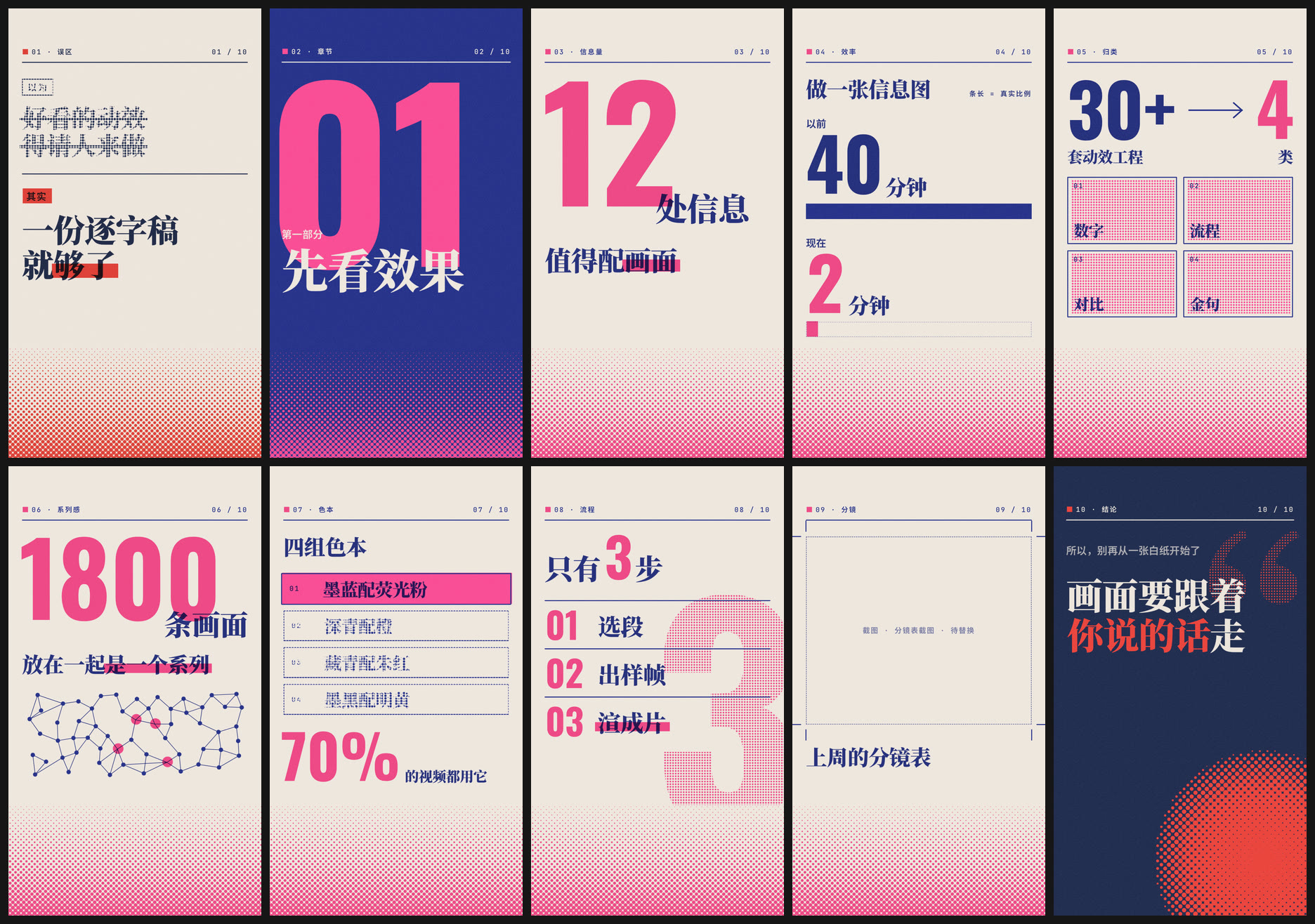
 Это скилл для ИИ-ассистента, который берёт текст видео с говорящей головой и превращает фразы, которые стоит показать визуально, в вертикальные информационные анимации в стиле ризографа в два цвета (mp4 1080x1920) — их вы вставляете в монтаж как b-roll.
Это скилл для ИИ-ассистента, который берёт текст видео с говорящей головой и превращает фразы, которые стоит показать визуально, в вертикальные информационные анимации в стиле ризографа в два цвета (mp4 1080x1920) — их вы вставляете в монтаж как b-roll.Это отдельное приложение или то, что запускает мой ИИ-ассистент?Это скилл/плагин для ИИ-агентов, а не отдельное приложение — вы устанавливаете его как папку-скилл, и Claude Code, Codex, Cursor или Gemini CLI читает его SKILL.md/AGENTS.md и сам запускает скрипты рендеринга.
Это скилл/плагин для ИИ-агентов, а не отдельное приложение — вы устанавливаете его как папку-скилл, и Claude Code, Codex, Cursor или Gemini CLI читает его SKILL.md/AGENTS.md и сам запускает скрипты рендеринга.Как его установить и пользоваться?Вставьте сообщение по установке из README своему агенту — он сам склонирует репозиторий (для Claude Code: ~/.claude/skills/eian-riso-broll, на Windows %USERPROFILE%\.claude\skills); затем просто передайте ему текст вашего сценария или SRT-файл и попросите сделать анимации.
Вставьте сообщение по установке из README своему агенту — он сам склонирует репозиторий (для Claude Code: ~/.claude/skills/eian-riso-broll, на Windows %USERPROFILE%\.claude\skills); затем просто передайте ему текст вашего сценария или SRT-файл и попросите сделать анимации.Что нужно установить заранее?Node.js 22+, Chrome (подойдёт и Edge или Chromium) и ffmpeg — на macOS это просто 'brew install node ffmpeg'. Есть скрипт checksetup.mjs, который проверит, что всё на месте.
Node.js 22+, Chrome (подойдёт и Edge или Chromium) и ffmpeg — на macOS это просто 'brew install node ffmpeg'. Есть скрипт checksetup.mjs, который проверит, что всё на месте.Чего он не умеет?Пока вывод только вертикальный (1080x1920), только картинка без звука, и он ничего не выдумывает: всё, что требовало бы реального скриншота, показывается заглушкой 'to be replaced' вместо фейкового интерфейса, а слишком длинный текст обрезается, а не ужимается.
Пока вывод только вертикальный (1080x1920), только картинка без звука, и он ничего не выдумывает: всё, что требовало бы реального скриншота, показывается заглушкой 'to be replaced' вместо фейкового интерфейса, а слишком длинный текст обрезается, а не ужимается.Для кого это сделано?Для авторов видео с говорящей головой, объясняющих или обучающих роликов для платформ коротких видео, которым нужны синхронные визуалы для чисел, сравнений или выводов, которые они произносят вслух.
Для авторов видео с говорящей головой, объясняющих или обучающих роликов для платформ коротких видео, которым нужны синхронные визуалы для чисел, сравнений или выводов, которые они произносят вслух.Для рендеринга нужен интернет?Нет — он полностью работает офлайн, без моделей генерации картинок и сетевых запросов, и поставляется со своими шрифтами, поэтому результат выглядит одинаково на macOS, Windows и Linux.
Нет — он полностью работает офлайн, без моделей генерации картинок и сетевых запросов, и поставляется со своими шрифтами, поэтому результат выглядит одинаково на macOS, Windows и Linux.Можно ли использовать это в коммерческих целях?Нет, только за деньги — пользовательская лицензия Eian Personal Non-Commercial License разрешает бесплатное личное некоммерческое использование и распространение, но любое монетизируемое использование, работа на клиента, работодателя или организацию требует отдельного платного письменного разрешения.
Нет, только за деньги — пользовательская лицензия Eian Personal Non-Commercial License разрешает бесплатное личное некоммерческое использование и распространение, но любое монетизируемое использование, работа на клиента, работодателя или организацию требует отдельного платного письменного разрешения.Какие десять шаблонов анимации есть?Они покрывают типовые задачи информационных видео: миф против факта, титульный слайд главы, крупное число, сравнение до/после, воронка «из многих в немногих», сеть/связи, выделение одного варианта из списка, нумерованные шаги, выноска на скриншоте и полноэкранная ключевая цитата.
Они покрывают типовые задачи информационных видео: миф против факта, титульный слайд главы, крупное число, сравнение до/после, воронка «из многих в немногих», сеть/связи, выделение одного варианта из списка, нумерованные шаги, выноска на скриншоте и полноэкранная ключевая цитата.Сколько реально занимает рендеринг?На Mac с Apple Silicon — примерно 15–20 секунд на 5-секундную анимацию, а статичные кадры занимают всего несколько секунд каждый.
На Mac с Apple Silicon — примерно 15–20 секунд на 5-секундную анимацию, а статичные кадры занимают всего несколько секунд каждый.Могу ли я сам отредактировать текст или оформление анимации?Да — каждая анимация это HTML-файл в папке compositions/ вашего проекта; можно посмотреть её зацикленное превью в браузере, отредактировать блок DATA в начале файла и попросить агента отрендерить заново.
Да — каждая анимация это HTML-файл в папке compositions/ вашего проекта; можно посмотреть её зацикленное превью в браузере, отредактировать блок DATA в начале файла и попросить агента отрендерить заново.Какие четыре цветовые палитры и когда какую использовать?Чернильно-синий x флуоресцентно-розовый (по умолчанию, техно-стиль), тёмно-бирюзовый x оранжевый (тёплый, лайфстайл), тёмно-синий x киноварный (мнения/предупреждения) и чернильно-чёрный x ярко-жёлтый (серьёзные темы/данные) — в README советуют использовать не больше двух палитр на один выпуск.
Чернильно-синий x флуоресцентно-розовый (по умолчанию, техно-стиль), тёмно-бирюзовый x оранжевый (тёплый, лайфстайл), тёмно-синий x киноварный (мнения/предупреждения) и чернильно-чёрный x ярко-жёлтый (серьёзные темы/данные) — в README советуют использовать не больше двух палитр на один выпуск.What are similar projects?herk-edit-kit, shuohao-skills, brag, framefields, reelmimic, huashu-motion, saas-motion-kit, guizang-product-video-skill
herk-edit-kit, shuohao-skills, brag, framefields, reelmimic, huashu-motion, saas-motion-kit, guizang-product-video-skillWhich topics is it in?storyboarding, talking-head, short-video, motion-graphics, typography, codex-skill, gemini-cli, claude-code-skill, content-creation, ffmpeg, video-generation, skill
storyboarding, talking-head, short-video, motion-graphics, typography, codex-skill, gemini-cli, claude-code-skill, content-creation, ffmpeg, video-generation, skill