



What is this?
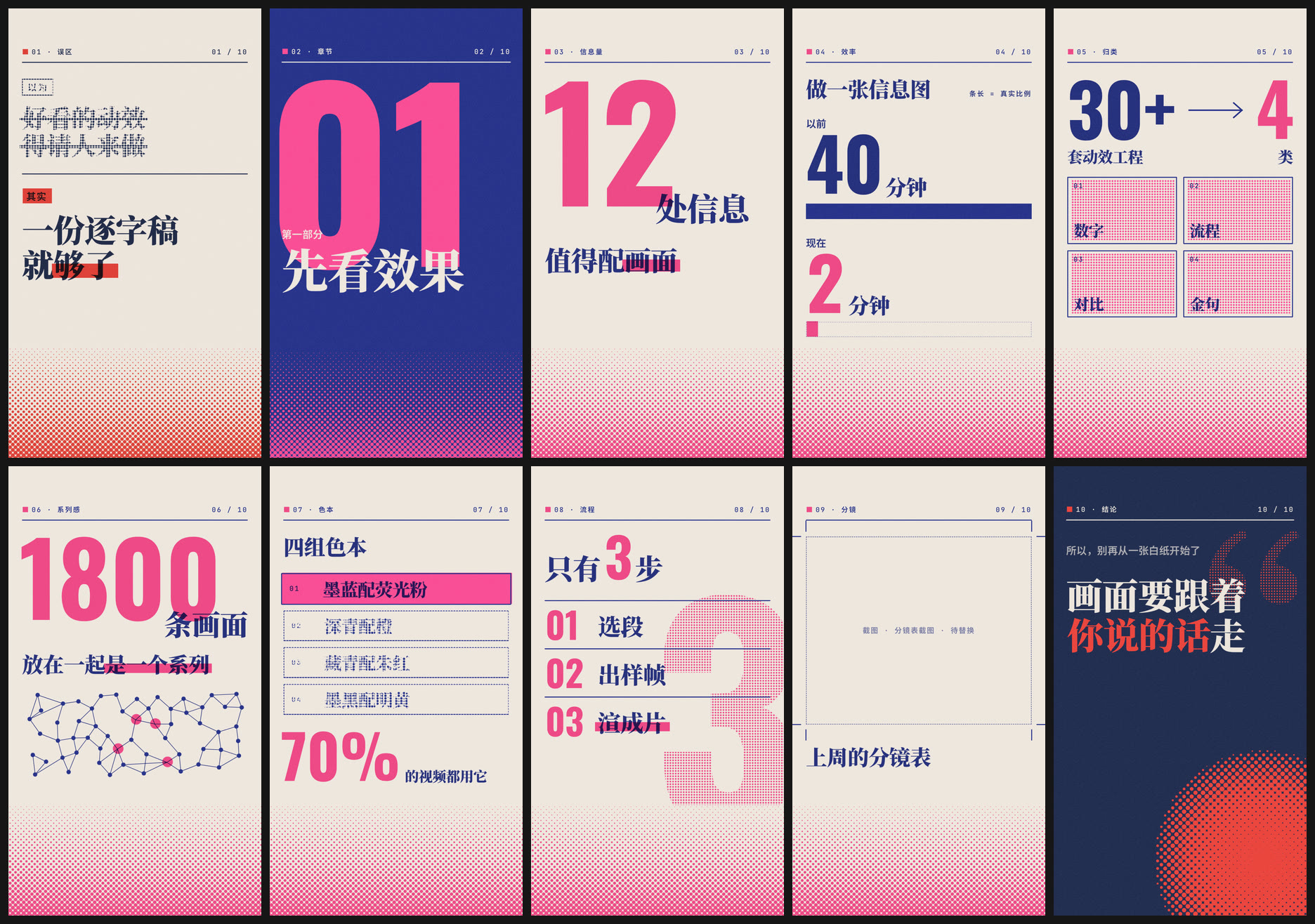
 This is an AI-assistant skill that takes the script of a talking-head video and turns the lines worth visualizing into risograph-style, two-color vertical info animations (1080x1920 mp4) you drop into your edit as b-roll.
This is an AI-assistant skill that takes the script of a talking-head video and turns the lines worth visualizing into risograph-style, two-color vertical info animations (1080x1920 mp4) you drop into your edit as b-roll.Is this a standalone app or something my AI assistant runs?It's a skill/plugin for AI coding agents, not a standalone app — you install it as a skill folder and Claude Code, Codex, Cursor or Gemini CLI reads its SKILL.md/AGENTS.md and runs the rendering scripts for you.
It's a skill/plugin for AI coding agents, not a standalone app — you install it as a skill folder and Claude Code, Codex, Cursor or Gemini CLI reads its SKILL.md/AGENTS.md and runs the rendering scripts for you.How do I install and use it?Paste the install message from the README to your agent and it clones the repo itself (for Claude Code: ~/.claude/skills/eian-riso-broll, on Windows %USERPROFILE%\.claude\skills); then just hand it your script text or an SRT file and ask for animations.
Paste the install message from the README to your agent and it clones the repo itself (for Claude Code: ~/.claude/skills/eian-riso-broll, on Windows %USERPROFILE%\.claude\skills); then just hand it your script text or an SRT file and ask for animations.What do I need installed first?Node.js 22+, Chrome (Edge or Chromium also work) and ffmpeg — on macOS that's just 'brew install node ffmpeg'. There's a checksetup.mjs script that verifies everything is in place.
Node.js 22+, Chrome (Edge or Chromium also work) and ffmpeg — on macOS that's just 'brew install node ffmpeg'. There's a checksetup.mjs script that verifies everything is in place.What can't it do?Output is vertical-only (1080x1920) for now, picture-only with no sound, and it never invents data: anything that would need a real screenshot shows a 'to be replaced' placeholder instead of a fake UI, and text that's too long gets cut rather than shrunk.
Output is vertical-only (1080x1920) for now, picture-only with no sound, and it never invents data: anything that would need a real screenshot shows a 'to be replaced' placeholder instead of a fake UI, and text that's too long gets cut rather than shrunk.Who is this built for?Creators making talking-head, explainer or knowledge-style videos for short-video platforms, who want synced visuals for the numbers, comparisons or conclusions they're saying out loud.
Creators making talking-head, explainer or knowledge-style videos for short-video platforms, who want synced visuals for the numbers, comparisons or conclusions they're saying out loud.Does it need internet access to render?No — it runs fully offline with no image-generation models or network calls, and ships its own fonts so output looks identical on macOS, Windows and Linux.
No — it runs fully offline with no image-generation models or network calls, and ships its own fonts so output looks identical on macOS, Windows and Linux.Can I use this commercially?No, not without paying — the custom Eian Personal Non-Commercial License allows free personal, non-commercial use and sharing, but any monetized, client, employer or organizational use needs a separately paid written authorization.
No, not without paying — the custom Eian Personal Non-Commercial License allows free personal, non-commercial use and sharing, but any monetized, client, employer or organizational use needs a separately paid written authorization.What are the ten animation templates?They cover common info-video needs: myth vs. fact, chapter title card, big number, before/after comparison, many-to-few funnel, network/connections, pick-one highlight, numbered steps, screenshot callout, and a full-screen key quote.
They cover common info-video needs: myth vs. fact, chapter title card, big number, before/after comparison, many-to-few funnel, network/connections, pick-one highlight, numbered steps, screenshot callout, and a full-screen key quote.How long does rendering actually take?On an Apple Silicon Mac, roughly 15-20 seconds for a 5-second animation, with stills taking just a few seconds each.
On an Apple Silicon Mac, roughly 15-20 seconds for a 5-second animation, with stills taking just a few seconds each.Can I edit the animation text or styling myself?Yes — each animation is an HTML file under compositions/ in your project folder; you can preview it looping in a browser, edit the DATA block at the top, then ask the agent to re-render.
Yes — each animation is an HTML file under compositions/ in your project folder; you can preview it looping in a browser, edit the DATA block at the top, then ask the agent to re-render.What are the four color palettes and when do I use them?Ink blue x fluorescent pink (default, techy), deep teal x orange (warm, lifestyle), navy x vermilion (opinions/warnings), and ink black x bright yellow (serious/data topics) — the README recommends using at most two palettes per episode.
Ink blue x fluorescent pink (default, techy), deep teal x orange (warm, lifestyle), navy x vermilion (opinions/warnings), and ink black x bright yellow (serious/data topics) — the README recommends using at most two palettes per episode.What are similar projects?herk-edit-kit, shuohao-skills, brag, framefields, reelmimic, saas-motion-kit, guizang-product-video-skill, huashu-art-motion
herk-edit-kit, shuohao-skills, brag, framefields, reelmimic, saas-motion-kit, guizang-product-video-skill, huashu-art-motionWhich topics is it in?storyboarding, talking-head, short-video, motion-graphics, typography, codex-skill, gemini-cli, claude-code-skill, content-creation, ffmpeg, video-generation, skill
storyboarding, talking-head, short-video, motion-graphics, typography, codex-skill, gemini-cli, claude-code-skill, content-creation, ffmpeg, video-generation, skill