JobFlow
JobFlow is a local-first, AI-centered job application workflow for Windows. It turns a resume, approved applicant facts, and an official job page into a reviewable application packet, then provides user-present browser assistance that stops before final submission.
Alpha software: JobFlow does not claim universal ATS compatibility. Final Submit is always a trusted user action. Unknown external state is never retried automatically.
Browser Companion 0.9.2 is published on Chrome Web Store and Microsoft Edge Add-ons (verified September 5, 2026). The v0.7.0 source prerelease remains for evaluation: signed Windows distribution and clean-Windows acceptance are not yet complete.
Version compatibility: the latest stable desktop release, v0.6.0, requires Browser Companion 0.9.1 and rejects the store's 0.9.2 update. Current v0.7.0 source targets 0.9.2, but a matching signed stable desktop update is not yet available. Reinstalling the extension will not resolve this mismatch; do not bypass the version check.
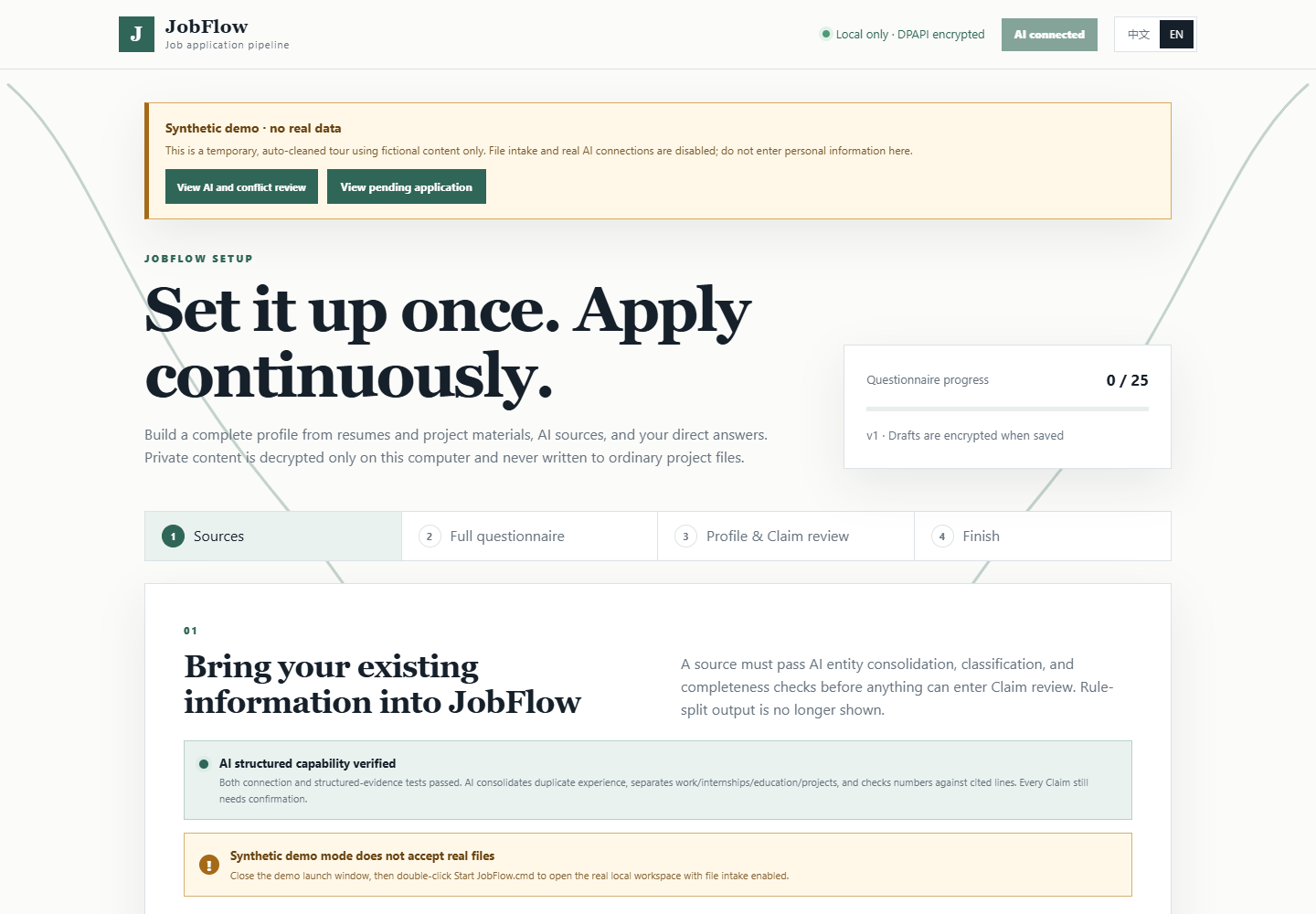
What JobFlow does
- Imports resumes and supporting material into Windows DPAPI encrypted storage.
- Connects to an existing Hermes, OpenClaw, or supported loopback model without copying model credentials into the project.
- Uses AI to reconstruct experience entities, preserve metrics, and produce source-grounded Claim candidates.
- Collects one reusable Candidate Profile and Answer Bank, with explicit review for sensitive or missing facts.
- Starts from an official company career page, verifies the job and approved ATS route, and builds one application review packet.
- After one application-specific approval, fills approved values, attaches approved materials, and advances only through verified non-final controls while the user is present.
- Stops at final review so the user can inspect the page and personally click Submit.
- Optionally polls only the exact public company or supported ATS job sources the user approves, for at most seven days, and places matched roles in a local candidate inbox.
- Keeps application preparation manual and user-present: a discovered candidate does not open Apply, create an application, fill a field, upload a file, or advance a form until the user chooses it and completes the normal review gates.
Quick start on Windows
Install JobFlow.cmd is a stock-Windows, bootstrap-first installer. It does not use a system Python, create a virtual environment, or build from source. It accepts only the exact complete Windows runtime named by a signed schema-v2 manifest on JobFlow's pinned stable GitHub release. If that release is not yet available, installation stops clearly and activates nothing.
- Download and extract the latest JobFlow source ZIP.
- Double-click
Install JobFlow.cmd once while connected to the internet.
- Install JobFlow Browser Companion from the official Chrome Web Store or Microsoft Edge Add-ons listing selected for the detected browser, and confirm its published version matches the release notes.
- Start JobFlow from the installed Start menu shortcut.
- If startup fails, run the installed Check JobFlow shortcut and follow the first failed check.
The installer copies the application into a fixed, versioned directory under the current Windows account. Candidate data, queues, reports, and encrypted private material remain in a separate data directory, so the extracted download can be removed after installation. Running a newer installer upgrades the application without replacing that data; the Start menu also provides update verification, health check, rollback, and uninstall shortcuts.
Installed builds contain a user-initiated verifier for a fixed stable GitHub release channel. The current public signing path is intentionally disabled until a protected publisher environment can attest the complete executable runtime closure, so local QA cannot create or authorize an official signed update. When that external gate is implemented, JobFlow will accept an update only when its canonical manifest is signed by the pinned release key and its source archive passes the signed hash, size, layout, and public-content boundary. A failed post-update health check restores the previous version. Source checkouts do not self-update and never replace their working tree.
To explore without private data, run Start JobFlow Demo.cmd. The demo uses fictional content, disables real AI and file intake, and removes its temporary state when closed.
See the full quick start for Browser Companion setup and recovery guidance.
AI connections
JobFlow can reuse an already configured:
- Hermes or OpenClaw Agent on Windows or WSL;
- Ollama, LM Studio, LocalAI, llama.cpp, or vLLM loopback server;
- advanced command adapter through
JOBOPS_AI_COMMAND_JSON.
An AI connection is accepted only after a structured capability test. Agent requests use an isolated, zero-tool channel. JobFlow does not extract, return, log, or persist API keys, tokens, cookies, executable paths, or model credentials.
Safety boundaries
- Private applicant values remain behind
secure-ref:* references and DPAPI encryption.
- Claims require source evidence and applicant approval before external use.
- Login, CAPTCHA, MFA, account creation, credentials, legal declarations, signatures, and unknown answers stop for the user.
- The only unattended feature is explicit, expiring, read-only job discovery. Background application opening, Apply, form filling, uploads, navigation, final Submit, email, and recruiter contact are not implemented.
SUBMISSION_UNKNOWN never triggers an automatic retry.- Knowledge sources are read-only.
Current support
| Capability |
Alpha status |
| Windows install, health check, rollback, and bilingual local UI |
Bootstrap-first entry available; activation remains fail-closed until the stable release publishes a signed schema-v2 complete Windows runtime |
| Public signed updates |
Blocked until protected publisher runtime closure is attested |
| Encrypted onboarding, Candidate Profile, Answer Bank, and Claim review |
Available |
| Existing Agent or loopback-model connection |
Available with capability gate |
| Visible official-company job discovery and verified Apply routing |
Available with user authorization |
| Expiring read-only background discovery to a local candidate inbox |
Available for exact approved HTTPS sources; maximum seven-day authorization |
| User-present company, Greenhouse, Lever, Workday, Ashby, and SmartRecruiters assistance |
Bound routes only; live compatibility varies |
| Approved field fill and material attachment |
Available per approved application |
| User-present local queue cadence, pause, and manual run |
Available; every run requires a user click |
| Redacted diagnostics and optional local fixed-code incident history |
Available; manual download only, no automatic transmission |
| Unattended application processing or final submission |
Not implemented; final Submit is permanently user-only |
Synthetic and saved-page tests are engineering evidence, not proof that every live ATS page is compatible.
Development
.\scripts\install-jobflow-v2.ps1 -NoLaunch
.\.venv\Scripts\python.exe -m unittest discover -s tests
.\.venv\Scripts\python.exe -m jobops.public_release
The project is intentionally Windows-first because secure applicant storage uses DPAPI. Runtime state, databases, review packets, encrypted private files, and local release reports are excluded from the public repository.
Documentation
When reporting a problem, use Privacy-safe incident history and support → Download diagnostics in the local UI. The JSON contains only versions, states, counts, safety boundaries, and validated fixed error codes. Optional incident capture is off by default and keeps at most 32 local records when explicitly enabled. It does not include resume text, answers, Claim text, error messages, stack traces, URLs, local paths, credentials, tokens, or secure references, and JobFlow never transmits it automatically.
NeedRadar portfolio relationship
JobFlow applies evidence gates, private-data controls, explicit approvals, and user-only final actions within the NeedRadar evidence-to-execution ecosystem.
The relationship is pattern-level and metadata-only. JobFlow has no NeedRadar runtime dependency, and private profiles, resumes, application state, secure references, and external-action records never enter NeedRadar. Product issues cannot independently validate general market demand. See needradar-project.json.
License
MIT

 JobFlow 是一个面向 Windows 的本地优先、以 AI 为核心的求职申请工作流:把你的简历和经你确认的事实变成一份可审阅的申请材料包,然后在浏览器里协助你操作,直到最终提交前的每一步。