15.4K ·GitHub
这是什么?
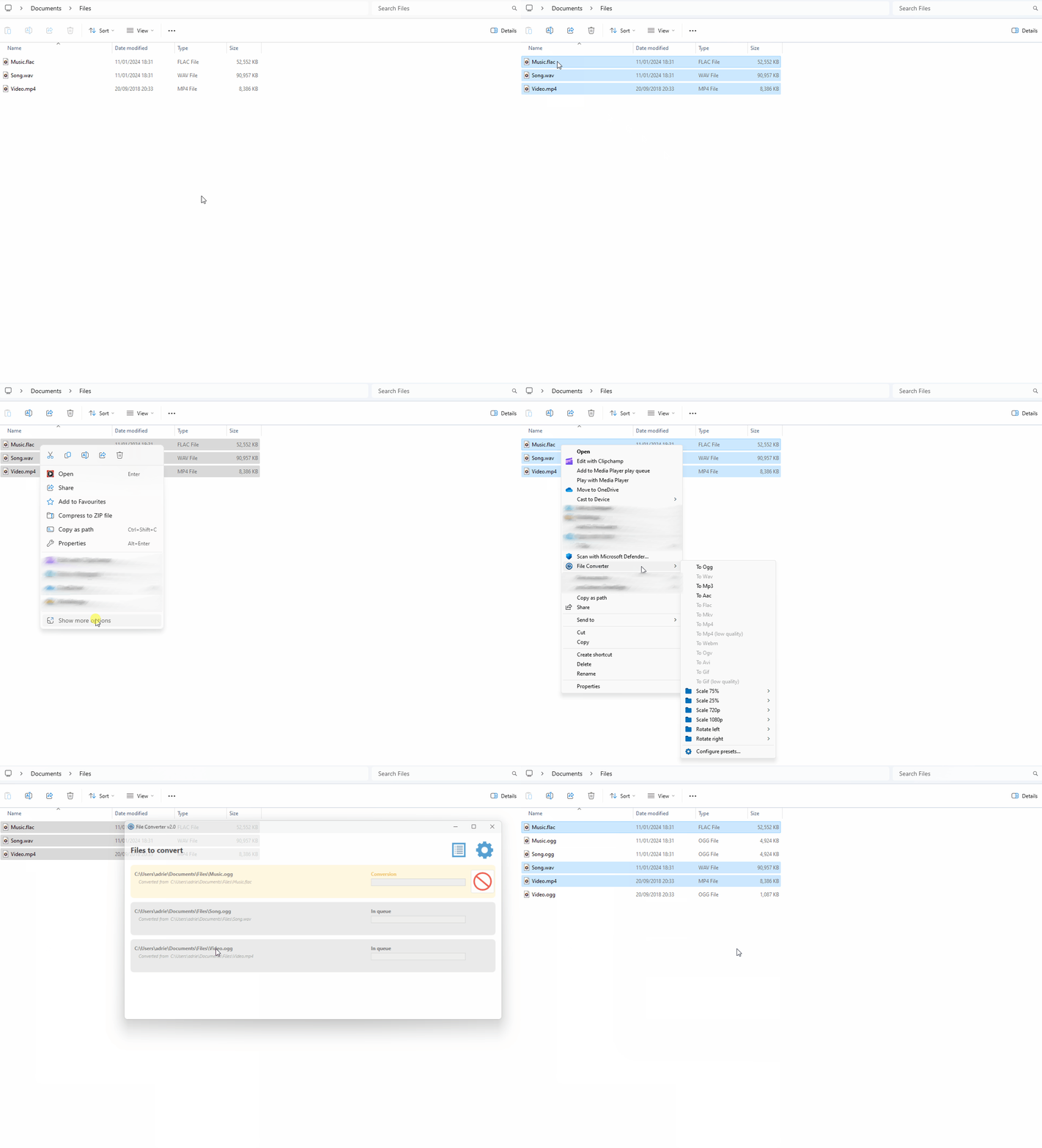
 File Converter 是一款 Windows 工具,无需打开单独的应用,就能直接通过 Windows 资源管理器的右键菜单转换和压缩文件。
File Converter 是一款 Windows 工具,无需打开单独的应用,就能直接通过 Windows 资源管理器的右键菜单转换和压缩文件。这是独立应用,还是其他软件的插件?它是一款独立的 Windows 桌面应用程序(使用 WPF 构建),并配有一个 Windows 资源管理器外壳扩展,用于在右键菜单中添加转换选项。
它是一款独立的 Windows 桌面应用程序(使用 WPF 构建),并配有一个 Windows 资源管理器外壳扩展,用于在右键菜单中添加转换选项。我该怎么安装和使用?从 file-converter.io 下载安装程序并安装,然后在 Windows 资源管理器中右键点击一个或多个文件,从右键菜单中选择转换或压缩选项;具体用法记录在项目 Wiki 上。
从 file-converter.io 下载安装程序并安装,然后在 Windows 资源管理器中右键点击一个或多个文件,从右键菜单中选择转换或压缩选项;具体用法记录在项目 Wiki 上。需要另外安装 FFmpeg 之类的软件吗?不需要。它自带转换引擎:FFmpeg、ImageMagick 和 Ghostscript 均以中间件形式内置,因此你无需自行安装。
不需要。它自带转换引擎:FFmpeg、ImageMagick 和 Ghostscript 均以中间件形式内置,因此你无需自行安装。Mac 或 Linux 也能用吗?不能。它仅适用于 Windows,因为它依赖 Windows 资源管理器的右键菜单以及 Visual Studio 和 WPF 开发工具。
不能。它仅适用于 Windows,因为它依赖 Windows 资源管理器的右键菜单以及 Visual Studio 和 WPF 开发工具。它能转换或压缩哪些文件类型?借助内置的 FFmpeg、ImageMagick 和 Ghostscript 引擎,它可以处理音频、视频、图片和 PDF 的转换与压缩,还能通过其 Ripper 组件提取 CD 音频。
借助内置的 FFmpeg、ImageMagick 和 Ghostscript 引擎,它可以处理音频、视频、图片和 PDF 的转换与压缩,还能通过其 Ripper 组件提取 CD 音频。这个软件免费吗?免费。它是一个个人开源项目,采用 GPL-3.0 协议发布;作者仅欢迎自愿捐赠。
免费。它是一个个人开源项目,采用 GPL-3.0 协议发布;作者仅欢迎自愿捐赠。这个项目还在维护吗?有翻译吗?在维护。它有一个活跃的贡献者社区,界面已翻译成 20 多种语言,包括中文、日语、阿拉伯语和俄语。
在维护。它有一个活跃的贡献者社区,界面已翻译成 20 多种语言,包括中文、日语、阿拉伯语和俄语。What are similar projects?iPhoneMirror, KillerPDF, VioletToolBox, Filee, PersistentWindows, flyingmouse-format, CefSharp, ContextMenuManager
iPhoneMirror, KillerPDF, VioletToolBox, Filee, PersistentWindows, flyingmouse-format, CefSharp, ContextMenuManagerWhich topics is it in?context-management, desktop-application, wpf, file-manager, c-sharp, compression, gpl, localization, audio-processing, video-processing, c#, ffmpeg
context-management, desktop-application, wpf, file-manager, c-sharp, compression, gpl, localization, audio-processing, video-processing, c#, ffmpeg