Dynamic Context Pruning Plugin


Automatically reduces token usage in OpenCode by managing conversation context.
Installation
Install from the CLI:
opencode plugin @tarquinen/opencode-dcp@latest --global
This installs the package and adds it to your global OpenCode config.
Project Status
Development on DCP has slowed because most new context-management work has moved to Sleev and the sleev CLI. Sleev is a local proxy for Claude Code, Codex, and OpenCode that builds on DCP's core ideas with newer context-management features and will work with any harness/client.
DCP remains available for OpenCode plugin users, but new features are landing in Sleev first. If you are starting fresh, we recommend trying Sleev:
npm i -g sleev
sleev
How It Works
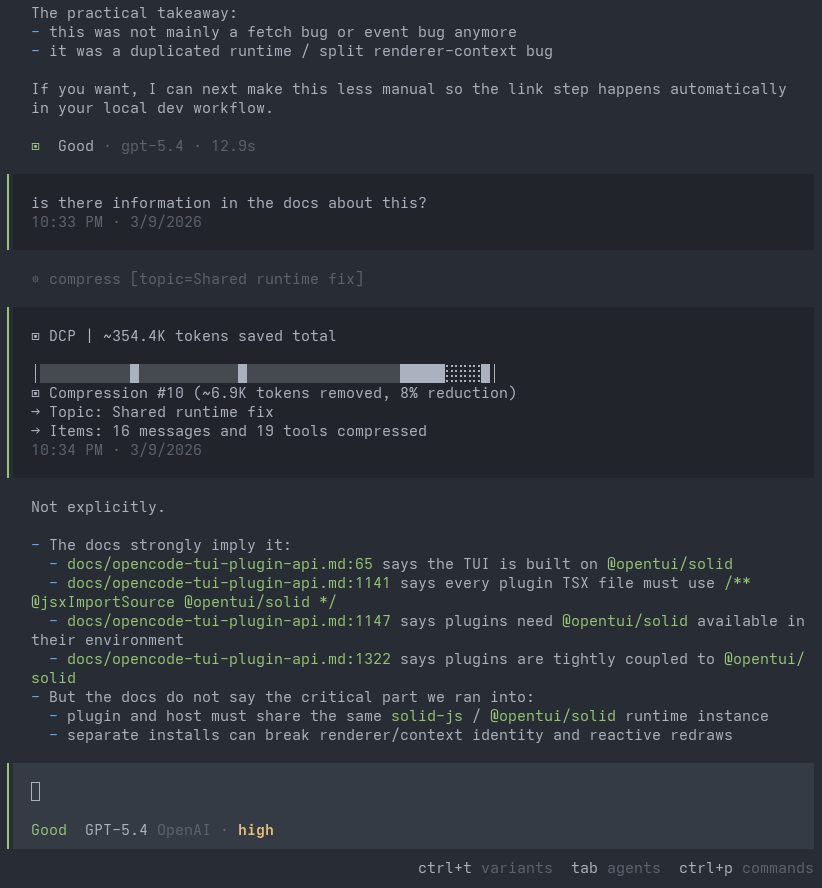
DCP reduces context size through a compress tool and automatic cleanup. Your session history is never modified — DCP replaces pruned content with placeholders before sending requests to your LLM.
Compress
Compress is a tool exposed to your model that replaces closed, stale conversation content with high-fidelity technical summaries. You can think of this as a much smarter version of Opencode's compaction process. Instead of triggering statically when your session reaches its maximum context and on the entire coding session, Compress allows the model to pick when to activate based on task completion, and to only compress the specific messages that are no longer needed verbatim.
DCP supports two compression modes:
range mode compresses contiguous spans of conversation into one or more summaries.message mode (experimental) compresses individual raw messages independently, letting the model manage context much more surgically.
In range mode, when a new compression overlaps an earlier one, the earlier summary is nested inside the new one so information is preserved through layers of compression rather than diluted away. In both modes, protected tool outputs (such as subagents and skills) and protected file patterns are kept in compression summaries, ensuring that the most important information is never lost. You can also enable protectUserMessages to preserve your messages verbatim during compression, though note that large prompts (e.g. copy-pasting log files in the prompt) will then never be compressed away.
Deduplication
Identifies repeated tool calls (same tool, same arguments) and keeps only the most recent output. Recalculated when the compress tool runs, so prompt cache is only impacted alongside compression.
Purge Errors
Prunes inputs from errored tool calls after a configurable number of turns (default: 4). Error messages are preserved; only the potentially large input content is removed. Recalculated on compress tool use.
Configuration
DCP uses its own config file, searched in order:
- Global:
~/.config/opencode/dcp.jsonc (or dcp.json), created automatically on first run
- Custom config directory:
$OPENCODE_CONFIG_DIR/dcp.jsonc (or dcp.json), if OPENCODE_CONFIG_DIR is set
- Project:
.opencode/dcp.jsonc (or dcp.json) in your project's .opencode directory
Each level overrides the previous, so project settings take priority over global. Restart OpenCode after making config changes.
[!NOTE]
If you use models with smaller context windows, such as GitHub Copilot models or local models, lower compress.minContextLimit and compress.maxContextLimit in your configuration to match the available context.
[!IMPORTANT]
Defaults are applied automatically. Expand this if you want to review or override settings.
Default Configuration (click to expand)
{
    "$schema": "https://raw.githubusercontent.com/Opencode-DCP/opencode-dynamic-context-pruning/master/dcp.schema.json",
    // Enable or disable the plugin
    "enabled": true,
    // Automatically update npm-installed DCP when a newer npm latest is available.
    // Version-locked plugin specs are not updated.
    "autoUpdate": true,
    // Enable debug logging to ~/.config/opencode/logs/dcp/
    "debug": false,
    // Notification display: "off", "minimal", or "detailed"
    "pruneNotification": "detailed",
    // Notification type: "chat" (in-conversation) or "toast" (system toast)
    "pruneNotificationType": "chat",
    // Slash commands configuration
    "commands": {
        "enabled": true,
        // Additional tools to protect from pruning via commands (e.g., /dcp sweep)
        "protectedTools": [],
    },
    // Manual mode: disables autonomous context management,
    // tools only run when explicitly triggered via /dcp commands
    "manualMode": {
        "enabled": false,
        // When true, automatic cleanup (deduplication, purgeErrors)
        // still runs even in manual mode
        "automaticStrategies": true,
    },
    // Protect from pruning for <turns> message turns past tool invocation
    "turnProtection": {
        "enabled": false,
        "turns": 4,
    },
    // Experimental settings
    "experimental": {
        // Allow DCP processing in subagent sessions
        "allowSubAgents": false,
        // Enable user-editable prompt overrides under dcp-prompts directories
        // When false (default), prompt override files/directories are ignored
        "customPrompts": false,
    },
    // Protect file operations from pruning via glob patterns
    // Patterns match tool parameters.filePath (e.g. read/write/edit)
    "protectedFilePatterns": [],
    // Unified context compression tool and behavior settings
    "compress": {
        // Compression mode: "range" (compress spans into block summaries)
        // or experimental "message" (compress individual raw messages)
        "mode": "range",
        // Permission mode: "allow" (no prompt), "ask" (prompt), "deny" (tool not registered)
        "permission": "allow",
        // Show compression content in a chat notification
        "showCompression": false,
        // Let active summary tokens extend the effective maxContextLimit
        "summaryBuffer": true,
        // Soft upper threshold: above this, DCP keeps injecting strong
        // compression nudges (based on nudgeFrequency), so compression is
        // much more likely. Accepts: number or "X%" of model context window.
        "maxContextLimit": 100000,
        // Soft lower threshold for reminder nudges: below this, turn/iteration
        // reminders are off (compression less likely). At/above this, reminders
        // are on. Accepts: number or "X%" of model context window.
        "minContextLimit": 50000,
        // Optional per-model override for maxContextLimit by providerID/modelID.
        // If present, this wins over the global maxContextLimit.
        // Accepts: number or "X%".
        // Example:
        // "modelMaxLimits": {
        //     "openai/gpt-5.3-codex": 120000,
        //     "anthropic/claude-sonnet-4.6": "80%"
        // },
        // Optional per-model override for minContextLimit.
        // If present, this wins over the global minContextLimit.
        // "modelMinLimits": {
        //     "openai/gpt-5.3-codex": 50000,
        //     "anthropic/claude-sonnet-4.6": "25%"
        // },
        // How often the context-limit nudge fires (1 = every fetch, 5 = every 5th)
        "nudgeFrequency": 5,
        // Start adding compression reminders after this many
        // messages have happened since the last user message
        "iterationNudgeThreshold": 15,
        // Controls how likely compression is after user messages
        // ("strong" = more likely, "soft" = less likely)
        "nudgeForce": "soft",
        // Tool names whose completed outputs are appended to the compression
        "protectedTools": [],
        // Preserve text wrapped in <protect>...</protect> when compressed
        "protectTags": false,
        // Preserve your messages during compression.
        // Warning: large copy-pasted prompts will never be compressed away
        "protectUserMessages": false,
    },
    // Automatic pruning strategies
    "strategies": {
        // Remove duplicate tool calls (same tool with same arguments)
        "deduplication": {
            "enabled": true,
            // Additional tools to protect from pruning
            "protectedTools": [],
        },
        // Prune tool inputs for errored tools after X turns
        "purgeErrors": {
            "enabled": true,
            // Number of turns before errored tool inputs are pruned
            "turns": 4,
            // Additional tools to protect from pruning
            "protectedTools": [],
        },
    },
}
Commands
DCP provides a TUI panel and one prompt-producing slash command:
/dcp — Opens the DCP panel with context, stats, and manual-mode controls./dcp-compress [focus] — Asks the model to run one compression pass. Optional focus text directs what content to compress, following the active compress.mode.
Prompt Overrides
DCP exposes six editable prompts:
systemcompress-rangecompress-messagecontext-limit-nudgeturn-nudgeiteration-nudge
This feature is disabled by default. Set experimental.customPrompts to true in your DCP config to activate it.
When enabled, managed defaults are written to ~/.config/opencode/dcp-prompts/defaults/ as plain-text prompt files. A single README.md in that directory explains each prompt and how to create overrides.
To customize behavior, add a file with the same name under an overrides directory and edit it as plain text.
To reset an override, delete the matching file from your overrides directory.
By default, these tools are always protected from pruning:
task, skill, todowrite, todoread, compress, batch, plan_enter, plan_exit, write, edit
The protectedTools arrays in commands and strategies add to this default list.
For the compress tool, compress.protectedTools ensures specific tool outputs are appended to the compressed summary. By default it includes task, skill, todowrite, and todoread.
Impact on Prompt Caching
LLM providers cache prompts based on exact prefix matching. When DCP prunes content, it changes messages, which invalidates cached prefixes from that point forward.
Trade-off: You lose some cache reads but gain token savings from reduced context size and fewer hallucinations from stale context. In most cases, especially in long sessions, the savings outweigh the cache miss cost.
[!NOTE]
In testing, cache hit rates were approximately 85% with DCP vs 90% without.
No impact for:
- Request-based billing — Some providers charge per request, not tokens.
- Uniform token pricing — Providers like Cerebras that bill cached and uncached tokens at the same rate.
License
AGPL-3.0-or-later

 动态上下文剪枝(DCP)是一款 OpenCode 插件,通过智能管理对话上下文来自动削减 token 用量——把过时的历史压缩成摘要、对重复的工具调用去重,并清除失败的工具调用输入。