StreamEval evaluates interactive streaming video generation in sessions lasting 15 to 300 seconds.
Our benchmark has four key features:
- First interactive streaming video generation benchmark: Tests how systems respond to new requests and preserve context as video is generated.
- Fully open: Benchmark data, evaluation code, protocols, and scoring rules are publicly available.
- Comprehensive coverage: Five tasks and ten metrics span avatar interaction, world generation, and video editing.
- Updated monthly: We will evaluate new and updated models and publish leaderboard results monthly.
Tasks and metrics
| Task |
The system receives |
Scored on |
| Digital-human dialogue |
a portrait and a persona; the user's speech (or text) turns |
Quality, A–V Sync, Stability, Dialogue, Identity |
| Avatar performance |
a portrait; speech to perform and live directions |
Quality, A–V Sync, Stability, Following, Identity |
| World generation |
an opening prompt (or image); live prompts and camera controls |
Quality, Stability, Following, Continuity (+ Reference for image-conditioned inputs) |
| Instruction editing |
a live source video; text edit instructions |
Quality, Stability, Following, Edit Success, Preservation |
| Reference editing |
a live source video; reference images to apply, patch, remove or reset |
Quality, Stability, Reference, Edit Success, Preservation |
Metrics are scored 0–100. A task's Overall is the equal-weight mean of its applicable content metrics;
tasks are never merged into one total.
Definitions.
Benchmark
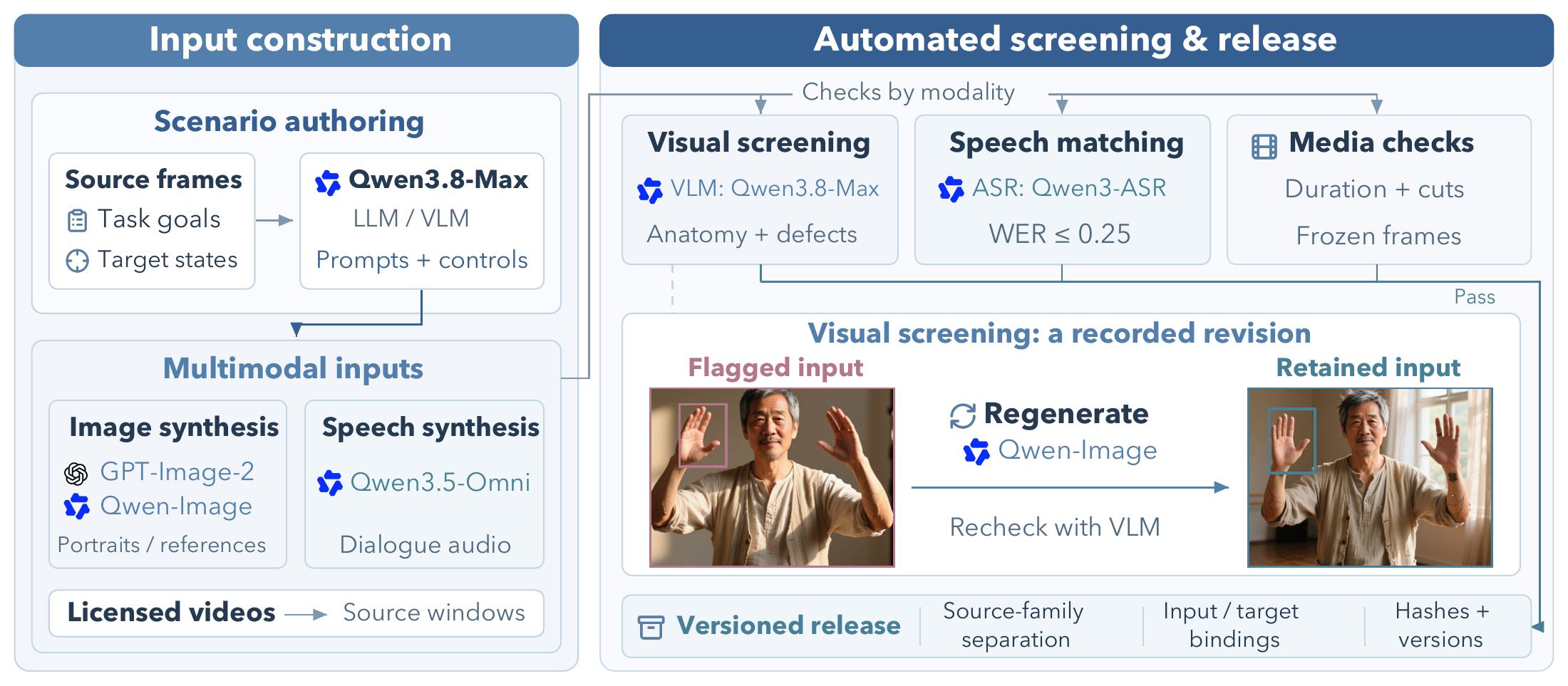
Model-assisted construction and modality-specific validation.
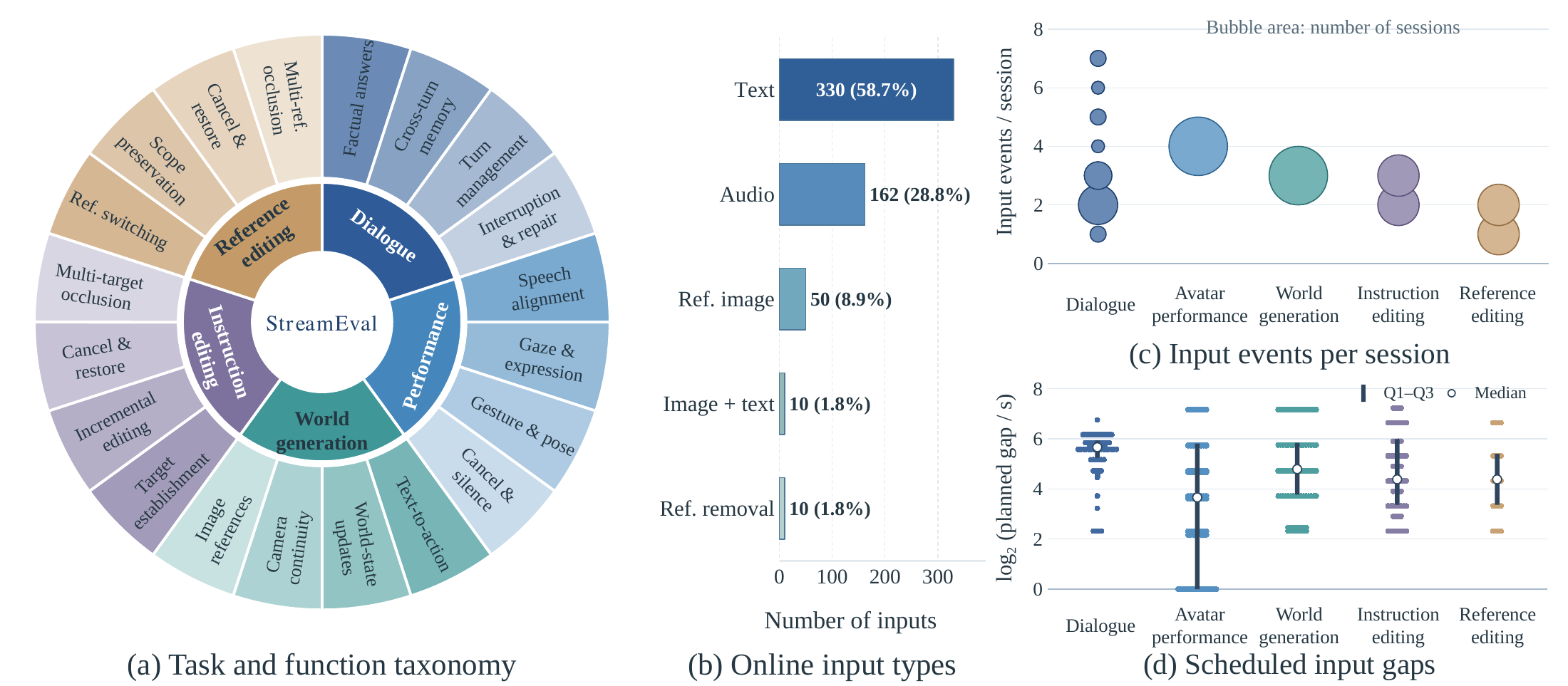
Benchmark subset: task composition, input types, input counts and timing.
The complete benchmark in benchmark/v1/full covers all five tasks and duration strata. Each condition-set folder contains cases.jsonl (input timelines), oracles.jsonl (expected outcomes, for the judge only) and manifest.json (media paths and SHA-256 hashes). See the benchmark documentation for the file format.
Quick start
Python ≥ 3.10 on Linux or macOS. Run the following steps from the code repository root in the same activated Python environment.
Installation and CPU example
This example generates its own media and needs no API key, GPU or benchmark download.
git clone https://github.com/StreamEval/StreamEval.git streameval && cd streameval
python -m venv .venv && source .venv/bin/activate
python -m pip install -e ".[runtime,judge,dev]"
python -m streameval.benchmark.synthetic --out .smoke
streameval run --model streameval.models.mock:MockModel --track instruction_edit \
  --case sa.v1.901.instruction_edit --benchmark .smoke/set --data .smoke/data --out .smoke/attempt
streameval validate-run .smoke/attempt --benchmark .smoke/set --data .smoke/data
pytest -q
Download and validation
Hugging Face and ModelScope provide the same benchmark definitions and media (≈3.1 GB).
python -m pip install -U huggingface_hub modelscope
Choose either platform. Download from Hugging Face:
from huggingface_hub import snapshot_download
path = snapshot_download("StreamEval/StreamEval", repo_type="dataset")
print(path)
Or download from ModelScope:
from modelscope import dataset_snapshot_download
path = dataset_snapshot_download(
    "StreamEval/StreamEval",
    endpoint="https://www.modelscope.ai",
)
print(path)
Replace <path> with the directory returned by the download command.
export STREAMEVAL_DATA="<path>/data"
streameval validate --benchmark benchmark/v1/full
Model evaluation
Install the selected model's dependencies using its adapter instructions, then create the credentials file:
cp .env.example .env
Fill in the model and judge credentials in .env. Choose ID from streameval list, then evaluate a registered self-hosted model:
streameval list
streameval evaluate --system ID --launch --out runs_full \
  --benchmark benchmark/v1/full --population full
Use --launch for a registered self-hosted server, or replace it with --url ws://HOST:PORT/session to connect to a running server. Follow the adapter's setup instructions for hosted services.
Results are saved under runs_full/. For comparable runs, follow the settings in the evaluation protocol.
Documentation
Repository layout
streameval/          Python package: benchmark, runtime (harness), models, providers, judge, scoring, cli
benchmark/v1/          the complete benchmark (full), compatible component rosters and attribution
models/                v1 systems: self-hosted model servers and vendor adapters
examples/my_model/     template model, in-process and as a WebSocket server
evaluation/protocol/   evaluation policy, scoring specification, frozen source manifest
assets/                benchmark construction and composition figures
tests/                 CPU test suite; generates its own media; no keys or GPU needed
Citation
@article{team2026streameval,
  title={StreamEval: Evaluating Interactive Streaming Video Generation Models},
  author={Team, StreamEval},
  journal={arXiv preprint arXiv:2610.28402},
  year={2026}
}
License
- Code: Apache License 2.0. Wrapped third-party models keep their own licences, several of them
non-commercial (models/README.md); vendor adapters are subject to each vendor's terms.
- Benchmark data (timelines, oracles, generated media): CC BY 4.0.
The editing source videos are excerpts of third-party footage and keep their own licences (CC BY, CC BY-SA,
CC0 or public domain); credit them as listed in benchmark/v1/ATTRIBUTION.md, including in
edited outputs you publish. See NOTICE.






 StreamEval 是一个基准测试,用于评估交互式流式视频生成模型。它包含五类任务,每次会话时长 15 到 300 秒,模型在生成的同时会逐步接收输入。