Latent Sparse Attention
Towards Subquadratic Ultra-Long Context Attention




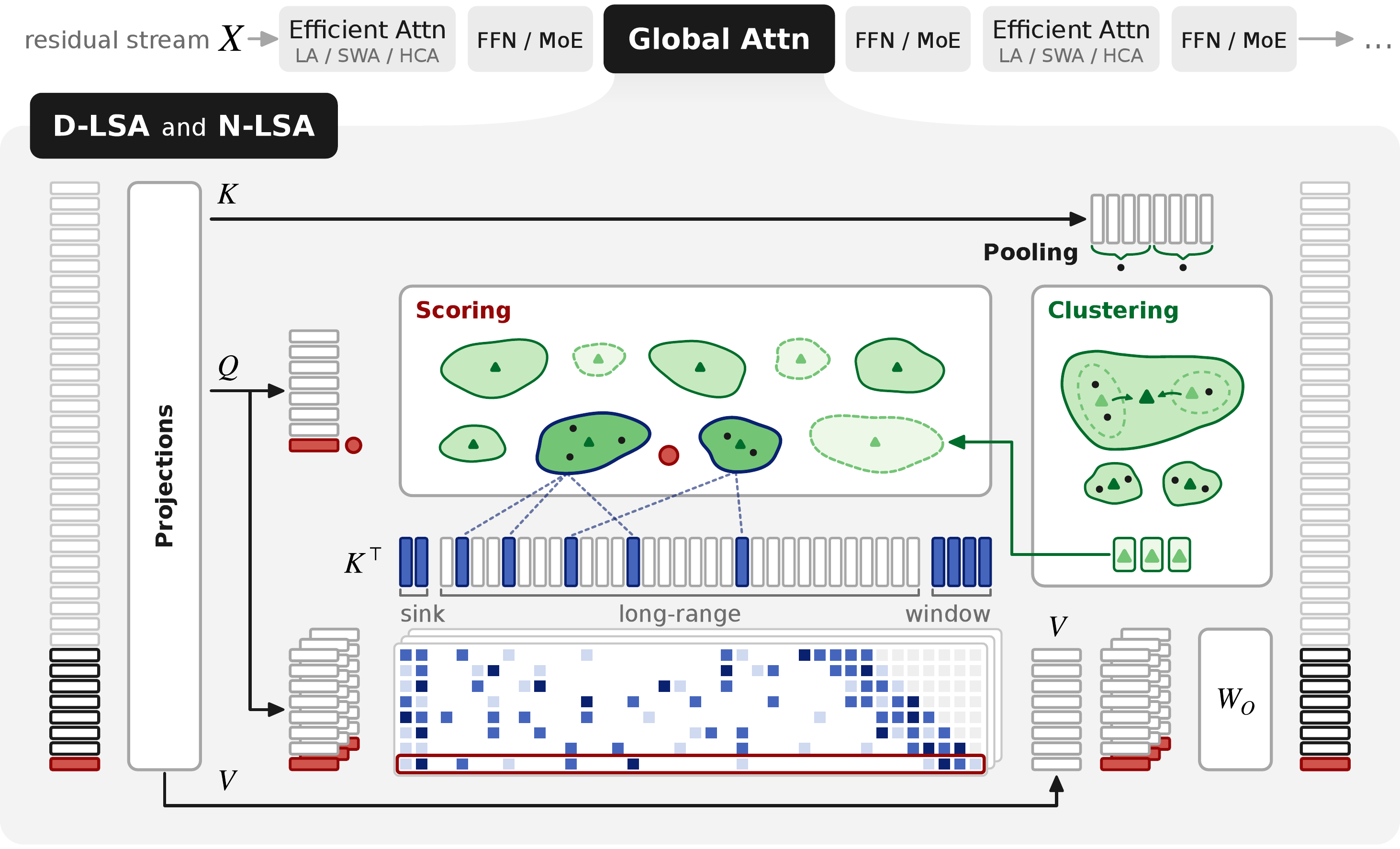
One global attention layer under D-LSA and N-LSA. Keys are pooled and clustered into buckets, and a query scores the bucket centroids, then attends only to the selected long-range keys plus the sink and window.
TL;DR
Latent Sparse Attention (LSA) clusters keys hierarchically in a learned latent space, and each query scores the clusters instead of every key.
Prefill, decode and training get faster at long context, while accuracy stays close to the original model's.
- D-LSA (Distilled) is applied to a pre-trained model by distilling its indexer.
On GLM-5.3-Flash at 10M tokens it speeds up one attention layer by 22.7x in prefill and 4.6x in decode over the model's own sparse attention.
On Qwen3.8-27B it is 72.4x and 42.5x faster than full attention.
- N-LSA (Native) is trained from scratch on the next-token loss alone.
It matches the accuracy of full attention, and its training is 1.6x faster per layer at 128k tokens.
The attention kernel is unchanged.
LSA only decides which keys it reads.
Contents
| Method |
Paper name |
Where |
| Distilled LSA, flat search |
D-LSA (Flat) |
src/lsa/core, served by src/lsa/sglang |
| Distilled LSA, tree search |
D-LSA (Tree) |
same |
| Training-free LSA, a PCA map |
D-LSA (Training-Free) |
same |
| Distillation of the index space |
- |
src/lsa/training/distillation |
| Native LSA and the native baselines (Full Attention, SWA, NSA, PISA) |
N-LSA |
src/lsa/training/native |
| Served baselines |
Block Sparse Attention (Flat, Tree) |
src/lsa/baselines |
| Accuracy, kernel and end-to-end evaluations |
- |
src/lsa/evaluation |
Everything runs through one command, lsa.
Installation
Python 3.12 and uv 0.10 or later are needed.
git clone https://github.com/Prefrontal-AI/latent-sparse-attention.git
cd latent-sparse-attention
uv sync --locked --extra evaluation --extra training
uv run lsa --help
For evaluation alone, use uv sync --locked --extra evaluation.
The training extra builds causal-conv1d from source against the locked torch (CUDA 12.9), which needs a 12.x nvcc on PATH, 12.8 or later for B300 (sm_100) kernels.
torch's extension builder raises on an nvcc of another CUDA major version, so CUDA 13 does not work, and a 12.4 to 12.7 nvcc still builds for H200.
Without one, skip it:
uv sync --locked --extra evaluation --extra training --no-install-package causal-conv1d
Only GLM-5.3-Flash's delta-attention layers use the package, and without it transformers runs a slower PyTorch kernel for them.
A failed sync does not fail loudly later.
uv run lsa --help works on the base dependencies alone, so it proves nothing about the extras.
To check them, run this - hf is the Hugging Face CLI that transformers installs, so it lands in .venv/bin only with an extra:
.venv/bin/hf version && uv run --no-sync python -c "import transformers, lm_eval"
The results in the paper were measured on NVIDIA H200 GPUs.
Quick start: serve a model with LSA
LSA is an SGLang plugin.
It runs in the serving image of our SGLang fork, which adds the context-parallel and long-context support the 10M-token runs need.
LSA itself is not in the image - you install this repository into it.
Download the Qwen map of the d-lsa-weights-v1 release into a directory of its own, which the commands below mount as /maps:
gh release download d-lsa-weights-v1 -R Prefrontal-AI/latent-sparse-attention \
  --pattern 'qwen38_27b__long-16k-1M-heavy-key-and-query-d2048.pt' --dir <maps directory>
Pull the image and start a container with this repository, a distilled map and the Hugging Face cache mounted.
The image is built with CUDA 13.0.3, and B300 (Blackwell) nodes take their own image, tagged lsa-v0.1.0-b300.
To build it from source, run the fork's docker/enroot/build.sh at the tag, from a checkout of it - it needs Docker with buildx and enroot, no GPU, and writes sglang-lsa-<sha10>.sqsh, where <sha10> is the first 10 characters of the commit (042d955ba3 for lsa-v0.1.0).
--cuda <version> builds against another CUDA version, --ref <commit> another commit and --out-dir <dir> writes elsewhere.
With Docker, which needs the NVIDIA container runtime:
docker pull ghcr.io/prefrontal-ai/sglang:lsa-v0.1.0
docker run -it --rm --gpus '"device=0"' --shm-size 32g --network host -e HF_HOME=/hf \
  -v $PWD:/workspace/latent-sparse-attention:ro -v <maps directory>:/maps:ro -v $HF_HOME:/hf \
  ghcr.io/prefrontal-ai/sglang:lsa-v0.1.0 bash
Docker refuses a symlink as a mount source, so pass real directories.
With enroot on Slurm, which needs no GPU to import:
enroot import -o sglang-lsa-042d955ba3.sqsh 'docker://ghcr.io#prefrontal-ai/sglang:lsa-v0.1.0'
enroot create --name lsa sglang-lsa-042d955ba3.sqsh
enroot start --rw -e HF_HOME=/hf -m $PWD:/workspace/latent-sparse-attention:none:x-create=dir,rbind,ro \
  -m <maps directory>:/maps:none:x-create=dir,rbind,ro -m $HF_HOME:/hf lsa bash
The import takes about 10 minutes and enroot create about 20 for the 26 GB image, and both print little while they run, so create the container once and reuse it.
The checkout and the maps are read-only as in Docker, and a bare -m is read-write.
Enroot spells that :none:rbind,ro plus x-create=dir: naming any option drops enroot's default x-create=auto, so without it the mount fails with No such file or directory when the mount point is not in the image (use x-create=file for a file).
Inside the container, install this repository and pass an lsa block in the model config:
pip install --no-deps /workspace/latent-sparse-attention
python -m sglang.launch_server --model-path Qwen/Qwen3.8-27b --tp 1 \
  --attention-backend fa3 --page-size 1 --disable-prefill-cuda-graph \
  --json-model-override-args '{"lsa": {"projections": "/maps/qwen38_27b__long-16k-1M-heavy-key-and-query-d2048.pt", "query_heads": "all"}}'
--disable-prefill-cuda-graph is required.
LSA selects keys for a prefill on the host, which a CUDA graph cannot capture, so without the flag the server crashes during startup.
Decode is still captured.
The plugin registers through SGLang's sglang.srt.plugins entry point and enables itself from the lsa block.
The server log prints enabled when it does.
Without that line, the server is running the checkpoint's own attention.
The line appears before startup finishes, so wait for /health and send a request:
curl -s localhost:30000/v1/completions -H 'Content-Type: application/json' \
  -d '{"model": "Qwen/Qwen3.8-27b", "prompt": "The capital of France is", "max_tokens": 32}'
Every key of the block defaults to the paper's flat design, and docs/reference/notation.md names each one.
projections is a distilled map: train one (see Distillation), or use the maps of the d-lsa-weights-v1 release, see Weights.
On a machine without internet access, download the model first and add -e HF_HUB_OFFLINE=1 to docker run or enroot start.
For GLM-5.3-Flash, the full server settings are in configs/evaluation/accuracy/glm53_flash/lsa_flat_early_budget_tp8.yaml.
Reproducing the paper
The evaluation harness starts the server, runs a suite against it and writes a record.
Each command below submits a Slurm job through a site (see Running on a cluster).
Add --dry-run to print what would be submitted.
Configs are named <method>_<mesh>[_<slice>].yaml under one directory per model, qwen38_27b or glm53_flash:
| Paper method |
Config stem |
| Full Attention |
full (Qwen3.8-27B) |
| Block Sparse Attention (Flat) |
qsa on Qwen3.8-27B, native on GLM-5.3-Flash - each model's own indexer |
| Block Sparse Attention (Tree) |
pisa_c8 |
| D-LSA (Flat) |
lsa_flat, and lsa_flat_early_budget on GLM-5.3-Flash |
| D-LSA (Tree) |
lsa_tree |
| D-LSA (Training-Free) |
lsa_flat_pca |
Accuracy (Section 4.2)
Prepare RULER once for the model's tokenizer, then score a config.
Preparation is deterministic - every haystack source is pinned by checksum, so the sets match the paper's byte for byte.
The accuracy config reads the sets from data/benchmarks-qwen38 under the site's root, so --root is that exact directory.
eval "$(lsa --site mycluster env)" sets LSA_ROOT to the site's root if it is not set already.
It also sets the Hugging Face cache variables and turns on offline mode (HF_HUB_OFFLINE=1, TRANSFORMERS_OFFLINE=1), so in a shell you keep open, run hf download with HF_HUB_OFFLINE=0 in front, or download first.
eval "$(lsa --site mycluster env)"
lsa --site mycluster data prepare ruler --tokenizer Qwen/Qwen3.8-27b \
  --root "$LSA_ROOT/data/benchmarks-qwen38" --lengths 4096 32768 --cpus 16 --mem-gb 64 --hours 2
lsa --site mycluster evaluate accuracy configs/evaluation/accuracy/qwen38_27b/lsa_flat_tp1.yaml \
  data.suite=ruler "data.tasks=[ruler]" "data.lengths=[4096,32768]" \
  run.output=<dir> --gpus 1 --hours 4
data.tasks=[ruler] selects every RULER task, and data.lengths narrows the cells.
For GLM-5.3-Flash, drop --tokenizer and --root, since its tokenizer is the default.
Add --fetch-in-job to data prepare when the machine you submit from has no network access but the compute nodes do.
Expected results, RULER mean over 13 tasks of 100 rows each, from a clean checkout:
| Run |
4k |
32k |
Paper 4k |
Paper 32k |
Wall time |
| Qwen3.8-27B, D-LSA (Flat), 1 H200 |
0.974 |
0.968 |
0.975 |
0.966 |
1 h 52 min |
| GLM-5.3-Flash, D-LSA (Flat) with early budget, 8 H200 |
0.973 |
0.968 |
0.973 |
0.968 |
about 40 min |
data.suite also takes papertrail, full and smoke (four rows per task, for a quick check).
full_tp1.yaml scores the dense baseline, which needs no map.
# One attention layer on one GPU, prefill and decode, 128k to 10M tokens
lsa --site mycluster evaluate kernels configs/evaluation/kernels/glm53_flash/lsa_flat.yaml
# Complete served requests end to end
lsa --site mycluster evaluate production configs/evaluation/production/glm53_flash/lsa_flat_cp8.yaml
Swap the stem for each method, and glm53_flash for qwen38_27b.
The configs prefixed b300_ measure on B300.
The kernel configs time a five-layer cut of the model on a shipped book as the prompt, and the production configs send the prompt files of a workload card.
Make all of them once before the first run, in a shell that has read the site:
eval "$(lsa --site mycluster env)"
# The kernel configs' prompt, under the shared root
install -D -m 644 data/prompts/gutenberg_300k.txt "$LSA_ROOT/data/prompts/gutenberg_300k.txt"
# GLM-5.3-Flash at its pinned revision, cut from the hub cache
HF_HUB_OFFLINE=0 hf download zai-org/GLM-5.3-Flash --revision eb9eb208eb0d988989d07a6a12d0fdeb5f52574a
lsa --site mycluster kernels cut --out "$LSA_ROOT/models/glm53_flash_real5"
# GLM read densely, for the B300 baseline (b300_full)
lsa --site mycluster kernels cut --dense --out "$LSA_ROOT/models/glm53_flash_real5_dense"
# Qwen3.8-27B at its pinned revision, cut from that snapshot
HF_HUB_OFFLINE=0 hf download Qwen/Qwen3.8-27b --revision 1d4bf0f2ff6012fd82039f2fa52739d0dd7c60c0
lsa --site mycluster kernels cut --snapshot "$HF_HOME/hub/models--Qwen--Qwen3.8-27b/snapshots/1d4bf0f2ff6012fd82039f2fa52739d0dd7c60c0" \
  --out "$LSA_ROOT/models/qwen38_27b_real5"
# Qwen with QSA, cut from the injected checkpoint, see Weights
lsa --site mycluster kernels cut --snapshot "$LSA_ROOT/models/qwen38_27b_qsa" --out "$LSA_ROOT/models/qwen38_27b_qsa_real5"
# The production prompts, in GLM's tokens and in Qwen's
lsa --site mycluster data prepare production
lsa --site mycluster data prepare production_qwen38
The cut keeps five layers with their real weights by default, which is what every kernel config assumes.
--dense nulls GLM's index_topk as well, so sglang reads the cut as dense MLA rather than DSA.
Each cut copies its shards rather than linking them, so the dense one takes as much room again as the first.
The prompt's sha256 and how to check it are in its readme.
The qwen38_27b_qsa_real5 cut reads qwen38_27b_qsa, which lsa distill inject builds from the QSA indexer first, as in Weights.
The Qwen production prompts need the qwen38_27b tokenized dataset, and the GLM ones the glm53_flash one, see Workloads.
Native training (Section 4.4)
The native methods pre-train a 24-layer hybrid model on 100B tokens of FineWeb-Edu at 4k, then decay at 128k on 12B tokens of LongDocs, each method from its own checkpoint.
Each sparse method reads about 2,560 keys per query in the decay.
| Method |
Pre-train |
128k decay |
| Full Attention |
pretrain_fineweb.yaml |
decay_fineweb128k.yaml |
| SWA |
pretrain_fineweb_window.yaml |
decay_fineweb128k_window.yaml |
| NSA |
nsam8.yaml |
decay_fineweb128k_nsa.yaml |
| PISA |
pisam8.yaml |
decay_fineweb128k_pisa.yaml |
| N-LSA |
pretrain_fineweb_lsa.yaml |
decay_fineweb128k_lsa.yaml |
lsa --site mycluster native train configs/training/native/qwen35_0_8b_gpt2/pretrain_fineweb_lsa.yaml --gpus 8
lsa --site mycluster native train configs/training/native/qwen35_0_8b_gpt2/decay_fineweb128k_lsa.yaml --gpus 8
lsa --site mycluster native evaluate configs/training/native/qwen35_0_8b_gpt2/decay_fineweb128k_lsa.yaml \
  --checkpoint <checkpoint> --suite benchmark
The configs live in configs/training/native/qwen35_0_8b_gpt2/, and its README lists the other presets.
Add --dry-run to print each resolved run before submitting it.
Distillation
D-LSA learns its index space from a frozen model on documents drawn from LongDocs, then exports the map the server reads:
lsa --site mycluster distill targets configs/data/targets/qwen38_27b/long_16k_1m_heavy.yaml
lsa --site mycluster distill train configs/training/distillation/qwen38_27b/long_16k_1m_heavy_key_and_query_d2048.yaml
lsa distill export <run's maps.pt> <out.pt>
long_16k_1m_heavy_key_and_query_d2048_smoke.yaml runs a single step.
Released artifacts
| Artifact |
Needed for |
Status |
SGLang fork, tag lsa-v0.1.0 |
every served run |
available |
| LongDocs, the long-document corpus |
distillation and the native 128k decay |
assembled from the hub with lsa data prepare <source>, see data/longdocs - the lock files are in release longdocs-locks-v1 |
Agent traces games and edgebench, scrubbed |
the distillation mix |
release traces-v1, see the data guide |
| Distilled maps for Qwen3.8-27B and GLM-5.3-Flash |
every lsa_* served config |
release d-lsa-weights-v1 |
| The QSA indexer distilled on Qwen3.8-27B |
the qsa configs |
release qsa-weights-v1 |
| Checkpoints of the ten 128k decays of the native comparison, N-LSA and its baselines |
lsa native evaluate |
release n-lsa-weights-v1 |
| PaperTrail |
the papertrail suite |
rebuilt from its kit, which is in the repository, with lsa data prepare papertrail - see data/papertrail |
| RULER haystack sources |
lsa data prepare ruler, which rebuilds the paper's RULER sets byte for byte |
release ruler-sources-v1 |
Weights
The distilled maps of D-LSA are assets of the release d-lsa-weights-v1, the QSA indexer of the Qwen3.8-27B baseline of the release qsa-weights-v1, and the checkpoints of the native comparison, N-LSA included, of the release n-lsa-weights-v1.
Both unpack into the layout the configs read, under the site's root (LSA_ROOT overrides it).
The commands below use gh, which must be installed and needs no login for a public repository.
Without it, curl -fL --create-dirs -o "<dest>/<asset>" https://github.com/Prefrontal-AI/latent-sparse-attention/releases/download/<tag>/<asset> fetches one asset, with no login either.
Repeat the command for each asset, with the <dest> of the gh command that follows for that kind of asset: $LSA_ROOT/models/maps for the distilled maps and $LSA_ROOT/downloads for the parts of a native checkpoint and SHA256SUMS.
The distilled maps are single files that go in models/maps/, where the lsa_* configs name them as ${root:models/maps/<name>.pt}:
gh release download d-lsa-weights-v1 -R Prefrontal-AI/latent-sparse-attention --pattern '*.pt' --dir "$LSA_ROOT/models/maps"
The QSA indexer is a maps file too, and the qsa configs read the checkpoint that lsa distill inject builds from it:
gh release download qsa-weights-v1 -R Prefrontal-AI/latent-sparse-attention --pattern '*.pt' --dir "$LSA_ROOT/models/maps"
lsa distill inject --model qwen38_27b --maps "$LSA_ROOT/models/maps/qwen38_27b__long-16k-1M-heavy-qsa.pt" --out "$LSA_ROOT/models/qwen38_27b_qsa"
A native checkpoint is a torchtitan step folder of 2.3 GB, split in two parts below the 2 GiB limit of a release asset.
There is one for each of the ten 128k decays of the comparison:
| Method |
Checkpoints |
Configs under configs/training/native/qwen35_0_8b_gpt2/ |
| Full Attention |
decay128k-dense |
evaluate_released_dense.yaml |
| SWA, window 2,560 and 4,608 |
decay128k-swa-2560, decay128k-swa-4608 |
evaluate_released_swa_2560.yaml, evaluate_released_swa_4608.yaml |
| NSA, 2,048 and 4,096 selected keys |
decay128k-nsa-2048, decay128k-nsa-4096 |
evaluate_released_nsa_2048.yaml, evaluate_released_nsa_4096.yaml |
| PISA, 2,368 and 4,416 keys |
decay128k-pisa-2368, decay128k-pisa-4416 |
evaluate_released_pisa_2368.yaml, evaluate_released_pisa_4416.yaml |
| N-LSA, 1,024, 2,048 and 4,096 long-range keys |
decay128k-lsa-1024, decay128k-lsa-2048, decay128k-lsa-4096 |
evaluate_released_lsa_k1024.yaml, evaluate_released_lsa_k2048.yaml, evaluate_released_lsa_k4096.yaml |
Join the parts of the ones you want and unpack them at the root, which creates training/native/released/<checkpoint>/checkpoint/step-5866:
gh release download n-lsa-weights-v1 -R Prefrontal-AI/latent-sparse-attention --pattern 'decay128k-lsa-2048.tar.part-*' --pattern SHA256SUMS --dir "$LSA_ROOT/downloads"
(cd "$LSA_ROOT/downloads" && sha256sum --check --ignore-missing SHA256SUMS && cat decay128k-lsa-2048.tar.part-* | tar -x -C "$LSA_ROOT")
lsa native evaluate configs/training/native/qwen35_0_8b_gpt2/evaluate_released_lsa_k2048.yaml --suite benchmark
Each config names its checkpoint, so no --checkpoint is needed.
The archive holds the step folder only.
The weights were trained with a different trainer, which is not released, and the tensors are mapped to the names of this one, which a reload checks exactly.
Running on a cluster
A site holds everything specific to one machine, and no run spells it.
It is configs/site/<name>.yaml, chosen with lsa --site <name>.
The default, local, is an example to copy.
A Slurm site
# configs/site/mycluster.yaml
launcher: slurm
slurm:
  partition: <partition>
  account: <account>
root: /path/to/shared/storage/lsa
datasets: /path/to/shared/datasets
hf_home: /path/to/hub/cache
mounts: []
images:
  h200: /path/to/sglang-lsa-<sha10>.sqsh
  b300: ""
Every slurm key is optional, and an unset key adds no sbatch flag.
Large artifacts - targets, maps, records and logs - live under root.
LSA_ROOT and HF_HOME override root and hf_home, and LSA_EXTRA_MOUNTS adds directories to the serving container.
Jobs read the Hugging Face cache offline, so download a model first at its card's pinned revision, for example hf download Qwen/Qwen3.8-27b --revision 1d4bf0f2ff6012fd82039f2fa52739d0dd7c60c0.
That download is about 52 GB and a job log shows no progress for it, so run it in a terminal where the progress bar prints.
images names the image built above, or a docker tag your runner can pull, and run.image=<file or tag> overrides it for one run.
Documentation
| Document |
Covers |
docs/guide/evaluation.md |
Accuracy, kernel and end-to-end evaluations |
docs/guide/training.md |
Distillation and native training |
docs/guide/data.md |
Preparing benchmarks, targets and corpora |
docs/guide/models.md |
Running LSA on another checkpoint, and the lsa block |
docs/guide/adapters.md |
Writing an adapter for a new model |
docs/guide/development.md |
Checks, tests and conventions |
docs/reference/notation.md |
Every symbol and config key, mapped to its name in the code |
Development
make sync     # uv sync --locked
make format   # apply every fix a tool can make
make check    # lint, types and the tests the installed environment can run
The gpu and cluster test markers need a GPU and are deselected in CI.
Citation
@misc{kubicek2026latentsparseattentionsubquadratic,
      title={Latent Sparse Attention: Towards Subquadratic Ultra-Long Context Attention},
      author={Ales Kubicek and Andrea Caciolai and Liangzu Peng and Sukrit Sumant and Benjamin Hoover and Fraser Greenlee and Ruairidh M. Battleday and Radim Urban and Torsten Hoefler and James C. R. Whittington},
      year={2026},
      eprint={2610.42147},
      archivePrefix={arXiv},
      primaryClass={cs.AI},
      url={https://arxiv.org/abs/2610.42147},
}
License
Apache-2.0, see LICENSE.
Third-party code keeps its own license, see THIRD_PARTY_NOTICES.md.
The PaperTrail kit in data/papertrail is CC BY 4.0, by Sukrit Sumant, and the text of every dataset assembled from the hub keeps the license its source gave it, also in THIRD_PARTY_NOTICES.md.
Acknowledgements
Serving builds on SGLang.
The NSA training kernels are adapted from flash-linear-attention.
Long-context accuracy uses RULER and LongBench v2.
Contributors

 这是 Latent Sparse Attention(LSA)的代码。它在一个学习得到的潜在空间中对键(key)进行聚类,使每个查询只需为各个聚类打分,而无需为每个键打分,从而在保持准确率接近原始模型的同时,加快长上下文注意力的计算速度。