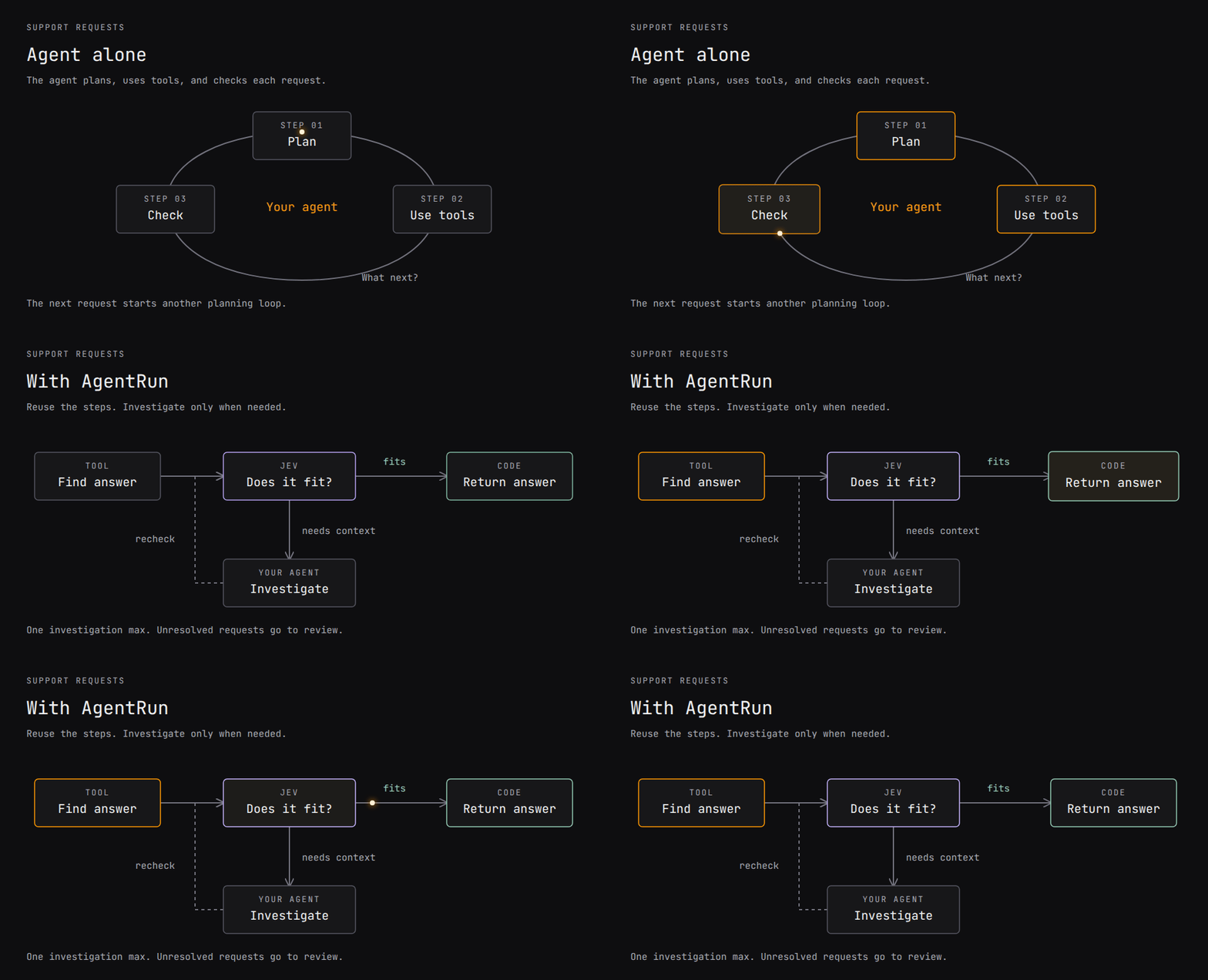
Что это такое?
 AgentRun — это DSL для рабочих процессов, который добавляет структурированные повторяемые шаги к агентам, которые вы уже запускаете: он использует Jev для точных решений типа «да/нет» и обращается к вашему агенту только тогда, когда задача требует настоящего разбора, а ваше приложение сохраняет собственные инструменты, доступ к моделям, права и бюджеты.
AgentRun — это DSL для рабочих процессов, который добавляет структурированные повторяемые шаги к агентам, которые вы уже запускаете: он использует Jev для точных решений типа «да/нет» и обращается к вашему агенту только тогда, когда задача требует настоящего разбора, а ваше приложение сохраняет собственные инструменты, доступ к моделям, права и бюджеты.Это один инструмент или набор отдельных пакетов?Это семейство независимых npm-пакетов, построенных вокруг ядра-DSL: @parcha/agentrun-dsl (определение и запуск рабочих процессов), @parcha/agentrun-jev (типизированные решения), @parcha/agentrun-pi (расширение для Pi), а также pi-durable-disk, pi-browser, pi-vision и pi-transport для надёжного выполнения, работы с браузером и файлами. Вы устанавливаете только те, что нужны вашему рабочему процессу.
Это семейство независимых npm-пакетов, построенных вокруг ядра-DSL: @parcha/agentrun-dsl (определение и запуск рабочих процессов), @parcha/agentrun-jev (типизированные решения), @parcha/agentrun-pi (расширение для Pi), а также pi-durable-disk, pi-browser, pi-vision и pi-transport для надёжного выполнения, работы с браузером и файлами. Вы устанавливаете только те, что нужны вашему рабочему процессу.Как запустить рабочий процесс?С Node 22.19+ и npm выполните 'npx agentrun demo', чтобы увидеть пример маршрутизации тикетов на заготовленном сценарии, либо установите '@parcha/agentrun-dsl@beta' и '@parcha/agentrun-jev@beta' в своё приложение и подключите свои инструменты через runEffect, агента через runNode, а решения Jev через createJevRunner() в роли runJudge.
С Node 22.19+ и npm выполните 'npx agentrun demo', чтобы увидеть пример маршрутизации тикетов на заготовленном сценарии, либо установите '@parcha/agentrun-dsl@beta' и '@parcha/agentrun-jev@beta' в своё приложение и подключите свои инструменты через runEffect, агента через runNode, а решения Jev через createJevRunner() в роли runJudge.Нужен ли мне API-ключ TypeSafe, чтобы попробовать?Нет, команды быстрого старта и демо работают полностью на заготовленных инструментах и заранее записанных ответах Jev и агента — ключ не нужен. Настоящий TYPESAFEAPIKEY из панели TypeSafe потребуется только когда вы подключите живые решения Jev.
Нет, команды быстрого старта и демо работают полностью на заготовленных инструментах и заранее записанных ответах Jev и агента — ключ не нужен. Настоящий TYPESAFEAPIKEY из панели TypeSafe потребуется только когда вы подключите живые решения Jev.Безопасно ли запускать рабочие процессы, написанные кем-то другим?По умолчанию нет: узлы-фрагменты кода в рабочем процессе выполняют произвольный JavaScript с правами самого хост-процесса, поэтому для недоверенных авторов нужен сандбокс, контролируемый хостом. Учтите также, что прохождение типизированных проверок или порогов уверенности не гарантирует, что ответ действительно верен.
По умолчанию нет: узлы-фрагменты кода в рабочем процессе выполняют произвольный JavaScript с правами самого хост-процесса, поэтому для недоверенных авторов нужен сандбокс, контролируемый хостом. Учтите также, что прохождение типизированных проверок или порогов уверенности не гарантирует, что ответ действительно верен.Какие пакеты реально можно использовать прямо сейчас?DSL, адаптер Jev и расширение для Pi опубликованы на npm с меткой @beta. pi-browser и pi-vision собраны, но ещё не опубликованы, а pi-transport «заморожен» — он тестировался вместе с остальными, но ставится только из приватного tarball, а не из npm.
DSL, адаптер Jev и расширение для Pi опубликованы на npm с меткой @beta. pi-browser и pi-vision собраны, но ещё не опубликованы, а pi-transport «заморожен» — он тестировался вместе с остальными, но ставится только из приватного tarball, а не из npm.Что именно такое Jev в этом контексте?Jev — это типизированный сервис принятия решений, к которому рабочие процессы обращаются за точными суждениями «да/нет/не уверен» с оценкой уверенности; например, в примере со поддержкой требуется ответ «да» с уверенностью не ниже 0.8, прежде чем произойдёт откат к агенту.
Jev — это типизированный сервис принятия решений, к которому рабочие процессы обращаются за точными суждениями «да/нет/не уверен» с оценкой уверенности; например, в примере со поддержкой требуется ответ «да» с уверенностью не ниже 0.8, прежде чем произойдёт откат к агенту.Как AgentRun связан с агентом для кодинга Pi?Установка @parcha/agentrun-pi добавляет в Pi (1.1.0+) расширение /agentrun, позволяющее собирать, просматривать, запускать, сохранять и загружать рабочие процессы прямо из сессии Pi, например '/agentrun demo' или '/agentrun run', без необходимости что-либо скачивать из репозитория.
Установка @parcha/agentrun-pi добавляет в Pi (1.1.0+) расширение /agentrun, позволяющее собирать, просматривать, запускать, сохранять и загружать рабочие процессы прямо из сессии Pi, например '/agentrun demo' или '/agentrun run', без необходимости что-либо скачивать из репозитория.Можно ли вкладывать рабочие процессы друг в друга или запускать их параллельно?Да: рабочие процессы могут вызывать другие рабочие процессы, распределять работу по элементам параллельно и выполнять ограниченные циклы — в дополнение к логике ветвления и эскалации из примера со поддержкой.
Да: рабочие процессы могут вызывать другие рабочие процессы, распределять работу по элементам параллельно и выполнять ограниченные циклы — в дополнение к логике ветвления и эскалации из примера со поддержкой.Как определить рабочий процесс?Рабочие процессы можно описывать обычным JSON или с помощью TypeScript-билдера на основе контрактов Zod, который выводит типы входных и выходных данных; интерпретатор проверяет пути промежуточного состояния во время выполнения.
Рабочие процессы можно описывать обычным JSON или с помощью TypeScript-билдера на основе контрактов Zod, который выводит типы входных и выходных данных; интерпретатор проверяет пути промежуточного состояния во время выполнения.What are similar projects?qwen-code, codify, oh-my-opencode-slim, pragma, ChatDev, open-multi-agent, turnstone, spring-ai-alibaba
qwen-code, codify, oh-my-opencode-slim, pragma, ChatDev, open-multi-agent, turnstone, spring-ai-alibabaWhich topics is it in?agent-framework, sandbox, workflow, workflow-automation, orchestration, agent-orchestration, agentic-ai, sdk, multi-agent, framework, agent, npm
agent-framework, sandbox, workflow, workflow-automation, orchestration, agent-orchestration, agentic-ai, sdk, multi-agent, framework, agent, npm