
agentrun README

The project's README from github.com/Parcha-ai/agentrun. As one markdown file: README.md.

agent.run()

Add Jev-powered workflows to your agents.

AgentRun is a workflow language for the agents you already run. Define repeatable steps, use Jev for focused decisions, and call an agent when the work needs investigation. Your application keeps its tools, model access, permissions, and budgets.

Quickstart · Packages · Documentation · Examples · Pi extension · Agent instructions

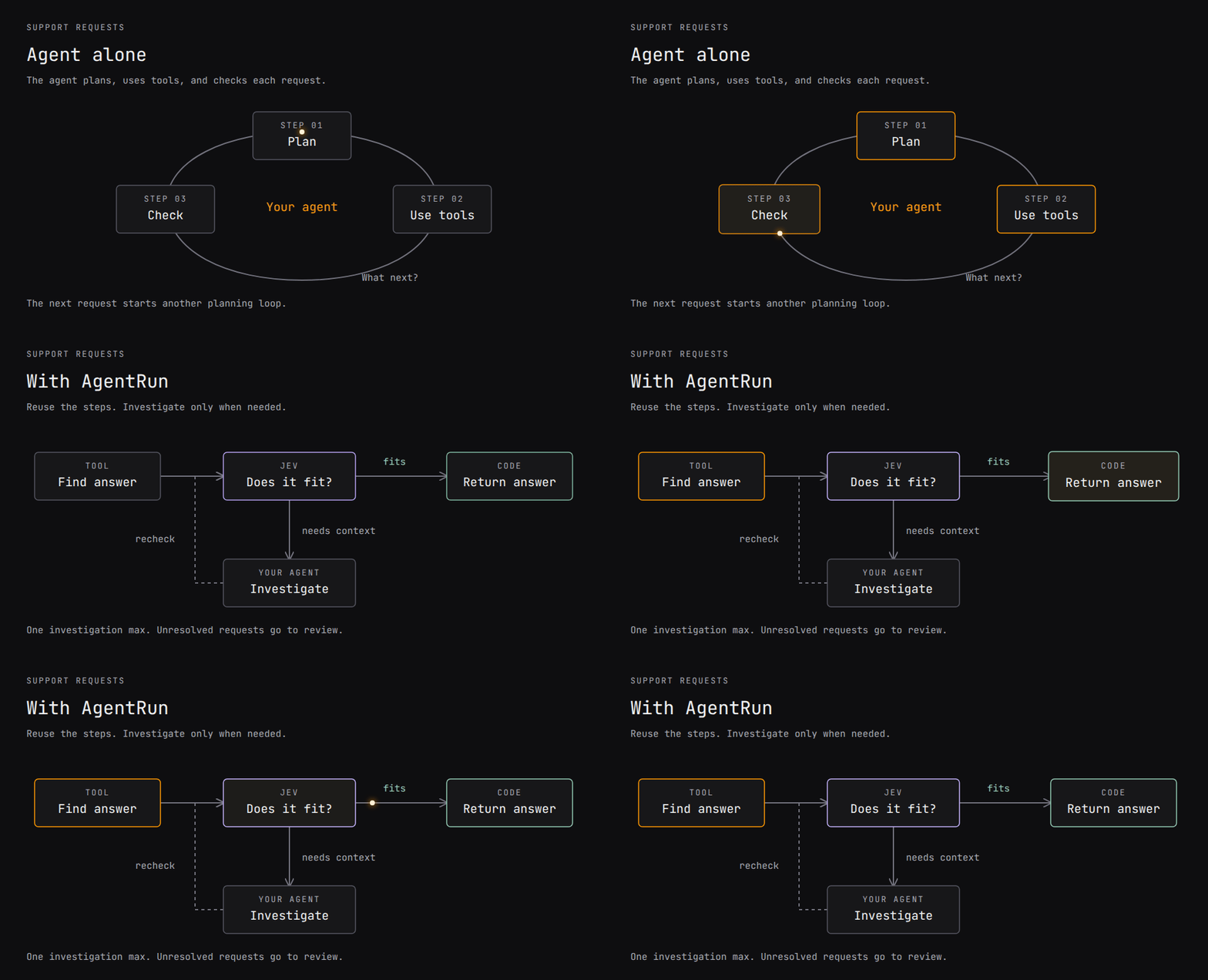
Support workflow: search for an answer, check it with Jev, and return it or ask an agent to investigate. Check the investigation before returning it or escalating for review.

View the static diagram · Run this example

The support example below follows this workflow with scripted tools and model responses.

Quickstart

Requires Node 22.19+ and npm. In your project:

npm install @parcha/agentrun-dsl@beta
npx agentrun demo

This ticket-routing demo uses scripted decisions and needs no API key. Next, run and change a workflow in your own app. To run the support workflow shown above, use the checkout below. To build workflows with your agent, install the Pi extension.

Run the support example

To run the workflow in the animation, clone the examples and build:

git clone --branch main --single-branch https://github.com/Parcha-ai/agentrun.git
cd agentrun
# With nvm: nvm install && nvm use
npm ci --ignore-scripts
npm run build
npm run demo:support

This runs the interpreter with scripted tools, Jev answers, and agent responses. It needs no API key and sends no customer replies.

The command prints a report for each case:

Request Agent calls Decision calls Result
Reset a password 0 1 Return the help answer
Find an invoice 0 1 Return the help answer
Investigate a failed payment 1 2 Return the investigation answer
Payment still unresolved 1 2 Escalate for review
npm run demo:support -- payment
npm run test:support

Try npm run demo:support -- unresolved to see an escalation. It exits with code 2. The responses are scripted; changing a prompt does not change them.

Connect live Jev and your agent, or give these instructions to your coding agent.

Use one piece, or all of it

Use one piece

Each package works on its own. Install the ones you need.

Package What it does What it needs First command with no key Status
@parcha/agentrun-dsl Define, validate, inspect and run workflows Node 22.19+ npx agentrun demo published (@beta)
@parcha/agentrun-jev Jev typed decisions as a workflow's runJudge the DSL; TYPESAFE_API_KEY for live calls its README's offline test published (@beta)
@parcha/agentrun-pi The /agentrun Pi extension and a Pi-backed node runner Pi 1.1.0; a model for live runs; pi-durable for its ./durable entry /agentrun demo in Pi (scripted, no model calls) published (@beta); the ./durable entry is in this repository, not yet in the published beta
@parcha/pi-durable-disk Run a pi-durable agent on a network disk: one owner per run, a fence, a supervisor pi-durable and chord; an Archil account, a disk and an API key none yet published (@beta)
@parcha/pi-browser A browser for pi agents: crash-safe session custody, evidence with SHA-256, typed failures pi-durable and chord; a provider (a local Chrome needs no key, Browserbase needs its key) its README's no-key command not yet published; a release publishes it
@parcha/pi-vision Eyes for pi agents: documents, images, scans and video within the model's limits, a receipt for every look nothing for a document's text; Photon or sharp for images; pi-durable, chord and pi-ai in pi; a model that looks, for questions about a file its README's first read not yet published; a release publishes it
@parcha/pi-transport Boxes for pi agents: one interface over a directory, a container, a sandbox or a VM pi-durable and chord; Docker for the Docker provider the "A box" example in its README (needs Docker) held, not published

A held package is built, tested and verified with the others, and its manifest says "private": true; it installs from a packed tarball, not from npm.

Use all of it

One program puts the packages together and runs a job end to end on pi-durable: a durable run, the recovery driver, the node runner, the browser and vision. It uses a scripted model and a fake browser, needs no key, and prints the record and the receipts it cites.

npm ci --ignore-scripts
npm run build
npm run demo:reference

examples/reference/ has the job and the code. What a host supplies lists the seven functions the packages ask a host for, the install order and why, and what the example does not do yet.

What a workflow looks like

The support workflow requires answer text and a source reference. Jev must also answer yes with confidence of at least 0.8. Otherwise, the workflow allows one agent attempt and checks again. If the answer still fails those checks, it escalates for review. You choose the criteria and thresholds for your task.

These are the search and decision nodes from that workflow:

{
  node: 'call', label: 'find-answer', via: 'tool',
  tool: 'help.search', args: { request: '{request}' },
  out: 'Candidate', as: 'answer', deadline_s: 10,
},
{
  node: 'judge', label: 'check-existing-answer',
  state: { request: '{request}', answer: '{answer}' },
  out: 'Fit', as: 'fit',
}

Candidate and Fit refer to schemas in the workflow. Fit defines the question and its yes, no, and uncertain criteria. Code reads the decision and its confidence to choose the next step. Read the complete definition, including the agent and review path.

Write workflows as JSON or use the TypeScript builder and Zod contracts. The builder infers input and output types. The interpreter checks intermediate state paths at runtime. Workflows can call other workflows, map work in parallel, and run bounded loops.

Connect your application

Install the core and Jev adapter in your application with npm install @parcha/agentrun-dsl@beta @parcha/agentrun-jev@beta. Then:

  1. Supply adapters. Connect tools through runEffect, your existing agent through runNode, and Jev decisions through createJevRunner() as runJudge.
  2. Define and test the workflow. Write its schemas, steps, thresholds, and review path. Start with fixtures, then evaluate real decisions on labeled cases from your task.
  3. Give your agent a workflow tool. Register a function that calls runWorkflow as one of your agent's tools. Handle the workflow's output, escalation, and errors.

The support integration guide has a config template and live command. Live Jev calls need TYPESAFE_API_KEY from the TypeSafe dashboard, separate from your coding-agent login. Workflows without Jev decisions do not need that key. See host integration for permissions, cancellation, and recovery.

Use it in Pi

With Pi 1.1.0 installed, run these commands in your project:

pi install npm:@parcha/agentrun-pi@beta -l
pi --offline

-l installs in this project; --offline skips startup downloads. Pi asks whether you trust the project before loading its extension. No AgentRun checkout is needed.

Once Pi has model access, ask it to build a workflow:

/agentrun Research how this repository handles cancellation. Investigate the runtime and tests separately, then report gaps with file references.

Pi uses the packaged skill to build, inspect, and run the workflow. Run /reload if you install into an open Pi session. Use /agentrun save <name> and /agentrun load <name> for project-local definition revisions. Saves contain neither run input nor execution permission. Pi setup and limits.

More examples

Example What it demonstrates
Support answers Search, Jev checks, optional investigation, review fallback
Research a decision Nested workflows, parallel research, evidence selection, report writing
Rank a list A reusable workflow: Jev scores, code sorts and applies quotas, duplicates are dropped, long lists split themselves
Standalone TypeScript starter Install the packages in your own app; search and screen evidence

Research demo

From the built checkout, run a scripted research workflow: "Should our team move its docs from a wiki into the code repository?"

npm run demo
npm run eval:research

It plans subquestions, researches them in parallel, screens evidence, and writes a report. The evaluation checks six labeled cases with scripted responses. Connect real Jev and Pi models.

Packages, status, and contributing

Package Responsibility
@parcha/agentrun-dsl Define, validate, inspect, and execute workflows
@parcha/agentrun-jev Connect Jev typed decisions
@parcha/agentrun-pi Pi extension and agent runner
@parcha/pi-durable-disk Run pi-durable agents on a network disk (Archil): one owner per run, a fence, and a supervisor
@parcha/pi-browser A browser for pi agents: crash-safe session custody, evidence with SHA-256, typed failures (not yet published)
@parcha/pi-vision Eyes for pi agents: documents, images, scans and video within the model's limits, typed misses, a priced receipt for every look (not yet published)
@parcha/pi-transport Boxes for pi agents: one small interface over a directory, a container, a sandbox or a VM, providers for this machine and Docker, a strict config, and a conformance suite a vendor can run (not yet published)

This release is 0.1.0-beta.4. See the changelog and contracts and limits.

Ordinary functions may be enough for a fixed sequence. AgentRun stores the steps in a workflow document that you can inspect, rerun, or call from an agent. Code nodes execute JavaScript with process privileges; untrusted workflow authors require a host-controlled sandbox. Typed decisions and validated output shapes do not prove that an answer is factually correct.

For development setup and checks, see Contributing. Open an issue for bugs or proposals.

Code and documentation use Apache-2.0. Copyright 2026 Parcha Labs, Inc. Dependencies retain their own licenses. Built by Grep.ai.

agentrun (Parcha-ai/agentrun)

Searching Database…

What is this?AgentRun is a workflow DSL that adds structured, repeatable steps to the agents you already run: it uses Jev for focused yes/no decisions and only calls your agent when the work needs real investigation, while your application keeps its own tools, model access, permissions and budgets.
Is this one tool or a set of separate packages?It's a family of independent npm packages built around a core DSL: @parcha/agentrun-dsl (define/run workflows), @parcha/agentrun-jev (typed decisions), @parcha/agentrun-pi (Pi extension), plus pi-durable-disk, pi-browser, pi-vision and pi-transport for durable execution, browsing and file handling. You install only the ones your workflow needs.
How do I get a workflow running?With Node 22.19+ and npm, run 'npx agentrun demo' for the scripted ticket-routing example, or install '@parcha/agentrun-dsl@beta' and '@parcha/agentrun-jev@beta' in your app and wire your tools through runEffect, your agent through runNode, and Jev decisions through createJevRunner() as runJudge.
Do I need a TypeSafe API key to try it?No, the quickstart and demo commands run entirely on scripted tools and canned Jev/agent responses and need no key. A real TYPESAFEAPIKEY from the TypeSafe dashboard is only required once you connect live Jev decisions.
Is it safe to run workflows written by someone else?Not by default: workflow code nodes execute arbitrary JavaScript with the host process's own privileges, so untrusted workflow authors need a host-controlled sandbox. Also note that passing typed checks or confidence thresholds doesn't guarantee an answer is actually correct.
Which packages are actually usable right now?The DSL, Jev adapter and Pi extension are published as @beta on npm. pi-browser and pi-vision are built but not yet published, and pi-transport is 'held' — tested alongside the others but only installable from a private tarball, not npm.
What exactly is Jev in this context?Jev is a typed decision service workflows call for focused yes/no/uncertain judgments with a confidence score; the support example, for instance, requires a yes answer with confidence of at least 0.8 before falling back to the agent.
How does AgentRun connect to the Pi coding agent?Installing @parcha/agentrun-pi adds a /agentrun extension to Pi (1.1.0+), letting you build, inspect, run, save and load workflows from inside a Pi session, e.g. '/agentrun demo' or '/agentrun run' with no checkout needed.
Can workflows be composed or run in parallel?Yes, workflows can call other workflows, map work across items in parallel, and run bounded loops, in addition to the branching/escalation logic shown in the support example.
How do I define a workflow?Workflows can be written as plain JSON or with a TypeScript builder backed by Zod contracts that infers input and output types; the interpreter checks intermediate state paths at runtime.
Creator
Parcha-ai
Size
17.8 MB
Stars
240
Updated
CommitOct 17
Age
24d
Commits · 90 Days