📺 Livestream: Ask the Experts: Evaluating Agent Skills
SkillEvaluator checks AI agent skills and plugins, and measures a skill's effect
on task results: start with quality checks, then compare runs with and without a skill.
Catch skill issues before merge. Connect your repository to SkillEvaluator with a
CI template
for automated quality and security gates, without building or maintaining
evaluation code.
Agent skills are folders of instructions and supporting files defined by the
Agent Skills specification. SkillEvaluator is part of
the NVIDIA Verified Skills pipeline.
Get started
Install the CLI in a Python 3.12–3.14 environment:
pip install skillevaluator
Or use uv
uv tool install --python 3.13 skillevaluator
For uv setup or direct GitHub source installation, see
Installation.
Then check skills from your terminal, CI, or agent:
|
Run checks backed by 500+ static rules and detection patterns, without an
LLM key. Complete scanner setup
for full coverage:
skillevaluator validate \
  ./my-skill --tiers 1
Run all three tiers
After all-tier setup with NVIDIA Build,
remove --tiers 1 to add deduplication and live agent evaluation to measure
skill lift:
skillevaluator validate \
  ./my-skill
|
Check every skill change. Run in your GitHub repo to open a setup PR:
skillevaluator ci init
Guided setup and CI templates for GitHub and GitLab.
|

Add the skill to Claude Code, Codex or another agent:
npx skills add \
  NVIDIA/SkillEvaluator
Then ask: "Is my skill any good?"
See the agent guide.
|
⚡ Harness check: will your agent load your skill?
🔑 No API key · 🤖 No agent run
skillevaluator harness-check ./my-skill
Illustrative summary of versioned profiles. Full output can include notes and schema diagnostics.
╭─ Harness compatibility · my-skill ──────────────────────────────────────────────────────╮
│  ⚠️ codex        degraded    Description cut to 1,021 chars + '...' in the skill list   │
│  ❌ claude-code  not loaded  .agents/skills is not scanned                              │
│  ✅ opencode     loads                                                                  │
│  ✅ hermes       loads                                                                  │
│  ✅ openclaw     loads                                                                  │
│  ❌ copilot-cli  not loaded  description is 1,028 UTF-16 units, 4 over the 1,024 limit  │
╰────────────────────────────────────────────────────────────────── ❌ 2 of 6 not loaded ─╯
skillevaluator validate includes Harness Check in Tier 1 alongside quality,
schema, version, PII, license, Unicode and script linting. Security and code
integrity checks use SkillSpector, Gitleaks, Bandit and optional Semgrep.
See all Tier 1 checks;
use --tiers 1 to run only this tier.
🧪 Ready to go deeper? Try a
live agent evaluation (Tier 3).
Quickstart
Check your skill without a key
skillevaluator quality-check ./my-skill
No API key, scanner, GPU or Docker is needed. It prints a score out of 100 with a
grade and the findings behind it; the passing threshold defaults to 70. This is
static quality only; publication evidence stays INCOMPLETE. Security and agent impact need additional checks. See the
keyless walkthrough.
No skill yet? Clone the repository and use the bundled
src/skillevaluator/tier3/reference_skills/text-analyzer. Scores can differ by release.
Run all three tiers with a free NVIDIA Build key
Eligible NVIDIA Developer Program members can use NVIDIA-hosted endpoints for
free prototyping, subject to access terms and rate limits.
- Sign in at build.nvidia.com and complete enrollment.
- Open a model page, select Get API Key, and generate your key.
- Complete scanner setup, start Docker, and prepare a reviewed dataset. Install every tier, set the provider and key, then validate:
pip install "skillevaluator[all]"
export SKILL_EVAL_LLM_PROVIDER=nv_build
export NVIDIA_API_KEY='nvapi-...'
skillevaluator validate ./my-skill
Without --tiers, validate runs all three. The key covers embeddings and chat
in Tier 2 and supported agents in Tier 3; add --llm for model checks in Tier 1.
For uv or GitHub installations, use the matching all-tier install instead of the pip command above. Tier 3 also
needs Docker running; add --tiers 1,2 to skip it. More in
Run the combined pipeline, the
Build walkthrough and provider configuration.
Bring skill evaluation to your repository
Minimal setup. No evaluation code to write or maintain. Choose your skill
folders and thresholds to get automated validation, security scanning and
downloadable reports for changed skills in GitHub or GitLab.
11 CI checks backed by 500+ static rules and detection patterns:
quality, schema, version, PII, license, Unicode, script linting,
Harness Check,
security, code integrity and dependency auditing.
Scanners: SkillSpector,
Gitleaks, Bandit and Semgrep,
and pip-audit.
GitHub guided setup: after installing the CLI, run inside
your checked-out repository:
skillevaluator ci init
Choose checks and optional hosted feedback, then review the setup PR.
CLI setup guide.
Manual setup: copy a filled-in template from CI templates.
No local CLI needed.
Choose one optional feedback workflow. These templates run Tier 1 quality and
security checks without a model key; see all-tier CI setup
to add deduplication and live agent evaluation.
See GitHub and
GitLab setup,
template reference and report examples.
Three-tier overview
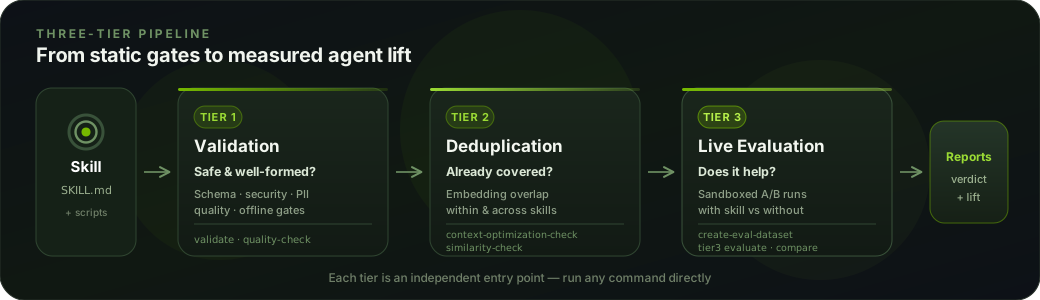
Each tier is independent. Use the all-tier installation for all three:
| Tier |
Question |
Example after setup |
Additional setup |
| Tier 1: Validation |
Is the skill safe, well-formed and harness-compatible? |
skillevaluator tier1 ./my-skill --no-llm |
External scanners for full static coverage; a provider and model clients enable LLM checks |
| Tier 1: Harness Check |
Will the agent load the skill? |
skillevaluator harness-check ./my-skill |
No API key or agent run |
| Tier 2: Deduplication |
Does guidance repeat or overlap? |
skillevaluator tier2 ./my-skill |
Embeddings and chat; add --catalog ./skill-catalog.json for inter-skill comparison |
| Tier 3: Live Agent Evaluation |
Does the skill help the agent? |
skillevaluator tier3 ./my-skill |
Provider access, a supported agent, and a running sandbox (Docker by default) |
Prepare scanners for your installed release; Semgrep is optional.
--no-llm does not remove scanner requirements; a scanner that cannot run is
INCOMPLETE and exits nonzero.
SkillSpector provides specialized skill
security scanning; Harbor, the
open-source agent evaluation framework, powers sandboxed agent runs.
Tier 2 reports when inter-skill comparison did not run. Tier 3 autopilot reuses
sources or creates one skill-grounded case with limited coverage. See
tier guides.
Run the combined pipeline
After setting up the provider, scanners, and agent sandbox, run all three tiers:
skillevaluator doctor --env-mode docker
skillevaluator validate ./my-skill
doctor checks readiness, not inference success. validate runs all tiers with
autopilot for skills. Use --tiers 1,2 to skip live evaluation or --tiers 1 for
static checks. --no-autopilot requires an existing source. Other artifact types
retain their applicable stages.
Tier 1 gates validate. Tier 2 gates unless --no-block-on-dedup is set;
Tier 3 gates only with --block-on-agent-eval. Model and managed-sandbox usage
can incur charges; see runtime and cost.
Standalone generation needs substantive evals/EVAL.md guidance, a --prompt
file with task requests and outcomes, or matching retained traces. --force
below replaces the autopilot starter; --refine refines it. Explicit
--grounding skill permits skill-only starters. Review cases; templates omit
unauthored negatives.
skillevaluator tier3 create-eval-dataset ./my-skill --full --prompt eval-guidance.md --force
Run from a source checkout
For an editable environment, follow the development setup.
Research and citation
Resources: paper,
PDF,
DOI,
BibTeX, and
NVIDIA Developer blog.
Cite the paper and record the SkillEvaluator release or commit; see CITATION.cff.
Documentation
See the documentation for
setup, tier guides, reports, CI integration, CLI reference, and
performance dashboard.
Installation and third-party software
This project will download and install additional third-party open source
software projects. Review the license terms of these open source projects before
use.
Contributing
Read CONTRIBUTING.md and run:
make lint && make test && make build
See project governance and Code of Conduct.
Support
Support level: Experimental. Community-supported, best-effort, with no SLA
or NVIDIA enterprise support entitlement. Report bugs and feature requests through
GitHub Issues; see
SUPPORT.md.
Security
Report suspected vulnerabilities using the private process in
SECURITY.md. Do not disclose security issues in a public GitHub
issue.
Releases
See CHANGELOG.md and
GitHub Releases.
License
Apache License 2.0: see LICENSE, NOTICE, and
THIRD_PARTY_NOTICES.md.
Copyright (c) 2026 NVIDIA CORPORATION & AFFILIATES. All rights reserved.









 SkillEvaluator 是 NVIDIA 推出的开源工具,用于检查 AI 智能体技能的质量和安全性,然后衡量某项技能是否真的改变了智能体完成任务的表现。