paper-aquarium README

The project's README from github.com/MrMoT9I/paper-aquarium. As one markdown file: README.md.

English · Русский

Paper Aquarium

A home game for a child, in the spirit of teamLab's Sketch Aquarium: print a sheet, colour it with markers, take a photo with a phone — and the fish starts swimming in an aquarium on the big screen.

A4 colouring sheet  →  phone photo  →  texture  →  3D fish in the scene

The server is plain Node with zero dependencies, the scene is three.js, and everything the game owns lives in data/.

Questions, ideas and "it won't start for me" — the project chat: t.me/+5PkSBR1C6LtmOTM0.

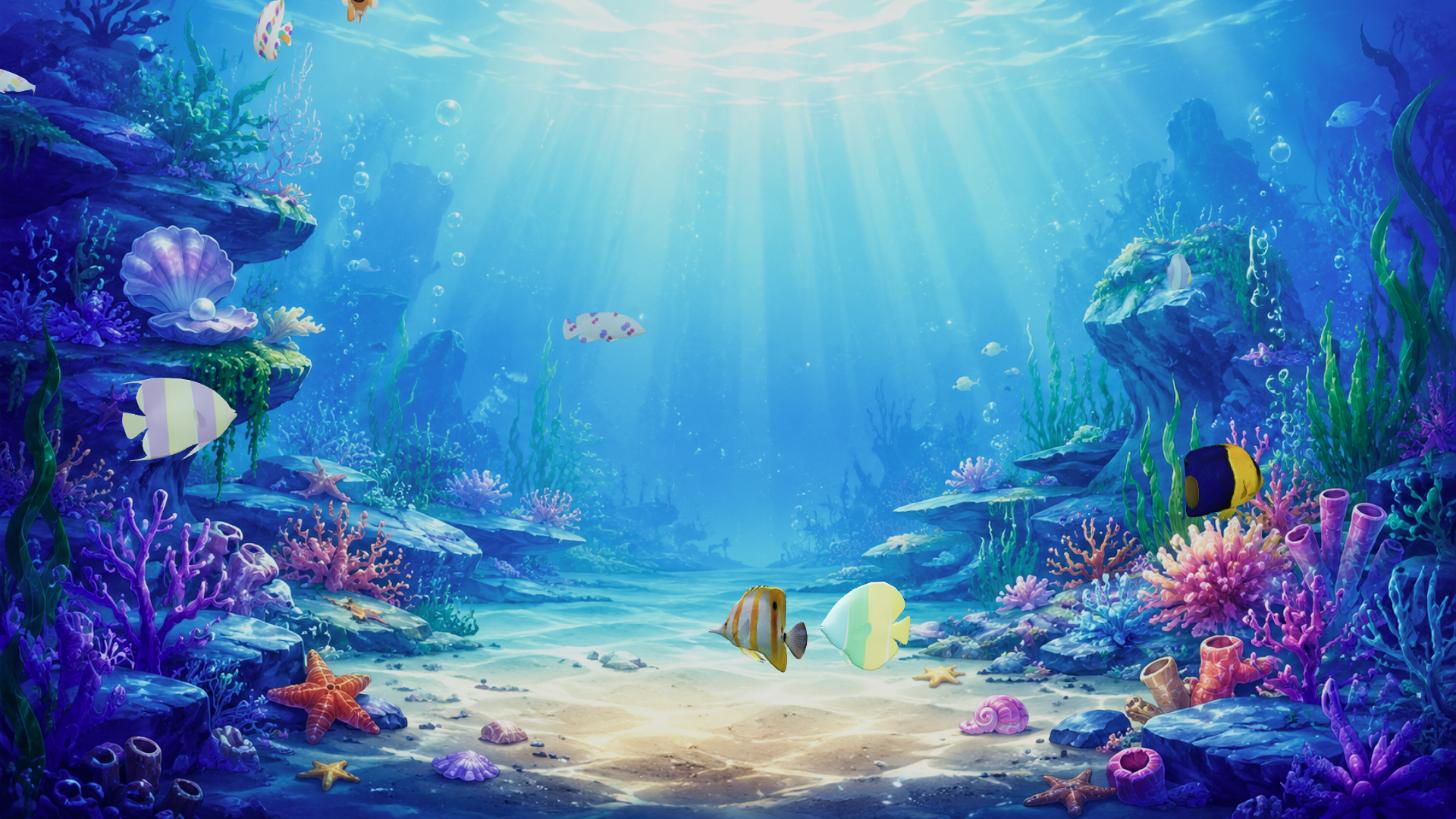
An aquarium with fish coloured by a child

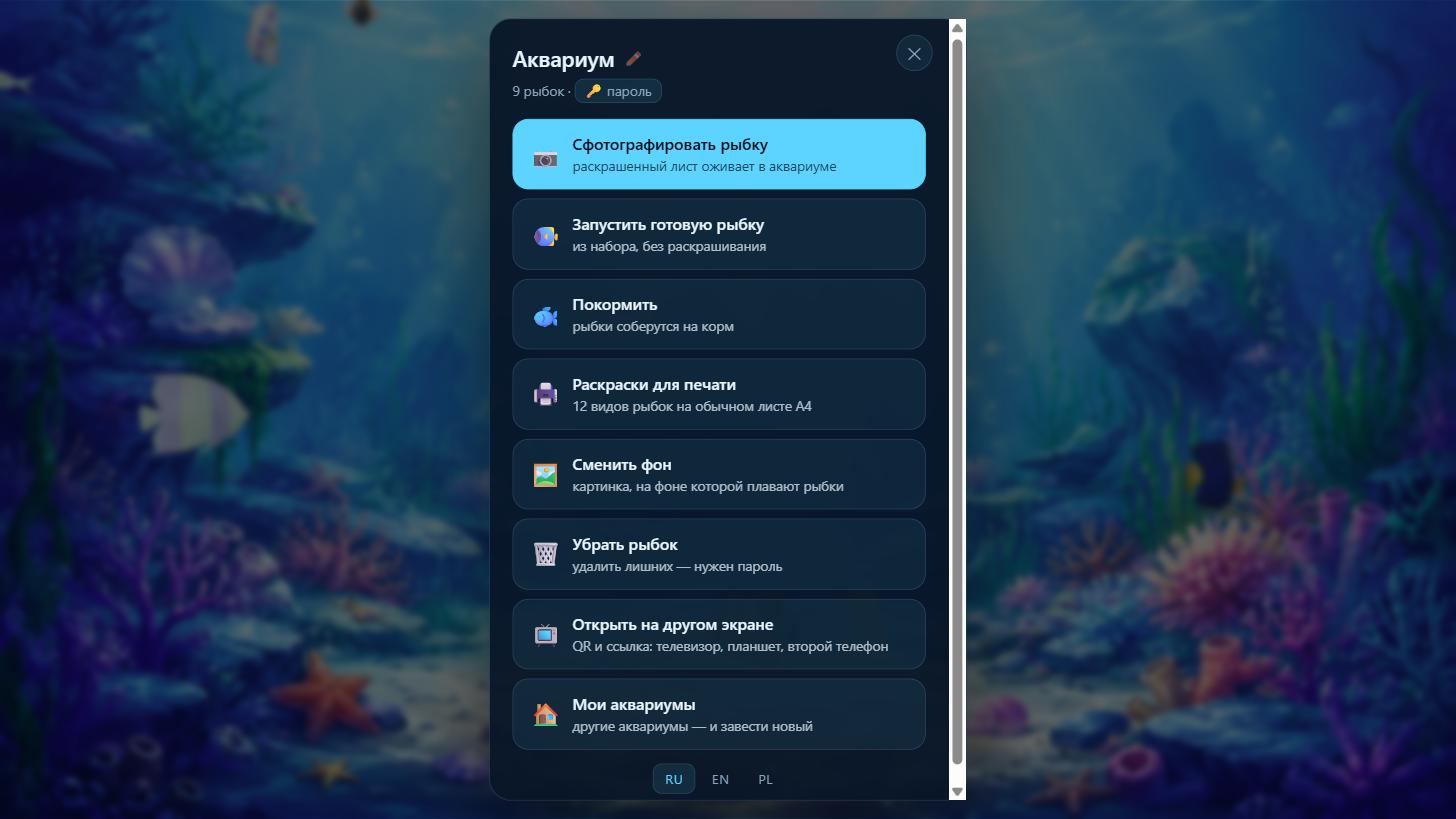
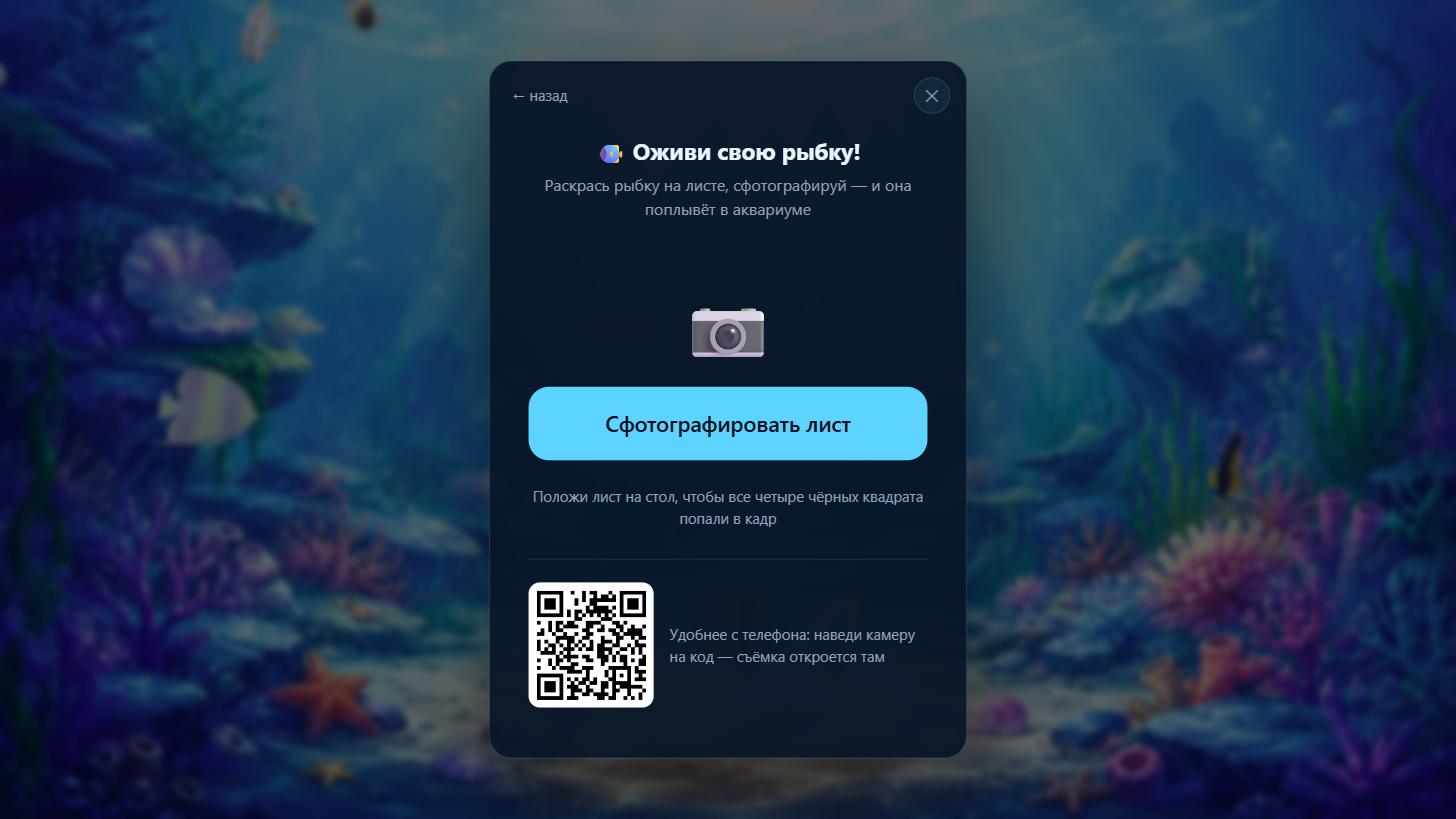
The aquarium menu The capture screen
Tap anywhere — a menu with every road out The sheet is photographed right there, in a frame
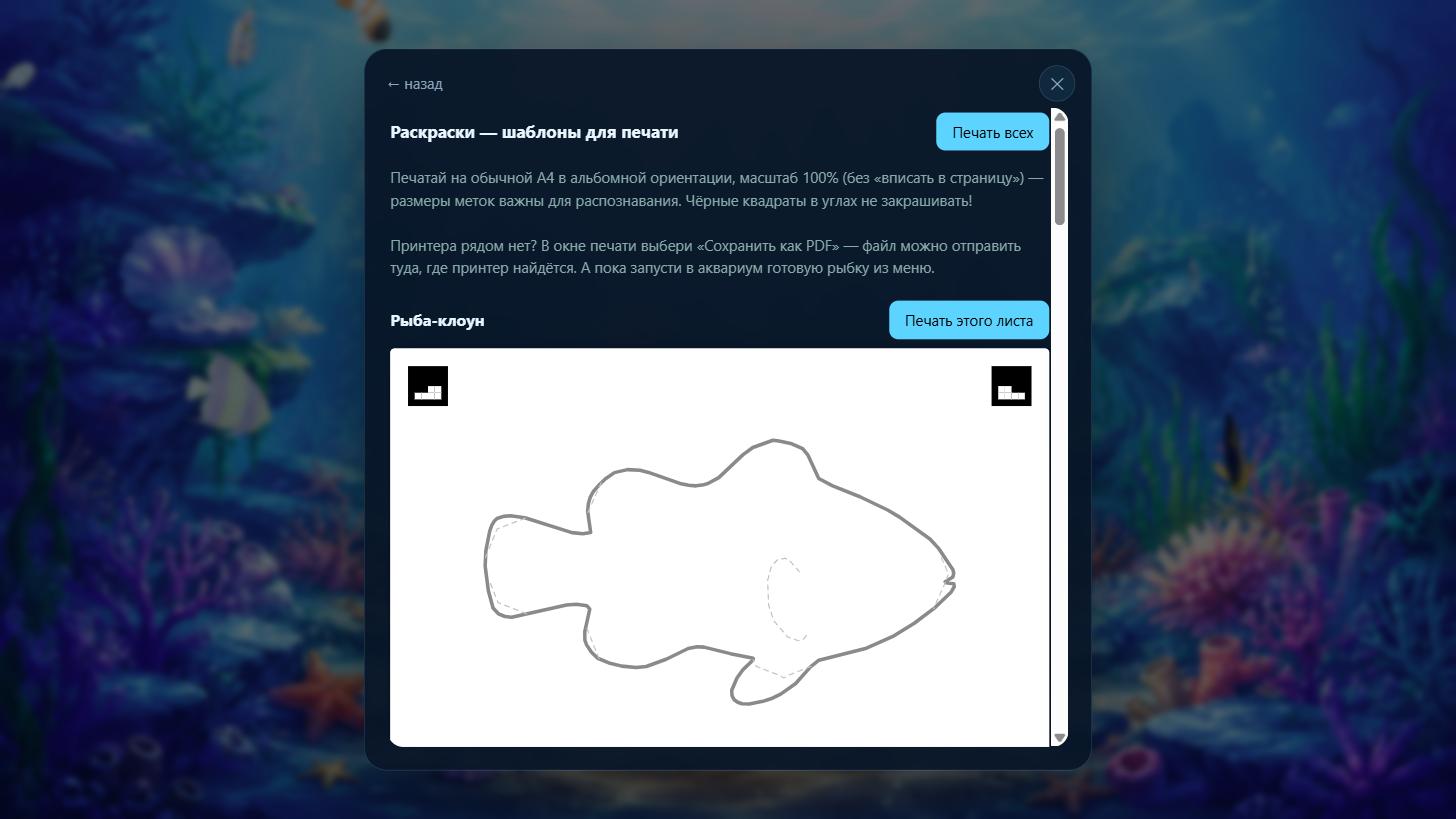
Colouring sheets Fish from the pack
Twelve A4 sheets with markers in the corners Ready-made fish, when there is no time to colour

More: the list of fish with their drawings, choosing a background, the list of aquariums.

How it works

The colouring sheet. Four black 6×6 markers in the corners: their 16 inner cells encode the species and the corner number. The capture step uses them to find the sheet in a photo and undo the perspective — the markers must stay uncoloured, everything else is fair game. The fish outline is printed as a thin grey line and the fin areas as a pale dashed one, so they are visible without the child taking the hint for part of the drawing.

Capture. assets/capture.js looks for the markers by sweeping brightness thresholds, undoes the perspective, cuts the drawing along the species contour from the manifest and trims a strip along the printed line itself — otherwise it would stay as a dark rim on the fish. The result is a texture, mapped onto the 3D model through a planar unwrap of its side silhouette.

The aquarium. demos/realistic-tank.html: the fish swim inside a volume that follows the camera frustum rather than a box — against a box, fish near the far wall would huddle towards the centre of the screen. The scene works out the model's orientation (where the nose is, where the back is) on its own, from the tail beats in the animation: assets/fish-frame.js.

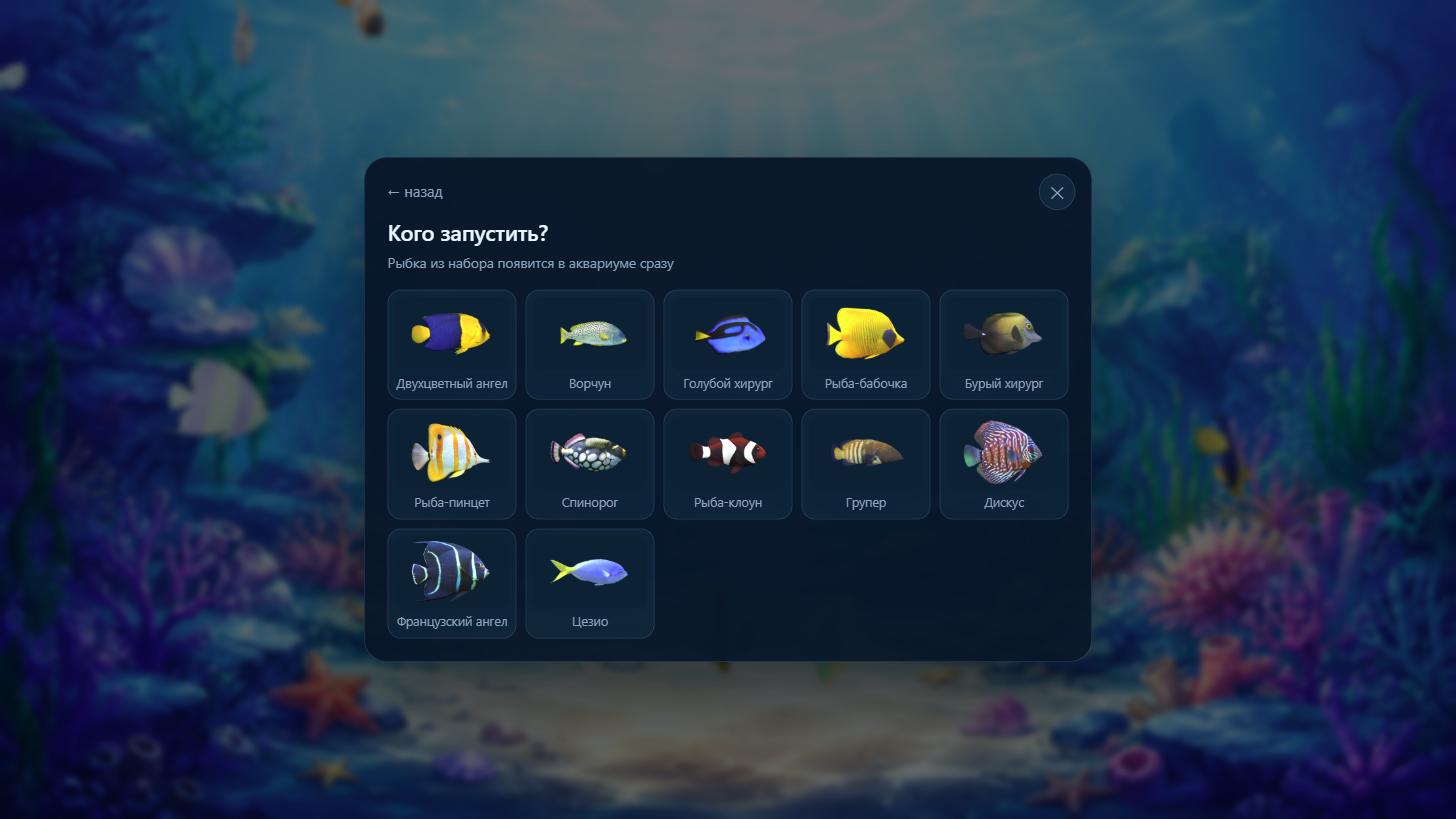
The menu. A tap anywhere in the aquarium opens the menu: capture, ready-made fish from the pack, food, colouring sheets, background, removing fish and “Open on another screen” — a QR code, a link and a five-digit TV code. Capture, background and sheets open right there in a frame — they are the same pages (?embed=1), not copies of them.

The showcase. The AQUA_DEMO_TANK variable turns one aquarium into a public showcase: the home page offers newcomers a “Peek at a live aquarium” card, and a ?demo link opens it with a trimmed menu — feed the fish or start your own. A screen opened with a PIN (?tv) never pops the menu by itself: that screen is for watching, the phone is for driving.

Languages. Russian, English and Polish; on the first visit the device language is used, after that whatever the switcher was set to. All strings live in assets/i18n.js and the markup is annotated with data-t attributes. The colouring sheets are trilingual too: the caption under the fish is printed in the language of the page, while the corner markers are identical in every version — any printed sheet is recognised.

Running it

node server.js          # http://localhost:8000

Node 18+ is required. There is nothing to install: no dependencies, and three.js sits in vendor/. The port is set by PORT.

The server prints the addresses of every network interface — use them to open the aquarium from a phone or a TV on the same Wi-Fi.

Access

There are no accounts. Every aquarium has a 10-character code (which is also its address) and a password:

code (the link) password
watch the aquarium ✅
add a fish, feed them, change the background ✅
delete fish or the aquarium, rename it ✅

Capture and feeding are deliberately password-free: the child opens the link on a phone, and asking for a password there would kill the whole idea. Nothing can be spoiled that way — everything irreversible is behind the password.

For a TV there is a shortcut: “Open on another screen” in the aquarium menu hands out a temporary five-digit code (lives 5 minutes, kept in the server's memory). It goes into the same field on the home page as the regular code; guessing is choked by a growing per-address pause.

The code is long on purpose: 31¹⁰ ≈ 8·10¹⁴ combinations, so somebody else's drawings cannot be found by guessing. A five-digit code (100,000 combinations) would be brute-forced in minutes. The password is protected by a pause after five misses, growing to ten minutes.

Deployment

Everything a server needs sits next to the code: Dockerfile, docker-compose.prod.yml and .env.example. The aquarium is a single container with no proxy of its own: HTTPS, the domain and the certificate are handled by Traefik through the external web network. The order of steps, backups and the usual breakages are in DEPLOY.md (in Russian).

cp .env.example .env      # DOMAIN
docker compose -f docker-compose.prod.yml --env-file .env up -d --build

The model pack never enters the image — it is mounted from the server as a volume.

What to know before putting it on the open internet

The fish models: what to buy and where to put it

The fish are not in this repository and cannot be: the game uses a purchased pack whose licence allows use but forbids redistributing the files. Without the models everything still starts, but the aquarium stays empty. Four steps get them swimming — about fifteen minutes including the download.

1. Buy the pack

Coral Reef Fish Collection animated — Game Ready pack 8 by JosKata, on CGTrader. Thirty reef fish with skeletal animation, Royalty Free licence.

This exact pack is not strictly required — any fish will do, see "Other models" below. But the colouring sheets in this repository were traced from it, and without rebuilding the sheets the species will not match.

2. Lay out the files

From the download you only need the fbx folder — thirty .fbx files. The textures are already embedded in them; the separate .rar archives in textures/ do not need unpacking (they are only useful if you want to rebuild the pack at the original resolution).

paper-aquarium/
└── купил 3д рыбок/          ← "the 3D fish I bought"
    └── fbx/
        ├── Auriga Butterflyfish.fbx
        ├── Bicolor Angelfish.fbx
        └── … 30 files in total

The folder купил 3д рыбок/ is in .gitignore — your purchase stays yours. The name can be changed, in which case the path is passed to the script: -Pack "your\folder".

3. Convert to glTF

You will need the FBX2glTF converter (Windows, PowerShell):

npm install --no-save fbx2gltf

# the path inside the package depends on the version — let PowerShell find it
$env:FBX2GLTF = (Get-ChildItem node_modules -Recurse -Filter FBX2glTF.exe)[0].FullName

powershell -ExecutionPolicy Bypass -File tools\convert-pack.ps1

The script unpacks every fish, squeezes the textures down to 1024 px JPEG (the originals are 2048×2048 PNGs of 3–4 MB each — 110 MB per pack instead of 12), fixes the alpha channel that makes some fish arrive invisible, and lays out the result:

assets/models/pack/
├── clownfish/
│   ├── clownfish.gltf
│   ├── buffer.bin
│   └── clownfish_basecolor_COLOR.jpg
├── bluetang/
└── … 28 folders + pack.json

Twenty-eight, not thirty: two fish in the pack have no embedded textures or empty geometry, so the script drops them and says so in the console.

4. Check

node server.js

Open http://localhost:8000, create an aquarium, tap it and choose "🐠 Release a ready-made fish" — you should see 12 cards with thumbnails. Twelve, not twenty-eight: only species that have a colouring sheet make it into the picker — what can be coloured is what swims. The full list of converted models is served by http://localhost:8000/api/pack (28 there, with sheet: true on the species that have a sheet). Empty means the pack was not built — look for "пропуск" ("skipped") lines in the script's output.

Other models

The script is tailored to this pack and to Windows (it resizes textures with System.Drawing). Any .glb/.gltf files of your own go into assets/models/pack/ by hand — one folder per species, with a pack.json listing them next to it.

The species in the game are defined by assets/coloring/manifest.json, which is built from the silhouettes of the models. So a different set of fish means the sheets have to be rebuilt: /tools/silhouettes.html → node tools/make-coloring.js. Model requirements, how to add a species and the conversion pitfalls are in assets/models/README.md (in Russian).

Tools

What Where Why
Silhouettes /tools/silhouettes.html traces the pack models, produces contours.json and the fins drawn over the body
Sheets node tools/make-coloring.js builds 12 A4 sheets in three languages plus the manifest
PDF node tools/make-pdf.js prints the sheets into raskraski.<lang>.pdf via headless Chrome; run after make-coloring
Capture test /tools/test-capture.html runs every sheet through skew, rotation and noise
Pack build tools/convert-pack.ps1 FBX from the purchased archive → glTF

After the sheets change, the capture test must report no failures: the markers are chosen so that the codes of any two species differ in at least four cells.

Data

Everything lives in data/tanks/<code>/: meta.json (name, salt and password hash), settings.json (background), fish/ (drawings and their descriptions), backgrounds/ (uploaded backgrounds), preview.jpg (the snapshot for the card). Deleted things move to trash/ and data/trash-tanks/ instead of being erased: there are children's drawings inside.

Deleted items stay in the trash for 30 days (AQUA_TRASH_DAYS) and are then erased for good: a child deletes a drawing by accident and it has to be recoverable, but an eternal trash bin on a public server is a warehouse of other people's children's drawings that they believe are deleted.

The data/ folder is not part of the repository — it is one family's data. A backup of the game is a copy of that folder.

For a public server there is a Terms and data page (/terms.html): what is stored, how long it lives, how to get it deleted, GDPR rights and a contact. The server itself keeps no access log: it only writes "a fish was added to such and such aquarium", with no addresses. Check what the proxy in front of it writes — either turn its access log off, or leave the terms text as it is (it already says that the proxy keeps such a log). Details are under "Журнал обращений" in DEPLOY.md.

Licence

The code is MIT. The aquarium backgrounds in assets/backgrounds/ were made by the author of the project and come under the same terms.

The fish models are not covered by the project licence: the pack is bought separately and is not part of the repository. The silhouettes in assets/coloring/*.svg, tools/contours.json and assets/coloring/manifest.json were traced from the pack models — they are derived 2D contours, not the models themselves, and for a different set of fish they are rebuilt from scratch.

paper-aquarium (MrMoT9I/paper-aquarium)

Searching Database…

What is this?Paper Aquarium turns a hand-colored paper fish into a swimming 3D fish on a big screen: a child colors a printed sheet, photographs it with a phone, and the fish appears swimming in a web-based aquarium scene built with three.js.
Is this an app I install, or a website I host myself?It is a self-hosted web app: a plain Node.js server with zero dependencies serves the pages and a three.js scene, and you run it yourself to open it from a phone and a TV on the same network, or deploy it publicly behind a reverse proxy.
How do I get it running?Install Node 18+, run 'node server.js' — there is nothing else to install since it has zero dependencies and three.js is vendored in; set PORT, and the server prints the addresses of every network interface so you can open it from a phone or TV.
Do I need to buy anything to get fish swimming?Yes — the fish models aren't included in the repo; you buy the 'Coral Reef Fish Collection animated' pack on CGTrader, convert the FBX files to glTF with the provided PowerShell script, which yields about 12 colorable species (roughly 15 minutes including the download).
Does the photo-to-fish capture always work?It relies on four black markers printed in the corners of the sheet to locate it in the photo and undo the perspective; the markers must stay uncoloured, and a built-in capture test checks every sheet against skew, rotation and noise before you rely on it in the wild.
How do I put it online for others to use?Ship it as a single Docker container using the included Dockerfile and docker-compose.prod.yml; it has no proxy of its own, so HTTPS, the domain and the certificate are handled by Traefik through an external web network, while the purchased fish-model pack is mounted as a volume rather than baked into the image.
Who can see or delete an aquarium?There are no accounts: a 10-character code/link lets anyone watch the tank or add fish, while deleting or renaming needs a separate password; that password travels in a plain-text header, so HTTPS through a reverse proxy is mandatory for any public deployment.
What's covered by the MIT license and what isn't?The code and the author's own backgrounds are MIT, but the fish models themselves are excluded — they come from a separately purchased, non-redistributable pack, and the traced silhouettes used for the coloring sheets are derived 2D contours, not the models.
How does the aquarium keep fish from bunching up at the screen edges?The swimming volume follows the camera frustum instead of a fixed box, so fish near the far wall don't crowd toward the center of the screen the way they would in a box.
What happens when a drawing gets deleted?Deleted fish and aquariums move to a trash folder instead of being erased immediately, and are only permanently removed after 30 days (AQUATRASHDAYS) so an accidental delete can still be recovered.
Can I show the aquarium on a TV while a kid drives it from a phone?Yes — 'Open on another screen' in the menu generates a temporary 5-digit code valid for 5 minutes for the TV; a screen opened that way never pops the menu itself, keeping the phone as the only control.
What languages does it support?Russian, English and Polish, switching automatically to the device's language on first visit; the printable coloring sheets are also trilingual, though the corner markers stay identical across all versions.
Creator
MrMoT9I
Size
28 MB
Stars
353
Updated
CommitOct 16
Age
2mo
Commits · 90 Days
