
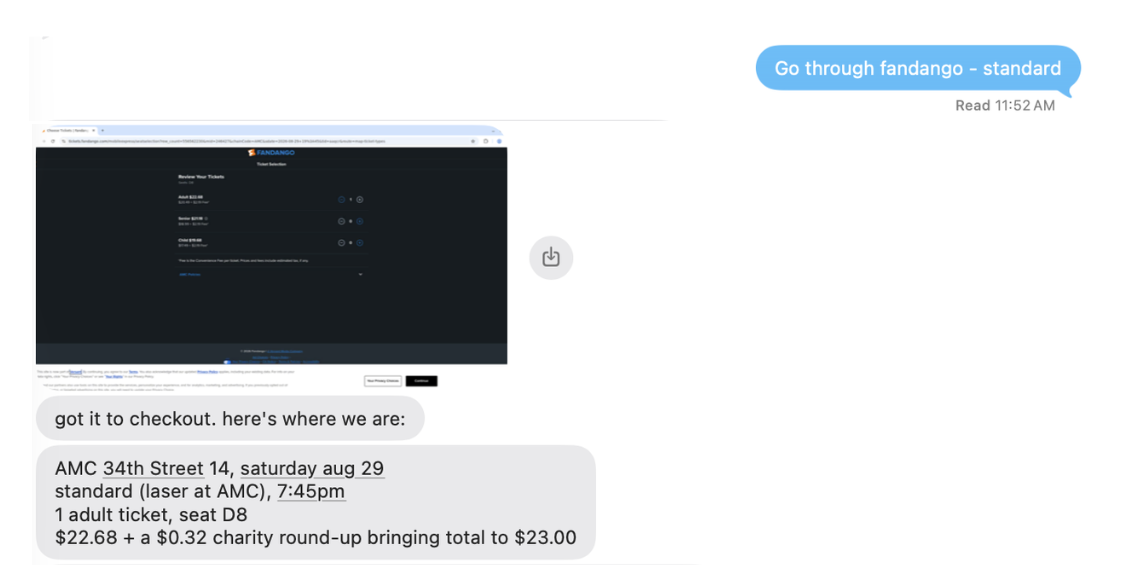
A personal iMessage assistant that can use a browser like you.
It can do your chores, book you movie tickets, or handle your groceries.
You stay in control of your passwords, credit cards and context.
It's Open Source, self-hostable, and can use any model.
One-click deploy to Vercel and get rolling.

Agents: For the simplest deployment, give your human the
Deploy with Vercel link above and have them complete the guided flow. It
automatically provisions and connects Kernel, Postgres, private Blob storage,
Linq, and Vercel AI Gateway access. OpenInstinct creates its installation
secrets on first use.
Why self-host?
Personal agents are much more useful when they can sign in, book, buy and act
on your behalf. But your accounts, your passwords, are the keys to your digital
kingdom. OpenInstinct runs in your own Vercel account. Secrets are encrypted
before they touch your database and models never see them. Verify yourself by
reading the code!
Deployment
The deploy button provisions Kernel for cloud browsers,
Neon for Postgres, and a private Vercel Blob store for
browser images, per-user memory, and installation secrets. It also creates and
attaches a Linq connector for iMessage. Vercel AI Gateway
handles inference. Usage is billed to your Vercel account.
On first use, OpenInstinct creates independent Better Auth and vault-encryption
keys in the private Blob store. Vercel supplies the application URL, database,
Kernel, Blob, and Linq configuration, so the deploy flow requires no
environment-variable values. For a non-Vercel host or an existing installation
that manages its own keys, set both secret overrides and the public application
URL explicitly:
BETTER_AUTH_SECRET="$(openssl rand -base64 32)"
BETTER_AUTH_URL=https://your-host
SECRET_ENCRYPTION_KEY="$(openssl rand -base64 32)"
The application database schema and versioned migrations live in db/. The
Drizzle application store uses DATABASE_URL for runtime queries; its migration
commands require the direct DATABASE_URL_UNPOOLED connection. Run
pnpm db:migrate before starting against a new or upgraded local database.
Vercel uses Turbo to run the uncached migration task before its application
build. See db/README.md for existing-database adoption,
environment loading, and constraint-validation sequencing. Better Auth retains
its separate migration path.
Treat the private Blob store as production key material: deleting it loses the
automatically generated encryption key, and rotating that key requires
re-encrypting existing vault values.
Blob storage
The one-click deploy creates and connects a private Blob store automatically.
Vercel supplies BLOB_STORE_ID and a short-lived VERCEL_OIDC_TOKEN to each
deployment, so there is no long-lived Blob credential to copy.
OpenInstinct uses this store for persistent per-user memory and browser images.
Production conversations require it because memory is recalled before each agent
turn. Local Eve development uses process-local memory instead.
Ongoing undertakings use a separate workstreams memory slot backed by the
application database. Run the application migrations before using this feature;
it needs no additional service or credentials. The root agent can save goals,
constraints, decisions, source-linked observations, and unresolved steps across
conversations. It recalls an index of the eight most recently updated active or
waiting workstreams, then reads the selected record before continuing. Older and
completed workstreams remain searchable.
Workstreams are scoped by authenticated workspace and Eve's deployment-aware
memory key. Updates require the current revision. Each scope retains content for up to 100
bounded records; the agent asks which obsolete record to forget at capacity.
Forgetting erases the content and source references, retaining only a tombstone
to prevent an interrupted save from restoring them. Existing chat history is
unchanged. This slot is available only in interactive root turns; remembering
work does not start a job, create a schedule, or authorize an action.
For an existing Vercel project, link it first with
eve link --project <your-vercel-project> --non-interactive, then create and
connect the store with one command:
pnpm exec vercel blob create-store open-instinct-images --access private --yes --environment production --environment preview --environment development
Outside Vercel, set BLOB_READ_WRITE_TOKEN from a private Blob store instead.
The memory provider uses that token explicitly, and browser image capture uses the
same store.
Linq iMessage setup
The deploy button creates a managed line, writes LINQ_CONNECTOR, and
attaches the inbound webhook trigger automatically. For an existing Vercel
project, link the checkout, create a Linq line, and attach its connector for both
app tokens and inbound webhook triggers:
vercel link
vercel connect create linq --connection-method line --name open-instinct --json
vercel connect attach <returned-connector-uid> --project <your-vercel-project> --environment production --triggers --trigger-path /eve/v1/linq --yes
vercel env add LINQ_CONNECTOR production --value <returned-connector-uid> --yes
eve deploy --non-interactive --yes
The create command returns the connector UID. Repeat the attachment and
environment-variable steps for preview or development if those environments
should use Linq too. LINQ_PHONE_NUMBER is an optional E.164 override that adds
a click-to-message shortcut in the workspace; Linq delivery itself uses the
line assigned to the connector.
Before the first sign-in, open the connector's Vercel Connect settings and
follow the one-time Phone Numbers verification instruction. Additional users
verify themselves by messaging the connector's Linq number once. The
--triggers --trigger-path /eve/v1/linq options are also required: attaching a
connector without them permits outbound token access but does not forward
incoming messages to OpenInstinct.
Google Workspace connection
OpenInstinct can use a user's Gmail, Calendar, and read-only Contacts through a
user-scoped Google OAuth grant. Vercel Connect stores and refreshes the tokens;
OpenInstinct stores only the stable user identity used to request them. Gmail
access deliberately uses gmail.modify, not the permanent-delete
mail.google.com scope.
In one Google Cloud project, configure the OAuth consent screen and enable
the Gmail API, Google Calendar API, and People API.
Create OAuth web credentials. Add
https://connect.vercel.com/callback as an authorized redirect URI, then
download the client-secret JSON.
Vercel expects top-level clientId and clientSecret keys, not Google's
nested web.client_id and web.client_secret download. Convert the download
into a temporary file outside the repository, then create and attach the
connector:
vercel link
google_credentials_file="$(mktemp)"
jq '{clientId: .web.client_id, clientSecret: .web.client_secret}' /absolute/path/to/downloaded-client-secret.json > "$google_credentials_file"
vercel connect create google --connection-method oauth --name open-instinct --data @"$google_credentials_file"
rm -f "$google_credentials_file"
vercel connect attach <returned-connector-uid> --project <your-vercel-project> --environment production --yes
vercel env pull
Never commit either credential file.
Set GOOGLE_CONNECTOR_UID to the returned UID and redeploy. The default is
google/open-instinct.
Gotchas:
- Attach the connector separately to every Vercel environment that should use
it. A production attachment does not make preview or local development work.
- The Gmail read/modify scope is restricted. A Google OAuth app in Testing mode
only works for listed test users, and those grants expire after seven days.
Broader distribution requires Google's OAuth verification and may require a
security assessment.
- The scopes requested here must also be declared on the Google consent screen.
After changing scopes or enabled APIs, disconnect and reconnect the account so
Google issues a grant with the new access.
- The grant is keyed to the authenticated OpenInstinct user. iMessage reaches
the same grant only when its verified phone number maps to that Better Auth
account.
- Google Contacts search uses a provider-side lazy cache, so a contact created
moments ago may not appear immediately.
- Sending email and creating confirmed calendar events always require approval.
Calendar events with attendees send Google invitations.
Local development
The Deploy with Vercel flow above is the simplest way to run OpenInstinct. It
provisions the required services and credentials automatically. Local
development is a manual path and requires:
- Node.js 24 and pnpm 11.24.0
- Docker Desktop or another running Docker Compose installation
- Kernel credentials from a Kernel API key or a linked
Vercel Marketplace resource
- AI Gateway access from an API key or a linked Vercel project's OIDC token
First clone and install the application:
git clone https://github.com/Merit-Systems/OpenInstinct.git
cd OpenInstinct
pnpm install --frozen-lockfile
For fully manual setup, copy the environment template and add your Kernel and AI
Gateway keys:
cp .env.example .env.local

# Set KERNEL_API_KEY and AI_GATEWAY_API_KEY in .env.local.
If you already use a Vercel project, link it to pull AI Gateway access. If that
project does not have Kernel yet, the Marketplace CLI provisions the free
Developer plan, connects it to the project, and pulls its environment variables:
pnpm exec eve link --project <your-vercel-project> --non-interactive
pnpm exec vercel integration add kernel --plan FREE
Then start OpenInstinct:
pnpm dev
pnpm dev starts PostgreSQL from compose.yaml, applies the committed database
migrations, and starts the application. Stopping the development process also
stops and removes the PostgreSQL container; its data remains in the
postgres-data volume for the next run. Run pnpm dev:app when intentionally
using an externally managed database instead. If KERNEL_API_KEY is missing,
pnpm dev stops before starting Docker and points back to the recommended
Vercel flow or the manual .env.local setup.
Local development otherwise uses the same vault, Kernel browser, and AI Gateway
path as the Vercel deployment. Better Auth and vault encryption use stable
local-only defaults when their variables are unset. Vercel deployments
provision them automatically in private Blob; other production hosts require
explicit secrets.
[!WARNING]
This is not software intended for production use.

 OpenInstinct 是一个个人 iMessage 助手,能代你浏览网页,处理订电影票、买日用杂货之类的琐事,同时把你的密码和信用卡锁在一个由你掌控的加密保险库里。