
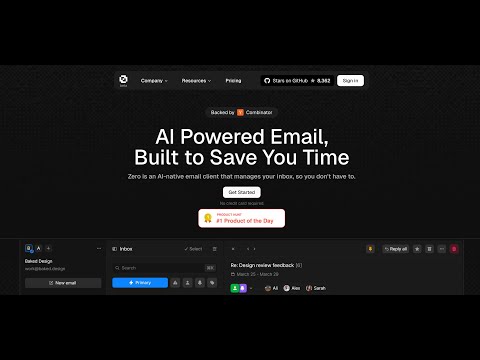




What is this?
 Zero (Mail0) is an open-source, self-hostable email app that lets you connect Gmail, Outlook and other providers into one inbox, enhanced with AI agents, while keeping your data private.
Zero (Mail0) is an open-source, self-hostable email app that lets you connect Gmail, Outlook and other providers into one inbox, enhanced with AI agents, while keeping your data private.Is this a hosted inbox I sign into, or something I run myself?It's a self-hosted web app you deploy yourself, not a SaaS inbox — Zero's whole pitch is giving you self-hosting freedom, built with a Next.js/React frontend and a Node.js/PostgreSQL backend.
It's a self-hosted web app you deploy yourself, not a SaaS inbox — Zero's whole pitch is giving you self-hosting freedom, built with a Next.js/React frontend and a Node.js/PostgreSQL backend.How do I get it running locally?Clone the repo and install with pnpm, run 'pnpm nizzy env' and 'pnpm nizzy sync' to configure environment variables, start Postgres with 'pnpm docker:db:up', initialize the schema with 'pnpm db:push', then run 'pnpm dev'.
Clone the repo and install with pnpm, run 'pnpm nizzy env' and 'pnpm nizzy sync' to configure environment variables, start Postgres with 'pnpm docker:db:up', initialize the schema with 'pnpm db:push', then run 'pnpm dev'.What do I need installed and configured before running it?Node.js v18+, pnpm v10+, and Docker v20+ for the Postgres database, plus Google Cloud OAuth credentials (People API and Gmail API) to connect Gmail, an Autumn secret key for encryption, and optionally Twilio credentials for SMS integration.
Node.js v18+, pnpm v10+, and Docker v20+ for the Postgres database, plus Google Cloud OAuth credentials (People API and Gmail API) to connect Gmail, an Autumn secret key for encryption, and optionally Twilio credentials for SMS integration.Is the setup a quick clone-and-run, or more involved?It's more involved than a typical clone-and-run: you have to manually create Google OAuth credentials with exactly matching redirect URIs, generate an Autumn secret key, and optionally wire up Twilio for SMS before the app fully works.
It's more involved than a typical clone-and-run: you have to manually create Google OAuth credentials with exactly matching redirect URIs, generate an Autumn secret key, and optionally wire up Twilio for SMS before the app fully works.Does Zero track or sell my email data?No — Zero says it does not track, collect, or sell your data, though anything passed through connected providers like Gmail is still governed by that provider's own privacy policy.
No — Zero says it does not track, collect, or sell your data, though anything passed through connected providers like Gmail is still governed by that provider's own privacy policy.What's the tech stack behind Zero?Next.js, React, TypeScript, TailwindCSS and Shadcn UI power the frontend, while Node.js with Drizzle ORM and PostgreSQL handle the backend, with Better Auth and Google OAuth for authentication.
Next.js, React, TypeScript, TailwindCSS and Shadcn UI power the frontend, while Node.js with Drizzle ORM and PostgreSQL handle the backend, with Better Auth and Google OAuth for authentication.Can I manage multiple email accounts in one place?Yes, Zero provides a unified inbox that connects multiple providers like Gmail and Outlook into a single interface.
Yes, Zero provides a unified inbox that connects multiple providers like Gmail and Outlook into a single interface.Why build Zero instead of just using Gmail?The project argues most email services are closed-source, data-hungry, or too complex to self-host, so Zero offers an open, privacy-first, AI-enhanced alternative you fully control.
The project argues most email services are closed-source, data-hungry, or too complex to self-host, so Zero offers an open, privacy-first, AI-enhanced alternative you fully control.How does Zero keep email syncing fast?Synced emails are stored in a Cloudflare Durable Object plus an R2 bucket, with environment variables like THREAD_SYNC_MAX_COUNT controlling how many threads sync per request.
Synced emails are stored in a Cloudflare Durable Object plus an R2 bucket, with environment variables like THREAD_SYNC_MAX_COUNT controlling how many threads sync per request.What are similar projects?crm, rankme.fast, chatbot, openhikmah-web, OpenStock, OpenInstinct, vibe-vibe, gemini-fullstack-langgraph-quickstart
crm, rankme.fast, chatbot, openhikmah-web, OpenStock, OpenInstinct, vibe-vibe, gemini-fullstack-langgraph-quickstartWhich topics is it in?drizzle-orm, shadcn-ui, oauth2, privacy-first, email, google, tailwindcss, nextjs, postgresql, web-app, agent, react
drizzle-orm, shadcn-ui, oauth2, privacy-first, email, google, tailwindcss, nextjs, postgresql, web-app, agent, react