
openmuse README

The project's README from github.com/CopilotKit/openmuse. As one markdown file: README.md.

OpenMuse

A personal agent with a browser, terminal, files, and work that keeps going. Compatible with any agent harness.

Ask for an outcome. Follow the plan, review actions, and come back to the result. Built with CopilotKit React Native for iOS, Android, and web.

Quick start · Demo · Features · Architecture · Docs · Contributing

CI MIT license

Clone this template and customize it however you want.

Building on OpenMuse? Meet with the CopilotKit team →

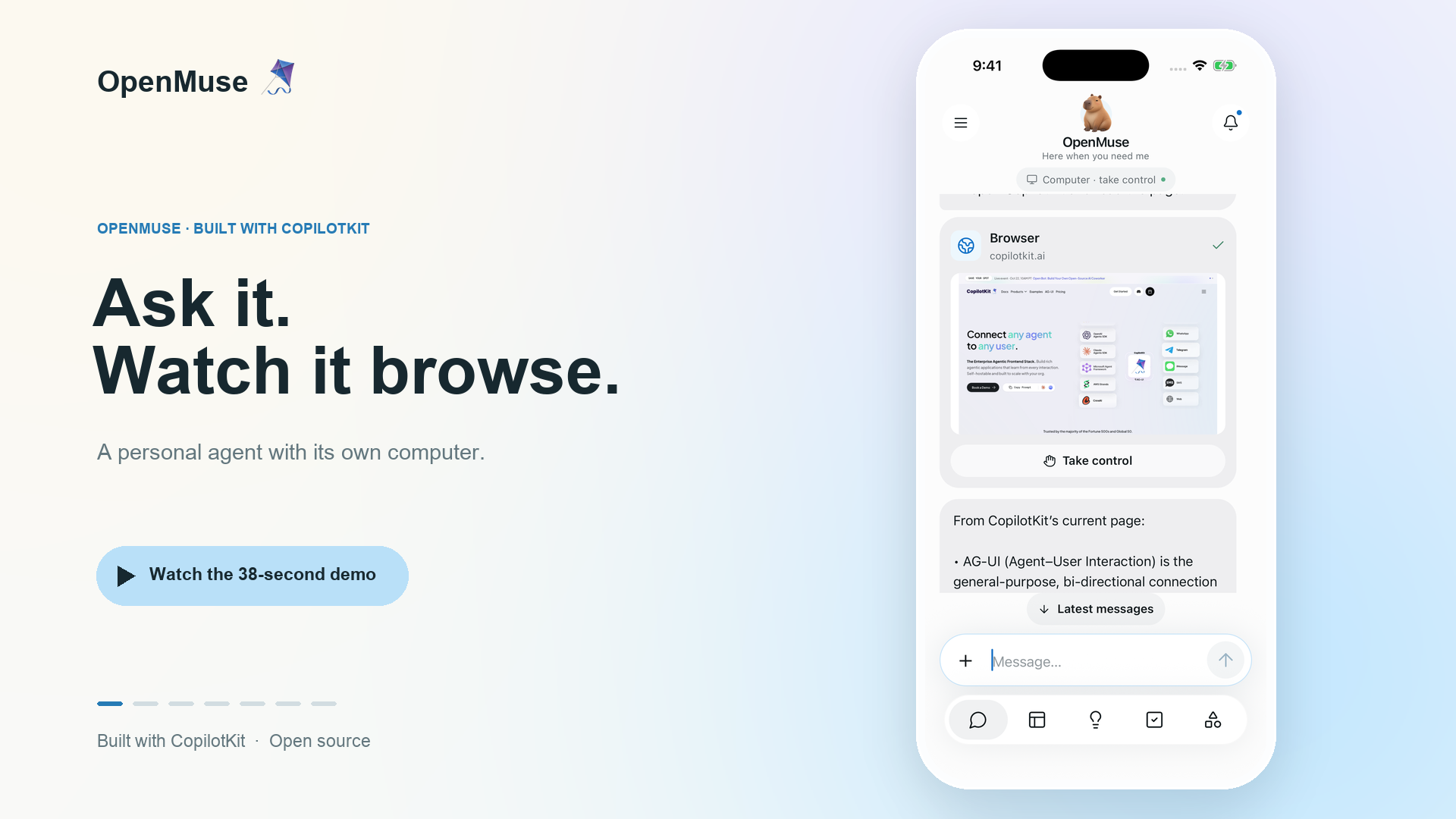
OpenMuse 🪁 — Ask it to browse. Watch the 38-second mobile demo.

Watch the mobile demo · 38 seconds

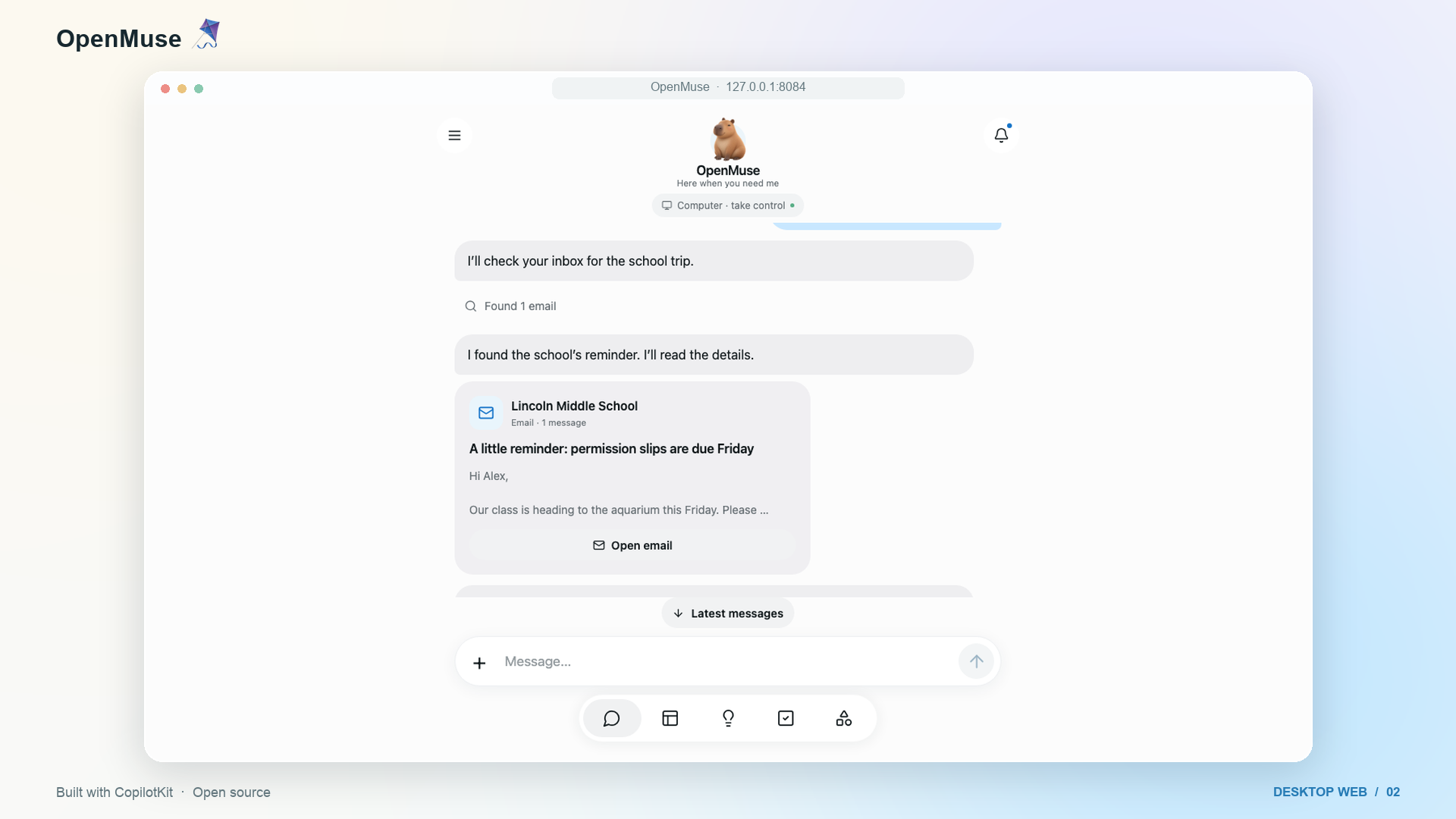
OpenMuse 🪁 on the web — Watch the 42-second desktop demo.

Watch the web demo · 42 seconds

Alpha, for self-hosting and building on. Open-ended reasoning, live Google accounts, and CopilotKit Rich Threads require their own configuration. See what is verified and the roadmap.

Demo

On iPhone, ask OpenMuse to find interesting stories on Hacker News and summarize CopilotKit. On desktop, ask it to check the school-trip email, open the message, and research exhibits at Monterey Bay Aquarium. The agent shows email and browser results inline. Take control opens that same browser session when you need it.

The 38-second iPhone and 42-second desktop web demos show the current interface, framed in 16:9. The send arrow becomes a stop square inside the input pill while the agent replies, then switches back. Stopping keeps your draft intact. See the recording notes for the model setup and reproduction steps.

Mobile MP4 · Web MP4 · Recording details and reproduction

What it is

OpenMuse is a personal-agent application with an agent computer, visible work, and rich results. It runs its own server, task worker, and browser worker. You can inspect and change the source under the MIT license.

The computer combines persistent Chromium and an optional Linux workspace. The agent can browse public pages, run commands in its own container, work with files, and move PDFs between the computer and the app. You can open its browser or terminal and continue the work. Graphical desktops and autonomous checkout remain future work.

Features

Surface What runs in this alpha
Chat CopilotKit headless chat with streamed AG-UI events, mailbox search and reading, send/stop in one input pill, a visible follow-up queue, retained drafts, delegated tasks, and inline email, browser, PDF, plan, and finance cards.
Agent computer Persistent browser profiles and takeover console; optional isolated Linux terminal, saved command receipts, editable workspace files, and PDF transfer.
Activity Durable task plans, progress, input requests, pause/resume/cancel/retry, approvals, and saved receipts. SQL leases recover interrupted work.
Ideas Suggestions with source evidence; edit, accept, or dismiss. Sent replies and completed matching work are excluded.
Goals & Tracking Goals and milestones; recurring public-page checks for changes, text availability, or USD price thresholds, with deduplicated alerts and failure backoff.
Documents Email attachment → PDF → requested form values → filled copy → reviewed reply → receipt. Native/web PDF viewing, paging, zoom, supported fields, and sharing.
Finance Import transaction CSV to create a spending summary with categories, transactions, and a savings-goal action.
Gmail & Calendar Google OAuth adapters, complete mail threads, drafts/attachments, calendar discovery, and reviewed event creation/update/deletion. Live credentials required.
Personal context Editable name, tone, avatar, and memories. Background-update preferences and durable in-app notifications.
Rich Threads CopilotKit Intelligence persistence in every mode, with a stable main conversation, side chats, renaming, archiving, restoring, and replay. A server-only project key is required.

The feature inventory describes implemented capabilities and planned extensions. Health/bank/social connectors, device push, voice, generated executable tools, and automatic reservations/payments are on the roadmap.

Quick start

Requirements: Node 24 LTS, pnpm 11.19.0, and a CopilotKit Intelligence project key. The local sample app needs no model, Google account, or Docker.

git clone https://github.com/CopilotKit/OpenMuse.git openmuse
cd openmuse
pnpm install --frozen-lockfile
cp .env.example .env
npx copilotkit@latest login
npx copilotkit@latest project select
# Set CPK_INTELLIGENCE_API_KEY in .env to the generated server-only project key.
pnpm dev

In another terminal:

pnpm dev:web

Open localhost:8081. The API runs at localhost:8787/api/health.

Try it

  1. In Chat, send “Complete the permission slip”. Open the task, supply fictional form values, inspect the saved PDF, and review the prepared reply. This writes only to the local mailbox.
  2. In Goals → Track, create a built-in availability watch, then change the built-in test page to trigger an alert.
  3. In Menu → Delegate task → Finance, use Try example transactions to create an interactive spending tracker.
  4. Start the browser worker and configure a model, then ask “Check out Hacker News for cool stuff” or “Summarize copilotkit.ai”. Follow the browser inline and use Take control to open its session. For a model-free version of this flow, follow the AI Mock demo setup.

For iOS or Android, use pnpm --dir apps/mobile ios or pnpm --dir apps/mobile android. Xcode or Android tooling is required. The PDF reader needs an Expo development build; use native setup.

Configure the agent and Google

Copy the commented settings in .env.example into your private .env:

  1. Set AGENT_BACKEND=model, MODEL=provider/model-id, and the matching provider key. CopilotKit supports the configured OpenAI, Anthropic or Google provider. Fictional data can still be used with a real model. Provider keys stay on the server.
  2. Create or select a CopilotKit Intelligence project with npx copilotkit@latest login and npx copilotkit@latest project select. Keep the generated CPK_INTELLIGENCE_API_KEY on the server.
  3. For personal mail/calendar, set WORKSPACE_MODE=live, the generated CPK_INTELLIGENCE_API_KEY, a random OPENMUSE_ACCESS_KEY of at least 24 characters, and TOKEN_ENCRYPTION_KEY containing 32 random bytes encoded as base64. Restart the API.
  4. Configure a Google OAuth web client with Gmail and Calendar APIs enabled. Set GOOGLE_CLIENT_ID and GOOGLE_CLIENT_SECRET; register ${PUBLIC_API_URL}/api/google/callback as its redirect URI. Configure consent/test-user access in your Google project.
  5. Open Apps → Gmail (or Google Calendar), connect read access, and grant write access when needed. Every send or calendar change still requires its own stored review. Changing/disconnecting the account invalidates pending connection-bound work.

Google credentials are encrypted at rest. File URLs and browser consoles use short-lived signatures. This deployment uses one owner protected by a shared access key; it is not a multi-tenant authentication system. Use HTTPS and restricted network access for a remote host. Keep the default local-data mode on loopback.

Browser worker

Set BROWSER_WORKER_URL=http://127.0.0.1:8790 and a random WORKER_TOKEN of at least 32 characters in .env.

pnpm --dir apps/worker exec playwright install chromium
pnpm dev:browser

Or use docker compose --env-file .env -f infra/compose.yaml up --build -d. The same token must reach the API and worker. Sessions have persistent Chromium profiles; the app can open a live screenshot console and import PDF downloads. Agent tools can read public pages and hand interactive work to the person. Worker setup and boundaries.

Persistence and operation

Linux terminal and workspace

Build the computer image, enable it on the API, then open Computer → Terminal → Start computer:

docker build -t openmuse-computer:local apps/computer
COMPUTER_ENABLED=true pnpm dev

The API needs access to the Docker CLI and engine. Commands run in a nonroot container with no host-directory mounts or credentials. A named /workspace volume retains files when stopped. Terminal networking is disabled; public web access uses the browser worker. Commands have a 30-second limit and saved output/exit receipts. Files supports folders, text editing, and PDF transfer to/from Documents. This is a Linux container, not a full operating-system VM. Setup, Colima option, and boundaries.

Application storage

By default, embedded PGlite, documents and the signing key live in .openmuse/; browser profiles live in .openmuse/browser-profiles/. Keep that directory private and back it up. The API hosts the task worker. The host must remain running for background work.

For a separate task worker, configure the same DATABASE_URL, secrets and shared DATA_DIR for both processes, then set TASK_WORKER_ENABLED=false on the API and run pnpm dev:worker. PGlite cannot be opened by separate processes. Production commands are pnpm build:server, pnpm start and pnpm start:worker. Run one API instance; task workers coordinate through SQL leases.

No hidden retry occurs after an uncertain external write. Review its provider outcome before creating a replacement. Pausing/cancelling prevents subsequent task steps; an already approved in-flight provider request may finish.

CopilotKit Rich Threads

Every deployment requires CPK_INTELLIGENCE_API_KEY on the API server for CopilotKit Intelligence conversation persistence and replay. Create or select a project with npx copilotkit@latest login and npx copilotkit@latest project select, set the generated server-only key, and restart the API. The native menu uses useThreads; rich tool results link back to saved tasks, documents, and browser sessions.

Intelligence is a separate service and is not included in this repository's MIT license. No project key is shipped. Configuration and validation boundaries.

Architecture

flowchart TD
  Client[Expo / React Native / Web] -->|AG-UI and authenticated API| API[Hono + CopilotKit runtime]
  API --> Tasks[Durable task worker]
  API --> Threads[CopilotKit Intelligence required in every mode]
  API --> Store[(PGlite or PostgreSQL)]
  Tasks --> Store
  Tasks --> Review[Stored action review]
  Review --> Google[Gmail / Calendar adapters]
  Tasks --> Browser[Chromium worker + persistent profiles]
  API --> Browser
  API --> Computer[Optional Docker Linux computer]
  Tasks --> Computer
  Computer --> Volume[(Persistent workspace volume)]
  Tasks --> Files[PDF files + structured artifacts]
  API -. future adapter .-> OpenBot[OpenBot]
Directory Purpose
apps/mobile Shared iOS, Android, and web UI with CopilotKit headless hooks.
apps/server API, CopilotKit runtime, identity boundary, task engine, reviews, files, and persistence.
apps/worker Token-protected Playwright browser service with persistent profiles.
apps/computer Nonroot Linux image, bounded filesystem helper, and real container verification.
packages/domain Shared types and request validation.
packages/integrations Google and browser protocol adapters.
packages/backends Optional OpenBot HTTP adapter and its identity boundary.
tests Workflow, runtime, persistence, provider-contract, and authorization tests.

OpenBot compatibility

OpenMuse's native client and personal-agent workflows are independent of OpenBot. The disabled OpenBot adapter is pinned and contract-tested against upstream interfaces. Live user/session bridging, routine mapping, and computer backend wiring remain future work. OpenBot's Intelligence runtime is not a raw AG-UI endpoint. Integration contract.

Development

pnpm lint
pnpm typecheck
pnpm test
pnpm build:server
pnpm build:web
pnpm build:ios
pnpm build:android
pnpm --dir apps/worker typecheck
pnpm test:browser
pnpm test:computer

Platform build scripts export JavaScript/Hermes bundles; they do not produce signed app binaries. Browser checks require installed Chromium and public fixture access. CI also exercises the browser and Linux computer containers. See contribution guidance and verification results.

Contributing and license

Issues and pull requests are welcome. Start with CONTRIBUTING.md, ROADMAP.md, and the security policy.

MIT licensed. Built by CopilotKit. Its original interface and fictional assets are included. Website, email, and document content supplies evidence, not permission to act.

openmuse (CopilotKit/openmuse)

Searching Database…

What is this?OpenMuse is a personal-agent application: an AI agent with its own browser, terminal, files, and background work that keeps going. You ask for an outcome, follow the plan, review its actions, and come back to the result.
Is this a mobile app, a web app, or something I run myself?All three, plus a server side. It is a CopilotKit React Native app for iOS, Android and web, and you self-host its API server, task worker and Playwright browser worker.
How do I get it running locally?Clone the template, install Node 24 LTS and pnpm 11.19.0, copy .env.example to .env and start it; the sample app opens at localhost:8081 with the API at localhost:8787. The local sample needs no model, Google account, or Docker.
Do I need a model provider key to try it?Every deployment needs a CopilotKit Intelligence project key for conversation persistence. For a real model, set AGENTBACKEND=model with MODEL=provider/model-id and the matching key; OpenAI, Anthropic and Google providers are supported, and keys stay on the server. An AI Mock setup runs model-free.
It is an alpha — what can it not do yet?Graphical desktops and autonomous checkout are future work. The Linux terminal caps commands at 30 seconds with networking disabled, and one deployment serves a single owner behind a shared access key, not multiple users. Health, bank, voice and payment connectors are roadmap items.
Where does my data and my Google credentials end up?Everything stays on your server by default: embedded PGlite, documents and the signing key live in .openmuse/, browser profiles in .openmuse/browser-profiles/. Google credentials are encrypted at rest, file URLs use short-lived signatures, and the default local-data mode runs on loopback.
The code is MIT — is everything in it free to use?The repository is MIT-licensed, but the CopilotKit Intelligence service behind Rich Threads persistence and replay is separate and not covered by that license, and no project key ships with the repo.
What can it actually do for me day to day?It chats with streamed AG-UI events and shows inline email, browser, PDF, plan and finance cards; runs durable task plans with approvals, pause/resume and retry; watches public pages for changes, text availability or USD price thresholds with deduplicated alerts; drafts Gmail replies and calendar events for your review; fills PDF forms; and turns a transaction CSV into a spending summary.
What is the agent computer?A persistent Chromium browser plus an optional nonroot Linux container. The agent browses public pages, runs commands with saved receipts, and keeps files in a /workspace volume that survives restarts; you can open its browser or terminal and take over mid-task. It is a container, not a full OS VM, and the terminal has no network access.
Does work keep going after I close the app?Yes. The API hosts a task worker and plans are durable: SQL leases recover interrupted work, follow-ups queue visibly, and no hidden retry happens after an uncertain external write. The host must stay running for background jobs, or you can run a separate worker process with pnpm dev:worker.
How do I connect my real Gmail and Calendar?Set WORKSPACEMODE=live, create a Google OAuth web client with Gmail and Calendar APIs enabled, register the callback URL, then connect the account under Apps. Credentials are encrypted at rest, and every send or calendar change still requires its own stored review before it happens.
Creator
CopilotKit
Size
47.9 MB
Stars
5.1K
Updated
CommitOct 06
Age
1mo
Commits · 90 Days