Agent Skills
A curated collection of agent skills for designers and builders using Codex, Claude, Cursor, and other AI coding agents to build rich user interfaces, playable games, frontend systems, agent loops, automations, and reusable workflows.
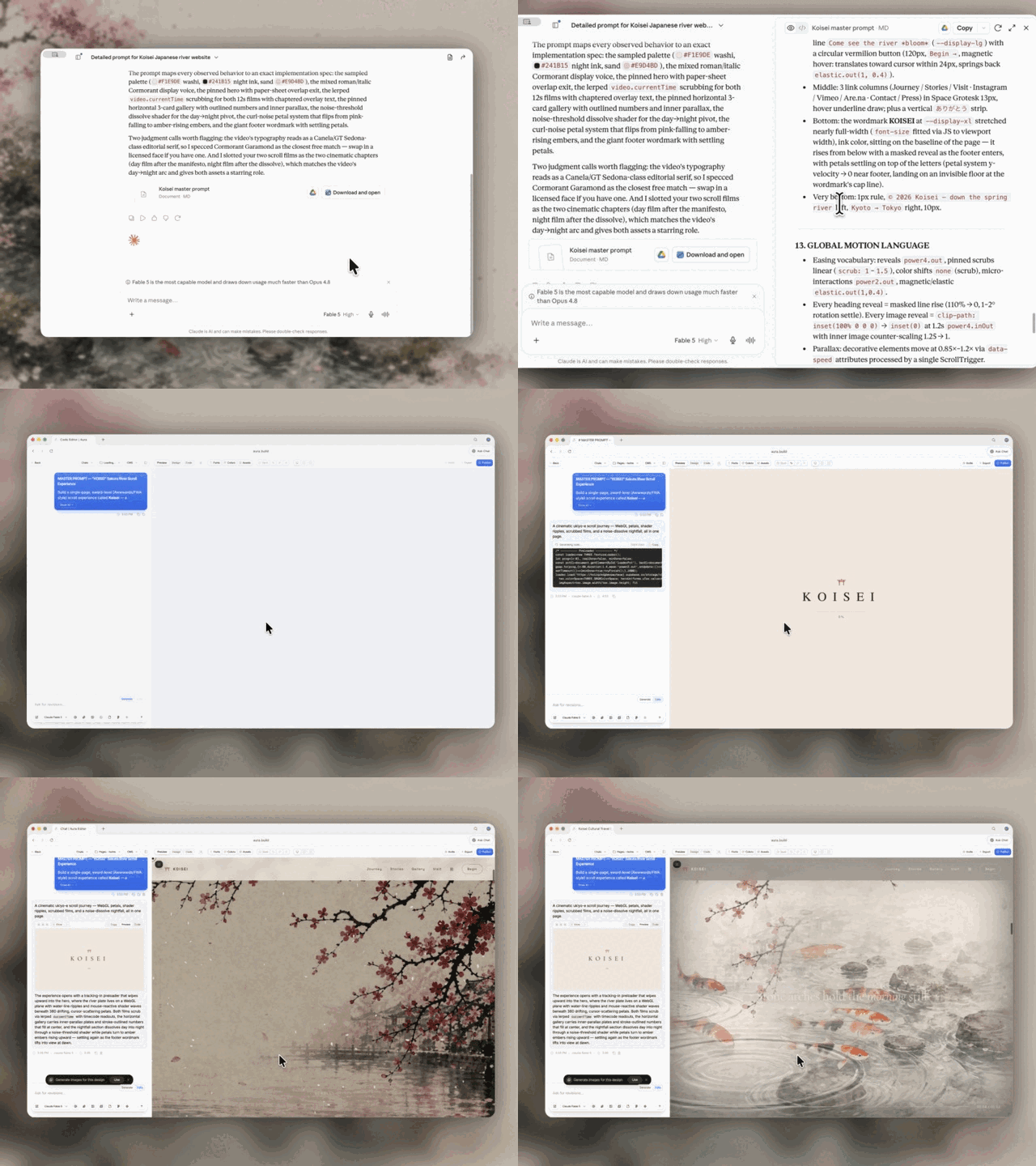
Use these skills with Codex, Claude Design, Aura Build, Lovable, and the rest of your agent stack to turn references into prompts, generate detailed landing pages, build playable Three.js systems, and create reusable implementation workflows.
Start with the flagship web-design workflow:
- Video to Super Prompt
Turns a screen recording of a design, landing page, or animation into a super detailed prompt that Fable 5 can use to one-shot HTML.
- HTML to Interaction Prompts
Turns an existing HTML page, like an Aura Build page, into reusable prompts for one section, one animation, one button, one hover state, or one WebGL effect.
- Stitched Full Page Capture
Captures the entire landing page instead of only the hero, giving your agent a full-page reference for structure, pacing, and visual hierarchy.
- Daily UI Inspiration
Combines browsing, capture, reference study, and prompt generation into a useful agent loop that turns strong landing pages into detailed prompt packs.
These are portable agent skill folders: concise SKILL.md playbooks with optional references, articles, scripts, and assets. The goal is simple: turn good prompts, workflows, style systems, capture recipes, and debugging habits into versioned files an agent can load and follow.
Portable by default. Each skill should work for any user, repo, or workspace unless the user supplies project-specific context through local agent instructions.
Browse all runnable demos and recreation prompts.
Use these skills when you want:
- repeatable design direction
- reusable game architecture and gameplay QA
- procedural implementation steps
- copy/paste snippets
- common pitfalls and guardrails
- reusable workflows instead of one-off chat answers
Agent support
The format is intentionally plain Markdown and folder-based.
- Codex: load the relevant
SKILL.md before acting. Repo behavior belongs in AGENTS.md; browser work in this repo should use the Codex browser.
- Claude Code: reference the relevant skill from
CLAUDE.md, copy it into a Claude skills setup, or open the SKILL.md directly as working context.
- Cursor: point Cursor rules or chat context at the specific skill folder. Keep reusable snippets, constraints, and defaults easy to paste.
- Other agents: use the same contract: read the narrowest matching skill first, then follow its steps and linked references.
Philosophy
1) Prompts are assets
If it’s good once, it should be reusable.
- store prompts as files
- version them
- build libraries + stylecards
2) Specs beat vibes
The fastest way to consistent output is:
- clear constraints
- clear hierarchy
- “change 1–2 things only” iteration
3) References beat paragraphs
Screenshots and examples carry:
- fonts, spacing, colors
- layout rhythm
- icon style
4) Skills are operating procedures
Good skills tell the agent exactly when to use them, what to do first, what defaults to apply, and what mistakes to avoid.
Repo structure
agent-skills/
  codex/
    audit-verify-explain-grade-5/
      SKILL.md
    build-daily-inspiration-sites/
      SKILL.md
    daily-ui-inspiration-capture/
      SKILL.md
  game-development/
    README.md
    build-isometric-arpg/
      SKILL.md
    author-game-levels/
      SKILL.md
    design-action-combat/
      SKILL.md
    build-threejs-enemy-systems/
      SKILL.md
    build-game-monster-system/
      SKILL.md
    build-vesperfall-review-assets/
      SKILL.md
    test-playable-web-games/
      SKILL.md
  media/
    aura-asset-images/
      SKILL.md
    unsplash-asset-images/
      SKILL.md
  ui/
    design-first-ui-prompting/
      SKILL.md
      ARTICLE.md
      REFERENCES.md
  web-design/
    add-shader-cursor-trail/
      SKILL.md
    build-awwwards-quality-sites/
      SKILL.md
    pricing-page/
      SKILL.md
      REFERENCES.md
    landing-page/
      SKILL.md
      REFERENCES.md
    gsap/
      SKILL.md
      REFERENCES.md
    threejs/
      SKILL.md
      REFERENCES.md
    tailwindcss/
      SKILL.md
      REFERENCES.md
    matterjs/
      SKILL.md
    globe-gl/
      SKILL.md
    css-border-gradient/
      SKILL.md
    progressive-blur/
      SKILL.md
    animation-on-scroll/
      SKILL.md
    css-alpha-masking/
      SKILL.md
    vantajs/
      SKILL.md
      REFERENCES.md
    cobejs/
      SKILL.md
      REFERENCES.md
    unicorn-studio/
      SKILL.md
      REFERENCES.md
Folder contract:
agent-skills/<category>/<skill-name>/
  SKILL.md            # required: frontmatter + workflow
  REFERENCES.md       # optional: links only
  ARTICLE.md          # optional: long-form explanation
  assets/             # optional: images, templates, examples
  scripts/            # optional: helper scripts
  demo/               # optional: visual or interaction proof
    index.html         # standalone HTML, CSS, and JavaScript
    PROMPT.md          # exact recreation and remix prompts
    assets/            # local demo assets when required
Conventions:
SKILL.md is the skill an agent loads and follows.REFERENCES.md is links only. Keep SKILL.md lean.- Visual and interaction skills may include a portable
demo/index.html and demo/PROMPT.md.
- Workflow skills may include fictional
demo/input.md and demo/expected-output.md handoffs when they materially improve proof.
- Keep skills procedural (steps, patterns, guardrails), not encyclopedic.
- Prefer explicit triggers: "Use when..." beats vague descriptions.
- Prefer defaults: durations, spacing, hierarchy, commands, and acceptance checks.
Current library
This snapshot contains 123 skills across five categories.
Use find agent-skills -name SKILL.md | sort for the source of truth.
Codex workflows (19)
Operational skills for repeatable Codex work:
article-prompts-to-skills - turn articles and prompt packs into focused, validated skill packages.audit-reference-originality - compare a website with its references and identify originality risks.audit-verify-explain-grade-5 - audit work, verify claims, and explain results simply.browser-video-recording - render polished browser screen-recording videos from scripted UI scenes.build-daily-inspiration-sites - turn five captured references into five original Sites builds.daily-ui-inspiration-capture - recurring UI inspiration bundles with screenshots, motion, and prompts.elevenlabs-tts - generate reusable ElevenLabs voiceovers from local profiles.generate-reference-inspired-brand-worlds - turn reference grammar into original brand-world directions.html-to-interaction-prompts - turn HTML pages into screenshot-backed interaction prompt articles.optimize-web-animations - profile and reduce animation, canvas, and WebGL performance cost.performance-profiling - Apple platform profiling with Instruments, diagnostics, and MetricKit.stitched-full-page-capture - reliable full-page screenshots for lazy, animated, and WebGL pages.video-to-superprompt - analyze reference videos into detailed recreation prompts.web-technique-to-skill - turn an effect you already built into a reusable web-design skill.write-like-meng-on-x - calibrate concise X drafts against an authored voice corpus.x-bookmark-quote-posts - turn recent X bookmarks into source-backed quote-post drafts.
Image sourcing skills:
aura-asset-images - use Aura Assets for stock-style design and marketing imagery.unsplash-asset-images - pick high-quality Unsplash assets by use case, crop, and ratio.
UI (1)
design-first-ui-prompting
Design-first UI prompting system:
- prompt template (goal → format → layout → type → color → constraints)
- “variants > rerolls” workflow
- negative prompts / guardrails
- 2-pass typography workflow (generate layout, typeset in Figma)
Files:
agent-skills/ui/design-first-ui-prompting/SKILL.mdagent-skills/ui/design-first-ui-prompting/ARTICLE.md
Game development (20)
Playable Three.js and browser-game workflows. See the game-development guide for the skill-selection table and system boundaries.
Foundation and world:
build-isometric-arpg, author-game-levels, build-game-camera-controls, build-mobile-threejs-games
Combat, enemies, and encounters:
design-action-combat, build-threejs-enemy-systems, build-game-monster-system, tune-enemy-ai, design-game-encounters
Player systems and feedback:
build-game-inventory, create-game-vfx, build-game-audio-feedback
Assets, performance, QA, and release:
build-hybrid-game-assets, build-vesperfall-review-assets, optimize-threejs-games, test-playable-web-games, ship-web-games
Web design (81)
Conversion and implementation:
build-awwwards-quality-sites, landing-page, pricing-page, tailwindcss, animation-systems, webgl-landing-steering
Motion and scroll:
animation-on-scroll, cinematic-gsap-lenis-motion-system, cinematic-scroll-storytelling, gsap, gsap-scrolltrigger-storytelling, marquee-loop, masked-reveal, staggered-word-reveal
WebGL, canvas, and 3D:
add-shader-cursor-trail, background-grid-webgl, cobejs, globe-gl, globe-particles, matterjs, threejs, threejs-landscape, threejs-towers, threejs-weather, unicorn-studio, vantajs, webgl-3d-object, webgl-laser
CSS treatments and details:
beautiful-shadows, company-logos, container-lines, corner-diagonals, corner-lasers, css-alpha-masking, css-border-gradient, gooey-blob-system, number-details, progressive-blur, solar-duotone-bold
Layout systems:
agency-grid-layout-minimal, book-serif-index, editorial-tech, framed-grid-layout, image-first-grid-layout, nested-container-frames, split-layout-technical, technical-wireframe-info-layout
Visual styles and page moods:
atmosphere-background, blue-cloudy-clean-modern, blue-laser-clean-glass-layout, bright-green-tech-system-webgl, clean-minimal-beige-light-mode, dark-blue-contrasting-clean, dark-glass-clean-layout, dither-background, dither-laser-dark-mode, framed-tech-dark-border-gradient, funky-purple-container-tech, glass-dark-mode-clock, glass-dark-ui, high-contrast-skeuomorphic-clean, light-mode-paper-technical, mesh-gradient-dark-blue-clean, nested-container-clean-agency, orange-clean-paper-saas, skeuomorphic-ui, tech-green-dark-mode-modern
Additional interaction, narrative, and product systems:
ambient-section-particles, beam-glow-states, documentary-brutalist-agency, editorial-portfolio-chapters, editorial-service-booking, falling-leaves, liquid-metal-border, operational-enterprise-ai, pointer-trail-emitter, product-proof-saas, reveal-hover-effect, scroll-progress-timeline, scroll-scrubbed-visual-sequence, scroll-scrubbed-word-reveal, scroll-world-storytelling, shaders-cursor-ripples, thinking-orbs
How to add a new skill (workflow)
- Create a folder:
agent-skills/<category>/<skill-name>/
- Add
SKILL.md:
- frontmatter:
name, description
- content: when to use, workflow, pitfalls, recipes, what to ask
- Add a portable demo when visual or interaction proof is useful:
demo/index.html with inline CSS and JavaScriptdemo/PROMPT.md with minimal, recreation, and remix prompts- local files under
demo/assets/
- (Optional) add
REFERENCES.md:
- Test the skill contract:
- clear trigger
- concrete workflow
- reusable snippets or commands
- pitfalls and acceptance checks
- no secrets or private client info
- Commit:
- small commits per skill
- clear message, usually
Add <skill-name> skill or Update <skill-name> skill
Writing style
- Write like Meng To: skimmable, practical, confident.
- Prefer constraints and defaults.
- Avoid fluff.
- Keep long explanations in
ARTICLE.md, not SKILL.md.
- Keep references in
REFERENCES.md, not the workflow.
Maintenance ideas
- Keep category README files current as the library grows.
- Add install notes for Codex, Claude Code, and Cursor once the preferred setup is stable.
- Add lightweight validation for required frontmatter.
- Keep imported skills portable: no secrets, no private paths, no hidden account assumptions.
Repository
GitHub: https://github.com/MengTo/Skills
Push updates:
cd /Users/mengto/clawd/@MengTo/Skills
git push origin main
License
MIT License. See LICENSE.

 Отобранная коллекция из 123 переиспользуемых «агентских скиллов» (Markdown-плейбуков с опциональными демо, скриптами и справочниками) для дизайнеров и создателей, использующих ИИ-агентов кодинга вроде Codex, Claude и Cursor, чтобы строить интерфейсы, игры и автоматизированные процессы.