
Introduction
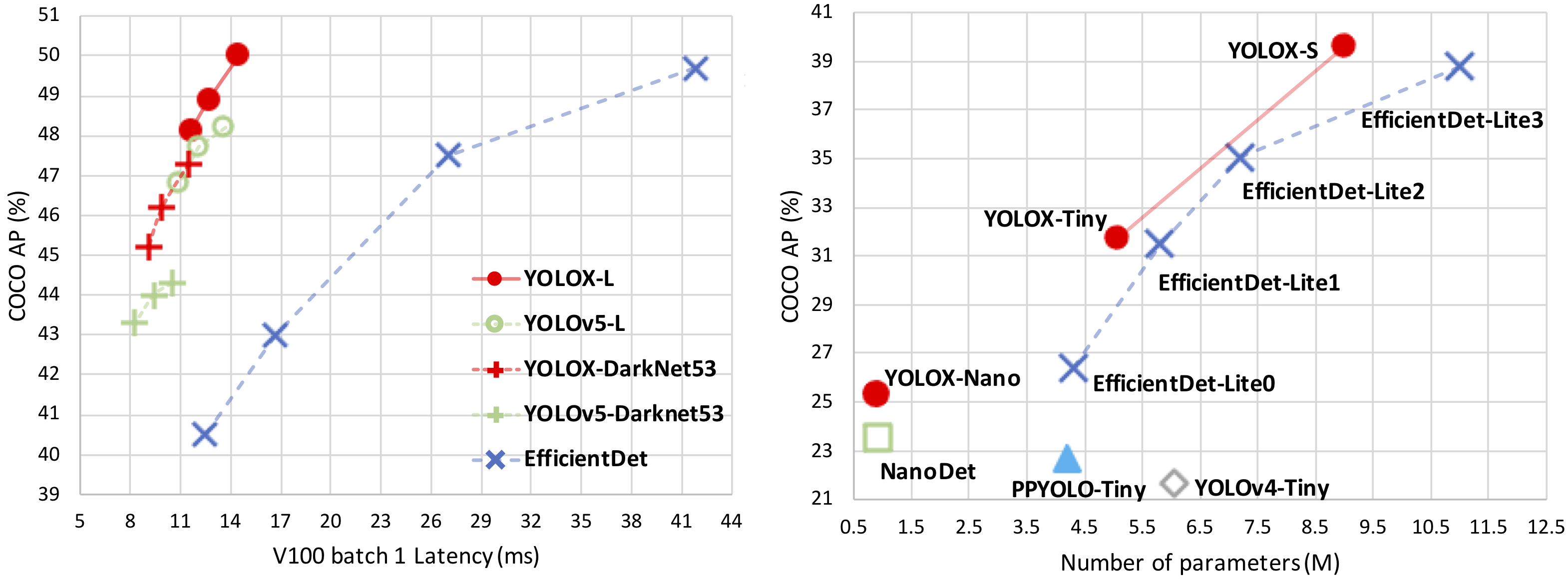
YOLOX is an anchor-free version of YOLO, with a simpler design but better performance! It aims to bridge the gap between research and industrial communities.
For more details, please refer to our report on Arxiv.
This repo is an implementation of PyTorch version YOLOX, there is also a MegEngine implementation.
Updates!!
- 【2023/02/28】 We support assignment visualization tool, see doc here.
- 【2022/04/14】 We support jit compile op.
- 【2021/08/19】 We optimize the training process with 2x faster training and ~1% higher performance! See notes for more details.
- 【2021/08/05】 We release MegEngine version YOLOX.
- 【2021/07/28】 We fix the fatal error of memory leak
- 【2021/07/26】 We now support MegEngine deployment.
- 【2021/07/20】 We have released our technical report on Arxiv.
Benchmark
Standard Models.
Legacy models
Light Models.
Legacy models
Quick Start
Installation
Step1. Install YOLOX from source.
git clone [email protected]:Megvii-BaseDetection/YOLOX.git
cd YOLOX
pip3 install -v -e .  # or  python3 setup.py develop
Demo
Step1. Download a pretrained model from the benchmark table.
Step2. Use either -n or -f to specify your detector's config. For example:
python tools/demo.py image -n yolox-s -c /path/to/your/yolox_s.pth --path assets/dog.jpg --conf 0.25 --nms 0.45 --tsize 640 --save_result --device [cpu/gpu]
or
python tools/demo.py image -f exps/default/yolox_s.py -c /path/to/your/yolox_s.pth --path assets/dog.jpg --conf 0.25 --nms 0.45 --tsize 640 --save_result --device [cpu/gpu]
Demo for video:
python tools/demo.py video -n yolox-s -c /path/to/your/yolox_s.pth --path /path/to/your/video --conf 0.25 --nms 0.45 --tsize 640 --save_result --device [cpu/gpu]
Reproduce our results on COCO
Step1. Prepare COCO dataset
cd <YOLOX_HOME>
ln -s /path/to/your/COCO ./datasets/COCO
Step2. Reproduce our results on COCO by specifying -n:
python -m yolox.tools.train -n yolox-s -d 8 -b 64 --fp16 -o [--cache]
                               yolox-m
                               yolox-l
                               yolox-x
- -d: number of gpu devices
- -b: total batch size, the recommended number for -b is num-gpu * 8
- --fp16: mixed precision training
- --cache: caching imgs into RAM to accelarate training, which need large system RAM.
When using -f, the above commands are equivalent to:
python -m yolox.tools.train -f exps/default/yolox_s.py -d 8 -b 64 --fp16 -o [--cache]
                               exps/default/yolox_m.py
                               exps/default/yolox_l.py
                               exps/default/yolox_x.py
Multi Machine Training
We also support multi-nodes training. Just add the following args:
- --num_machines: num of your total training nodes
- --machine_rank: specify the rank of each node
Suppose you want to train YOLOX on 2 machines, and your master machines's IP is 123.123.123.123, use port 12312 and TCP.
On master machine, run
python tools/train.py -n yolox-s -b 128 --dist-url tcp://123.123.123.123:12312 --num_machines 2 --machine_rank 0
On the second machine, run
python tools/train.py -n yolox-s -b 128 --dist-url tcp://123.123.123.123:12312 --num_machines 2 --machine_rank 1
Logging to Weights & Biases
To log metrics, predictions and model checkpoints to W&B use the command line argument --logger wandb and use the prefix "wandb-" to specify arguments for initializing the wandb run.
python tools/train.py -n yolox-s -d 8 -b 64 --fp16 -o [--cache] --logger wandb wandb-project <project name>
                         yolox-m
                         yolox-l
                         yolox-x
An example wandb dashboard is available here
Others
See more information with the following command:
python -m yolox.tools.train --help
Evaluation
We support batch testing for fast evaluation:
python -m yolox.tools.eval -n  yolox-s -c yolox_s.pth -b 64 -d 8 --conf 0.001 [--fp16] [--fuse]
                               yolox-m
                               yolox-l
                               yolox-x
- --fuse: fuse conv and bn
- -d: number of GPUs used for evaluation. DEFAULT: All GPUs available will be used.
- -b: total batch size across on all GPUs
To reproduce speed test, we use the following command:
python -m yolox.tools.eval -n  yolox-s -c yolox_s.pth -b 1 -d 1 --conf 0.001 --fp16 --fuse
                               yolox-m
                               yolox-l
                               yolox-x
Tutorials
Deployment
- MegEngine in C++ and Python
- ONNX export and an ONNXRuntime
- TensorRT in C++ and Python
- ncnn in C++ and Java
- OpenVINO in C++ and Python
- Accelerate YOLOX inference with nebullvm in Python
Third-party resources
Cite YOLOX
If you use YOLOX in your research, please cite our work by using the following BibTeX entry:
 @article{yolox2021,
  title={YOLOX: Exceeding YOLO Series in 2021},
  author={Ge, Zheng and Liu, Songtao and Wang, Feng and Li, Zeming and Sun, Jian},
  journal={arXiv preprint arXiv:2107.08430},
  year={2021}
}
In memory of Dr. Jian Sun
Without the guidance of Dr. Jian Sun, YOLOX would not have been released and open sourced to the community.
The passing away of Dr. Sun is a huge loss to the Computer Vision field. We add this section here to express our remembrance and condolences to our captain Dr. Sun.
It is hoped that every AI practitioner in the world will stick to the belief of "continuous innovation to expand cognitive boundaries, and extraordinary technology to achieve product value" and move forward all the way.
没有孙剑博士的指导,YOLOX也不会问世并开源给社区使用。
孙剑博士的离去是CV领域的一大损失,我们在此特别添加了这个部分来表达对我们的“船长”孙老师的纪念和哀思。
希望世界上的每个AI从业者秉持着“持续创新拓展认知边界,非凡科技成就产品价值”的观念,一路向前。




 YOLOX 是一个目标检测器:YOLO 的无锚框(anchor-free)版本,设计更简洁但性能更好,旨在弥合学术研究与工业应用之间的差距。项目称其性能超过了 YOLOv3-v5。