



What is this?
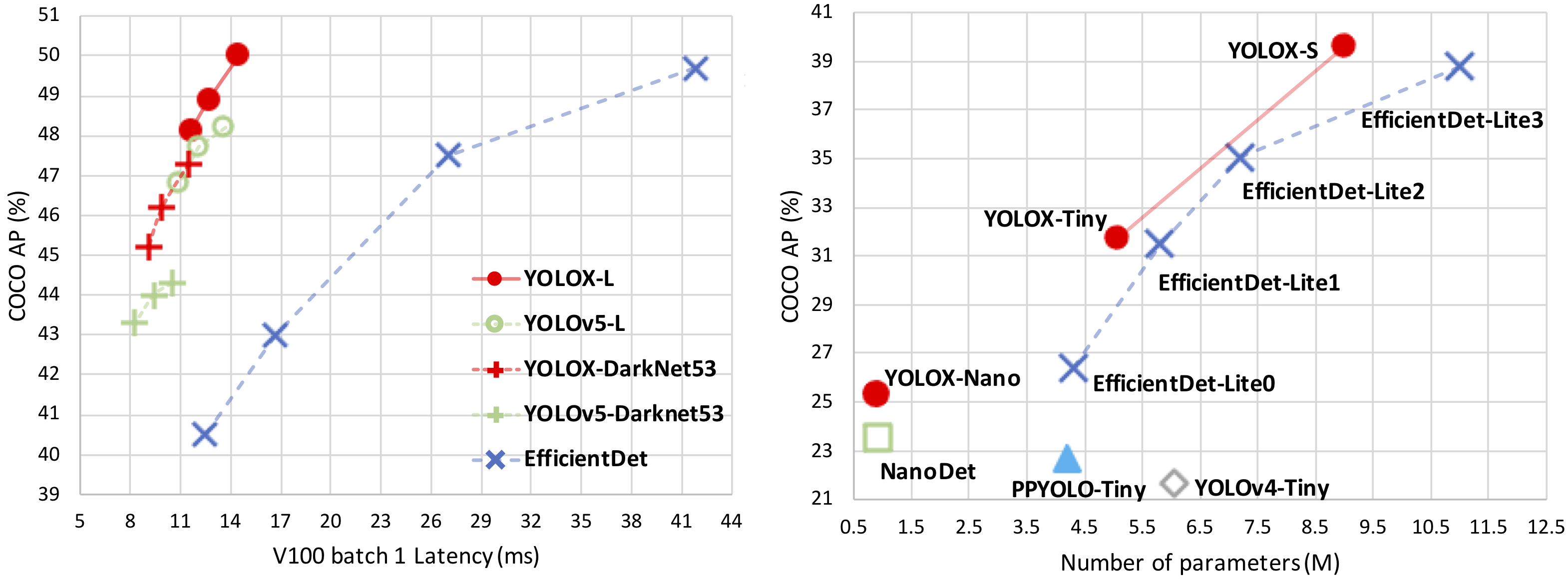
 YOLOX is an object detector: an anchor-free version of YOLO with a simpler design but better performance, built to bridge the gap between research and industrial communities. The project says it outperforms YOLOv3-v5.
YOLOX is an object detector: an anchor-free version of YOLO with a simpler design but better performance, built to bridge the gap between research and industrial communities. The project says it outperforms YOLOv3-v5.Is it a ready-trained model, a library, or training code?All three: a PyTorch implementation of YOLOX that ships pretrained weights for every model size plus training and evaluation code. A separate MegEngine implementation exists as well.
All three: a PyTorch implementation of YOLOX that ships pretrained weights for every model size plus training and evaluation code. A separate MegEngine implementation exists as well.How do I get it running?Install YOLOX from source, download a pretrained model from the benchmark table, then run the demo, naming the model with -n or pointing to its config file with -f. A video demo works the same way.
Install YOLOX from source, download a pretrained model from the benchmark table, then run the demo, naming the model with -n or pointing to its config file with -f. A video demo works the same way.What do I need to reproduce the COCO benchmark numbers?The COCO dataset, prepared before launching a training run with the -n flag. If one machine is not enough, multi-node training across machines is supported.
The COCO dataset, prepared before launching a training run with the -n flag. If one machine is not enough, multi-node training across machines is supported.Is training fast, and does it need much RAM?Training was optimized to run 2x faster with about 1% higher performance. The optional --cache flag speeds it up further by caching images into RAM, which needs large system RAM.
Training was optimized to run 2x faster with about 1% higher performance. The optional --cache flag speeds it up further by caching images into RAM, which needs large system RAM.Can I try it in a browser before installing anything?Yes. YOLOX-s and YOLOX-Nano are integrated into ModelScope with online demos, and there is a Gradio web demo on Huggingface Spaces.
Yes. YOLOX-s and YOLOX-Nano are integrated into ModelScope with online demos, and there is a Gradio web demo on Huggingface Spaces.What ready-made integrations exist beyond this repo?Community projects include ncnn-android-yolox with video support on Android, YOLOX-ROS for ROS2 Foxy, DeepStream deployment, Tengine support, MNN/TNN/ONNXRuntime C++ ports, and StreamYOLO for streaming perception.
Community projects include ncnn-android-yolox with video support on Android, YOLOX-ROS for ROS2 Foxy, DeepStream deployment, Tengine support, MNN/TNN/ONNXRuntime C++ ports, and StreamYOLO for streaming perception.Does training integrate with experiment trackers?Yes — pass --logger wandb to log metrics, predictions and model checkpoints to Weights & Biases, with wandb- prefixed arguments for initializing the run.
Yes — pass --logger wandb to log metrics, predictions and model checkpoints to Weights & Biases, with wandb- prefixed arguments for initializing the run.Why does the README end with a tribute to Dr. Jian Sun?Dr. Jian Sun guided YOLOX and its open-source release; after his passing the team added the section in his memory, calling his death a huge loss to the computer vision field.
Dr. Jian Sun guided YOLOX and its open-source release; after his passing the team added the section in his memory, calling his death a huge loss to the computer vision field.What are similar projects?yolov3, RelateAnything, yolov5, yolov7, High-Angle_Robust_Fast_FaceAlignment, PaddleDetection, yolov10, ncnn
yolov3, RelateAnything, yolov5, yolov7, High-Angle_Robust_Fast_FaceAlignment, PaddleDetection, yolov10, ncnnWhich topics is it in?openvino, ncnn, tensorrt, yolo, object-detection, pretrained-models, onnx, training, deployment, neural-network, inference, computer-vision
openvino, ncnn, tensorrt, yolo, object-detection, pretrained-models, onnx, training, deployment, neural-network, inference, computer-vision