Why PyTorch Lightning?
Training models in plain PyTorch requires writing and maintaining a lot of repetitive engineering code. Handling backpropagation, mixed precision, multi-GPU, and distributed training is error-prone and often reimplemented for every project. PyTorch Lightning organizes PyTorch code to automate this infrastructure while keeping full control over your model logic. You write the science. Lightning handles the engineering, and scales from CPU to multi-node GPUs without changing your core code. PyTorch experts can still opt into expert-level control.
Fun analogy: If PyTorch is Javascript, PyTorch Lightning is ReactJS or NextJS.
Looking for GPUs?
Lightning Cloud is the easiest way to run PyTorch Lightning without managing infrastructure. Start training with one command and get GPUs, autoscaling, monitoring, and a free tier. No cloud setup required.
You can also run PyTorch Lightning on your own hardware or cloud.
Lightning has 2 core packages
PyTorch Lightning: Train and deploy PyTorch at scale.
Lightning Fabric: Expert control.
Lightning gives you granular control over how much abstraction you want to add over PyTorch.
Quick start
Install Lightning:
pip install lightning
Advanced install options
Install with optional dependencies
pip install lightning['extra']
Conda
conda install lightning -c conda-forge
Install stable version
Install future release from the source
pip install https://github.com/Lightning-AI/lightning/archive/refs/heads/release/stable.zip -U
Install bleeding-edge
Install nightly from the source (no guarantees)
pip install https://github.com/Lightning-AI/lightning/archive/refs/heads/master.zip -U
or from testing PyPI
pip install -iU https://test.pypi.org/simple/ pytorch-lightning
PyTorch Lightning example
Define the training workflow. Here's a toy example (explore real examples):
# main.py
# ! pip install torchvision
import torch, torch.nn as nn, torch.utils.data as data, torchvision as tv, torch.nn.functional as F
import lightning as L

# --------------------------------
# Step 1: Define a LightningModule
# --------------------------------
# A LightningModule (nn.Module subclass) defines a full *system*
# (ie: an LLM, diffusion model, autoencoder, or simple image classifier).


class LitAutoEncoder(L.LightningModule):
    def __init__(self):
        super().__init__()
        self.encoder = nn.Sequential(nn.Linear(28 * 28, 128), nn.ReLU(), nn.Linear(128, 3))
        self.decoder = nn.Sequential(nn.Linear(3, 128), nn.ReLU(), nn.Linear(128, 28 * 28))

    def forward(self, x):
        # in lightning, forward defines the prediction/inference actions
        embedding = self.encoder(x)
        return embedding

    def training_step(self, batch, batch_idx):
        # training_step defines the train loop. It is independent of forward
        x, _ = batch
        x = x.view(x.size(0), -1)
        z = self.encoder(x)
        x_hat = self.decoder(z)
        loss = F.mse_loss(x_hat, x)
        self.log("train_loss", loss)
        return loss

    def configure_optimizers(self):
        optimizer = torch.optim.Adam(self.parameters(), lr=1e-3)
        return optimizer


# -------------------
# Step 2: Define data
# -------------------
dataset = tv.datasets.MNIST(".", download=True, transform=tv.transforms.ToTensor())
train, val = data.random_split(dataset, [55000, 5000])

# -------------------
# Step 3: Train
# -------------------
autoencoder = LitAutoEncoder()
trainer = L.Trainer()
trainer.fit(autoencoder, data.DataLoader(train), data.DataLoader(val))
Run the model on your terminal
pip install torchvision
python main.py
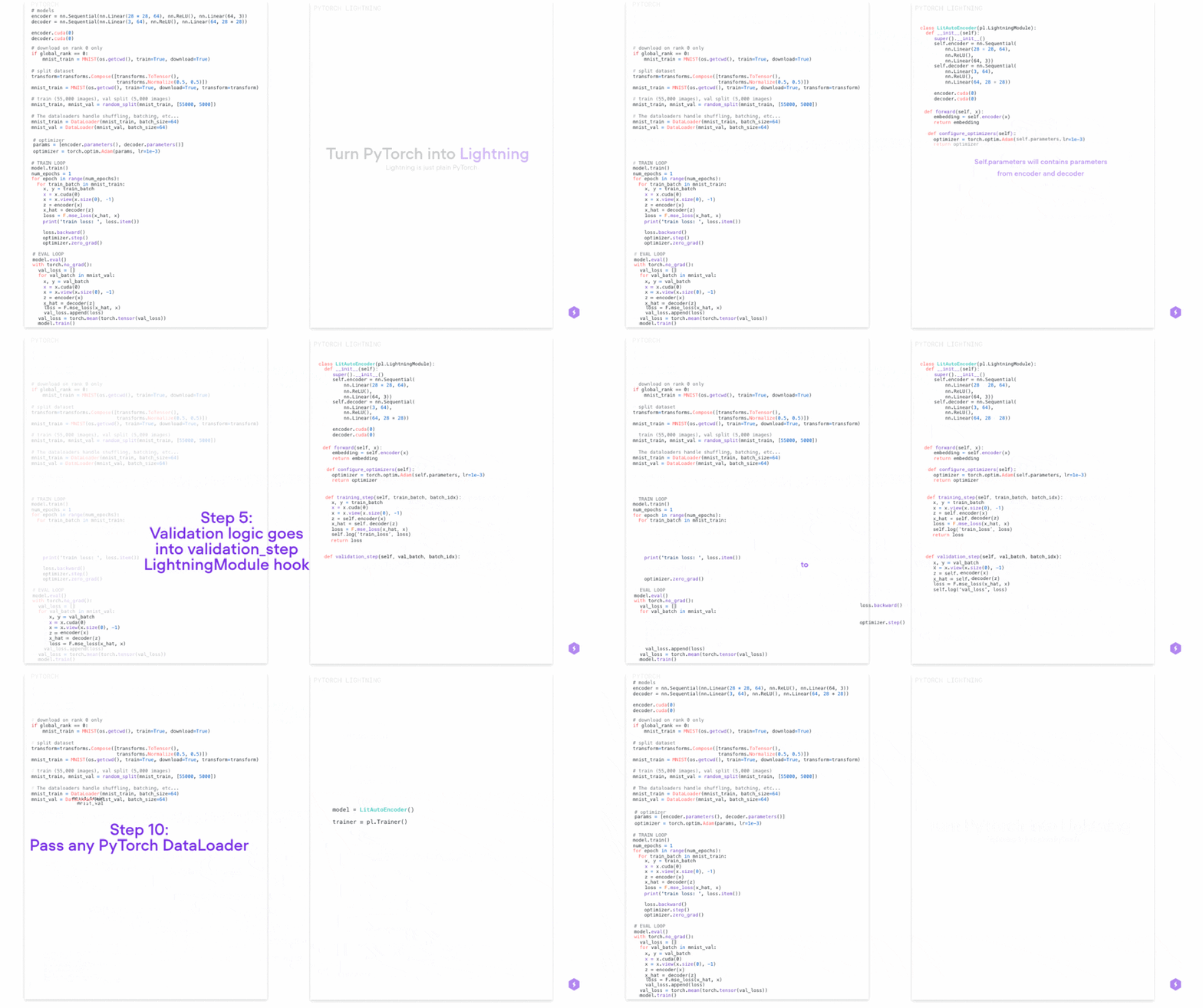
Convert from PyTorch to PyTorch Lightning
PyTorch Lightning is just organized PyTorch - Lightning disentangles PyTorch code to decouple the science from the engineering.
Examples
Explore various types of training possible with PyTorch Lightning. Pretrain and finetune ANY kind of model to perform ANY task like classification, segmentation, summarization and more:
Advanced features
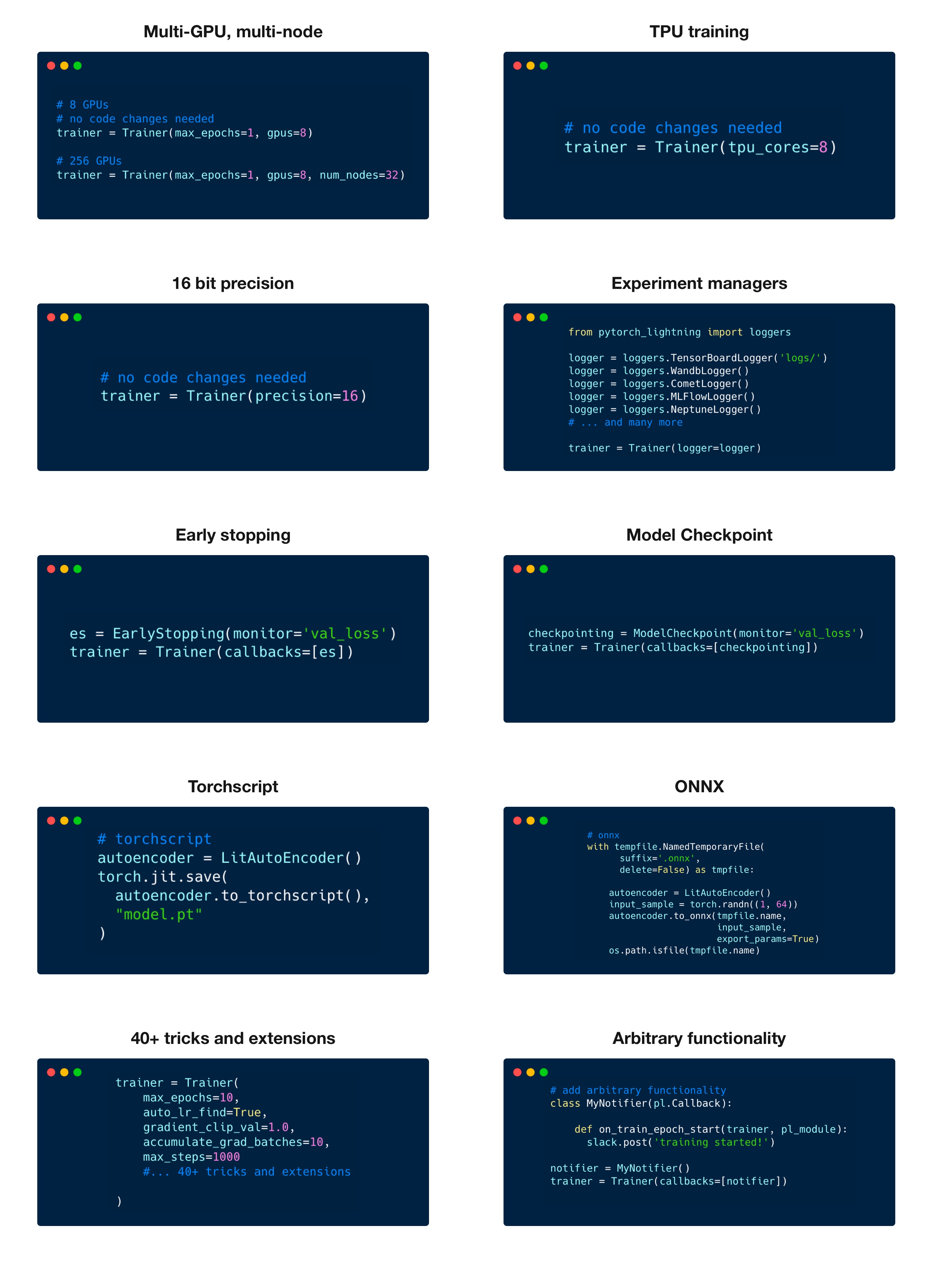
Lightning has over 40+ advanced features
designed for professional AI research at scale.
Here are some examples:
Train on 1000s of GPUs without code changes
# 8 GPUs
# no code changes needed
trainer = Trainer(accelerator="gpu", devices=8)

# 256 GPUs
trainer = Trainer(accelerator="gpu", devices=8, num_nodes=32)
Train on other accelerators like TPUs without code changes
# no code changes needed
trainer = Trainer(accelerator="tpu", devices=8)
16-bit precision
# no code changes needed
trainer = Trainer(precision=16)
Experiment managers
from lightning import loggers

# litlogger
trainer = Trainer(logger=LitLogger())

# tensorboard
trainer = Trainer(logger=TensorBoardLogger("logs/"))

# weights and biases
trainer = Trainer(logger=loggers.WandbLogger())

# comet
trainer = Trainer(logger=loggers.CometLogger())

# mlflow
trainer = Trainer(logger=loggers.MLFlowLogger())

# ... and dozens more
Early Stopping
es = EarlyStopping(monitor="val_loss")
trainer = Trainer(callbacks=[es])
Checkpointing
checkpointing = ModelCheckpoint(monitor="val_loss")
trainer = Trainer(callbacks=[checkpointing])
Export to torchscript (JIT) (production use)
# torchscript
autoencoder = LitAutoEncoder()
torch.jit.save(autoencoder.to_torchscript(), "model.pt")
Export to ONNX (production use)
# onnx
with tempfile.NamedTemporaryFile(suffix=".onnx", delete=False) as tmpfile:
    autoencoder = LitAutoEncoder()
    input_sample = torch.randn((1, 64))
    autoencoder.to_onnx(tmpfile.name, input_sample, export_params=True)
    os.path.isfile(tmpfile.name)
Advantages over unstructured PyTorch
- Models become hardware agnostic
- Code is clear to read because engineering code is abstracted away
- Easier to reproduce
- Make fewer mistakes because lightning handles the tricky engineering
- Keeps all the flexibility (LightningModules are still PyTorch modules), but removes a ton of boilerplate
- Lightning has dozens of integrations with popular machine learning tools.
- Tested rigorously with every new PR. We test every combination of PyTorch and Python supported versions, every OS, multi GPUs and even TPUs.
- Minimal running speed overhead (about 300 ms per epoch compared with pure PyTorch).
Lightning Fabric: Expert control
Run on any device at any scale with expert-level control over PyTorch training loop and scaling strategy. You can even write your own Trainer.
Fabric is designed for the most complex models like foundation model scaling, LLMs, diffusion, transformers, reinforcement learning, active learning. Of any size.
| What to change |
Resulting Fabric Code (copy me!) |
+ import lightning as L
  import torch; import torchvision as tv

 dataset = tv.datasets.CIFAR10("data", download=True,
                               train=True,
                               transform=tv.transforms.ToTensor())

+ fabric = L.Fabric()
+ fabric.launch()

  model = tv.models.resnet18()
  optimizer = torch.optim.SGD(model.parameters(), lr=0.001)
- device = "cuda" if torch.cuda.is_available() else "cpu"
- model.to(device)
+ model, optimizer = fabric.setup(model, optimizer)

  dataloader = torch.utils.data.DataLoader(dataset, batch_size=8)
+ dataloader = fabric.setup_dataloaders(dataloader)

  model.train()
  num_epochs = 10
  for epoch in range(num_epochs):
      for batch in dataloader:
          inputs, labels = batch
-         inputs, labels = inputs.to(device), labels.to(device)
          optimizer.zero_grad()
          outputs = model(inputs)
          loss = torch.nn.functional.cross_entropy(outputs, labels)
-         loss.backward()
+         fabric.backward(loss)
          optimizer.step()
          print(loss.data)
|
import lightning as L
import torch; import torchvision as tv

dataset = tv.datasets.CIFAR10("data", download=True,
                              train=True,
                              transform=tv.transforms.ToTensor())

fabric = L.Fabric()
fabric.launch()

model = tv.models.resnet18()
optimizer = torch.optim.SGD(model.parameters(), lr=0.001)
model, optimizer = fabric.setup(model, optimizer)

dataloader = torch.utils.data.DataLoader(dataset, batch_size=8)
dataloader = fabric.setup_dataloaders(dataloader)

model.train()
num_epochs = 10
for epoch in range(num_epochs):
    for batch in dataloader:
        inputs, labels = batch
        optimizer.zero_grad()
        outputs = model(inputs)
        loss = torch.nn.functional.cross_entropy(outputs, labels)
        fabric.backward(loss)
        optimizer.step()
        print(loss.data)
|
Key features
Easily switch from running on CPU to GPU (Apple Silicon, CUDA, …), TPU, multi-GPU or even multi-node training
# Use your available hardware
# no code changes needed
fabric = Fabric()

# Run on GPUs (CUDA or MPS)
fabric = Fabric(accelerator="gpu")

# 8 GPUs
fabric = Fabric(accelerator="gpu", devices=8)

# 256 GPUs, multi-node
fabric = Fabric(accelerator="gpu", devices=8, num_nodes=32)

# Run on TPUs
fabric = Fabric(accelerator="tpu")
Use state-of-the-art distributed training strategies (DDP, FSDP, DeepSpeed) and mixed precision out of the box
# Use state-of-the-art distributed training techniques
fabric = Fabric(strategy="ddp")
fabric = Fabric(strategy="deepspeed")
fabric = Fabric(strategy="fsdp")

# Switch the precision
fabric = Fabric(precision="16-mixed")
fabric = Fabric(precision="64")
All the device logic boilerplate is handled for you
  # no more of this!
- model.to(device)
- batch.to(device)
Build your own custom Trainer using Fabric primitives for training checkpointing, logging, and more
import lightning as L


class MyCustomTrainer:
    def __init__(self, accelerator="auto", strategy="auto", devices="auto", precision="32-true"):
        self.fabric = L.Fabric(accelerator=accelerator, strategy=strategy, devices=devices, precision=precision)

    def fit(self, model, optimizer, dataloader, max_epochs):
        self.fabric.launch()

        model, optimizer = self.fabric.setup(model, optimizer)
        dataloader = self.fabric.setup_dataloaders(dataloader)
        model.train()

        for epoch in range(max_epochs):
            for batch in dataloader:
                input, target = batch
                optimizer.zero_grad()
                output = model(input)
                loss = loss_fn(output, target)
                self.fabric.backward(loss)
                optimizer.step()
You can find a more extensive example in our examples
Examples
Self-supervised Learning
Convolutional Architectures
Reinforcement Learning
GANs
Classic ML
Continuous Integration
Lightning is rigorously tested across multiple CPUs, GPUs and TPUs and against major Python and PyTorch versions.
*Codecov is > 90%+ but build delays may show less
Current build statuses
| System / PyTorch ver. |
1.13 |
2.0 |
2.1 |
| Linux py3.9 [GPUs] |
|
|
 |
| Linux (multiple Python versions) |
 |
|
|
| OSX (multiple Python versions) |
|
|
|
| Windows (multiple Python versions) |
|
|
|
The lightning community is maintained by
- 10+ core contributors who are all a mix of professional engineers, Research Scientists, and Ph.D. students from top AI labs.
- 800+ community contributors.
Want to help us build Lightning and reduce boilerplate for thousands of researchers? Learn how to make your first contribution here
Lightning is also part of the PyTorch ecosystem which requires projects to have solid testing, documentation and support.
Asking for help
If you have any questions please:
- Read the docs.
- Search through existing Discussions, or add a new question
- Join our discord.













 PyTorch Lightning is a deep learning framework for pretraining and finetuning AI models of any size, scaling from a single CPU to thousands of GPUs or TPUs without changing your model code.