




ai-website-cloner-template README

The project's README from github.com/JCodesMore/ai-website-cloner-template. As one markdown file: README.md.

AI Website Cloner Template

Clone any website with one command

Give your AI coding agent a URL and watch it recreate the website as a clean Next.js app.

Best results with Claude Code + Opus 5. Works with Codex, Cursor, Gemini, and more.

Use this template Discord

Quick Start · Watch Demo · Supported Platforms

MIT License Stars tokens

JCodesMore%2Fai-website-cloner-template | Trendshift Star History Global Rank


SPONSORED BY

RapidProxy residential proxy service
Power your scraping and automation with 90M+ residential IPs, 500MB free traffic, and non-expiring bandwidth. Explore RapidProxy →

Atlas Cloud
Generate AI images, video, audio, and 3D assets through one API. Explore Atlas Cloud →

Demo

Watch the demo

Click the image above to watch the full demo on YouTube.

Quick Start

Important: Start by making your own copy with GitHub's Use this template button. Do not clone this template repository directly for your website project, and do not open pull requests here with your generated website.

  1. Create your own repository from this template

    On the GitHub page for this project, click Use this template, then click Create a new repository.

    Give your new repository a name, choose whether it should be public or private, then click Create repository. If GitHub shows an Include all branches option, you can leave it off.

    This gives you your own separate project to work in, so your website changes stay in your account instead of coming back to the main template.

  2. Open your new repository on your computer

    After GitHub creates your copy, open that new repository. Click Code and open or clone your new repository with your preferred coding tool.

    If you use the terminal, the command will look like this:

    git clone https://github.com/YOUR-USERNAME/YOUR-NEW-REPOSITORY.git
    cd YOUR-NEW-REPOSITORY
    
  3. Install dependencies

    npm install
    
  4. Start your AI agent — Claude Code recommended:

    claude --chrome
    
  5. Run the skill:

    /clone-website <target-url1> [<target-url2> ...]
    
  6. Customize (optional) — after the base clone is built, modify as needed

Most supported clients expose /clone-website directly. If your client activates skills from natural-language requests, enter Clone <target-url> using the clone-website workflow. Project instructions are in AGENTS.md.

Supported Platforms

Agent Status
Claude Code Recommended — Opus 5
Codex CLI Supported
OpenCode Supported
GitHub Copilot Supported
Kiro Supported
Cursor Supported
Windsurf Supported
Gemini CLI Supported
Cline Supported
Roo Code Supported
Continue Supported
Amazon Q Supported
Augment Code Supported

Prerequisites

Tech Stack

How It Works

The /clone-website skill runs a multi-phase pipeline:

flowchart LR
    P1["1. Reconnaissance"] --> P2["2. Foundation"]
    P2 --> P3["3. Component Specs"]
    P3 --> P4["4. Parallel Build"]
    P4 --> P5["5. Assembly and QA"]
  1. Reconnaissance — screenshots, design token extraction, interaction sweep (scroll, click, hover, responsive)
  2. Foundation — updates fonts, colors, globals, downloads all assets
  3. Component Specs — writes detailed spec files (docs/research/components/) with exact computed CSS values, states, behaviors, and content
  4. Parallel Build — dispatches builder agents in git worktrees, one per section/component
  5. Assembly & QA — merges worktrees, wires up the page, runs visual diff against the original

Each builder agent receives the full component specification inline — exact getComputedStyle() values, interaction models, multi-state content, responsive breakpoints, and asset paths. No guessing.

Use Cases

Not Intended For

Project Structure

src/
  app/              # Next.js routes
  components/       # React components
    ui/             # shadcn/ui primitives
    icons.tsx       # Extracted SVG icons
  lib/utils.ts      # cn() utility
  types/            # TypeScript interfaces
  hooks/            # Custom React hooks
public/
  images/           # Downloaded images from target
  videos/           # Downloaded videos from target
  seo/              # Favicons, OG images
docs/
  research/         # Extraction output & component specs
  design-references/ # Screenshots
scripts/
  sync-agent-rules.sh  # Regenerate agent instruction files
  sync-skills.mjs      # Regenerate /clone-website for all platforms
.kiro/skills/          # Generated Kiro workspace skill
.cline/skills/         # Generated Cline workspace skill
.roo/skills/           # Generated Roo Code workspace skill
.roo/commands/         # Generated Roo Code slash command
AGENTS.md           # Agent instructions (single source of truth)
CLAUDE.md           # Claude Code config (imports AGENTS.md)
GEMINI.md           # Gemini CLI config (imports AGENTS.md)

Commands

npm run dev    # Start dev server
npm run build  # Production build
npm run lint   # ESLint check
npm run typecheck # TypeScript check
npm run check  # Run lint + typecheck + build

If using docker

docker compose up app --build # build and run the app
docker compose up dev --build # run the app in dev mode on port 3001

Updating for Other Platforms

Two source-of-truth files power all platform support. Edit the source, then run the sync script:

What Source of truth Sync command
Project instructions AGENTS.md bash scripts/sync-agent-rules.sh
/clone-website skill .claude/skills/clone-website/SKILL.md node scripts/sync-skills.mjs

Each script regenerates the platform-specific copies automatically. Agents that read the source files natively need no regeneration.

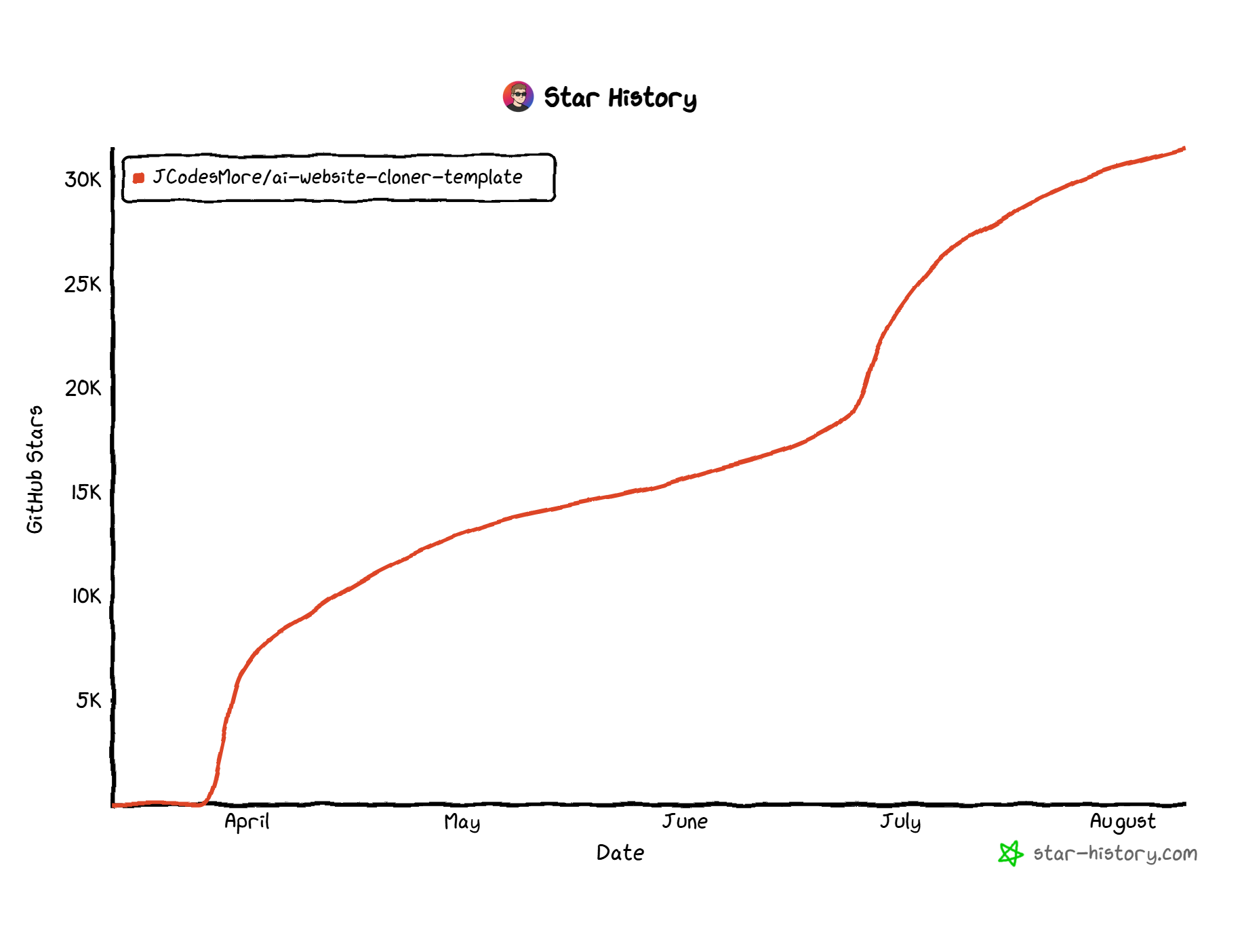
Star History

Star History Chart

License

MIT

Translations: 日本語 · Simplified Chinese

ai-website-cloner-template (JCodesMore/ai-website-cloner-template)

Searching Database…

这是什么?一个 GitHub 模板,让 AI 编程智能体只需拿到网址,就能把任意网站克隆成可运行的 Next.js 项目。
这是一个现成的应用,还是需要我自己运行的起步模板?这是一个 GitHub 模板仓库:点击 'Use this template' 创建你自己的副本,然后通过你的 AI 智能体运行其中附带的技能,就能从中生成一个真正的 Next.js 应用。
我到底要怎么用它克隆一个网站?用模板创建你自己的仓库,在本地打开,运行 npm install,启动你的 AI 智能体(推荐 Claude Code),然后运行 /clone-website 技能,剩下的步骤它会自动完成。
开始之前我需要先安装什么?你需要安装 Node.js 24 或更高版本,以及一款受支持的 AI 编程智能体(Claude Code、Codex CLI、Cursor、Gemini CLI 等众多选择)。
使用时有什么规则需要遵守吗?不要直接在这个模板仓库里为自己的网站开发,也不要在这里提交包含生成克隆内容的拉取请求(PR);项目还明确禁止将其用于钓鱼、冒充,或复制他人的品牌形象。
这东西到底有什么用?面向开发者:需要把旧的 WordPress/Webflow/Squarespace 网站迁移到现代代码,恢复源代码已丢失的网站,或研究线上网站的布局与交互是如何构建的。
我可以在 Windows 上运行吗,还是必须用 Mac?它只依赖 Node.js 加上你所用的 AI 智能体命令行工具,因此在 Windows、macOS 和 Linux 上的运行方式完全相同。
克隆流程到底是怎么运行的?它运行一个多阶段流程:侦察(截图、设计令牌、交互扫描)、基础搭建、详细的组件规格文件、在 git worktree 中并行工作的构建智能体,最后进行组装,并与原网站做视觉差异质量检查。
想要最佳效果,我应该用哪款 AI 智能体?官方明确推荐搭配 Opus 5 使用 Claude Code,但 Codex CLI、Cursor、Gemini CLI、GitHub Copilot、Windsurf、Cline、Roo Code、Continue、Amazon Q 和 Augment Code 也都受支持。
生成的网站使用什么技术栈?克隆输出的是一个 Next.js 16 应用,使用 App Router、React 19、严格模式的 TypeScript、基于 Radix 基础组件的 shadcn/ui,以及使用 oklch 设计令牌的 Tailwind CSS v4。
哪些情况下不应该使用它?它不适用于钓鱼或冒充,不适用于把他人的 logo、品牌资产或文案据为己有,也不适用于抓取服务条款禁止转载的网站。
Creator
JCodesMore
Size
1.4 MB
Stars
37K
Age
7mo
Commits · 90 Days