What is this?
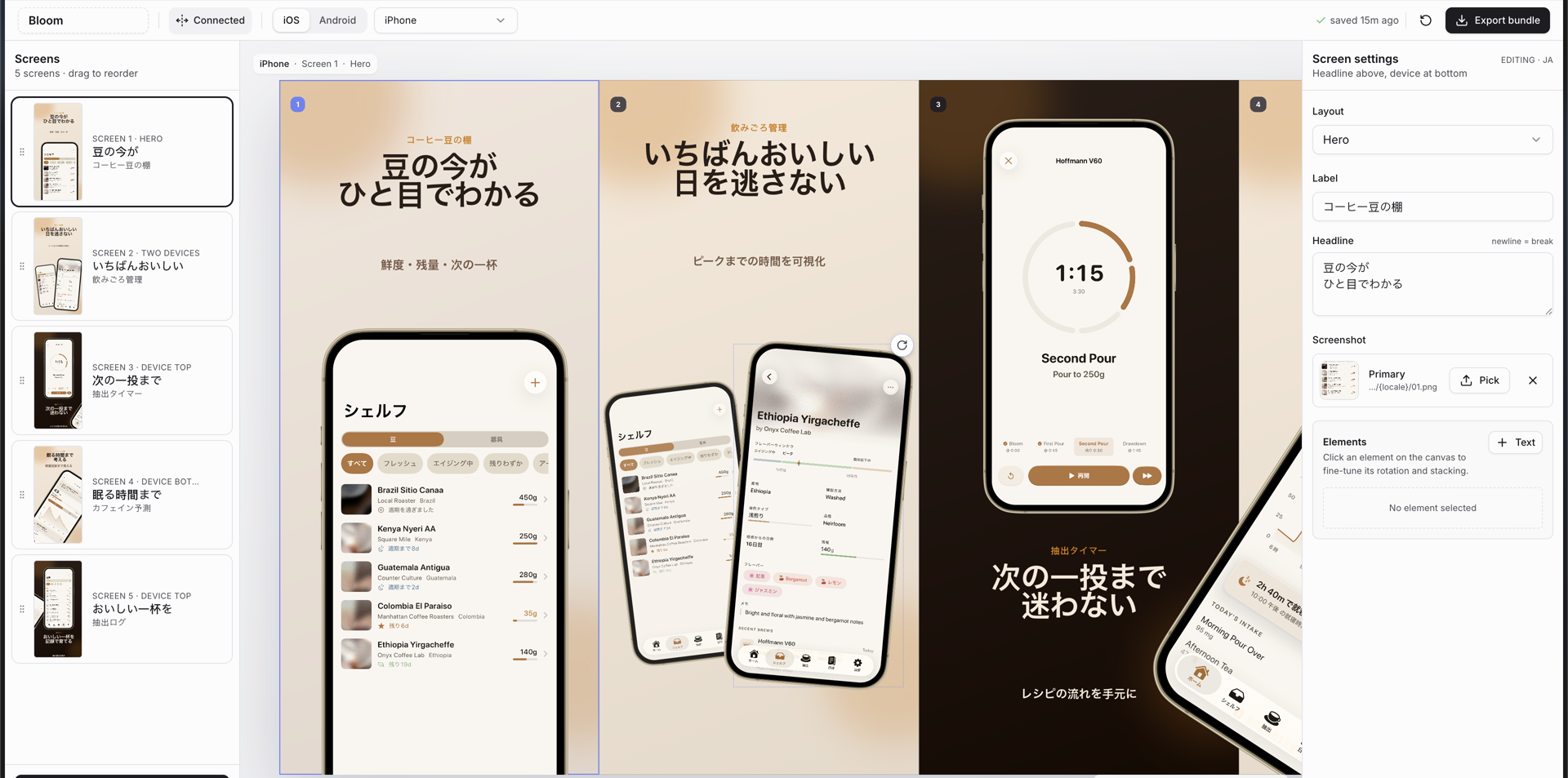
 A skill for AI coding agents (like Claude Code, Cursor, Windsurf, OpenCode, and Codex) that scaffolds a full Next.js editor for creating App Store and Google Play marketing screenshots, complete with device frames, a connected canvas, and one-click export bundles at store-ready sizes.
A skill for AI coding agents (like Claude Code, Cursor, Windsurf, OpenCode, and Codex) that scaffolds a full Next.js editor for creating App Store and Google Play marketing screenshots, complete with device frames, a connected canvas, and one-click export bundles at store-ready sizes.Is this a ready-made app, or something my coding agent builds for me?It is an agent skill, not a standalone app: installing it teaches your coding agent to scaffold a complete Next.js project with the screenshot editor directly in your repo, which you then run and customize yourself.
It is an agent skill, not a standalone app: installing it teaches your coding agent to scaffold a complete Next.js project with the screenshot editor directly in your repo, which you then run and customize yourself.How do I install and use it?Install it globally or for a specific agent with the 'npx skills' command, then just ask your coding agent for store screenshots and it scaffolds the Next.js editor project for you to run locally.
Install it globally or for a specific agent with the 'npx skills' command, then just ask your coding agent for store screenshots and it scaffolds the Next.js editor project for you to run locally.What do I need on my machine first?Node.js 18 or newer, plus one package manager of your choice — bun, pnpm, yarn, or npm — to run the scaffolded editor project.
Node.js 18 or newer, plus one package manager of your choice — bun, pnpm, yarn, or npm — to run the scaffolded editor project.Does it support both iOS and Android, or just one platform?Both: it generates decks for iOS, iPad, Android phone, Android tablet, and Play Store feature graphics, and exports the exact PNG sizes required by each store.
Both: it generates decks for iOS, iPad, Android phone, Android tablet, and Play Store feature graphics, and exports the exact PNG sizes required by each store.What happens to my project data between sessions?Everything — app name, platforms, devices, locales, theme, slides, screenshot paths, and transforms — is saved to app-store-screenshots.json, making the deck git-trackable and resumable, with localStorage used for fast reloads.
Everything — app name, platforms, devices, locales, theme, slides, screenshot paths, and transforms — is saved to app-store-screenshots.json, making the deck git-trackable and resumable, with localStorage used for fast reloads.What's the difference between Connected and Isolated canvas mode?Connected canvas lets phones, captions, and decorative elements span adjacent screenshots across the whole strip before exporting precise crops, while Isolated mode protects older decks so offscreen elements never leak into neighboring exports.
Connected canvas lets phones, captions, and decorative elements span adjacent screenshots across the whole strip before exporting precise crops, while Isolated mode protects older decks so offscreen elements never leak into neighboring exports.Can I customize the visual theme of the screenshots?Yes, custom themes are defined in src/lib/constants.ts, and any unrecognized theme id just falls back to the default clean-light theme.
Yes, custom themes are defined in src/lib/constants.ts, and any unrecognized theme id just falls back to the default clean-light theme.Has anyone actually shipped screenshots made with this skill to the App Store?Yes — the README notes that example screenshots generated with this skill were accepted for the Bloom Coffee Shelf Recipe app on the App Store.
Yes — the README notes that example screenshots generated with this skill were accepted for the Bloom Coffee Shelf Recipe app on the App Store.What are similar projects?ai-website-cloner-template, evondevKit, ui-ux-pro-max-skill, design-extract, ChunUI, appllama-skills, SwiftUI-Agent-Skill, stitch-skills
ai-website-cloner-template, evondevKit, ui-ux-pro-max-skill, design-extract, ChunUI, appllama-skills, SwiftUI-Agent-Skill, stitch-skillsWhich topics is it in?automate, appstore, skills-sh, shadcn-ui, ios-app, screenshot, marketing, swiftui, agent-skill, tailwindcss, apple, design
automate, appstore, skills-sh, shadcn-ui, ios-app, screenshot, marketing, swiftui, agent-skill, tailwindcss, apple, design