



Website • Docs • Join Slack Community 
What is Label Studio?
Label Studio is an open source data labeling tool. It lets you label data types like audio, text, images, videos, and time series with a simple and straightforward UI and export to various model formats. It can be used to prepare raw data or improve existing training data to get more accurate ML models.

Have a custom dataset? You can customize Label Studio to fit your needs. Read an introductory blog post to learn more.
Try out Label Studio
Install Label Studio locally or deploy it in a cloud instance. Or sign up for a free trial of our Starter Cloud edition! You can learn more about what each edition offers here.
Install locally with Docker
Official Label Studio docker image is here and it can be downloaded with docker pull.
Run Label Studio in a Docker container and access it at http://localhost:8080.
docker pull heartexlabs/label-studio:latest
docker run -it -p 8080:8080 -v $(pwd)/mydata:/label-studio/data heartexlabs/label-studio:latest
You can find all the generated assets, including SQLite3 database storage label_studio.sqlite3 and uploaded files, in the ./mydata directory.
Override default Docker install
You can override the default launch command by appending the new arguments:
docker run -it -p 8080:8080 -v $(pwd)/mydata:/label-studio/data heartexlabs/label-studio:latest label-studio --log-level DEBUG
Build a local image with Docker
If you want to build a local image, run:
docker build -t heartexlabs/label-studio:latest .
Run with Docker Compose
Docker Compose script provides production-ready stack consisting of the following components:
- Label Studio
- Nginx - proxy web server used to load various static data, including uploaded audio, images, etc.
- PostgreSQL - production-ready database that replaces less performant SQLite3.
To start using the app from http://localhost run this command:
docker-compose up
Run with Docker Compose + MinIO
You can also run it with an additional MinIO server for local S3 storage. This is particularly useful when you want to
test the behavior with S3 storage on your local system. To start Label Studio in this way, you need to run the following command:
# Add sudo on Linux if you are not a member of the docker group
docker compose -f docker-compose.yml -f docker-compose.minio.yml up -d
If you do not have a static IP address, you must create an entry in your hosts file so that both Label Studio and your
browser can access the MinIO server. For more detailed instructions, please refer to our guide on storing data.
Install locally with pip
# Requires Python >=3.10
pip install label-studio

# Start the server at http://localhost:8080
label-studio
Install locally with poetry
### install poetry
pip install poetry

### set poetry environment
poetry new my-label-studio
cd my-label-studio
poetry add label-studio

### activate poetry environment
poetry shell

### Start the server at http://localhost:8080
label-studio
Install locally with Anaconda
conda create --name label-studio
conda activate label-studio
conda install psycopg2
pip install label-studio
Install for local development
You can run the latest Label Studio version locally without installing the package from pypi.
# Install all package dependencies
pip install poetry
poetry install
# Run database migrations
python label_studio/manage.py migrate
python label_studio/manage.py collectstatic
# Start the server in development mode at http://localhost:8080
python label_studio/manage.py runserver
Deploy in a cloud instance
You can deploy Label Studio with one click in Heroku, Microsoft Azure, or Google Cloud Platform:



Apply frontend changes
For information about updating the frontend, see label-studio/web/README.md.
Install dependencies on Windows
To run Label Studio on Windows, download and install the following wheel packages from Gohlke builds to ensure you're using the correct version of Python:
# Upgrade pip
pip install -U pip

# If you're running Win64 with Python 3.8, install the packages downloaded from Gohlke:
pip install lxml‑4.5.0‑cp38‑cp38‑win_amd64.whl

# Install label studio
pip install label-studio
Run test suite
To add the tests' dependencies to your local install:
poetry install --with test
Alternatively, it is possible to run the unit tests from a Docker container in which the test dependencies are installed:
make build-testing-image
make docker-testing-shell
In either case, to run the unit tests:
cd label_studio

# sqlite3
DJANGO_DB=sqlite DJANGO_SETTINGS_MODULE=core.settings.label_studio pytest -vv

# postgres (assumes default postgres user,db,pass. Will not work in Docker
# testing container without additional configuration)
DJANGO_DB=default DJANGO_SETTINGS_MODULE=core.settings.label_studio pytest -vv
What you get from Label Studio
https://github.com/user-attachments/assets/525ad5ff-6904-4398-b507-7e8954268d69
- Multi-user labeling sign up and login, when you create an annotation it's tied to your account.
- Multiple projects to work on all your datasets in one instance.
- Streamlined design helps you focus on your task, not how to use the software.
- Configurable label formats let you customize the visual interface to meet your specific labeling needs.
- Support for multiple data types including images, audio, text, HTML, time-series, and video.
- Import from files or from cloud storage in Amazon AWS S3, Google Cloud Storage, or JSON, CSV, TSV, RAR, and ZIP archives.
- Integration with machine learning models so that you can visualize and compare predictions from different models and perform pre-labeling.
- Embed it in your data pipeline REST API makes it easy to make it a part of your pipeline
Included templates for labeling data in Label Studio
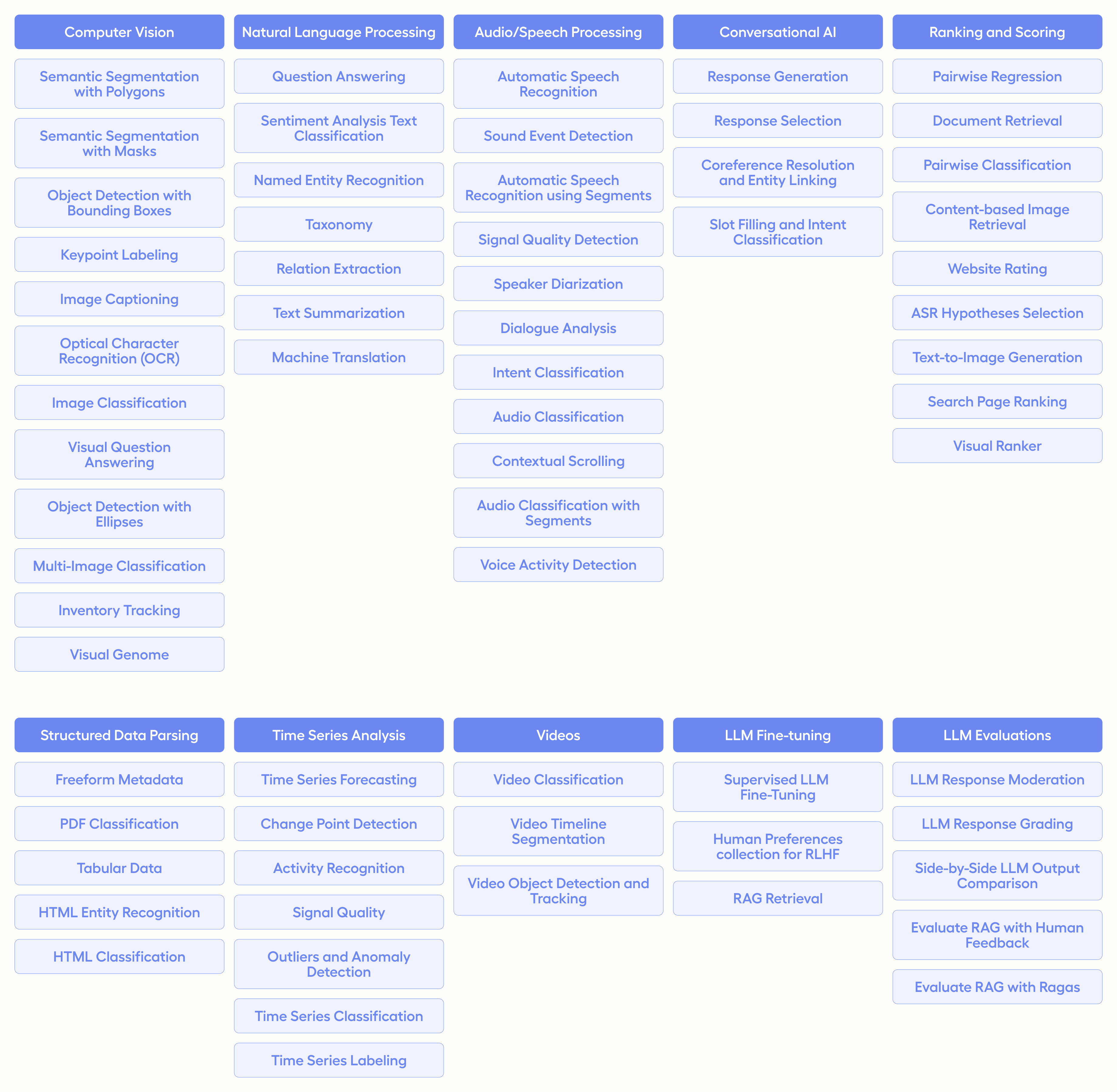
Label Studio includes a variety of templates to help you label your data, or you can create your own using specifically designed configuration language. The most common templates and use cases for labeling include the following cases:
Set up machine learning models with Label Studio
Connect your favorite machine learning model using the Label Studio Machine Learning SDK. Follow these steps:
- Start your own machine learning backend server. See more detailed instructions.
- Connect Label Studio to the server on the model page found in project settings.
This lets you:
- Pre-label your data using model predictions.
- Do online learning and retrain your model while new annotations are being created.
- Do active learning by labeling only the most complex examples in your data.
You can use Label Studio as an independent part of your machine learning workflow or integrate the frontend or backend into your existing tools.
Ecosystem
| Project |
Description |
| label-studio |
Server, distributed as a pip package |
| Frontend library |
The Label Studio frontend library. This uses React to build the UI and mobx-state-tree for state management. |
| Data Manager library |
A library for the Data Manager, our data exploration tool. |
| label-studio-converter |
Encode labels in the format of your favorite machine learning library |
| label-studio-transformers |
Transformers library connected and configured for use with Label Studio |
Citation
Include a citation for Label Studio in the References section of your articles:
@misc{Label Studio,
  title={{Label Studio}: Data labeling software},
  url={https://github.com/HumanSignal/label-studio},
  note={Open source software available from https://github.com/HumanSignal/label-studio},
  author={
    Maxim Tkachenko and
    Mikhail Malyuk and
    Andrey Holmanyuk and
    Nikolai Liubimov},
  year={2020-2025},
}
License
This software is licensed under the Apache 2.0 LICENSE © Heartex. 2020-2025


 Label Studio 是一个开源的数据标注工具:你可以在浏览器界面里给音频、文本、图片、视频和时间序列数据打标签,并把结果导出成机器学习训练能直接用的格式。