








109 ·GitHub
What is this?
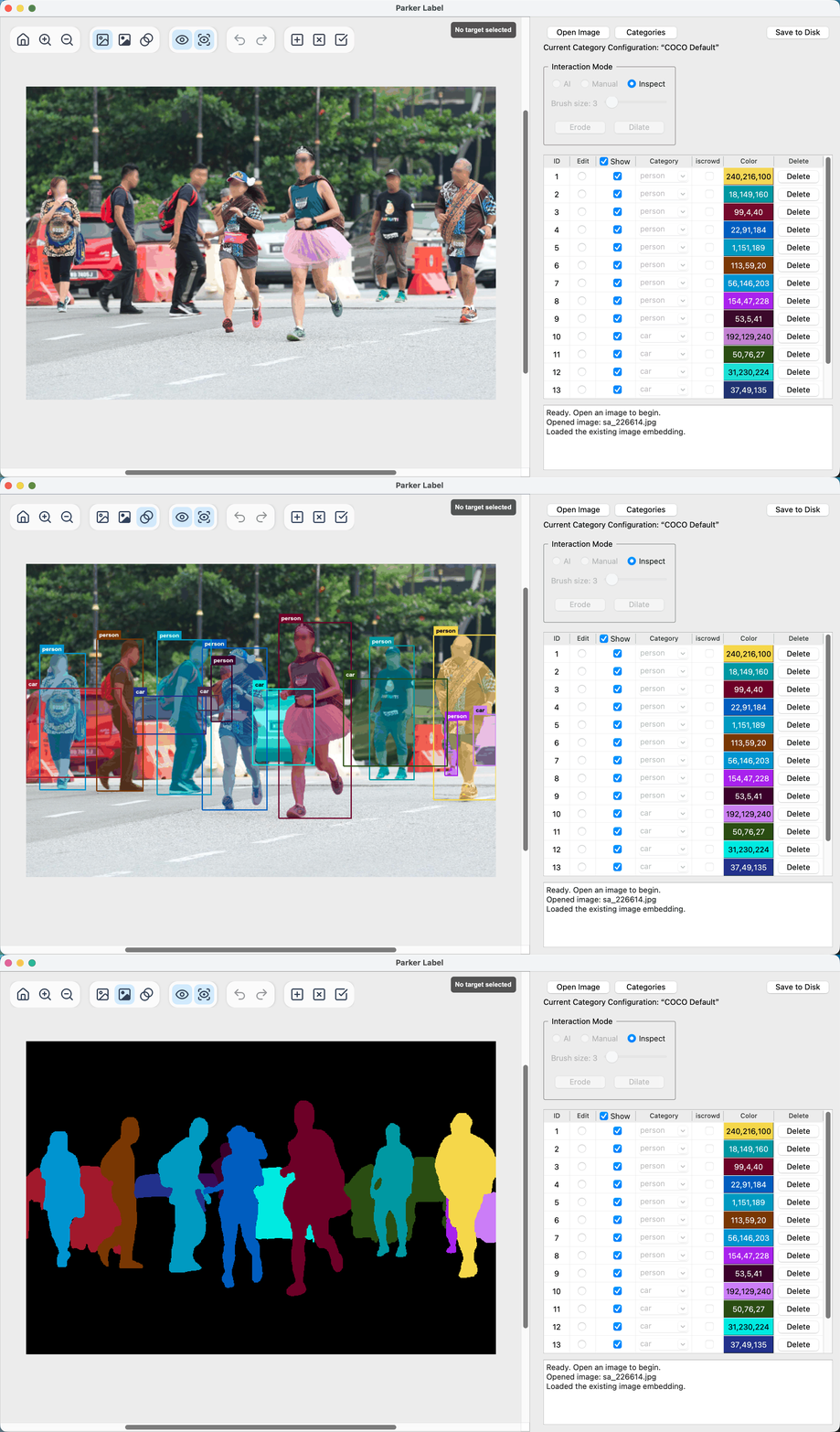
 ParkerLabel is a lightweight, AI-assisted interactive annotation tool for object detection and instance segmentation that uses MobileSAM to generate masks from click prompts.
ParkerLabel is a lightweight, AI-assisted interactive annotation tool for object detection and instance segmentation that uses MobileSAM to generate masks from click prompts.Is this a desktop app or a library I'd import into code?It's a standalone desktop GUI application with a PyQt5 interface, distributed as portable release packages, not a library.
It's a standalone desktop GUI application with a PyQt5 interface, distributed as portable release packages, not a library.How do I get it running?Either download a portable application package for your OS from GitHub Releases (or Baiduyun), or clone the repo, create a Python 3.11 Conda environment, install dependencies, and start it from source.
Either download a portable application package for your OS from GitHub Releases (or Baiduyun), or clone the repo, create a Python 3.11 Conda environment, install dependencies, and start it from source.Any install pitfalls on macOS or Windows?On macOS the package is ad-hoc signed but not notarized, so the first launch is blocked until you allow it via Privacy & Security settings; on Windows, SmartScreen may warn and require clicking 'Run anyway'.
On macOS the package is ad-hoc signed but not notarized, so the first launch is blocked until you allow it via Privacy & Security settings; on Windows, SmartScreen may warn and require clicking 'Run anyway'.Which operating systems does it support?Portable packages are published for macOS and Windows, and it can also be run from source on any platform with Conda (e.g. Linux).
Portable packages are published for macOS and Windows, and it can also be run from source on any platform with Conda (e.g. Linux).Does my data or images get sent anywhere?No, everything runs locally on CPU; annotation data is stored as local .npy, .json, and .mask.png files next to each source image.
No, everything runs locally on CPU; annotation data is stored as local .npy, .json, and .mask.png files next to each source image.How does the AI-assisted labeling actually work?In AI mode you give positive and negative clicks on an image, and MobileSAM generates an instance mask from those prompts in real time (about 20 ms per inference on modern CPUs).
In AI mode you give positive and negative clicks on an image, and MobileSAM generates an instance mask from those prompts in real time (about 20 ms per inference on modern CPUs).What category sets can I use for labeling?ParkerLabel ships with a read-only built-in configuration of the 80 standard COCO categories, and you can create new category configurations or copy existing ones, each tracked by UUID and SHA-256 digest.
ParkerLabel ships with a read-only built-in configuration of the 80 standard COCO categories, and you can create new category configurations or copy existing ones, each tracked by UUID and SHA-256 digest.What format are the annotation files saved in?Each image gets a JSON file with per-instance category, bounding box, area, and uncompressed COCO RLE segmentation, plus a cached image embedding (.npy) and a color mask preview (.mask.png); the JSON uses COCO-style fields but isn't a full COCO dataset export.
Each image gets a JSON file with per-instance category, bounding box, area, and uncompressed COCO RLE segmentation, plus a cached image embedding (.npy) and a color mask preview (.mask.png); the JSON uses COCO-style fields but isn't a full COCO dataset export.Which languages does the interface support?ParkerLabel's UI supports Simplified and Traditional Chinese, English, Japanese, Korean, German, French, Italian, and Spanish, switchable in Settings.
ParkerLabel's UI supports Simplified and Traditional Chinese, English, Japanese, Korean, German, French, Italian, and Spanish, switchable in Settings.What are similar projects?X-AnyLabeling, label-studio, cvat, labelImg, supervision, albumentations, ingetrazo, labelme
X-AnyLabeling, label-studio, cvat, labelImg, supervision, albumentations, ingetrazo, labelmeWhich topics is it in?bounding-boxes, image-annotation, data-labeling, cpu-inference, annotation, image-segmentation, qt, object-detection, onnx, offline, computer-vision, pytorch
bounding-boxes, image-annotation, data-labeling, cpu-inference, annotation, image-segmentation, qt, object-detection, onnx, offline, computer-vision, pytorch