







28.5K ·GitHub
What is this?
 Label Studio is an open source data labeling and annotation tool: you label audio, text, images, videos, and time series in a browser UI and export the results in formats ready for ML training.
Label Studio is an open source data labeling and annotation tool: you label audio, text, images, videos, and time series in a browser UI and export the results in formats ready for ML training.Is it a hosted service I sign up for, or something I run myself?It's a self-hosted web app: you install it locally or on a server and use it through a browser. HumanSignal also runs a hosted Starter Cloud edition with a free trial.
It's a self-hosted web app: you install it locally or on a server and use it through a browser. HumanSignal also runs a hosted Starter Cloud edition with a free trial.What's the quickest way to get it running?Fastest is Docker: docker pull the official image, run the container, and open Label Studio in the browser. Plain pip, poetry, and Anaconda installs work too.
Fastest is Docker: docker pull the official image, run the container, and open Label Studio in the browser. Plain pip, poetry, and Anaconda installs work too.Do I need Python installed first?Docker needs nothing but Docker itself. The pip, poetry, and Anaconda routes need Python - and on Windows you must also install the lxml wheel from Gohlke builds to match your Python version.
Docker needs nothing but Docker itself. The pip, poetry, and Anaconda routes need Python - and on Windows you must also install the lxml wheel from Gohlke builds to match your Python version.Is the default single-container setup good enough for production?No - it runs on SQLite3, which the README itself calls less performant. For production it recommends the Docker Compose stack: Label Studio with an Nginx proxy and PostgreSQL.
No - it runs on SQLite3, which the README itself calls less performant. For production it recommends the Docker Compose stack: Label Studio with an Nginx proxy and PostgreSQL.Do people use it to build training datasets from scratch or to fix existing ones?Both: it's built for preparing raw data or improving existing training data to get more accurate ML models, whether you label alone or with a team.
Both: it's built for preparing raw data or improving existing training data to get more accurate ML models, whether you label alone or with a team.My annotators aren't technical - what do they have to install?Nothing - it's a browser app. Once the server is up, annotators just sign up and log in, and each annotation is tied to their account.
Nothing - it's a browser app. Once the server is up, annotators just sign up and log in, and each annotation is tied to their account.Can I deploy it to a cloud server instead of my own machine?Yes - the README documents one-click deployment to Heroku, Microsoft Azure, and Google Cloud Platform.
Yes - the README documents one-click deployment to Heroku, Microsoft Azure, and Google Cloud Platform.If I self-host it, does any of my data leave my machine?It stays where you host it: generated assets, the SQLite database, and uploaded files live in a local ./mydata directory. Imports from Amazon S3 or Google Cloud Storage are opt-in connections.
It stays where you host it: generated assets, the SQLite database, and uploaded files live in a local ./mydata directory. Imports from Amazon S3 or Google Cloud Storage are opt-in connections.Can I use it commercially for free, or is there a paid tier?The core is Apache 2.0 licensed (c) Heartex, so self-hosting for commercial work is fine. HumanSignal sells paid cloud editions around the open-source core.
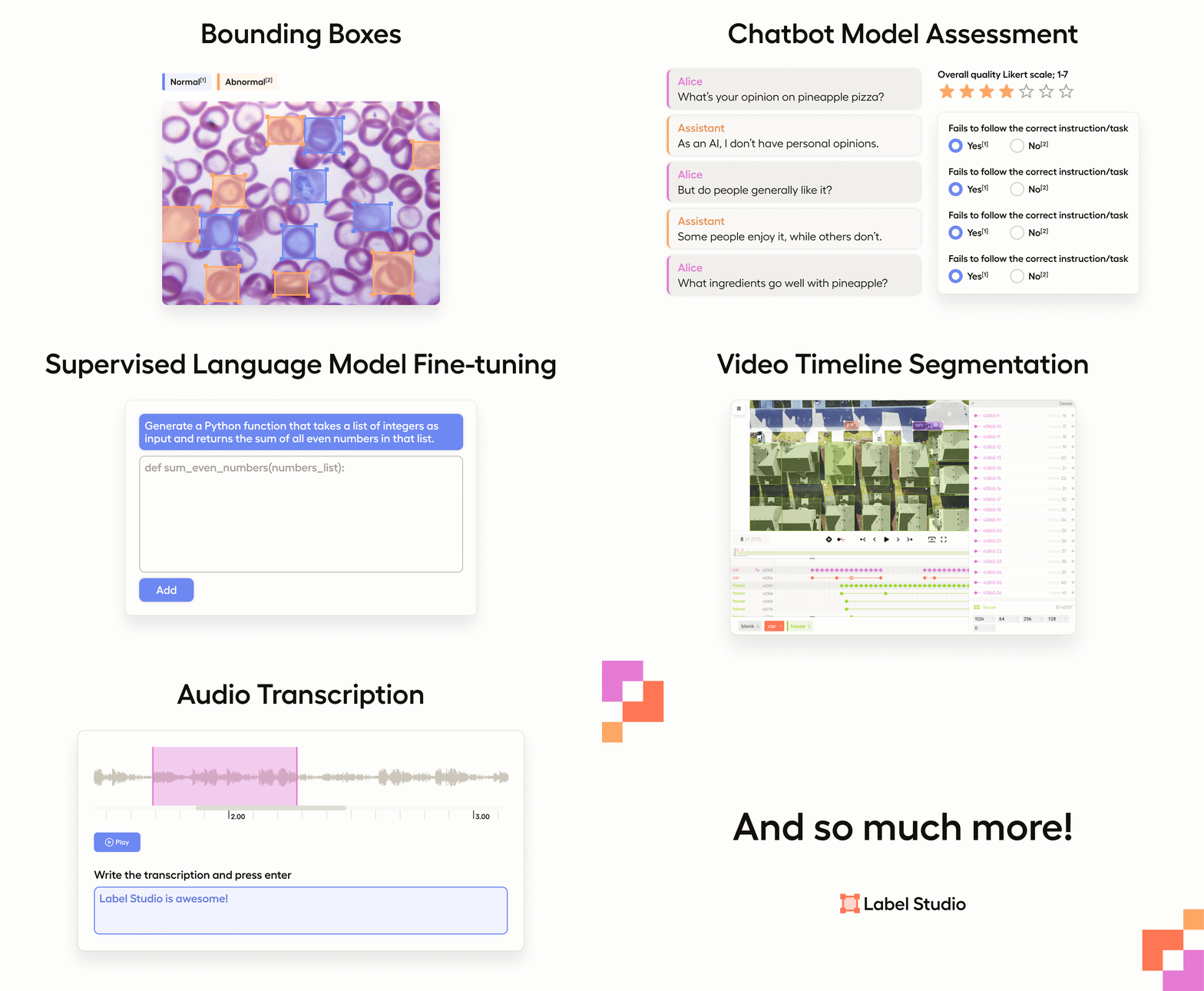
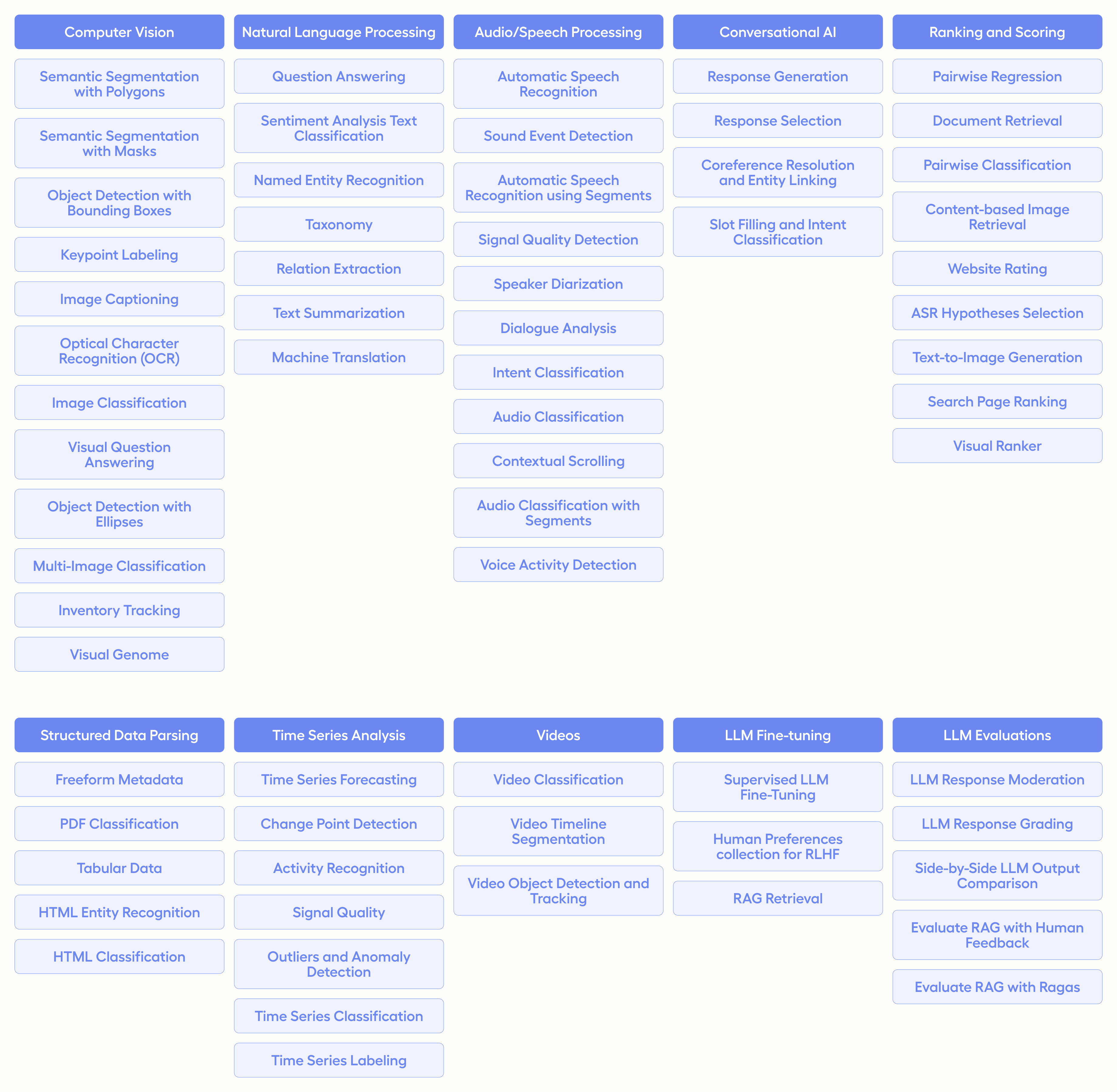
The core is Apache 2.0 licensed (c) Heartex, so self-hosting for commercial work is fine. HumanSignal sells paid cloud editions around the open-source core.What kinds of data can it label?Images, audio, text, HTML, video, and time series. Label Studio ships with templates for common labeling tasks, and you can design custom interfaces with its configuration language.
Images, audio, text, HTML, video, and time series. Label Studio ships with templates for common labeling tasks, and you can design custom interfaces with its configuration language.Can my model pre-label data to speed humans up?Yes - connect it through the Label Studio Machine Learning SDK: start your ML backend server and link it in project settings. You get model predictions as pre-labels, online retraining while annotations arrive, and active learning that focuses on the hardest examples.
Yes - connect it through the Label Studio Machine Learning SDK: start your ML backend server and link it in project settings. You get model predictions as pre-labels, online retraining while annotations arrive, and active learning that focuses on the hardest examples.What formats does it import and export?Imports: local files or cloud storage from Amazon S3 and Google Cloud Storage, including JSON, CSV, TSV, RAR, and ZIP archives. Exports: various model formats, and the label-studio-converter package encodes labels for your ML library.
Imports: local files or cloud storage from Amazon S3 and Google Cloud Storage, including JSON, CSV, TSV, RAR, and ZIP archives. Exports: various model formats, and the label-studio-converter package encodes labels for your ML library.What are similar projects?cvat, labelImg, labelme, doccano, cleanlab, ParkerLabel, X-AnyLabeling, fiftyone
cvat, labelImg, labelme, doccano, cleanlab, ParkerLabel, X-AnyLabeling, fiftyoneWhich topics is it in?bounding-boxes, image-annotation, annotation-tool, data-labeling, annotations, annotation, semantic-segmentation, yolo, datasets, image-classification, mlops, dataset
bounding-boxes, image-annotation, annotation-tool, data-labeling, annotations, annotation, semantic-segmentation, yolo, datasets, image-classification, mlops, dataset