🚀 RAG-Anything: All-in-One RAG Framework

🎉 News
- [2026.06]🎯📢 🎉 LightRAG enables multimodal RAG through native integration of RAG-Anything.
- [2025.10]🎯📢 🚀 We have released the technical report of RAG-Anything. Access it now to explore our latest research findings.
- [2025.08]🎯📢 🔍 RAG-Anything now features VLM-Enhanced Query mode! When documents include images, the system seamlessly integrates them into VLM for advanced multimodal analysis, combining visual and textual context for deeper insights.
- [2025.07]🎯📢 RAG-Anything now features a context configuration module, enabling intelligent integration of relevant contextual information to enhance multimodal content processing.
- [2025.07]🎯📢 🚀 RAG-Anything now supports multimodal query capabilities, enabling enhanced RAG with seamless processing of text, images, tables, and equations.
- [2025.07]🎯📢 🎉 RAG-Anything has reached 1k🌟 stars on GitHub! Thank you for your incredible support and valuable contributions to the project.
🌟 System Overview
Next-Generation Multimodal Intelligence
Modern documents increasingly contain diverse multimodal content—text, images, tables, equations, charts, and multimedia—that traditional text-focused RAG systems cannot effectively process. RAG-Anything addresses this challenge as a comprehensive All-in-One Multimodal Document Processing RAG system built on LightRAG.
As a unified solution, RAG-Anything eliminates the need for multiple specialized tools. It provides seamless processing and querying across all content modalities within a single integrated framework. Unlike conventional RAG approaches that struggle with non-textual elements, our all-in-one system delivers comprehensive multimodal retrieval capabilities.
Users can query documents containing interleaved text, visual diagrams, structured tables, and mathematical formulations through one cohesive interface. This consolidated approach makes RAG-Anything particularly valuable for academic research, technical documentation, financial reports, and enterprise knowledge management where rich, mixed-content documents demand a unified processing framework.
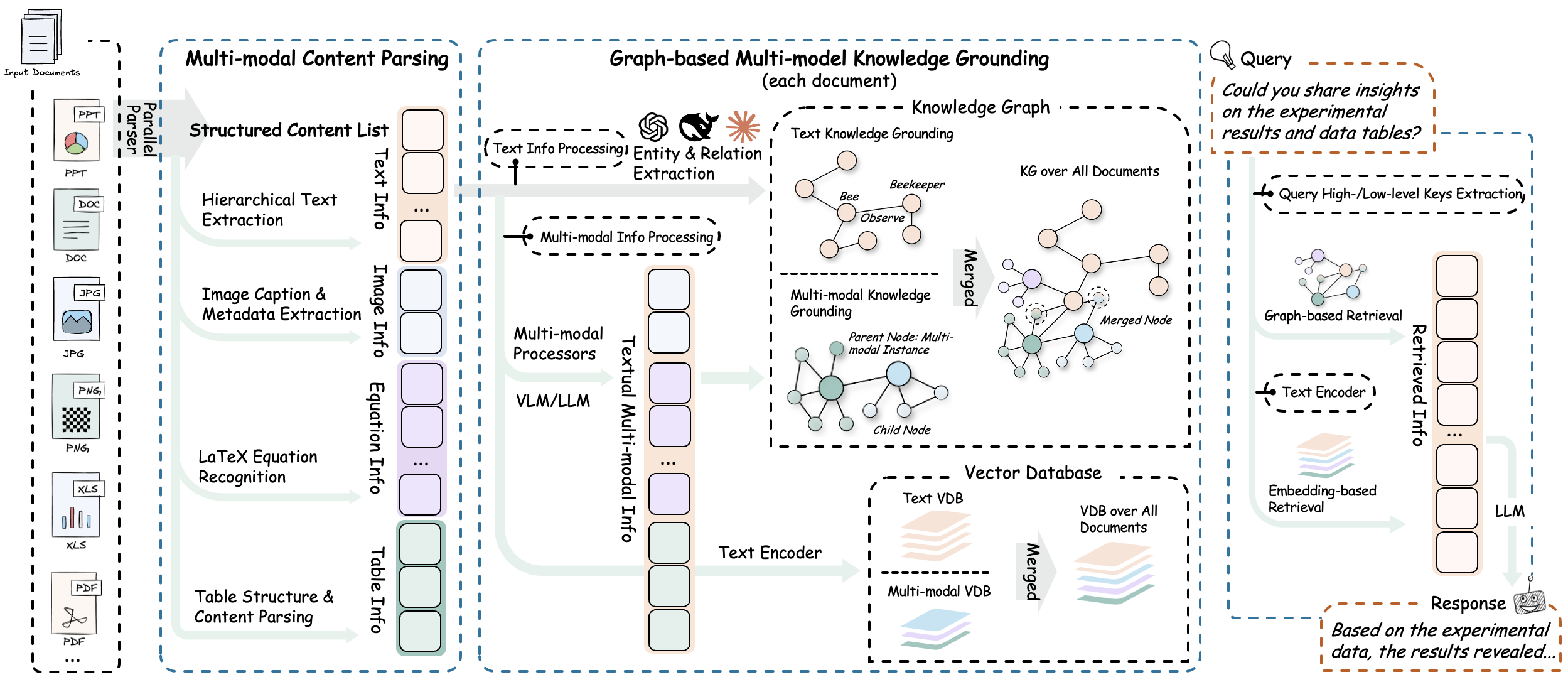
🎯 Key Features
- 🔄 End-to-End Multimodal Pipeline - Complete workflow from document ingestion and parsing to intelligent multimodal query answering
- 📄 Universal Document Support - Seamless processing of PDFs, Office documents, images, and diverse file formats
- 🧠 Specialized Content Analysis - Dedicated processors for images, tables, mathematical equations, and heterogeneous content types
- 🔗 Multimodal Knowledge Graph - Automatic entity extraction and cross-modal relationship discovery for enhanced understanding
- ⚡ Adaptive Processing Modes - Flexible MinerU-based parsing or direct multimodal content injection workflows
- 📋 Direct Content List Insertion - Bypass document parsing by directly inserting pre-parsed content lists from external sources
- 🎯 Hybrid Intelligent Retrieval - Advanced search capabilities spanning textual and multimodal content with contextual understanding
🏗️ Algorithm & Architecture
Core Algorithm
RAG-Anything implements an effective multi-stage multimodal pipeline that fundamentally extends traditional RAG architectures to seamlessly handle diverse content modalities through intelligent orchestration and cross-modal understanding.
1. Document Parsing Stage
The system provides high-fidelity document extraction through adaptive content decomposition. It intelligently segments heterogeneous elements while preserving contextual relationships. Universal format compatibility is achieved via specialized optimized parsers.
Key Components:
⚙️ MinerU Integration: Leverages MinerU for high-fidelity document structure extraction and semantic preservation across complex layouts.
🧩 Adaptive Content Decomposition: Automatically segments documents into coherent text blocks, visual elements, structured tables, mathematical equations, and specialized content types while preserving contextual relationships.
📁 Universal Format Support: Provides comprehensive handling of PDFs, Office documents (DOC/DOCX/PPT/PPTX/XLS/XLSX), images, and emerging formats through specialized parsers with format-specific optimization.
2. Multi-Modal Content Understanding & Processing
The system automatically categorizes and routes content through optimized channels. It uses concurrent pipelines for parallel text and multimodal processing. Document hierarchy and relationships are preserved during transformation.
Key Components:
🎯 Autonomous Content Categorization and Routing: Automatically identify, categorize, and route different content types through optimized execution channels.
⚡ Concurrent Multi-Pipeline Architecture: Implements concurrent execution of textual and multimodal content through dedicated processing pipelines. This approach maximizes throughput efficiency while preserving content integrity.
🏗️ Document Hierarchy Extraction: Extracts and preserves original document hierarchy and inter-element relationships during content transformation.
3. Multimodal Analysis Engine
The system deploys modality-aware processing units for heterogeneous data modalities:
Specialized Analyzers:
🔍 Visual Content Analyzer:
- Integrate vision model for image analysis.
- Generates context-aware descriptive captions based on visual semantics.
- Extracts spatial relationships and hierarchical structures between visual elements.
📊 Structured Data Interpreter:
- Performs systematic interpretation of tabular and structured data formats.
- Implements statistical pattern recognition algorithms for data trend analysis.
- Identifies semantic relationships and dependencies across multiple tabular datasets.
📐 Mathematical Expression Parser:
- Parses complex mathematical expressions and formulas with high accuracy.
- Provides native LaTeX format support for seamless integration with academic workflows.
- Establishes conceptual mappings between mathematical equations and domain-specific knowledge bases.
🔧 Extensible Modality Handler:
- Provides configurable processing framework for custom and emerging content types.
- Enables dynamic integration of new modality processors through plugin architecture.
- Supports runtime configuration of processing pipelines for specialized use cases.
4. Multimodal Knowledge Graph Index
The multi-modal knowledge graph construction module transforms document content into structured semantic representations. It extracts multimodal entities, establishes cross-modal relationships, and preserves hierarchical organization. The system applies weighted relevance scoring for optimized knowledge retrieval.
Core Functions:
🔍 Multi-Modal Entity Extraction: Transforms significant multimodal elements into structured knowledge graph entities. The process includes semantic annotations and metadata preservation.
🔗 Cross-Modal Relationship Mapping: Establishes semantic connections and dependencies between textual entities and multimodal components. This is achieved through automated relationship inference algorithms.
🏗️ Hierarchical Structure Preservation: Maintains original document organization through "belongs_to" relationship chains. These chains preserve logical content hierarchy and sectional dependencies.
⚖️ Weighted Relationship Scoring: Assigns quantitative relevance scores to relationship types. Scoring is based on semantic proximity and contextual significance within the document structure.
5. Modality-Aware Retrieval
The hybrid retrieval system combines vector similarity search with graph traversal algorithms for comprehensive content retrieval. It implements modality-aware ranking mechanisms and maintains relational coherence between retrieved elements to ensure contextually integrated information delivery.
Retrieval Mechanisms:
🔀 Vector-Graph Fusion: Integrates vector similarity search with graph traversal algorithms. This approach leverages both semantic embeddings and structural relationships for comprehensive content retrieval.
📊 Modality-Aware Ranking: Implements adaptive scoring mechanisms that weight retrieval results based on content type relevance. The system adjusts rankings according to query-specific modality preferences.
🔗 Relational Coherence Maintenance: Maintains semantic and structural relationships between retrieved elements. This ensures coherent information delivery and contextual integrity.
🚀 Quick Start
Initialize Your AI Journey
Installation
Option 1: Install from PyPI (Recommended)
# Basic installation
pip install raganything

# With optional dependencies for extended format support:
pip install 'raganything[all]'              # All optional features
pip install 'raganything[image]'            # Image format conversion (BMP, TIFF, GIF, WebP)
pip install 'raganything[text]'             # Text file processing (TXT, MD)
pip install 'raganything[image,text]'       # Multiple features
Option 2: Install from Source
# Install uv (if not already installed)
curl -LsSf https://astral.sh/uv/install.sh | sh

# Clone and setup the project with uv
git clone https://github.com/HKUDS/RAG-Anything.git
cd RAG-Anything

# Install the package and dependencies in a virtual environment
uv sync

# If you encounter network timeouts (especially for opencv packages):
# UV_HTTP_TIMEOUT=120 uv sync

# Run commands directly with uv (recommended approach)
uv run python examples/raganything_example.py --help

# Install with optional dependencies
uv sync --extra image --extra text  # Specific extras
uv sync --all-extras                 # All optional features
Optional Dependencies
[image] - Enables processing of BMP, TIFF, GIF, WebP image formats (requires Pillow)[text] - Enables processing of TXT and MD files (requires ReportLab)[all] - Includes all Python optional dependencies
⚠️ Office Document Processing Requirements:
- Office documents (.doc, .docx, .ppt, .pptx, .xls, .xlsx) require LibreOffice installation
- Download from LibreOffice official website
- Windows: Download installer from official website
- macOS:
brew install --cask libreoffice
- Ubuntu/Debian:
sudo apt-get install libreoffice
- CentOS/RHEL:
sudo yum install libreoffice
Check MinerU installation:
# Verify installation
mineru --version

# Check if properly configured
python -c "from raganything import RAGAnything; rag = RAGAnything(); print('✅ MinerU installed properly' if rag.check_parser_installation() else '❌ MinerU installation issue')"
Models are downloaded automatically on first use. For manual download, refer to MinerU Model Source Configuration.
Usage Examples
1. End-to-End Document Processing
import asyncio
from functools import partial
from raganything import RAGAnything, RAGAnythingConfig
from lightrag.llm.openai import openai_complete_if_cache, openai_embed
from lightrag.utils import EmbeddingFunc

async def main():
    # Set up API configuration
    api_key = "your-api-key"
    base_url = "your-base-url"  # Optional

    # Create RAGAnything configuration
    config = RAGAnythingConfig(
        working_dir="./rag_storage",
        parser="mineru",  # Parser selection: mineru, docling, or paddleocr
        parse_method="auto",  # Parse method: auto, ocr, or txt
        enable_image_processing=True,
        enable_table_processing=True,
        enable_equation_processing=True,
    )

    # Define LLM model function
    def llm_model_func(prompt, system_prompt=None, history_messages=[], **kwargs):
        return openai_complete_if_cache(
            "gpt-4o-mini",
            prompt,
            system_prompt=system_prompt,
            history_messages=history_messages,
            api_key=api_key,
            base_url=base_url,
            **kwargs,
        )

    # Define vision model function for image processing
    def vision_model_func(
        prompt, system_prompt=None, history_messages=[], image_data=None, messages=None, **kwargs
    ):
        # If messages format is provided (for multimodal VLM enhanced query), use it directly
        if messages:
            return openai_complete_if_cache(
                "gpt-4o",
                ""


















 An all-in-one multimodal RAG framework built on LightRAG: it ingests real-world documents that mix text, images, tables and equations, then answers queries across all content types through one pipeline instead of separate specialized tools.