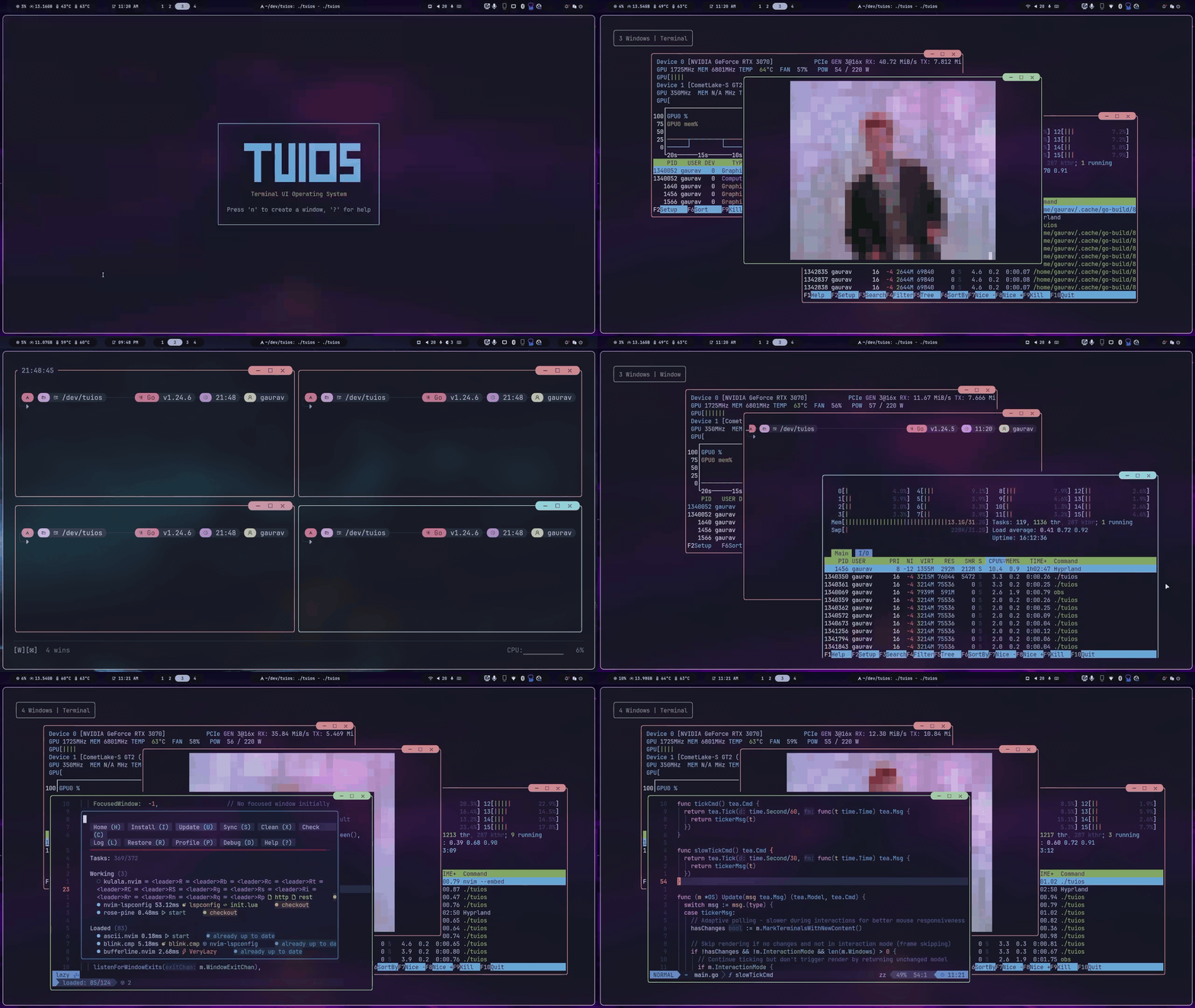
TUIOS is a modern terminal multiplexer and window manager built with Go. It provides a vim-like modal interface with multiple terminal panes, workspaces, BSP tiling, kitty graphics protocol support, and a command palette, all running inside your existing terminal. A daemon keeps sessions alive, reaches sessions on your other machines, and lets the coding agents in your panes report their state and message each other.
Built on the Charm stack (Bubble Tea v2, Lipgloss v2), TUIOS features event-driven rendering for near-zero idle CPU usage, flicker-free kitty image passthrough, and comprehensive keyboard/mouse interaction.
Documentation
Full documentation is available at tuios.dev (hosted) or in the docs/ folder. To try tuios without installing it, take the guided tour at tuios.dev/learn: the real app, compiled to WebAssembly, with a practice shell in every pane.
What changed in v0.8.1 is in the release notes.
Quick Links
- Getting Started: Install and first session
- Keybindings: Default keys and how to rebind them
- BSP Tiling: Tiling with preselection and split control
- Layout Modes: BSP, master-stack and scrolling layouts, aggregate view, multifocus
- Configuration: Customize keybindings, themes, and behavior
- Hooks: Run shell commands on window, session and agent events
- Themes: Built-in themes and custom theme JSON
- Glyph sets: The characters the chrome is drawn with
- CLI Reference: All command-line options
- Tape Scripting: Automate workflows
- Sessions: Daemon mode, attach/detach, other machines, and what survives
- Agents: Running coding agents in tuios: state, the Inbox, approvals, fleets, other machines, grants and MCP
- tmux Shim: Run tools that drive tmux, such as Claude Code agent teams
- Control Protocol: JSON verb protocol for driving the daemon
- Architecture: Technical design
Table of Contents
Installation
Package Managers
Homebrew (macOS/Linux):
brew install tuios
Arch Linux (AUR):
yay -S tuios-bin
Nix:
nix run github:Gaurav-Gosain/tuios/v0.8.1#tuios   # a release
nix run github:Gaurav-Gosain/tuios#tuios          # the latest main
nix run nixpkgs#tuios                             # the nixpkgs package
Put a release tag after the repo name to build that release. Without a tag, Nix builds the newest commit on main.
Other Methods
# Quick install script (Linux/macOS)
curl -fsSL https://raw.githubusercontent.com/Gaurav-Gosain/tuios/main/install.sh | bash

# Go install
go install github.com/Gaurav-Gosain/tuios/cmd/tuios@latest

# Docker
docker run -it --rm ghcr.io/gaurav-gosain/tuios:latest
GitHub Releases: Pre-built binaries for Linux, macOS, Windows, FreeBSD and OpenBSD, with a checksums.txt. The tuios-ghostty_* archives are tuios built on the libghostty-vt emulator, for Linux, macOS and Windows on amd64 and arm64.
Building from source needs Go 1.26.6 or newer.
Updating. If you installed with the quick install script or a release
binary, tuios update fetches the newest release and puts it in place
(tuios update --check just reports). Everything else has a package manager
that owns the binary, so use that instead; tuios update detects which you have
and prints the right command rather than overwriting it.
Requirements: A terminal with true color support. Kitty graphics and sixel support recommended (Ghostty, Kitty, WezTerm).
Features
Core
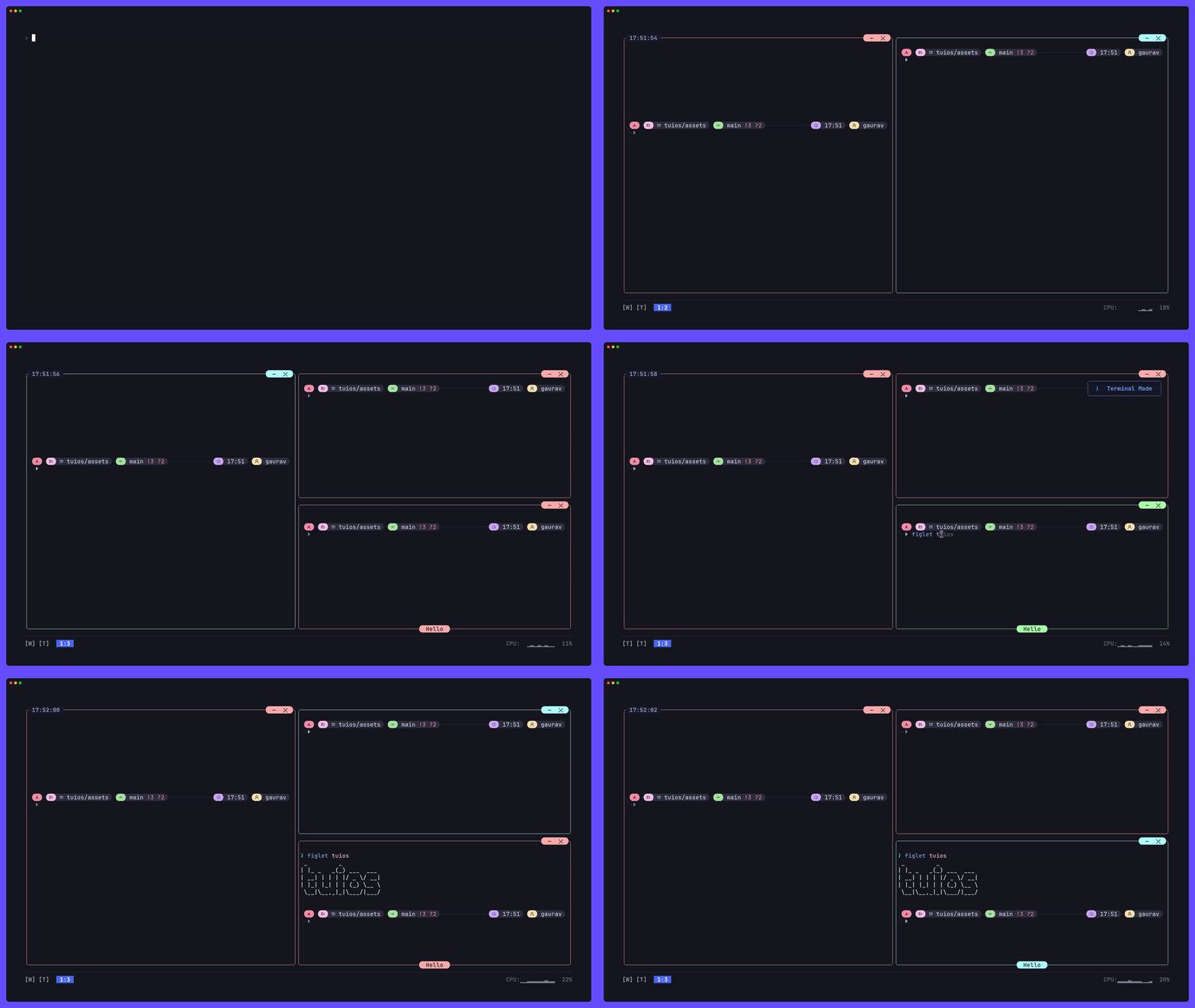
- Multiple Terminal Panes: Create, resize, drag, and organize terminal sessions
- 9 Workspaces: Independent workspace isolation with instant switching
- Modal Interface: Vim-inspired Window Management and Terminal modes
- Command Palette: Fuzzy-searchable action launcher (Ctrl+P)
- Launcher: Fuzzy search everything on
$PATH plus your installed desktop apps (Alt+Space), ranked by what you actually run. Enter starts it; Tab opens a shell with the command typed but not entered, so you can add arguments. App icons are drawn where the terminal supports kitty graphics.
- Pane Zoom: Zoom any pane with z (WM mode) or Prefix+z. It takes 95% of the screen by default; set
appearance.zoom_size = 100 for fullscreen. A fullscreen zoom hides the shared borders, and the dockbar shows a Z indicator.
- Session Rail: A sidebar with sessions, terminals, files, git state and agents, on by default on the right (
appearance.sidebar.enabled)
- Settings Page: Change options in the app with Prefix+,
- Popups:
tuios popup -- fzf runs a command in a floating pane that closes when it exits
Agents
The guide is docs/AGENT_STATE.md.
- Agent State: Panes running a coding agent show whether it is working, waiting for you, done or errored, as a shape in the title and a row on the rail.
tuios integration install wires 19 harnesses (Claude Code, Codex, Gemini CLI, opencode and more) to report it, and tuios detects 24 agent CLIs by their process and screen
- Inbox: Prefix+i lists everything waiting for you in every session and on every machine: approvals, questions, mail, errors, finished turns. Prefix+o jumps to the oldest. Answer a prompt from there without going to the pane, and with
[agents.approvals] answer Claude Code, opencode, Kilo and Qwen Code permission requests with one key
- Questions and Messages:
tuios ask-human puts a question with fixed answers in your Inbox. Agents mail each other with tuios send-agent-message, and tuios ask-agent asks one and waits for its answer. It never types into a pane waiting on a prompt, and replies from you are marked verified
- Fleets:
tuios fan starts one prompt in several agents, mixed harnesses allowed, each in its own git worktree. tuios start-agent starts one helper beside you, in its TUI or headless over ACP or the Codex app-server. Selectors such as group:fan/retry needs:you address a whole group
- Resume: After a daemon restart, the Inbox offers to resume each agent conversation that was running
- Pane Grants: Say what an agent's pane may do through tuios (
read, write, fan, respond, admin), and give a helper less with --grants
- MCP Server:
tuios mcp serves the same surface as MCP tools, read-only and held to the agent's own session unless you say otherwise
- tmux Shim:
tuios tmux-shim runs tools that drive tmux, such as Claude Code agent teams, with their panes opened as tuios panes
- Session Stash:
tuios stash put keeps a file for the session, so another agent can still open it
- Agent Skill:
tuios --skill prints the short guide an agent in a pane reads to drive tuios, and tuios --skill TOPIC the rest, recipes included
Machines
- Hosts:
tuios hosts add names another machine, reached over ssh. tuios hosts tailnet lists the machines on a Tailscale tailnet
- Remote Sessions:
tuios attach --host build api draws a session on another machine in this client, and -s HOST:SESSION sends any command there
- Hosted Panes:
tuios new-window NAME --host build runs one pane's process on another machine, in a session here
- Global Sessions:
tuios new NAME --global holds panes from several machines (docs)
- Agents on Other Machines:
tuios fan --host build and tuios start-agent -s build:api run agents there, their Inbox items show here, and tuios worktree pull brings their work back. Each machine's [hosts] policy says what the others may do
Tiling
- BSP Tiling: Binary Space Partitioning with spiral layout
- Scrolling Layout: niri-style columns on an infinite horizontal strip (docs)
- Master-Stack Layout: One master pane with the rest stacked beside it
- Smart Auto-Split: Aspect-ratio-aware splitting (opt-in)
- Shared Borders: tmux-style separator lines between panes (
--shared-borders)
- Preselection: Control where the next pane spawns
- Equalize Splits: Reset all splits to balanced ratios
- Vim-Style Copy Mode: Navigate 10,000-line scrollback with hjkl, search down with
/ and up with ?, yank with y
- Multi Copy Mode: Copy mode on every pane of the multifocus set at once. Search once, select with
v/V in each pane, and yank all selections as plain text, markdown or JSON, to the clipboard or a file (docs)
- Mouse Wheel Scrollback: The wheel scrolls history with no mode entered; typing or reaching the bottom returns to live output
- Interactive Scrollbar: Click or drag the right border to jump to scroll position
- Selection Auto-Scroll: Drag selection above/below pane to scroll
- Scrollback Browser: OSC 133-aware command/output block navigation
- Scroll Position Indicator: Shows offset/total on the bottom border
Graphics & Protocols
- Kitty Graphics Protocol: Full image rendering with flicker-free video playback.
mpv --vo=kitty works (both shm and base64), and youterm works.
- Sixel Graphics: Sixel image passthrough (experimental, no pixel-level clipping yet)
- Kitty Keyboard Protocol: Progressive enhancement (CSI u) with push/pop/query support. Fish 4.x compatible; Shift+printable bypasses the protocol and sends text directly.
- Synchronized Output: Mode 2026 prevents screen tearing
- Shared Memory Support:
t=s passthrough for mpv --vo-kitty-use-shm
- Animation Frames: A guest's
a=f frame edits are forwarded to the host, so a program that patches its own image costs a rectangle instead of a whole bitmap. TUIOS also patches guests that only retransmit. Panes are told whether the host carries frame edits through TUIOS_KITTY_ANIMATION, because the host's reply is not relayed back into the pane and a guest cannot find out for itself.
- Terminal Queries: OSC 4 palette, OSC 10-12 colors, CSI 14/16/18t sizing, DA1/DA2
- Experimental: Kitty text sizing protocol (OSC 66). Basic passthrough works but has known issues with scrollback and window repositioning
- Kitty Animation Protocol: Frame transmission, composition, and control (a=f, a=a, a=c), with damage-patch streaming for animated guests
Session Management
- Daemon Mode: Persistent sessions with detach/reattach (like tmux)
- Session Resurrection: Sessions come back after a daemon restart or reboot with their structure and working directories (docs)
- Session Switcher: In-app session list (Prefix+S)
- Layout Templates: Save/load window arrangements with working directories and startup commands
- Layout CLI:
tuios layout list, tuios layout delete, tuios layout export
Automation
- Tape Scripting: DSL for recording and replaying terminal workflows
- Tape Recording: Record live sessions (Prefix+T r)
- Headless Execution:
tuios tape exec runs a tape against a running daemon session
- Layout Export: Convert layouts to tape scripts for sharing
Discovery & Navigation
- Which-Key Popup: Hold the prefix key to see the chords available (
appearance.whichkey_enabled, docs)
- App Launcher: Alt+Space runs anything on
$PATH, frecency-ranked, with desktop-entry names and icons
- Keybind Manager: Prefix+k in-app, or
tuios keybinds doctor and tuios keybinds explain <key> from the shell
- Aggregate View: Searchable list of every window across every workspace, with previews (docs)
- Multifocus: Broadcast typing to several panes at once,
Ctrl+Shift+click to select (docs)
More
- Showkeys Overlay: Display pressed keys for presentations
- Spotlight: Light one area of the screen and dim the rest, for demos and recordings (
[spotlight] config table)
- Screenshots:
tuios screenshot renders a pane to PNG, SVG, ANSI, HTML or text
- Dock Components: Your own commands drawn in the dock, updated on events, from a running command, or by polling (examples)
- Customizable Keybindings: TOML configuration with Kitty protocol support
- Hooks: Run shell commands on ten events, including window, workspace, attach and agent state changes (docs)
- Mouse Support: Wheel scrollback, drag-to-select with copy on release, double-click word and triple-click line, window drag, resize, scrollbar
- SSH Server Mode: Remote terminal multiplexing
- Web Terminal Mode: Browser-based access (separate
tuios-web binary)
- Themes: Bundled themes plus custom themes from JSON, with chrome designed for truecolor, 256 and 16 colours and for light themes (docs)
- Host Colours: tuios asks your terminal for its colours, passes them to programs that ask, and follows its light and dark switch
- Backgrounds:
appearance.background paints empty cells with the theme's background or a colour of your own, per surface if you like
- Motion:
appearance.motion is none, basic or full (fades, the working shimmer, confetti)
- Glyph Sets: Choose the characters the chrome is drawn with (docs)
Quick Start
tuios                    # Launch TUIOS
tuios --show-keys        # Launch with key overlay for learning
tuios --standalone       # Launch without the daemon, for this run only
tuios attaches to a daemon-backed session, so the session outlives the
terminal window it started in. New panes are tiled. See
SESSIONS.md to turn either off.
Essential Keys
| Key |
Action |
| Ctrl+P |
Command palette: search and run any action |
| Alt+Space |
Launcher: search and start a program (Enter runs it, Tab types it out) |
| n |
New pane (Window Management mode) |
| i / Enter |
Enter Terminal mode |
| Prefix+Esc or Alt+Esc |
Back to Window Management mode (a bare Esc goes to the shell) |
| Prefix+d |
Detach in a daemon session, otherwise back to Window Management mode |
| z (WM) or Prefix+z |
Toggle pane zoom |
| Prefix+Space |
Toggle BSP tiling |
| Prefix+[ |
Enter copy mode (vim scrollback) |
| Prefix+S |
Session switcher |
| Prefix+L then l/s |
Load/Save layout template |
| Prefix+? |
Help overlay |
| Prefix+q |
Quit |
The prefix key is Ctrl+B by default (configurable).
Daemon Mode
tuios new mysession          # Create persistent session
tuios attach mysession       # Reattach
tuios ls                     # List sessions
tuios kill-session mysession # Kill session
Layout Templates
# In-app: Ctrl+B, L, l to load / Ctrl+B, L, s to save
# Or via command palette: Ctrl+P → "Save layout" / "Load layout"

# CLI:
tuios layout list            # List saved layouts
tuios layout delete mysetup  # Delete a layout
tuios layout export mysetup  # Export as tape script
Configuration
tuios config edit            # Edit config in $EDITOR
tuios keybinds list          # View the common keybindings
See the configuration reference (or run tuios list-options) for all options including show_clock, show_cpu, show_ram, shared_borders, window_button_style, window_button_position, custom themes, and keybinding customization.
Architecture
TUIOS follows the Model-View-Update pattern on Bubble Tea v2. For details, see Architecture Guide.
Key design decisions:
- Event-driven rendering: PTY reader goroutines signal bubbletea via a buffered channel. No fixed-rate ticking for terminal content.
- Kitty graphics passthrough: Image IDs are reused across frames for flicker-free video. Output is batched with the render cycle and wrapped in mode 2026 sync.
- BSP tiling: Binary space partitioning tree with configurable schemes (spiral, smart split). Shared borders mode overlaps window rects and draws separator lines as a separate layer.
- Copy mode: Full vim navigation over scrollback. Wheel scrolling and mouse selection borrow the same machinery through an implicit session that presents as nothing at all, plus scrollbar interaction and selection auto-scroll (timer-based continuous drag scrolling).
Core Components:
- Event-driven rendering: Zero CPU at idle. Renders only when PTY data arrives or interaction occurs.
- Kitty graphics: Flicker-free via image ID reuse. Tearing-free via mode 2026 sync + render cycle batching.
- Fast unfocused render: Unfocused panes use emulator's built-in
Render() instead of cell-by-cell, unless appearance.dim_unfocused needs each cell.
- Style caching: LRU cache with sequence-based change detection (40-60% allocation reduction).
- Viewport culling: Off-screen and minimized panes skip rendering.
- Memory pooling: Pooled strings, buffers, and styles.
Development
git clone https://github.com/gaurav-gosain/tuios.git
cd tuios
go build -o tuios ./cmd/tuios
./tuios
To install a local build on your PATH instead, ./scripts/install.sh builds
and installs into ~/.local/bin. It builds the pure Go emulator.
./scripts/install.sh ghostty builds the
ghostty emulator backend instead, and tuios --version
says which is installed.
go test ./...              # Run tests
go vet ./...               # Vet
golangci-lint run          # Lint with the checks CI runs (.golangci.yml)
govulncheck ./...          # Known vulnerabilities in what the build reaches
Support: 
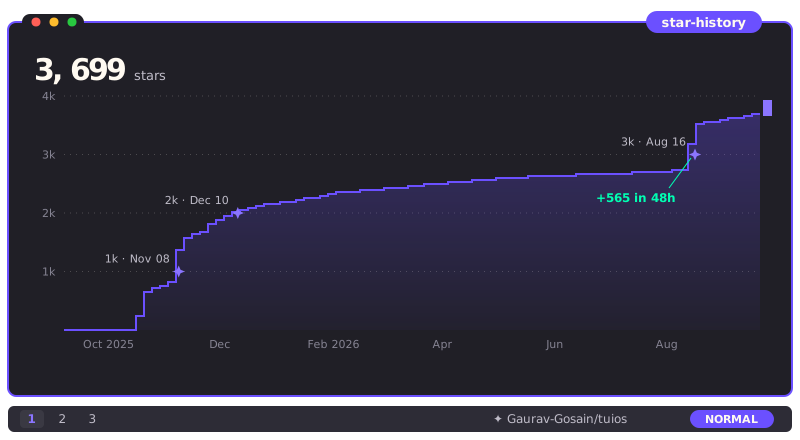
Star History










License
MIT License. See LICENSE for details.
Acknowledgments
- The Charm team for Bubble Tea, Lipgloss, and the Go terminal ecosystem
- The vim, tmux, and i3 communities for interface design inspiration
- Ghostty, Kitty, and WezTerm for excellent terminal emulators with graphics support




 TUIOS 是一个用 Go 编写的终端窗口管理器和多路复用器,在你的终端之上提供平铺窗格、工作区和基于守护进程的持久会话,并内置对窗格中运行的编码代理正在做什么的感知。