
[ En |
中 |
Fr |
日 ]
Assign different roles to GPTs to form a collaborative entity for complex tasks.



News
🚀 Mar. 10, 2025: 🎉 mgx.dev is the #1 Product of the Week on @ProductHunt! 🏆
🚀 Mar. 4, 2025: 🎉 mgx.dev is the #1 Product of the Day on @ProductHunt! 🏆
🚀 Feb. 19, 2025: Today we are officially launching our natural language programming product: MGX (MetaGPT X) - the world's first AI agent development team. More details on Twitter.
🚀 Feb. 17, 2025: We introduced two papers: SPO and AOT, check the code!
🚀 Jan. 22, 2025: Our paper AFlow: Automating Agentic Workflow Generation accepted for oral presentation (top 1.8%) at ICLR 2025, ranking #2 in the LLM-based Agent category.
👉👉 Earlier news
Software Company as Multi-Agent System
- MetaGPT takes a one line requirement as input and outputs user stories / competitive analysis / requirements / data structures / APIs / documents, etc.
- Internally, MetaGPT includes product managers / architects / project managers / engineers. It provides the entire process of a software company along with carefully orchestrated SOPs.
Code = SOP(Team) is the core philosophy. We materialize SOP and apply it to teams composed of LLMs.
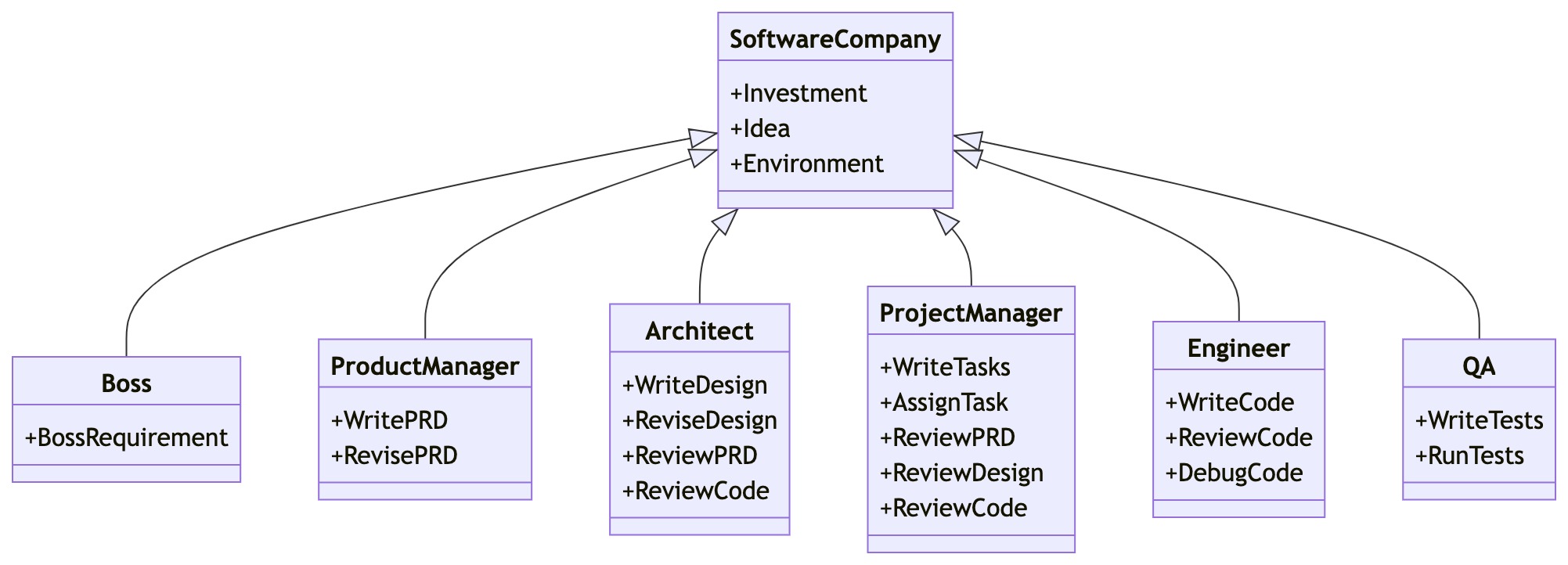
Software Company Multi-Agent Schematic (Gradually Implementing)
Get Started
Installation
Ensure that Python 3.9 or later, but less than 3.12, is installed on your system. You can check this by using: python --version.
You can use conda like this: conda create -n metagpt python=3.9 && conda activate metagpt
pip install --upgrade metagpt
# or `pip install --upgrade git+https://github.com/geekan/MetaGPT.git`
# or `git clone https://github.com/geekan/MetaGPT && cd MetaGPT && pip install --upgrade -e .`
Install node and pnpm before actual use.
For detailed installation guidance, please refer to cli_install
or docker_install
Configuration
You can init the config of MetaGPT by running the following command, or manually create ~/.metagpt/config2.yaml file:
# Check https://docs.deepwisdom.ai/main/en/guide/get_started/configuration.html for more details
metagpt --init-config  # it will create ~/.metagpt/config2.yaml, just modify it to your needs
You can configure ~/.metagpt/config2.yaml according to the example and doc:
llm:
  api_type: "openai"  # or azure / ollama / groq etc. Check LLMType for more options
  model: "gpt-4-turbo"  # or gpt-3.5-turbo
  base_url: "https://api.openai.com/v1"  # or forward url / other llm url
  api_key: "YOUR_API_KEY"
Usage
After installation, you can use MetaGPT at CLI
metagpt "Create a 2048 game" # this will create a repo in ./workspace
or use it as library
from metagpt.software_company import generate_repo
from metagpt.utils.project_repo import ProjectRepo

repo: ProjectRepo = generate_repo("Create a 2048 game")  # or ProjectRepo("<path>")
print(repo)  # it will print the repo structure with files
You can also use Data Interpreter to write code:
import asyncio
from metagpt.roles.di.data_interpreter import DataInterpreter

async def main():
    di = DataInterpreter()
    await di.run("Run data analysis on sklearn Iris dataset, include a plot")

asyncio.run(main())  # or await main() in a jupyter notebook setting
QuickStart & Demo Video
https://github.com/user-attachments/assets/888cb169-78c3-4a42-9d62-9d90ed3928c9
Tutorial
Support
Discord Join US
📢 Join Our Discord Channel! Looking forward to seeing you there! 🎉
📝 Fill out the form to become a contributor. We are looking forward to your participation!
If you have any questions or feedback about this project, please feel free to contact us. We highly appreciate your suggestions!
We will respond to all questions within 2-3 business days.
Citation
To stay updated with the latest research and development, follow @MetaGPT_ on Twitter.
To cite MetaGPT in publications, please use the following BibTeX entries.
@inproceedings{hong2024metagpt,
      title={Meta{GPT}: Meta Programming for A Multi-Agent Collaborative Framework},
      author={Sirui Hong and Mingchen Zhuge and Jonathan Chen and Xiawu Zheng and Yuheng Cheng and Jinlin Wang and Ceyao Zhang and Zili Wang and Steven Ka Shing Yau and Zijuan Lin and Liyang Zhou and Chenyu Ran and Lingfeng Xiao and Chenglin Wu and J{\"u}rgen Schmidhuber},
      booktitle={The Twelfth International Conference on Learning Representations},
      year={2024},
      url={https://openreview.net/forum?id=VtmBAGCN7o}
}
For more work, please refer to Academic Work.

 MetaGPT 是一个模拟软件公司的多智能体框架:你给它一行需求,它就会协调产品经理、架构师、项目经理、工程师等角色,输出用户故事、设计、数据结构、API 和代码。