📚 ebook2audiobook (E2A)
CPU/GPU Converter from E-Book to audiobook with chapters and metadata
using advanced TTS engines and much more.
Supports voice cloning and 1158 languages!
[!IMPORTANT]
This tool is intended for use with non-DRM, legally acquired eBooks only.
The authors are not responsible for any misuse of this software or any resulting legal consequences.
Use this tool responsibly and in accordance with all applicable laws.

Thanks to support ebook2audiobook developers!

Run locally





Run Remotely



GUI Interface
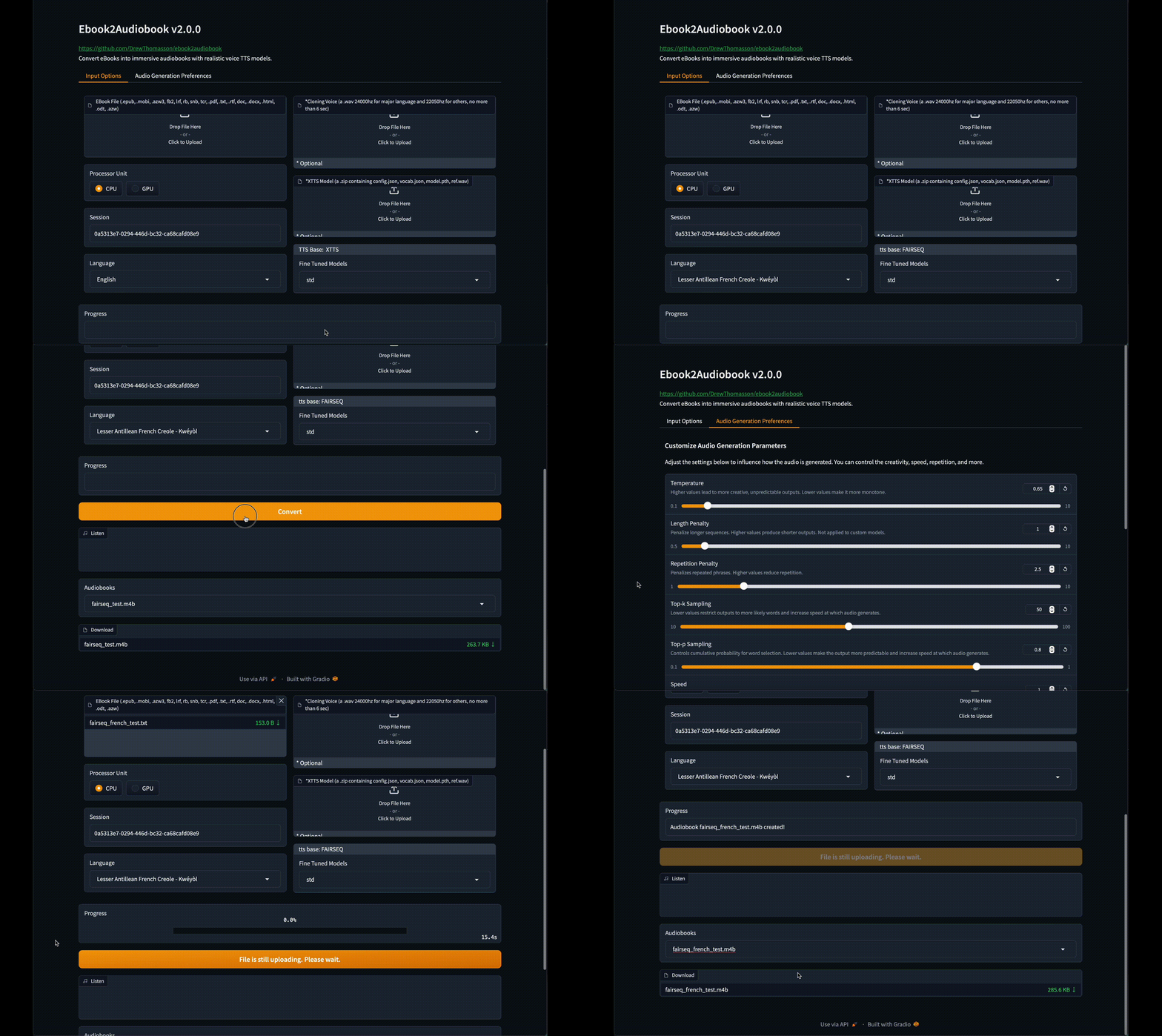
Click to see images of Web GUI


Demos
New Default Voice Demo
https://github.com/user-attachments/assets/750035dc-e355-46f1-9286-05c1d9e88cea
More Demos
ASMR Voice
https://github.com/user-attachments/assets/68eee9a1-6f71-4903-aacd-47397e47e422
Rainy Day Voice
https://github.com/user-attachments/assets/d25034d9-c77f-43a9-8f14-0d167172b080
Scarlett Voice
https://github.com/user-attachments/assets/b12009ee-ec0d-45ce-a1ef-b3a52b9f8693
David Attenborough Voice
https://github.com/user-attachments/assets/81c4baad-117e-4db5-ac86-efc2b7fea921
Example

README.md
Table of Contents
Features
- 🔧 TTS Engines supported:
XTTSv2, Bark, Fairseq, VITS, Tacotron2, Tortoise, GlowTTS, YourTTS
- 📚 Convert multiple file formats:
.epub, .mobi, .azw3, .fb2, .lrf, .rb, .snb, .tcr, .pdf, .txt, .rtf, .doc, .docx, .html, .odt, .azw, .tiff, .tif, .png, .jpg, .jpeg, .bmp, .zip
- 💻 TextArea to convert directly a short text in audio
- 🔍 OCR scanning for files with text pages as images
- 🔊 High-quality text-to-speech from near realtime to near real voice
- 🗣️ Optional voice cloning using your own voice file
- 🌐 Supports 1158 languages (supported languages list)
- 💻 Low-resource friendly — runs on 2 GB RAM / 1 GB VRAM (minimum)
- 🎵 Audiobook output formats: mono or stereo
aac, flac, mp3, m4b, m4a, mp4, mov, ogg, wav, webm
- 🧠 SML tags supported — fine-grained control of breaks, pauses, voice switching and more (see below)
- 🧩 Optional custom model using your own trained model (XTTSv2, VITS, FAIRSEQ, PIPER, others on request)
- 🎛️ Fine-tuned preset models trained by the E2A Team
(Contact us if you need additional fine-tuned models, or if you’d like to share yours to the official preset list)
Hardware Requirements
- 2GB RAM min, 8GB recommended.
- 1GB VRAM min, 4GB recommended.
- Virtualization enabled if running on windows (Docker only).
- CPU, XPU (intel, AMD, ARM)*.
- CUDA, ROCm, JETSON
- MPS (Apple Silicon CPU)
* Modern TTS engines are very slow on CPU, so use lower quality TTS like YourTTS, Tacotron2 etc..
Supported Languages
| Arabic (ar) |
Chinese (zh) |
English (en) |
Spanish (es) |
| French (fr) |
German (de) |
Italian (it) |
Portuguese (pt) |
| Polish (pl) |
Turkish (tr) |
Russian (ru) |
Dutch (nl) |
| Czech (cs) |
Japanese (ja) |
Hindi (hi) |
Bengali (bn) |
| Hungarian (hu) |
Korean (ko) |
Vietnamese (vi) |
Swedish (sv) |
| Persian (fa) |
Yoruba (yo) |
Swahili (sw) |
Indonesian (id) |
| Slovak (sk) |
Croatian (hr) |
Tamil (ta) |
Danish (da) |
.epub, .pdf, .mobi, .txt, .html, .rtf, .chm, .lit,
.pdb, .fb2, .odt, .cbr, .cbz, .prc, .lrf, .pml,
.snb, .cbc, .rb, .tcr- Best results:
.epub or .mobi for automatic chapter detection
.m4b, .m4a, .mp4, .webm, .mov, .mp3, .flac, .wav, .ogg, .aac- Process format can be changed in lib/conf.py
[break] — silence (random range 0.3–0.6 sec.)[pause] — silence (random range 1.0–1.6 sec.)[pause:N] — fixed pause (N sec.)[voice:/path/to/voice/file]...[/voice] — switch voice from default or selected voice from GUI/CLI
Check our other repo dedicated to add SML automatically in your ebook -> E2A-SML
[!IMPORTANT]
Before to post an install or bug issue search carefully to the opened and closed issues TAB
to be sure your issue does not exist already.
[!NOTE]
EPUB format lacks any standard structure like what is a chapter, paragraph, preface etc.
So you should first remove manually any text you don't want to be converted in audio.
Instructions
Clone repo
git clone https://github.com/DrewThomasson/ebook2audiobook.git
cd ebook2audiobook
Install / Run ebook2audiobook:
Linux/MacOS
./ebook2audiobook.command
Note for MacOS users: homebrew is installed to install missing programs.
Mac Launcher
Double click Mac Ebook2Audiobook Launcher.command
Windows
ebook2audiobook.cmd
or
Double click ebook2audiobook.cmd
Note for Windows users: scoop is installed to install missing programs without administrator privileges.
Open the Web App: Click the URL provided in the terminal to access the web app and convert eBooks. http://localhost:7860/
For Public Link:
./ebook2audiobook.command --share (Linux/MacOS)
ebook2audiobook.cmd --share (Windows)
python app.py --share (all OS)
[!IMPORTANT]
If the script is stopped and run again, you need to refresh your gradio GUI interface
to let the web page reconnect to the new connection socket.
Basic Usage
Linux/MacOS:
./ebook2audiobook.command --headless --ebook <path_to_ebook_file> --voice <path_to_voice_file> --language <language_code>
Windows
ebook2audiobook.cmd --headless --ebook <path_to_ebook_file> --voice <path_to_voice_file> --language <language_code>
[--ebook]: Path to your eBook file
[--voice]: Voice cloning file path (optional)
[--language]: Language code in ISO-639-3 (i.e.: ita for italian, eng for english, deu for german...).
Default language is eng and --language is optional for default language set in ./lib/lang.py.
The ISO-639-1 2 letters codes are also supported.
Example of Custom Model Zip Upload
(must be a .zip file containing the mandatory model files. Example for XTTSv2: config.json, model.pth, vocab.json and ref.wav)
Linux/MacOS
./ebook2audiobook.command --headless --ebook <ebook_file_path> --language <language> --custom_model <custom_model_path>
Windows
ebook2audiobook.cmd --headless --ebook <ebook_file_path> --language <language> --custom_model <custom_model_path>
Note: the ref.wav of your custom model is always the voice selected for the conversion
: Path to model_name.zip file,
which must contain (according to the tts engine) all the mandatory files
(see ./lib/models.py).
For Detailed Guide with list of all Parameters to use
usage: app.py [-h] [--session SESSION] [--share] [--headless] [--ebook EBOOK] [--ebooks_dir EBOOKS_DIR]
              [--language LANGUAGE] [--voice VOICE] [--voice_map VOICE_MAP] [--device {CPU,CUDA,MPS,ROCM,XPU,JETSON}]
              [--tts_engine {XTTS,BARK,VITS,FAIRSEQ,TACOTRON,YOURTTS,xtts,bark,vits,fairseq,tacotron,yourtts}]
              [--custom_model CUSTOM_MODEL] [--fine_tuned FINE_TUNED] [--output_format OUTPUT_FORMAT]
              [--output_channel OUTPUT_CHANNEL] [--temperature TEMPERATURE] [--length_penalty LENGTH_PENALTY]
              [--num_beams NUM_BEAMS] [--repetition_penalty REPETITION_PENALTY] [--top_k TOP_K] [--top_p TOP_P]
              [--speed SPEED] [--enable_text_splitting] [--text_temp TEXT_TEMP] [--waveform_temp WAVEFORM_TEMP]
              [--output_dir OUTPUT_DIR] [--version]

Convert eBooks to Audiobooks using a Text-to-Speech model. You can either launch the Gradio interface or run the script in headless mode for direct conversion.

options:
  -h, --help            show this help message and exit
  --session SESSION     Session to resume the conversion in case of interruption, crash,
                            or reuse of custom models and custom cloning voices.

**** The following option is for gradio/gui mode only:
  --share               (Optional) Enable a public shareable Gradio link.

**** The following options are for --headless mode only:
  --headless            Run the script in headless mode
  --ebook EBOOK         Path to the ebook file for conversion. Cannot be used when --ebooks_dir is present.
  --ebooks_dir EBOOKS_DIR
                        Relative or absolute path of the directory containing the files to convert.
                            Cannot be used when --ebook is present.
  --text TEXT           Raw text for conversion. Cannot be used when --ebook or --ebooks_dir is present.
  --language LANGUAGE   Language of the e-book. Default language is set
                            in ./lib/lang.py sed as default if not present. All compatible language codes are in ./lib/lang.py

optional parameters:
  --translate ISO3      (Optional) Translate ebook to a target language (ISO 639-3 code, e.g. eng, fra, deu) before TTS synthesis.
                            Uses argostranslate. The target language becomes the effective TTS language for the run.
                            A copy of the source ebook is made with the _<iso3> suffix so translated and non-translated
                            outputs stay isolated (independent process folder, audio chunks, and final file).
  --voice VOICE         (Optional) Path to the voice cloning file for TTS engine.
                            Uses the default voice if not present.
  --voice_map VOICE_MAP
                        (Optional, --ebooks_dir only) Path to a JSON file mapping ebook path -> voice path.
                            Each entry overrides --voice for that specific ebook. Missing/null entries fall back to --voice.
                            Keys may be absolute paths or basenames. Example:
                            {"book1.epub": "/voices/eng/adult/female/alice.wav", "/abs/path/book2.epub": null}
  --device {CPU,CUDA,MPS,ROCM,XPU,JETSON}
                        (Optional) Processor unit type for the conversion.
                            Default is set in ./lib/conf.py if not present. Fall back to CPU if CUDA or MPS is not available.
  --tts_engine {XTTS,BARK,VITS,FAIRSEQ,TACOTRON,YOURTTS,xtts,bark,vits,fairseq,tacotron,yourtts}
                        (Optional) Preferred TTS engine (available are: ['XTTS', 'BARK', 'VITS', 'FAIRSEQ', 'TACOTRON', 'YOURTTS', 'xtts', 'bark', 'vits', 'fairseq', 'tacotron', 'yourtts'].
                            Default depends on the selected language. The tts engine should be compatible with the chosen language
  --custom_model CUSTOM_MODEL
                        (Optional) Path to the custom model zip file cntaining mandatory model files.
                            Please refer to ./lib/models.py
  --fine_tuned FINE_TUNED
                        (Optional) Fine tuned model path. Default is builtin model.
  --output_format OUTPUT_FORMAT
                        (Optional) Output audio format. Default is m4b set in ./lib/conf.py
  --output_channel OUTPUT_CHANNEL
                        (Optional) Output audio channel. Default is mono set in ./lib/conf.py
  --temperature TEMPERATURE
                        (xtts only, optional) Temperature for the model.
                            Default to config.json model. Higher temperatures lead to more creative outputs.
  --length_penalty LENGTH_PENALTY
                        (xtts only, optional) A length penalty applied to the autoregressive decoder.
                            Default to config.json model. Not applied to custom models.
  --num_beams NUM_BEAMS
                        (xtts only, optional) Controls how many alternative sequences the model explores. Must be equal or greater than length penalty.
                            Default to config.json model.
  --repetition_penalty REPETITION_PENALTY
                        (xtts only, optional) A penalty that prevents the autoregressive decoder from repeating itself.
                            Default to config.json model.
  --top_k TOP_K         (xtts only, optional) Top-k sampling.
                            Lower values mean more likely outputs and increased audio generation speed.
                            Default to config.json model.
  --top_p TOP_P         (xtts only, optional) Top-p sampling.
                            Lower values mean more likely outputs and increased audio generation speed. Default to config.json model.
  --speed SPEED         (xtts only, optional) Speed factor for the speech generation.
                            Default to config.json model.
  --enable_text_splitting
                        (xtts only, optional) Enable TTS text splitting. This option is known to not be very efficient.
                            Default to config.json model.
  --text_temp TEXT_TEMP
                        (bark only, optional) Text Temperature for the model.
                            Default to config.json model.
  --waveform_temp WAVEFORM_TEMP
                        (bark only, optional) Waveform Temperature for the model.
                            Default to config.json model.
  --output_dir OUTPUT_DIR
                        (Optional) Path to the output directory. Default is set in ./lib/conf.py
  --abs_url ABS_URL     Audiobookshelf server URL (e.g. http://localhost:13378).
  --abs_api_token ABS_API_TOKEN
                        Audiobookshelf API token.
  --abs_library ABS_LIBRARY
                        Audiobookshelf library ID.
  --version             Show the version of the script and exit

Example usage:
Windows:
    Gradio/GUI:
    ebook2audiobook.cmd
    Headless mode:
    ebook2audiobook.cmd --headless --ebook '/path/to/file' --language eng
Linux/Mac:
    Gradio/GUI:
    ./ebook2audiobook.command
    Headless mode:
    ./ebook2audiobook.command --headless --ebook '/path/to/file' --language eng

SML tags available:
	[break] — silence (random range **0.3–0.6 sec.**)
	[pause] — silence (random range **1.0–1.6 sec.**)
	[pause:N] — fixed pause (**N sec.**)
	[voice:/path/to/voice/file]...[/voice] — switch voice from default or selected voice from GUI/CLI
NOTE: in gradio/gui mode, to cancel a running conversion, just click on the [X] from the ebook upload component.
TIP: if it needs some more pause, add '[pause:3]' for 3 sec. etc.
Docker
- Clone the Repository:
   git clone https://github.com/DrewThomasson/ebook2audiobook.git
   cd ebook2audiobook
- Build the container
    Windows:
        Docker:
            ebook2audiobook.cmd --script_mode build_docker
        Docker Compose:
            ebook2audiobook.cmd --script_mode build_docker --docker_mode compose
        Podman Compose:
            ebook2audiobook.cmd --script_mode build_docker --docker_mode podman
    Linux/Mac
        Docker:
            ./ebook2audiobook.command --script_mode build_docker
        Docker Compose
            ./ebook2audiobook.command --script_mode build_docker --docker_mode compose
        Podman Compose:
            ./ebook2audiobook.command --script_mode build_docker --docker_mode podman
- Run the Container:
Docker run image:
    Gradio/GUI:
        CPU:
          docker run -v "./ebooks:/app/ebooks" -v "./audiobooks:/app/audiobooks" -v "./models:/app/models" -v "./voices:/app/voices" -v "./tmp:/app/tmp" --rm -it -p 7860:7860 athomasson2/ebook2audiobook:cpu
        CUDA:
          docker run -v "./ebooks:/app/ebooks" -v "./audiobooks:/app/audiobooks" -v "./models:/app/models" -v "./voices:/app/voices" -v "./tmp:/app/tmp" --gpus all --rm -it -p 7860:7860 athomasson2/ebook2audiobook:cu[118/122/124/126 etc..]
        ROCM:
          docker run -v "./ebooks:/app/ebooks" -v "./audiobooks:/app/audiobooks" -v "./models:/app/models" -v "./voices:/app/voices" -v "./tmp:/app/tmp" --device=/dev/kfd

 A converter that turns DRM-free e-books into audiobooks with chapters and metadata, using TTS engines with optional voice cloning, in 1158+ languages. It runs locally on modest hardware or in Docker.