273 ·GitHub
What is this?
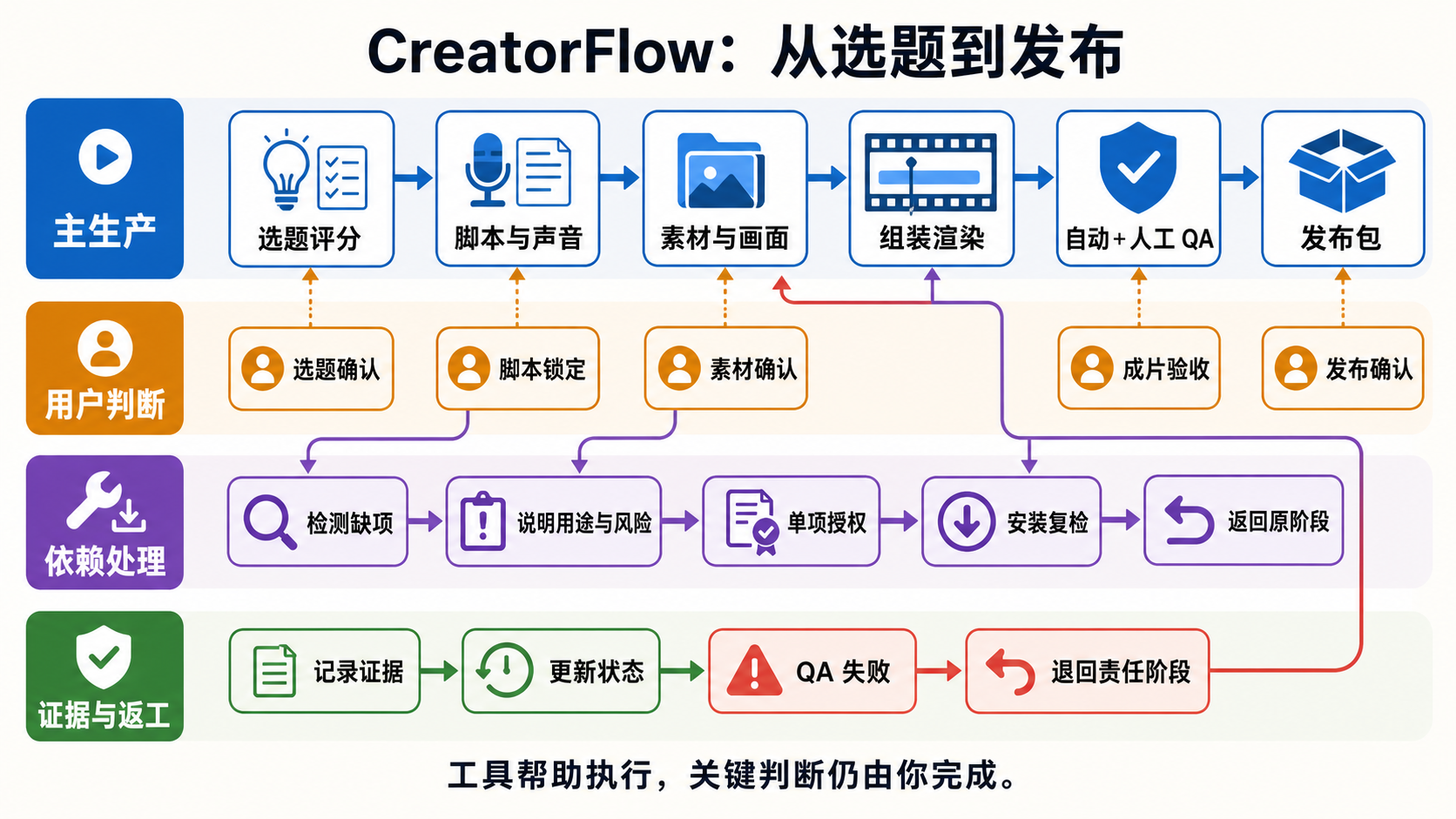
 CreatorFlow is an Agent Skills workflow that takes a video topic all the way through scoring, scripting, voiceover, materials, assembly, rendering, QA and a publish package, meant to be driven by a coding agent.
CreatorFlow is an Agent Skills workflow that takes a video topic all the way through scoring, scripting, voiceover, materials, assembly, rendering, QA and a publish package, meant to be driven by a coding agent.Is this an app I install, or a set of skills I hand to a coding agent?It is not a standalone app. It is a repo of shared skills, scripts and check rules under .agents/skills/ that any supported coding agent reads and executes; Claude Code only gets a thin entry point that points to the same main skill.
It is not a standalone app. It is a repo of shared skills, scripts and check rules under .agents/skills/ that any supported coding agent reads and executes; Claude Code only gets a thin entry point that points to the same main skill.How do I get started with it?Clone the repo and open the root folder with an agent that has local file and terminal access, then send it the start instruction; alternatively run the Windows PowerShell commands manually and wait for a capability check to return ready: true.
Clone the repo and open the root folder with an agent that has local file and terminal access, then send it the start instruction; alternatively run the Windows PowerShell commands manually and wait for a capability check to return ready: true.Which coding agents and tools does it need?It supports Codex, TRAE Work, Claude Code, OpenClaw and Hermes as the agent layer; the macOS Core Beta path needs PowerShell 7, Python 3, FFmpeg and ffprobe, with HyperFrames and voice tools added as needed.
It supports Codex, TRAE Work, Claude Code, OpenClaw and Hermes as the agent layer; the macOS Core Beta path needs PowerShell 7, Python 3, FFmpeg and ffprobe, with HyperFrames and voice tools added as needed.Does passing automated QA mean the video is ready to publish?No. Automated QA and the human visual review are two separate gates, and a script showing PASS is never treated as the video being publish-ready.
No. Automated QA and the human visual review are two separate gates, and a script showing PASS is never treated as the video being publish-ready.Is Windows required, or does it run on Mac too?Windows is the current main line; a macOS Core Beta is open and tested on both Intel and Apple Silicon for the basic pipeline, though local voice cloning and auto-upload are not yet promised on Mac.
Windows is the current main line; a macOS Core Beta is open and tested on both Intel and Apple Silicon for the basic pipeline, though local voice cloning and auto-upload are not yet promised on Mac.Does it ever touch my accounts, logins or private data?No secrets are meant to be committed: local config, cookies, tokens, API keys, voice samples and local paths are excluded, and API base URLs only come from your own command line, env vars or a local providers file, never a hardcoded relay.
No secrets are meant to be committed: local config, cookies, tokens, API keys, voice samples and local paths are excluded, and API base URLs only come from your own command line, env vars or a local providers file, never a hardcoded relay.What does a finished run actually leave behind?A complete run writes the inputs and production evidence into the project folder stage by stage: locked script, actual audio/subtitles, source material and visual beat map, assembled project and render, a QA report plus a human visual review file, and finally a publish package with sync records.
A complete run writes the inputs and production evidence into the project folder stage by stage: locked script, actual audio/subtitles, source material and visual beat map, assembled project and render, a QA report plus a human visual review file, and finally a publish package with sync records.Can I run just one stage instead of the whole pipeline?Yes. The workflow reads currentStage, stageStatus, nextAction and blockers from the project state and jumps straight to the matching stage, so you can work on only topic scoring, scripting, assembly or QA on their own.
Yes. The workflow reads currentStage, stageStatus, nextAction and blockers from the project state and jumps straight to the matching stage, so you can work on only topic scoring, scripting, assembly or QA on their own.Will it silently download or upload things for me?No. Capability checks only report what is missing and how to get it, downloads and installs need an explicit -AcceptAction flag, and the publish package is generated for your review rather than auto-uploaded.
No. Capability checks only report what is missing and how to get it, downloads and installs need an explicit -AcceptAction flag, and the publish package is generated for your review rather than auto-uploaded.What if I can't reach GitHub or Hugging Face reliably?CreatorFlow ships separate Windows offline resource bundles with third-party files pre-downloaded, used when the normal online installer packages can't reach GitHub, Hugging Face, npm or PyPI; these bundles still never include login state or private keys.
CreatorFlow ships separate Windows offline resource bundles with third-party files pre-downloaded, used when the normal online installer packages can't reach GitHub, Hugging Face, npm or PyPI; these bundles still never include login state or private keys.What are similar projects?herk-edit-kit, guizang-product-video-skill, video-use, superpowers-zh, lanshu-create-ai-presenter-video, ai-marketing-skills, open-edit, ffmpeg-skill
herk-edit-kit, guizang-product-video-skill, video-use, superpowers-zh, lanshu-create-ai-presenter-video, ai-marketing-skills, open-edit, ffmpeg-skillWhich topics is it in?trae, voice-cloning, video-editing, hermes-agent, powershell, content-creation, text-to-speech, video-processing, openclaw, ffmpeg, workflow, workflow-automation
trae, voice-cloning, video-editing, hermes-agent, powershell, content-creation, text-to-speech, video-processing, openclaw, ffmpeg, workflow, workflow-automation