
Contrastive Language Models
A System One Model for Fast and Generalizable Decision-Making
| 📄 Blog | 🗣️ Discord | 🤗 Data & Models | 📚 API Reference | 🛠️ Fine-Tuning Tutorial |
🔥 Contrastive Language Models (CLMs) are a new class of System One
model trained with a contrastive learning objective that connects
states and actions. This repo serves CLM-8B behind a
TypeSafe-compatible API.
- CLM-8B is pre-trained on 60M Nemotron Q&A pairs, mid-trained on
30M synthetic hard negatives, and post-trained on 1M agentic
trajectories.
- It performs on par with Jev across computer-use, gaming and tool-calling
tasks with up to 9× lower latency. With lightweight fine-tuning it sets a
new SOTA as a verifier on agentic coding benchmarks: Terminal-Bench 2.1
(87.6%) and DeepSWE (81.6%).
- States and actions are disaggregated, so their embeddings are cached and
reused independently, which makes training and serving cheap and blazing fast!
We invite the community to plug it into their own agents and benchmarks!
Installation
pip install contrastive-lm
To install the latest from a clone:
pip install -e .
Quickstart
Serve
# 1. encoder (Qwen3-8B embeddings)
vllm serve Qwen/Qwen3-8B --served-model-name qwen3-8b --runner pooling --max-model-len 2048 --port 8090 &

# 2. CLM API on :8700 (downloads the 75 MB reference head on first run)
clm-serve
States longer than 2048 tokens are truncated. For longer states, raise both limits
together, e.g. --max-model-len 8192 on vllm serve and clm-serve --max-tokens 8192
(needs more GPU memory).
Ask typed questions about a state
from clm import CLMClient, Choice, Noul, Score

client = CLMClient()                          # CLM_BASE_URL (default http://127.0.0.1:8700), CLM_API_KEY
r = client.system_one(
    state="Customer: my invoice was charged twice and nobody answers the phone!",
    questions={
        "urgency": Noul(instructions="Is this urgent?"),
        "department": Choice(instructions="Which team should handle this?",
                             criteria={"billing": "Charges, invoices, refunds",
                                       "technical": "Bugs and outages"}),
        "frustration": Score(instructions="How frustrated is the customer?",
                             criteria=["Calm", "Frustrated", "Very angry"]),
    },
)
print(r.answers["urgency"].noul)                # 0.41022     probability the statement is true
print(r.answers["department"].choice)           # billing
print(r.answers["department"].probabilities)    # {'billing': 0.93878, 'technical': 0.06122}
print(r.answers["frustration"].score)           # 1.98386     expected level, 0..2
print(r.usage.input_tokens, r.latency_ms)       # 38 58.1     (106 tokens on a cold cache: option texts are embedded once)
Questions may be Noul / Choice / Score objects or plain wire-format
dicts, so a request written for TypeSafe replays as
client.system_one(state, questions).
Rank candidates directly
system_one is built on one primitive: score a candidate against a state.
For free-form candidates (best-of-N answers, tool names, next moves) use the
in-process engine's rank:
from clm import Engine

engine = Engine(emb_url="http://127.0.0.1:8090/v1/embeddings")     # reference head, downloaded if missing
engine.rank("What causes tides on Earth?",
            ["The Moon's gravitational pull.", "Photosynthesis in plants.", "Because the Earth is round."])
# [{'rank': 1, 'candidate': "The Moon's gravitational pull.", 'prob': 0.997}, ...]

engine.answer(state, questions)      # the same dict the HTTP endpoint returns, no server needed
Playground
clm-serve also serves a web UI at / (http://localhost:8700/ by default).
Write a state, add typed questions, and see CLM's answer distributions; every
request is also shown as JSON, curl and Python. A Rank tab ranks any
candidate set, and links are shareable.
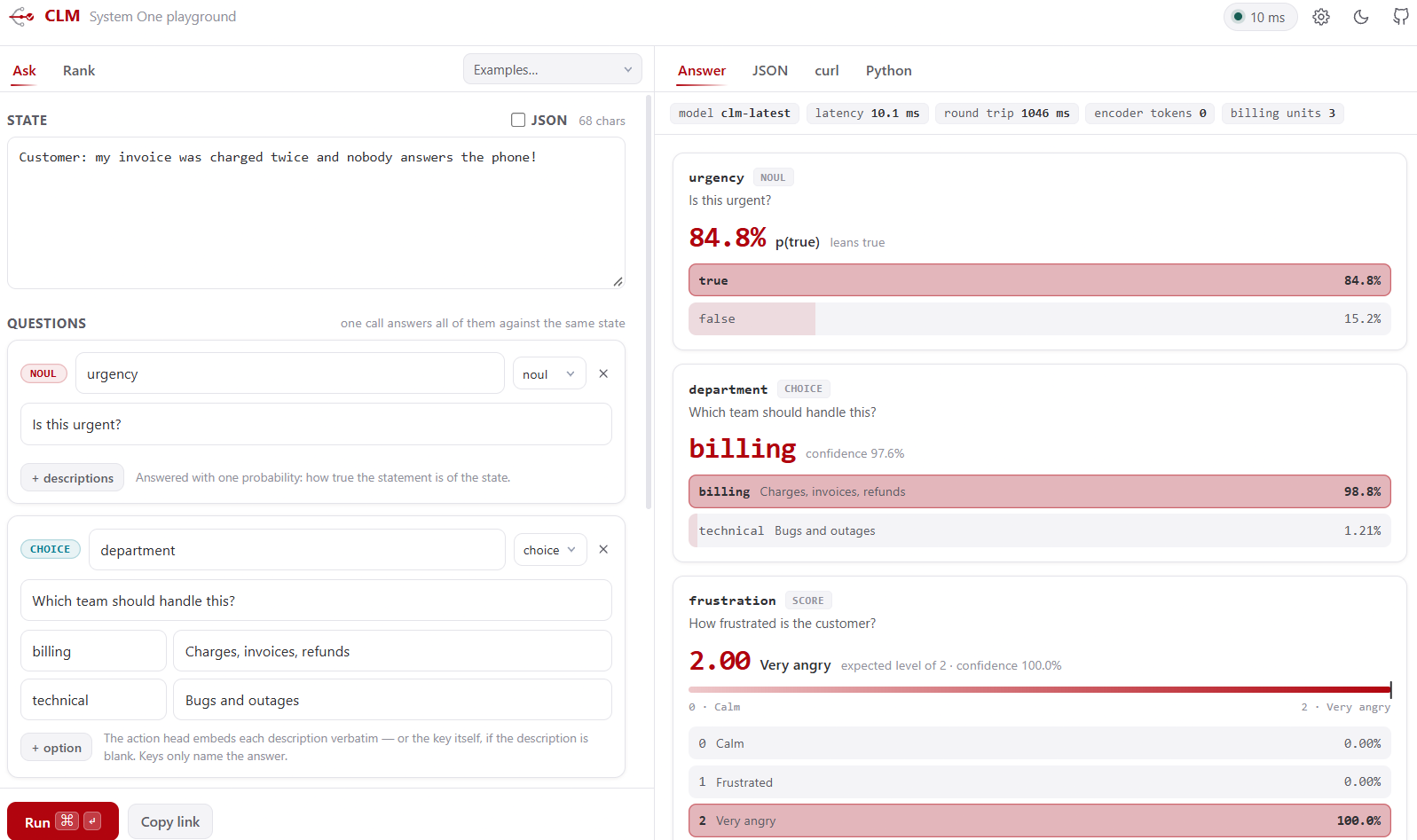
Captured against a real clm-serve (clm-latest, Qwen3-8B encoder on one RTX 4090).
Remote server? ssh -L 8700:localhost:8700 <host>. API only: clm-serve --no-ui.
Results
Zero-shot evaluation
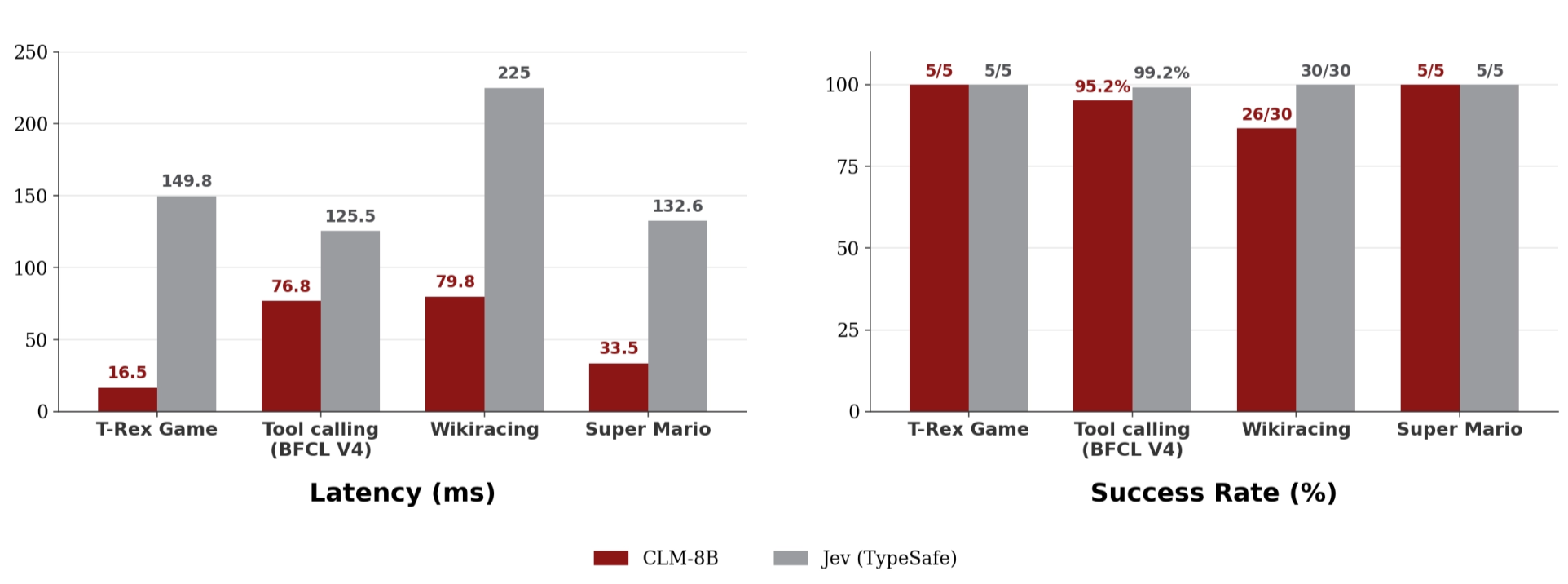
Across computer-use, gaming and tool-calling tasks, CLM-8B performs on par
with Jev while running up to 9× faster. The speedups are largest when the
number of candidate actions is large (WikiRacing) or when actions are reused
across states (the T-Rex game). The T-Rex benchmark ships in this repo:
see examples/t_rex.
Agentic benchmarks: CLM as a verifier
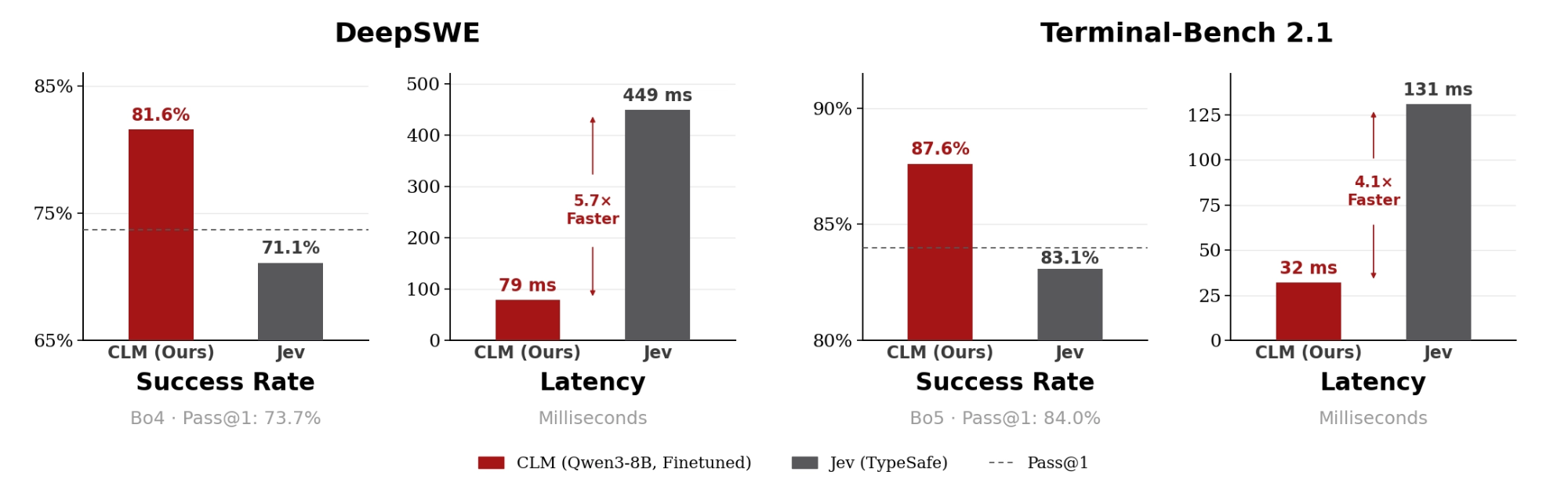
For each task we sample several candidate solutions (Opus 5 for DeepSWE,
Fable 5 for Terminal-Bench 2.1), and CLM or Jev acts as the verifier that
picks the best one. Evaluated on 38 held-out DeepSWE tasks and 30
held-out Terminal-Bench 2.1 tasks; latency on an H100. Jev fails to serve as
a verifier for these long-horizon tasks, scoring below pass@1. With lightweight
fine-tuning, CLM reaches SOTA on both (81.6% and 87.6%) while running
4.1–5.7× faster than Jev.
Fine-tuning CLM on Your Own Data
See docs/FINETUNING.md.
# reproduce the task-disjoint DeepSWE heldout-38 result (31/38 = 81.6%)
hf download Contrastive-LM/deepswe-clm-heads-8k --local-dir heads/deepswe
python evaluation/bon_eval.py --hf-dataset Contrastive-LM/deepswe-clm-embeddings-8k \
    --checkpoint heads/deepswe/best_head.pt \
    --tasks-file heads/deepswe/heldout_tasks.json --n 4 --window 12

# fine-tune the matching DeepSWE head
python train/finetune.py --task clm --init-ckpt "$(clm-download)" --out-dir runs/deepswe \
    --holdout-tasks heads/deepswe/heldout_tasks.json --batch 512

# typed decisions
python train/finetune.py --task choice --data LocalLLaMA/typed-decisions --workflow all \
    --init-ckpt "$(clm-download)" --out-dir runs/typed
How it works
About
CLM first trains a state encoder and an action encoder on a
large-scale dataset with a contrastive objective (InfoNCE), so that each state
is pulled toward the ground-truth action that was taken and pushed away from
all others. The two encoders then serve directly as a zero-shot action
classifier: at deployment, given the current state and a set of candidate
actions, CLM scores each action by how well its embedding aligns with the
state embedding and selects the highest-scoring action.
That is what this package serves. A typed question is a state plus a closed
set of candidate actions (the options and their descriptions); a softmax over
CLM's scores is the answer distribution, and the same call ranks best-of-N
trajectories, routes tools, shortlists retrieval pools and answers typed
decisions with no per-task setup.
Architecture, data recipe and scaling laws:
- Each encoder is a frozen LLM backbone plus a 20M-parameter trainable
projection head, so inference is one
embedding per fresh text and a dot product per cached candidate.
- CLM is pre-trained on internet-scale Q&A, mid-trained on synthetic
hard negatives, post-trained on agentic traces, and can be easily
fine-tuned on downstream tasks (data recipe).
- The InfoNCE loss decreases predictably as a power law in training
compute, model size and dataset size (details).
browser ──► clm-serve  (CPU, :8700)   GET / (playground)
client  ──►                          POST /v1/systemone · GET /v1/models · GET /health
               │       state head + action head (20M params, hot-reloaded), embedding cache
               ▼
          vLLM Qwen3-8B pooling server (GPU, :8090)   /v1/embeddings
Training Algorithm
CLM is trained with a bidirectional InfoNCE loss. Given a batch of $B$
matched state–action pairs, we compute a $B \times B$ similarity matrix and,
for each positive pair $(s_i, a_i)$, optimize retrieval in both directions
($s_i \rightarrow a_i$ and $a_i \rightarrow s_i$):
L_{\mathrm{CLM}} = -\frac{1}{2B}\sum_i \left[ \log \frac{\exp\left(s_i^\top a_i/\tau\right)} {\sum_j \exp\left(s_i^\top a_j/\tau\right)} + \log \frac{\exp\left(a_i^\top s_i/\tau\right)} {\sum_j \exp\left(a_i^\top s_j/\tau\right)} \right]
For mid-training, the objective is extended with hard negatives. Let
$h_{ik}^{(a)}$ denote a hard negative action for state $s_i$; the
state-to-action direction becomes
L_{s \rightarrow a}^{\mathrm{hard}}=-\frac{1}{B}\sum_i\log\frac{\exp\left(s_i^\top a_i / \tau\right)}{\exp\left(s_i^\top a_i / \tau\right)+\sum_k\exp\left(s_i^\top h_{ik}^{(a)} / \tau\right)}.
Scaling Laws for Verification
The test InfoNCE loss $L$ scales as a power law with training compute $C$,
dataset size $D$, projection-head size $N$ and encoder size
$N_{\mathrm{enc}}$. These dimensions must be scaled jointly for the best
verification performance; when a scale factor is not bottlenecked by the
others, the dependence on each variable $X \in \{C, D, N, N_{\mathrm{enc}}\}$
is
L(X) \approx \left(\frac{X_c}{X}\right)^{\alpha_X},
where $X_c$ is a fitted scale constant and $\alpha_X$ the corresponding
scaling exponent, following Kaplan et al. Scaling the encoder size yields the
strongest gains. Experiments are conducted on the Nemotron DQA dataset and
evaluated on a held-out set; the fits and figures are in the
blog post.
Data vs. optimal model size. At a fixed compute budget, each iso-FLOP
curve of test loss against head size is well approximated by a parabola in
log-parameter space, and its minimum gives the optimal head size for that data
budget. The optimum grows almost exactly linearly with the number of training
tokens, $N^* \propto D^{1.02}$, at roughly 310 tokens per parameter.
Data Recipe
CLM is trained in three stages, each a progressively harder form of
state–action alignment:
- Pre-training on ~60M Nemotron DQA question–answer pairs, each
question the state and its answer the action. This learns broad semantic
representations.
- Mid-training on ~30M synthetic hard negatives generated by Gemini
2.5 Flash-Lite: semantically similar but incorrect answers to Nemotron DQA
questions, added to the InfoNCE loss as above. This develops fine-grained
discrimination between plausible actions.
- Post-training on ~1M agent trajectories from the Agent Data
Protocol (ADP) dataset, plus terminal traces from Endless-Terminals and
LiteCoder-Terminal-SFT. Each trajectory step is a state–action pair: the
agent's current context and the decision it took.
Replay during post-training. 40% of the post-training mixture is Nemotron
DQA replay and 60% agentic trajectories. With replay, Nemotron hard-negative
top-1 accuracy only moves from 69% to 68.5%; training on agentic data alone for
the same number of agentic steps drops it to 56.2%.
Why not train on hard negatives from the start? On ~100K held-out
questions (one gold answer, 10 hard negatives each), pre-training alone reaches
52.1% top-1 without seeing a hard negative, and a short mid-training stage
lifts it to 69.2%. Training with hard negatives from the start improves
quickly but peaks at 62.4% before overfitting, so the two-stage recipe is
7 points better at a fixed budget: hard negatives work best as a refinement
on top of pre-training, not a substitute for it.
The reference head served as clm-latest is
Contrastive-LM/CLM-v0.1-8B
(CLM_v0.1-8B.pt, Qwen3-8B backbone, last-token pooling). Any head in
the same checkpoint format — a torch.save dict with state_head /
action_head state dicts, logit_scale and cfg (width, depth,
projection_dim, activation, layernorm, residual) — can be served with
--ckpt; a head only makes sense with the encoder and pooling it was trained
against.
Roadmap
- Scaling experiments: larger backbones, and how far verification
performance keeps scaling.
- Vision and multimodal support: images, video and other modalities for
robotics and computer-use tasks.
- Scaling the data recipe: more pre-training, hard-negative mining and
agentic post-training.
Citation
If you find CLM useful, please consider citing it:
@misc{kwok2026contrastivelanguagemodels,
  title={Contrastive Language Models: A System One Model for Fast and Generalizable Decision-Making},
  author={Jacky Kwok and Hangoo Kang and Tarun Suresh and Jon Saad-Falcon and Marco Pavone and Christopher Ré and Azalia Mirhoseini},
  year={2026},
  note={Notion Blog},
  url={https://contrastive-lm.notion.site}
}
License
The code in this repository is released under the Apache 2.0 License. The CLM-8B weights are released under Apache 2.0 on Hugging Face.
Directory Structure
.
├── pyproject.toml               # the clm package (installed editable by requirements.txt)
├── serve_qwen3_8b.sh            # launch the Qwen3-8B pooling encoder on a GPU
├── download_head.sh             # fetch the released head (`clm-download` does the same)
├── assets/                      # logo + the playground screenshot used above
├── src/clm/                     # inference: the package `clm-serve` and `clm` ship
│   ├── __init__.py              #   from clm import CLMClient, Noul, Choice, Score, Engine
│   ├── client.py                #   CLMClient + question / answer types (no torch needed)
│   ├── schema.py                #   question -> (state text, candidate texts); logits -> Answer
│   ├── engine.py                #   Engine.answer(...) / Engine.rank(...): the inference engine
│   ├── heads.py                 #   head architecture, checkpoint load / hot-reload / download
│   ├── embedder.py              #   /v1/embeddings client + LRU cache of normalised embeddings
│   ├── cache.py                 #   the reserved vector arena behind --action-cache
│   ├── server.py                #   FastAPI app, `clm-serve`
│   └── static/                  #   the playground: index.html + app.css + app.js, no build step
├── tools/playground_mock.py     # serve the playground without a GPU (fake encoder)
├── train/                       # fine-tuning
│   ├── finetune.py              #   trains the projection heads on a frozen encoder
│   ├── adapters.py              #   dataset adapters: agentic traces, typed decisions
│   └── embed_utils.py           #   encoder embeddings with the training token recipe
├── evaluation/bon_eval.py            # unified best-of-N evaluation
├── preprocessing/hf_embeddings.py    # embedding dir <-> Hugging Face dataset
├── requirements.txt             # pip install -r requirements.txt  (clm + torch + vLLM + example deps)
├── examples/                    # CLM vs Jev on the T-Rex runner (examples/t_rex/README.md)
│   ├── common.py                #   one client for both endpoints: retries, latency, cache
│   └── t_rex/                   #   Chrome dinosaur game in real time (run.py --model clm|jev)
└── docs/FINETUNING.md           # the fine-tuning guide
This branch carries the inference package, the playground, the fine-tuning script,
the T-Rex example.
The scaling experiments, data pipelines and paper figures
live in the research repo's main branch.
API Reference
POST /v1/systemone
| field |
|
state |
string, object or array (objects are rendered as key: value text, arrays as - item lines; never JSON, the heads are trained on prose) |
model |
clm-latest (default), clm-raw, or any model from GET /v1/models |
questions |
{id: Question}, at least one |
temperature |
optional, (0, 100], default 1; divides the logits before the softmax |
| question |
required |
answer |
noul |
instructions; optional criteria: {"true": …, "false": …} |
{"noul": p_true} |
choice |
instructions (the question), criteria: {option: description} (each option is embedded as its description, or its key when the description is empty) |
{"choice", "confidence", "probabilities"} |
score |
instructions, criteria: [level0, level1, …] (ordered, ≥2) |
{"score", "confidence", "legend", "probabilities"} |
confidence = top probability minus the mean of the others.score = expected level index; legend maps indices back to the rubric.usage.input_tokens counts encoder tokens spent on cache misses;
billing_units is the number of questions.- Errors:
401 bad key · 422 malformed request or unknown model · 502
embedder unreachable. X-CLM-Latency-Ms carries the server-side time.
POST /v1/rank
The same primitive in its plain form: {"context": ..., "question": ..., "answers": [...]}
returns {"model", "ranked": [{"rank", "candidate", "prob"}, ...]}, best first. The
state head sees context + question, the action head sees each answer verbatim.
CLMClient.rank(context, question, answers) and Engine.rank(context, answers, question)
are the client and in-process forms.
GET /
The playground (see above), unless clm-serve --no-ui. Static
files only; every API route above shadows it.
GET /v1/models
{"models": [{"name": "clm-latest", "description": "...", "release_date": "2026-09-19"},
            {"name": "clm-raw", "description": "Ablation: cosine in the raw encoder space", ...}]}
clm-serve options
clm-serve [--port 8700] [--emb-url http://127.0.0.1:8090/v1/embeddings] [--emb-model qwen3-8b]
          [--max-tokens 2048] [--ckpt PATH] [--ckpt-dir DIR] [--model NAME=PATH ...] [--device cpu|cuda]
          [--action-cache 0.02|512MiB|0] [--no-ui] [--cors]
--ckpt PATH serves your own head as clm-latest (default: the reference
head in ~/.cache/clm/, downloaded if missing); --ckpt-dir DIR serves every
*.pt there under its file stem; --model NAME=PATH adds one more.
The heads run on the GPU when torch sees one, else on the CPU; --device (or
CLM_DEVICE) forces one. Checkpoints hot-reload when the file changes. Set CLM_API_KEY to require
Authorization: Bearer <key> (the playground has a field for it). Environment
equivalents: CLM_PORT, CLM_EMB_URL, CLM_EMB_MODEL, CLM_CKPT,
CLM_DEVICE, CLM_ACTION_CACHE.
--no-ui drops the playground and serves the API alone. --cors allows browser
requests from any origin and is off by default, because an API key otherwise
travels in a header any page would then be free to send.
The vector cache
An agent asks about a changing state but a mostly fixed set of actions, and it
revisits states it has already seen. Neither their embeddings nor their
projections change while the head does not, so clm-serve reserves a slab of
device memory at start-up — the way vLLM claims its KV cache — and keeps them in
it:
[clm] vector cache 505.0 MB reserved on cuda (215,764x512d + 3,852x4096d)
--action-cache takes a fraction of the device (0.02, the default), an
absolute size (512MiB), or 0 to switch it off; CLM_ACTION_CACHE does the
same. It covers states and actions on every served head, and clm-raw in the
encoder's own space — the two widths are pools carved from the one allocation,
which never grows, so a long-running server cannot drift into an out-of-memory
kill. Entries are keyed by head and generation, so several heads share the arena
and a hot-reloaded head stops matching rows its previous weights produced;
eviction is least-recently-used. GET /health reports occupancy and hit rate.
A hit skips the encoder call, the host-to-device copy and the head's forward
pass. Measured on one RTX 4090, server-side p50, against a fixed action set:
|
3 actions |
50 actions |
| new state every call |
28.6 → 28.0 ms |
28.8 → 28.1 ms |
| revisited states (20 rooms) |
1.7 → 0.6 ms |
2.0 → 0.7 ms |
| one repeated state |
1.7 → 0.6 ms |
2.0 → 0.7 ms |
So a loop that revisits states answers about 2.8x faster, and a loop that never
repeats itself pays the encoder either way. A cached vector costs no encoder
tokens, so usage.input_tokens counts only what the encoder actually did.

 CLM (Contrastive Language Models) — модель «Системы 1», обученная с контрастивной целью, связывающей состояния и действия, разворачиваемая за TypeSafe-совместимым API как CLM-8B. Она задумана для подключения к агентам в качестве быстрого скорера/верификатора решений, вызовов инструментов и кандидатов best-of-N.