





20.1K ·GitHub
What is this?
 Tongyi DeepResearch — an open-source agentic LLM from Alibaba's Tongyi Lab, built for long-horizon, deep information-seeking on the web. This repo ships the model weights plus Python inference and benchmark evaluation scripts.
Tongyi DeepResearch — an open-source agentic LLM from Alibaba's Tongyi Lab, built for long-horizon, deep information-seeking on the web. This repo ships the model weights plus Python inference and benchmark evaluation scripts.So is it an app I install, or a model I have to run myself?A model, not a packaged app: 30.5B total parameters with only 3.3B activated per token and a 128K context window. You download the weights and run them with the repo's inference scripts, or skip hosting and call the model through OpenRouter's API.
A model, not a packaged app: 30.5B total parameters with only 3.3B activated per token and a 128K context window. You download the weights and run them with the repo's inference scripts, or skip hosting and call the model through OpenRouter's API.How do I get it running?Create an isolated Python 3.10 environment (conda or virtualenv), install the dependencies, copy the example .env and fill in your API keys, point the inference script at your model weights and question file, then run it.
Create an isolated Python 3.10 environment (conda or virtualenv), install the dependencies, copy the example .env and fill in your API keys, point the inference script at your model weights and question file, then run it.Which services and keys does it need to actually search the web?A Serper.dev key for web search and Google Scholar, Jina.ai for page reading, an OpenAI-compatible API for page summarization, Dashscope for file parsing, and a SandboxFusion endpoint for the Python sandbox — all configured in .env.
A Serper.dev key for web search and Google Scholar, Jina.ai for page reading, an OpenAI-compatible API for page summarization, Dashscope for file parsing, and a SandboxFusion endpoint for the Python sandbox — all configured in .env.Can I just try it online somewhere?Yes — there are hosted demos on ModelScope, HuggingFace and Alibaba's bailian service. They are for quick exploration only and can be slow or fail intermittently due to model latency and tool QPS limits.
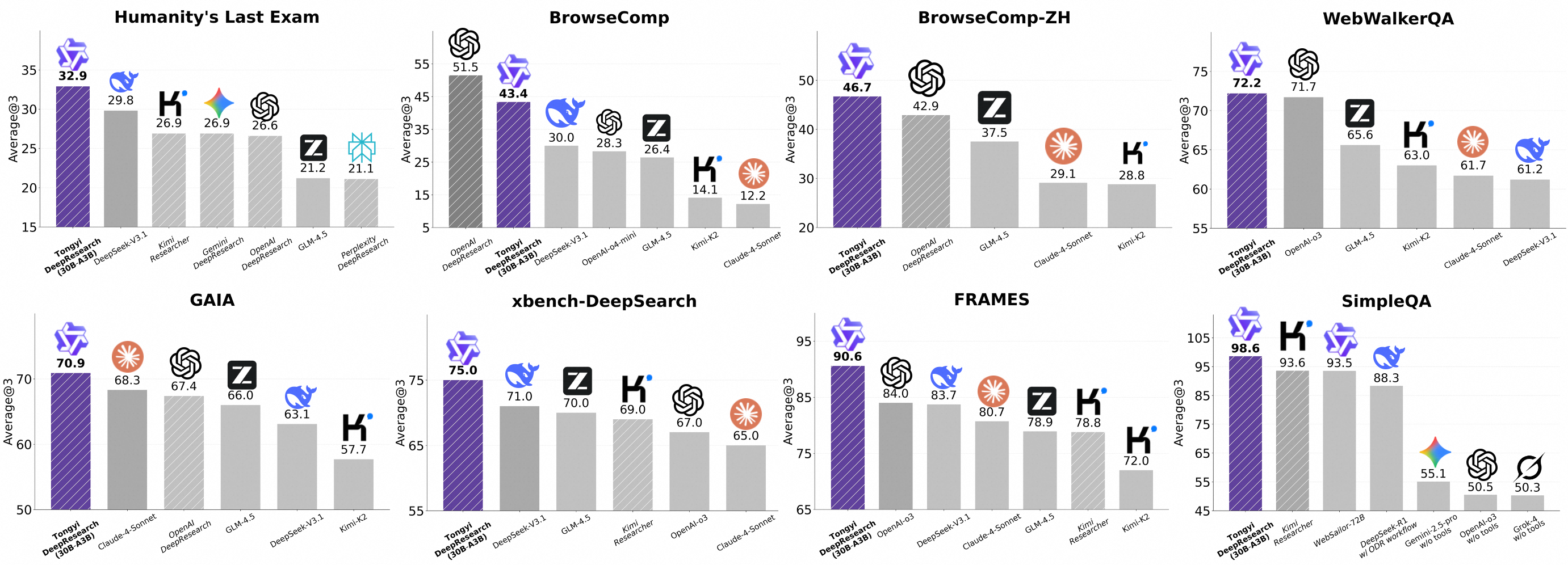
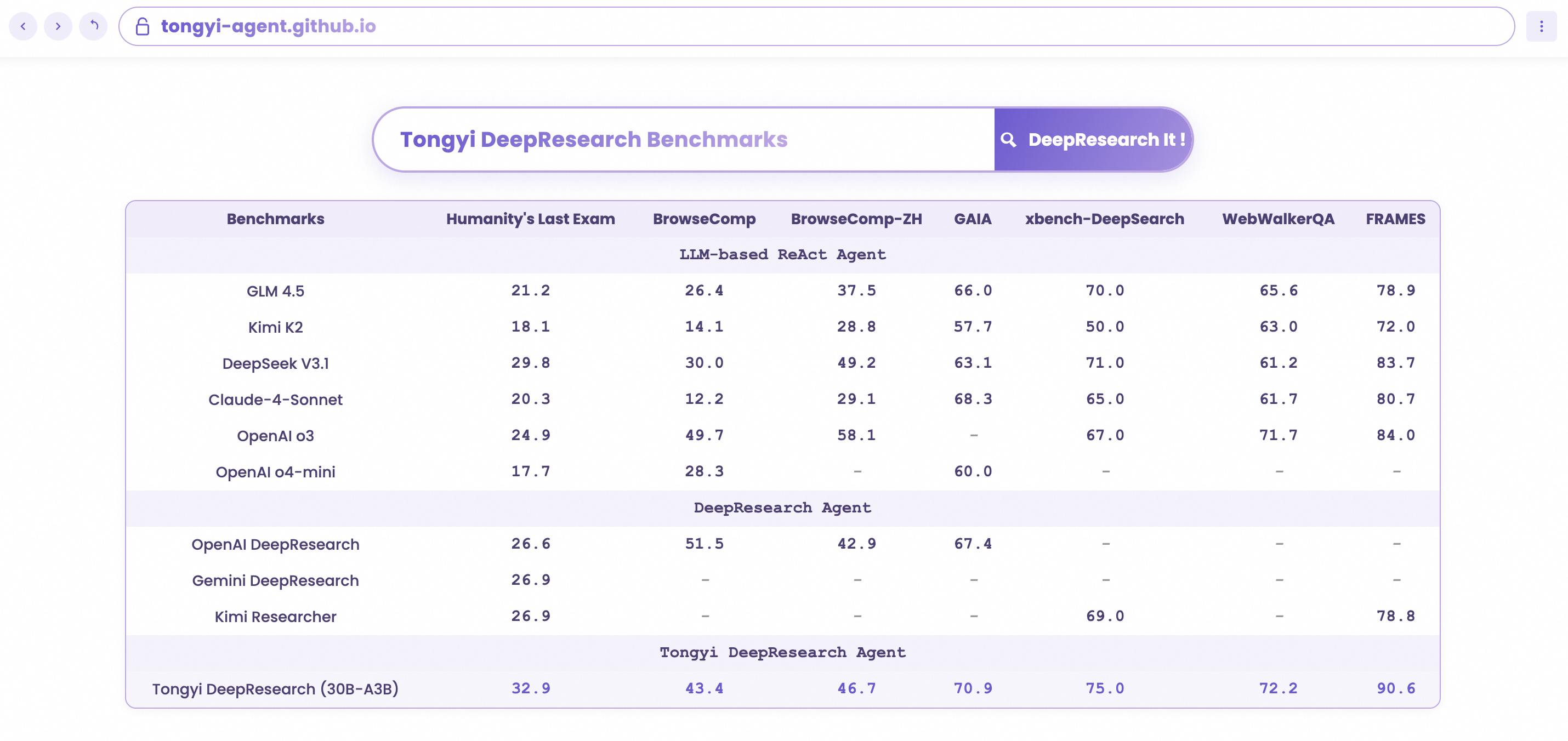
Yes — there are hosted demos on ModelScope, HuggingFace and Alibaba's bailian service. They are for quick exploration only and can be slow or fail intermittently due to model latency and tool QPS limits.How strong is it, actually?It reports state-of-the-art results across agentic search benchmarks, including Humanity's Last Exam, BrowseComp, BrowseComp-ZH, WebWalkerQA, xbench-DeepSearch, FRAMES and SimpleQA.
It reports state-of-the-art results across agentic search benchmarks, including Humanity's Last Exam, BrowseComp, BrowseComp-ZH, WebWalkerQA, xbench-DeepSearch, FRAMES and SimpleQA.What is the 'Heavy' mode?One of two inference paradigms the model supports: IterResearch-based 'Heavy' mode uses test-time scaling to unlock its maximum performance ceiling, while plain ReAct mode measures the model's core intrinsic abilities.
One of two inference paradigms the model supports: IterResearch-based 'Heavy' mode uses test-time scaling to unlock its maximum performance ceiling, while plain ReAct mode measures the model's core intrinsic abilities.How was the model trained?Through a fully automated synthetic-data pipeline powering agentic continual pre-training, supervised fine-tuning and reinforcement learning — the RL stage is strictly on-policy, built on a customized GRPO framework with token-level policy gradients.
Through a fully automated synthetic-data pipeline powering agentic continual pre-training, supervised fine-tuning and reinforcement learning — the RL stage is strictly on-policy, built on a customized GRPO framework with token-level policy gradients.What do I feed it — do I have to write the answers too?Evaluation runs on JSON or JSONL files of question/answer pairs, but the answer field is ground truth used only to automatically judge the model's responses — the agent itself just gets the question. Files for the document parser tool go in evaldata/filecorpus/.
Evaluation runs on JSON or JSONL files of question/answer pairs, but the answer field is ground truth used only to automatically judge the model's responses — the agent itself just gets the question. Files for the document parser tool go in evaldata/filecorpus/.What are similar projects?NeoHorse, DeepAnalyze, Qwen3.8, minimind, gpt-researcher, Qwen3-Coder, GLM-5, ZDTaichu5.0-9B
NeoHorse, DeepAnalyze, Qwen3.8, minimind, gpt-researcher, Qwen3-Coder, GLM-5, ZDTaichu5.0-9BWhich topics is it in?long-context, alibaba, deep-research, web-search, moe, reinforcement-learning, evaluation, openai-compatible, artificial-intelligence, agentic-ai, huggingface, benchmark
long-context, alibaba, deep-research, web-search, moe, reinforcement-learning, evaluation, openai-compatible, artificial-intelligence, agentic-ai, huggingface, benchmark