Agentic Product Demo
Point your coding agent at your product and get a demo video back — built in
React, not recorded off a screen.
What's in it · Your first clip · Motion rules · Working with an agent · The frame gate · Licensing
The hard part is not making a video. It is making one that does not look like
a screen recording. This repo is the motion vocabulary, the render pipeline and
the frame gate that got mine there, plus the skill file that makes an agent
follow them instead of improvising.

src/compositions/Demo.tsx — sixteen seconds, exactly what npm run render
gives you on a fresh clone. Nothing on screen snaps between frames: the counter
counts, the rows stagger, the pointer stops before it presses. A screen
recording of a real app shows every one of those as a teleport.
npm install
npm run adopt ../src/app/globals.css   # take your product's real tokens
npm run studio     # preview at localhost:3000
npm run preview    # stills on every beat + a contact sheet — seconds
npm run render     # renders, stitches, and gates the result
Node 20+. First render downloads a headless Chromium (~100 MB); if that fails
see Troubleshooting.
Works with Claude Code, Cursor, or anything else that loads a skill file. It
reads your product, puts up a shot list, and waits for you to correct it —
what that looks like. Then it writes the composition,
renders it, and refuses to pass a render it cannot verify.
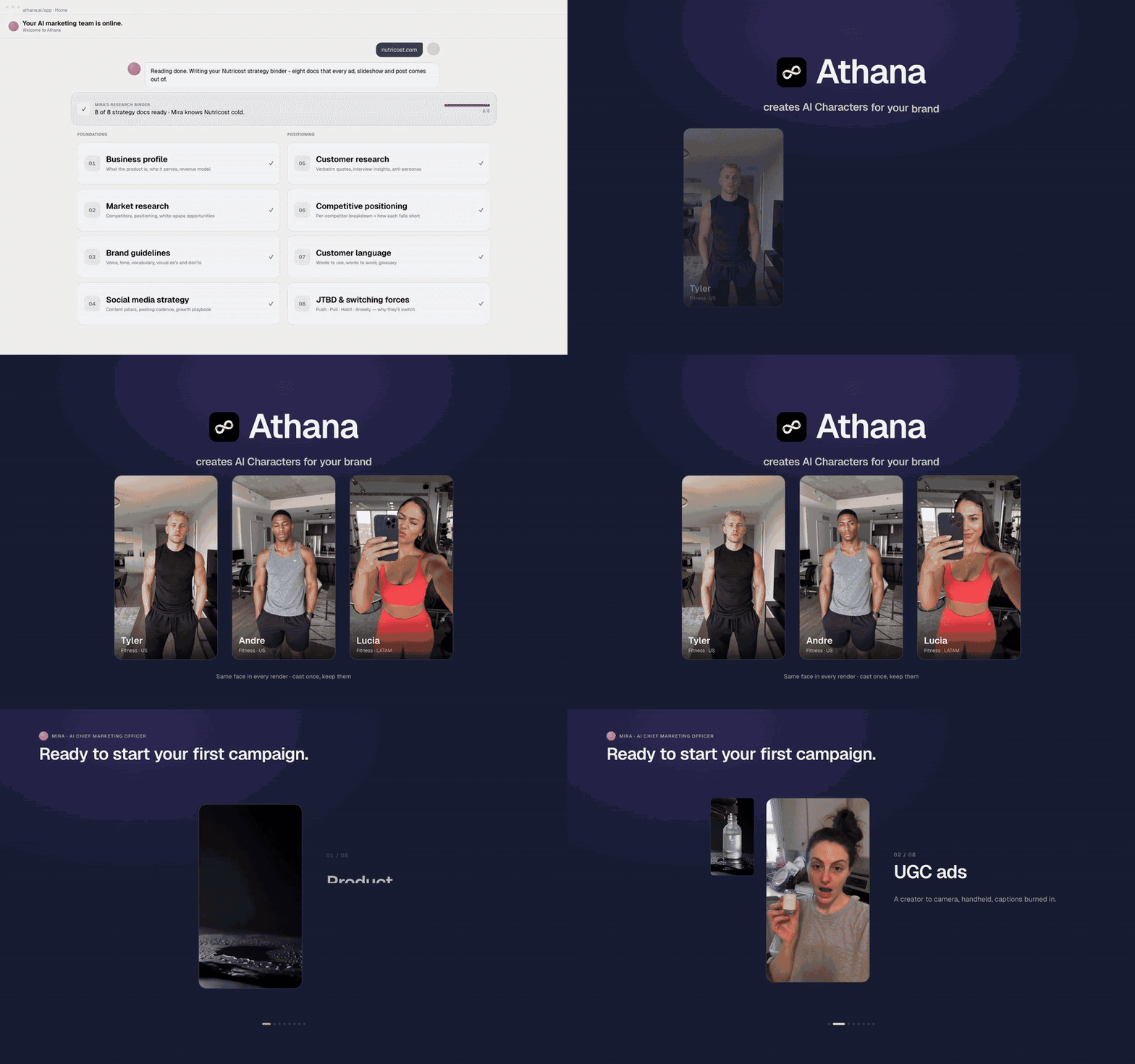
The same pipeline, cut for Athana — five movements, one
flow, no screen recorder. It runs on that product's own assets, which is why
the composition that ships here is the generic one above.
What's in it
|
|
src/motion.ts |
The vocabulary. Curves, durations, stagger, and the helpers that stop states teleporting. Imports nothing. |
src/title-card.tsx |
The cold open — words rising out of per-word masks. |
src/chrome.tsx |
The fake app window, the pointer, the click beats. |
src/compositions/Demo.tsx |
A worked example. Copy this, change the flow. |
scripts/preview.sh |
Stills on every beat, plus a contact sheet. What the gate cannot see. |
scripts/render.sh |
Sequence render → 1536×960 mp4 + poster → gate. |
scripts/check-frames.mjs |
The frame gate. See below. |
scripts/add-sfx.sh |
Optional sound pass over the finished mp4. |
scripts/beats/ |
One beat file per clip — where the sound is scored. |
.claude/skills/product-demo/ |
The skill: the playbook an agent reads before touching any of it. |
AGENTS.md |
What an agent needs on arrival — commands, and the rules it would otherwise break. |
AGENTS.md at the root is read natively by Claude Code, Codex, Cursor, Aider,
Copilot, Gemini CLI and Windsurf — an agent opening this folder is oriented
before you say anything. CLAUDE.md points at it rather than repeating it.
Cursor users who want the skill loaded as a skill: copy
.claude/skills/product-demo/ to .cursor/skills/. Same file either way.
Your first clip
The mental model
A composition is a pure function of the frame number. useCurrentFrame()
hands you N, you return what the screen looks like at frame N. Nothing is
stateful and nothing animates on its own — if a value is not derived from the
frame, it does not move.
That is why every clip starts with a beat sheet: a block of named
constants for the frame each thing happens on. Look at the top of
src/compositions/Demo.tsx — FIELD_CLICK = 20, RUN_CLICK = 88,
TOAST_AT = 282. Decide those before you write any JSX, because every
entrance, colour change and cursor move is anchored to one of them.
Elements are positioned in absolute pixels rather than with flexbox. A demo is
choreography: you need to know where a button is in order to put a pointer
on it at frame 214.
1. Copy the example
cp src/compositions/Demo.tsx src/compositions/MyClip.tsx
Rename the export Demo → MyClip and DEMO_LEN → MYCLIP_LEN.
2. Register it
src/Root.tsx currently returns a single <Composition>. Wrap it in a
fragment and add yours next to it:
import { MyClip, MYCLIP_LEN } from "./compositions/MyClip";

return (
  <>
    <Composition id="demo" /* … */ />
    <Composition
      id="myclip"
      component={() => (
        <Clip body={<MyClip />} name="My Product" kicker="One line of promise" />
      )}
      durationInFrames={MYCLIP_LEN + TITLE_LEN}
      fps={FPS}
      width={WIDTH}
      height={HEIGHT}
    />
  </>
);
3. Watch it
npm run studio # localhost:3000, pick "myclip", scrub the timeline
Scrubbing is where the work happens. Jump to a beat, look at it, adjust the
constant, look again.
4. Look at it
sh scripts/preview.sh myclip
Reads the beat sheet out of your composition and shoots a still on each beat
and again twelve frames later, then tiles them into
out/myclip-preview/contact.jpg. Seconds, where a render is minutes.
Do this before every render. The gate that runs afterwards measures two
numbers per frame and cannot see whether the picture is right — a panel over
the header, a phase drawn empty, a pointer pressing the number above the
button all sail through it. Looking is the only thing that catches those, and
this makes looking cheap.
It cannot see time, though. Rhythm only exists in motion, so watch the mp4
when it comes out.
5. Render it
sh scripts/render.sh myclip 366 # 366 = which frame becomes the poster
npm run render is just this with demo. Output lands in out/.
The example runs 480 frames — 16 seconds. That is a default, not a ceiling.
Length follows your flow rather than a template. Budget one step, add 66 for
the title and ~30 for the outro, and set MYCLIP_LEN to the total:
| pace |
simple step |
movement with its own beats |
| punchy |
70 |
170 |
| standard |
100 |
240 |
| cinematic |
140 |
330 |
A three-step flow lands near 14 seconds; a five-movement product story runs
past 40. Nothing in the pipeline cares which you pick — the render, the gate
and the sound pass all read the length off the composition.
Working with an agent, you do not do this arithmetic: it derives the number
from the flow you described and shows its working, so you can answer "punchy"
in one word instead of counting frames.
6. Optionally, score it
bash scripts/add-sfx.sh myclip # out/myclip-sound.mp4
A clip autoplaying in a page has to stay muted — browsers block autoplay
with audio, and a scored file simply will not start. So for a page loop the
silent mp4 is the deliverable and the scored one is an extra.
For a launch video nobody autoplays: sound can be the point, and the scored
file is the one you ship. Either way the pass writes a new file and the silent
original is never overwritten.
The pass runs over the already-rendered mp4 and copies the video stream byte
for byte (-c:v copy), so no frame is redrawn and the gate does not need
re-running. Beats live in scripts/beats/<id>.txt, written against the
beat-sheet constants at the top of your composition. Nine sounds, chosen by
level of motion rather than by element — the palette and the rules are in
scripts/add-sfx.sh and in the skill.
Then make it yours
Run this first, before you draw anything:
npm run adopt                          # finds your stylesheet
npm run adopt ../src/app/globals.css   # or name it
npm run adopt ../app/globals.css --curves --dry-run
It reads your stylesheet and rewrites src/theme.css with your tokens —
--primary becomes the kit's --brand, a --poster/--backdrop becomes
--ground, and anything with no counterpart is derived from what did match
rather than left as a stranger's purple. --curves also copies your
cubic-bezier easings into src/motion.ts, so the film moves the way your
product moves. --dry-run reports and writes nothing.
It prints what it matched and what it could not, so a half-adopted palette is
visible instead of silent:
  ✓ --brand              --primary                taken
  ~ --brand-soft         —                        derived from --brand
  ! --ground             —                        PLACEHOLDER — no match
Handles Tailwind 3 and 4, :root / .dark / [data-theme] /
prefers-color-scheme, and one level of var() indirection. It takes the
dark palette by default — the title card, the ground and the loop seam all
sit on a dark stage — so pass --mode=light for a light demo.
It copies, it does not link. Remotion cannot import an app stylesheet: that
pulls Tailwind plugins and font files that live on the app's own serving path.
So these are snapshots, the written file records its source and date, and a
token you change in the app afterwards needs a rerun. Hand-edits to
src/theme.css do not survive the next run — put a deliberate override in a
composition, or add your name to ALIASES in the script.
Then, by hand:
src/fonts.ts — swap the face. The script tells you which one your
stylesheet asks for, but cannot swap it for you: the family has to exist in
@remotion/google-fonts or be wired up as a local file. A fontFamily
string alone loads nothing; skip loadFont() and every frame silently
renders in a system fallback.MyClip.tsx — replace the flow with the real steps of your product, in the
real order, with copy taken from the live UI. A demo that walks a flow the
product doesn't have proves nothing, however good it looks.
The palette is the cheap half. The copy is what makes a frame recognisable as
your software — the real button labels, the real row names, the real empty
state. npm run adopt cannot do that part, and the skill is written to stop an
agent inventing it.
The nine motion rules
These are the difference between a clip that reads as software and one that
reads as a screenshot slideshow. Long form in
.claude/skills/product-demo/references/motion.md.
- A boolean in a style is a bug.
on ? "var(--brand)" : "var(--border)"
snaps in one frame. Anchor a ramp at the frame the state changes and blend
the tokens through it.
- Never
scale(0). Entrances start at 0.9–0.97 and travel ≤16px. A 40px
entrance reads as a slide deck.
- Counters count. A number that jumps is the loudest teleport on screen,
because the eye is already reading it.
- Typed text types. Static copy in a field the flow says is being filled
reads as a screenshot, and viewers clock it instantly.
- Nothing enters as a group. Two-frame stagger, minimum.
- Springs for landing, ramps for travel. Damping 14 or above, or it
looks like a toy.
- Weight and layout stay stepped. Tweening
fontSize reflows the row
every frame.
- One hero beat per phase. If everything is animated, nothing reads as
animated.
- The pointer lands on what it presses, and stops there. Take the
coordinate off a rendered frame, never off the CSS — estimating a chip's
centre from padding and font size put the cursor 94px away, on the counter
above it. Then give every target two keys, the second outlasting the
press: with one key the pointer starts easing toward its next target the
frame it arrives, and the click fires 20 frames into that move.
And the one that is not about motion: never put a lasting transform on
the container that holds the whole UI. A scale on the app frame resamples
every glyph inside it. Move what is in the frame, never the frame.
Working with an agent
.claude/skills/product-demo/SKILL.md is written to be read by Claude Code,
Cursor, or anything else that loads skill files. It is not documentation with
a YAML header on top — it is a set of refusals.
First it reads your product, then proposes a plan.
If it can reach your repo, your running app or your site, it reads them — the
running order of your marketing page tells it which features matter and in
what order, and the app tells it what those features actually look like.
Neither answers the other's question. Then it drafts the whole thing and asks
you to confirm it, rather than interviewing you for what it could have looked
up.
Four things have to be settled before a line of a composition gets written:
0. A demo of the whole product, or a scene about one feature? A product
demo strings three to five features into movements on a through-line; a
feature clip walks one flow start to finish. They are not the same clip at
different lengths.
That answer also decides where the clip lives — whole product means a
standalone launch video that plays once, one feature means a muted loop in a
page section — and with it the loop seam, the sound, the length ceiling and
the ending. Both crossings happen, so the agent picks and shows you the
pick rather than assuming in silence.
1. What is being made on screen? Not the feature — the thing the viewer
watches get built. "A revenue report", "a deploy going out".
2. What does it walk, in order? Real steps, or real features as
movements with something carrying the viewer between them. Copy comes from
the live product.
3. How does it end? By default on the finished thing — the flow
completes and the last state holds long enough to read. No asset, no
question. Only when the ending is media your product generates does it
need a real file, and there it may propose one from your disk but never
fabricate a stand-in.
Most of that you never answer.
Settled is not the same as asked. The agent drafts what it can read — the
flow, the screens, the copy, the ending — and only three things come back to
you, in one block rather than an interview:
- Scope — the whole product, or one feature?
- Where it lives — a muted loop in a page section, or a standalone clip
that plays once? Pre-picked from your scope answer.
- The flow — do you already know the steps you want walked, or should it
read your product and propose them?
Each option carries a line saying what it costs you, and the agent's own
guess is already selected. That is the difference between this and a form:
you are correcting a plan, not filling one in. The usual answer is one click,
and so is the correction. In Claude Code it is a native picker; elsewhere the
same three arrive in a single message.
The third one matters more than it looks. Reading your product gives a
plausible flow, never the right one — the code does not record which path
converts, which step people get stuck on, or which feature shipped last week
and needs the attention. Only you know that. It is offered once and never
pressed: ignore it and the agent reads your product and proposes a flow anyway.
Beyond those three it asks for exactly one more thing, and only sometimes:
which file the ending shows, when the payoff is media your product generates
and several would do. Fragments are fine as answers everywhere.
Length is deliberately not among them. Asked, it gets answered "short" on
reflex, and a demo that rushes the steps it exists to show is the result. The
agent derives it from your flow and shows the arithmetic instead — which is
what the shot list below is.
Then it reads the screen it is about to rebuild.
The shot list settles what happens. What the clip looks like is decided by
how much of your codebase the agent actually reads, and the skill makes that
non-optional: nothing on screen may be invented.
Lists on screen — rows, cards, chips, steps — almost never live in the page.
They sit in a constants module with the real names, the real subtitles and the
real order, and the agent is told to grep a visible string back to its
definition and use the whole list. Light or dark is a property of the screen
rather than of the product. --primary is often not the accent the surface
you are drawing reaches for. Getting any of those wrong yields a clip that
renders clean, passes the gate, and is not your software.
It does not ask you for screenshots. Everything a screenshot would settle —
the arrangement, the density, the ground, the accent — is in the markup and the
classes, and asking for a picture is how an agent gives itself permission not
to read them.
Then it shows you the shot list, and waits.
t0    title     "Acme Studio" · "Ask a question, publish the answer"
0     query     types "Revenue by channel, last quarter", hits Run
96    results   five channel rows stagger in, the counter lands on 1,940
184   filter    "Paid only" lights, three rows dim, the total recounts
274   publish   press, the confirmation springs into its slot
380   out       folds back to the dark ground
Four steps and a hold: 66 for the title, four steps just under the standard
100, and 34 to fold out — 480 frames, 16s. Ends on the published report.
Say "punchy" for ~12s.
One line per phase, the frame it starts on, and the arithmetic behind the
length — so a redirect costs you a word instead of a paragraph.
That checkpoint is the whole reason the interview exists. The failure mode of
"make me a demo video" is a beautiful montage of output that never shows what a
visitor would actually do, and getting question 2 wrong is the one defect that
cannot be fixed in the edit — by the time you see it, the entire clip is built
on it. Correcting a line in that list costs a sentence. Correcting it after the
composition exists costs a rebuild.
Everything else it decides on its own and tells you in passing: the title copy,
the pace, and which single element carries the hero beat of each phase.
If you only take one thing from this repo, take that section.
The frame gate
Every render is checked before it is allowed to pass.
scripts/check-frames.mjs looks for two defects. Corrupted frames, where
the page texture comes back wrapped or mirrored inside an otherwise correct
frame — it hits a handful out of hundreds, at random, so it reads as a flicker
rather than as damage, and no encoder setting fixes it because it is already
baked into the JPEG. And luminance jumps, including the loop seam: the
last frame cutting back to frame 0, which fires every time the video repeats
and which nobody inspects.
480 frames, 1536x960

tiled frames: none

luminance jumps over 25: none

loop seam: frame 479 Y=20.0 -> frame 0 Y=20.0   jump 0.0
What it does not check is the picture. Two numbers per frame — half
against half, and average luminance — is the whole of it. A panel over the
header, a phase drawn empty, a counter cut off, a pointer pressing the wrong
element: every one of those passes. That is what scripts/preview.sh is for,
and why it runs before this, not instead of it.
scripts/render.sh exits non-zero on a failure, and keeps the frame
sequence when it fails, printing the path. The flagged JPEG is what decides
whether the encoder is innocent, and being able to open it is the only reason
to render through stills at all.
For a clip that plays once rather than looping, pass STANDALONE=1 — the seam
check only means something for a clip that cuts back to its first frame, and
without the flag the gate fails a launch video for ending somewhere brighter
than it started. Remotion's docs also recommend
--concurrency=1 for flickering
and the render script always passes it — but a flag you have to remember is
not a guarantee.
**Two kn

 Этот репозиторий позволяет направить кодинг-агента вроде Claude Code или Cursor на ваш продукт и получить на выходе отполированное демо-видео, собранное на React с Remotion, вместо записи экрана.