AdGuardHome README

The project's README from github.com/AdguardTeam/AdGuardHome. As one markdown file: README.md.


AdGuard Home

Privacy protection center for you and your devices

Free and open source, powerful network-wide ads & trackers blocking DNS server.

AdGuard.com | Wiki | Reddit | Twitter | Telegram

Code Coverage Go Report Card Docker Pulls
Latest release adguard-home


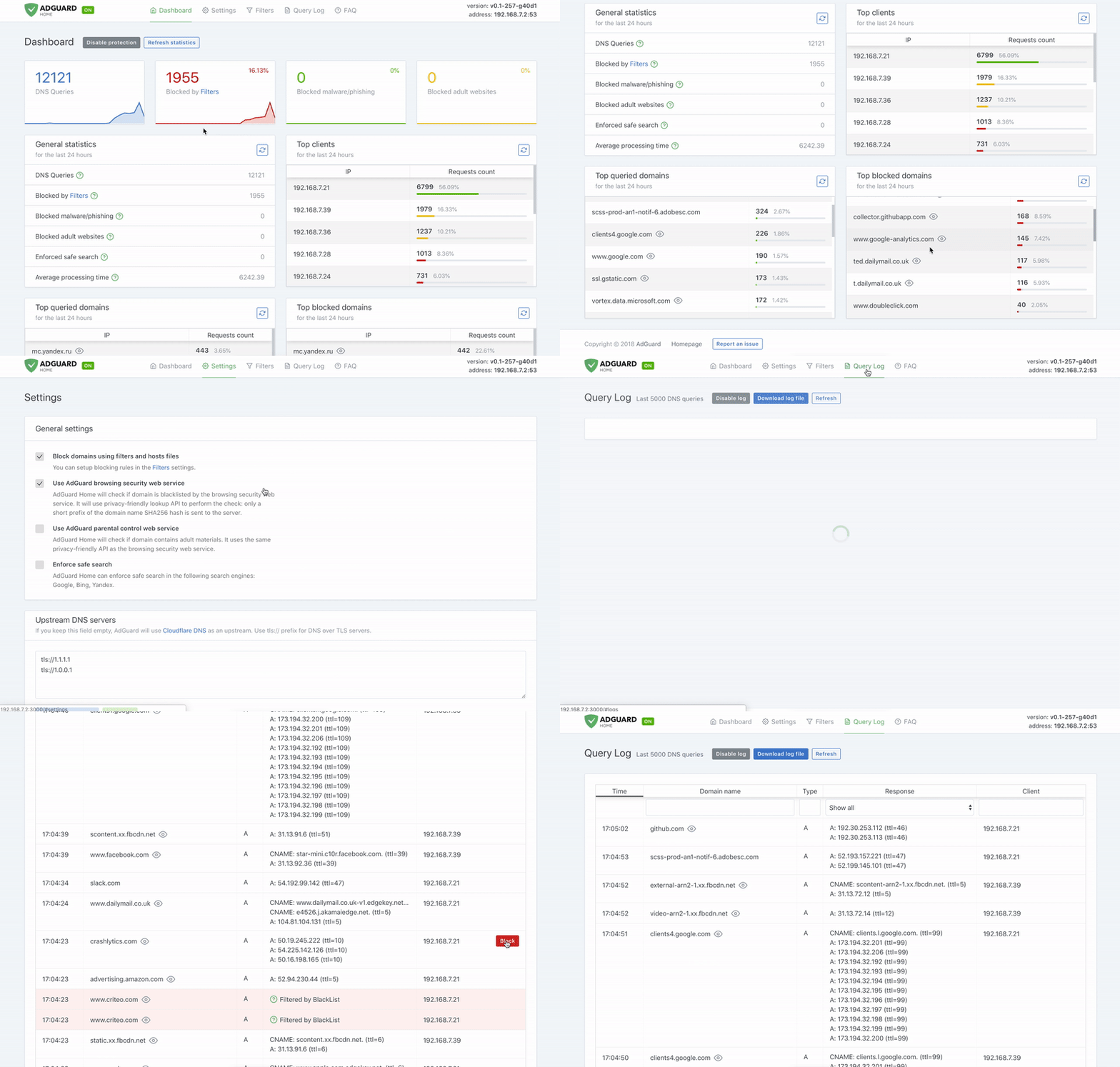
AdGuard Home is a network-wide software for blocking ads and tracking. After you set it up, it'll cover ALL your home devices, and you don't need any client-side software for that.

It operates as a DNS server that re-routes tracking domains to a “black hole”, thus preventing your devices from connecting to those servers. It's based on software we use for our public AdGuard DNS servers, and both share a lot of code.

Getting Started

Automated install (Linux/Unix/MacOS/FreeBSD/OpenBSD)

To install with curl run the following command:

curl -s -S -L https://raw.githubusercontent.com/AdguardTeam/AdGuardHome/master/scripts/install.sh | sh -s -- -v

To install with wget run the following command:

wget --no-verbose -O - https://raw.githubusercontent.com/AdguardTeam/AdGuardHome/master/scripts/install.sh | sh -s -- -v

To install with fetch run the following command:

fetch -o - https://raw.githubusercontent.com/AdguardTeam/AdGuardHome/master/scripts/install.sh | sh -s -- -v

The script also accepts some options:

Note that options -r and -u are mutually exclusive.

Alternative methods

Manual installation

Please read the Getting Started article on our Wiki to learn how to install AdGuard Home manually, and how to configure your devices to use it.

Docker

You can use our official Docker image on Docker Hub.

Snap Store

If you're running Linux, there's a secure and easy way to install AdGuard Home: get it from the Snap Store.

Guides

See our Wiki.

API

If you want to integrate with AdGuard Home, you can use our REST API. Alternatively, you can use this python client, which can be used to build the AdGuard Home Assistant integration.

Comparing AdGuard Home to other solutions

How is this different from public AdGuard DNS servers?

Running your own AdGuard Home server allows you to do much more than using a public DNS server. It's a completely different level. See for yourself:

How does AdGuard Home compare to Pi-Hole

At this point, AdGuard Home has a lot in common with Pi-Hole. Both block ads and trackers using the so-called “DNS sinkholing” method and both allow customizing what's blocked.

[!NOTE] We're not going to stop here. DNS sinkholing is not a bad starting point, but this is just the beginning.

AdGuard Home provides a lot of features out-of-the-box with no need to install and configure additional software. We want it to be simple to the point when even casual users can set it up with minimal effort.

[!NOTE] Some of the listed features can be added to Pi-Hole by installing additional software or by manually using SSH terminal and reconfiguring one of the utilities Pi-Hole consists of. However, in our opinion, this cannot be legitimately counted as a Pi-Hole's feature.

Feature AdGuard Home Pi-Hole
Blocking ads and trackers ✅ ✅
Customizing blocklists ✅ ✅
Built-in DHCP server ✅ ✅
HTTPS for the Admin interface ✅ Kind of, but you'll need to manually configure lighttpd
Encrypted DNS upstream servers (DNS-over-HTTPS, DNS-over-TLS, DNSCrypt) ✅ ❌ (requires additional software)
Cross-platform ✅ ❌ (not natively, only via Docker)
Running as a DNS-over-HTTPS or DNS-over-TLS server ✅ ❌ (requires additional software)
Blocking phishing and malware domains ✅ ❌ (requires non-default blocklists)
Parental control (blocking adult domains) ✅ ❌ (requires non-default blocklists)
Force Safe search on search engines ✅ ❌
Per-client (device) configuration ✅ ✅
Access settings (choose who can use AGH DNS) ✅ ❌
Running without root privileges ✅ ❌

How does AdGuard Home compare to traditional ad blockers

It depends.

DNS sinkholing is capable of blocking a big percentage of ads, but it lacks the flexibility and the power of traditional ad blockers. You can get a good impression about the difference between these methods by reading this article, which compares AdGuard for Android (a traditional ad blocker) to hosts-level ad blockers (which are almost identical to DNS-based blockers in their capabilities). This level of protection is enough for some users.

Additionally, using a DNS-based blocker can help to block ads, tracking and analytics requests on other types of devices, such as SmartTVs, smart speakers or other kinds of IoT devices (on which you can't install traditional ad blockers).

Known limitations

Here are some examples of what cannot be blocked by a DNS-level blocker:

Essentially, any advertising that shares a domain with content cannot be blocked by a DNS-level blocker.

Is there a chance to handle this in the future? DNS will never be enough to do this. Our only option is to use a content blocking proxy like what we do in the standalone AdGuard applications. We're going to bring this feature support to AdGuard Home in the future. Unfortunately, even in this case, there still will be cases when this won't be enough or would require quite a complicated configuration.

How to build from source

Prerequisites

Run make init to prepare the development environment.

You will need this to build AdGuard Home:

Building

Open your terminal and execute these commands:

git clone https://github.com/AdguardTeam/AdGuardHome
cd AdGuardHome
make

[!WARNING] The non-standard -j flag is currently not supported, so building with make -j 4 or setting your MAKEFLAGS to include, for example, -j 4 is likely to break the build. If you do have your MAKEFLAGS set to that, and you don't want to change it, you can override it by running make -j 1.

Check the Makefile to learn about other commands.

Building for a different platform

You can build AdGuard Home for any OS/ARCH that Go supports. In order to do this, specify GOOS and GOARCH environment variables as macros when running make.

For example:

env GOOS='linux' GOARCH='arm64' make

or:

make GOOS='linux' GOARCH='arm64'

Preparing releases

You'll need snapcraft to prepare a release build. Once installed, run the following command:

make build-release CHANNEL='...' VERSION='...'

See the build-release target documentation.

Docker image

Run make build-docker to build the Docker image locally (the one that we publish to DockerHub). Please note, that we're using Docker Buildx to build our official image.

You may need to prepare before using these builds:

See the build-docker target documentation.

Debugging the frontend

When you need to debug the frontend without recompiling the production version every time, for example to check how your labels would look on a form, you can run the frontend build a development environment.

  1. In a separate terminal, run:

    ( cd ./client/ && env NODE_ENV='development' npm run watch )
    
  2. Run your AdGuardHome binary with the --local-frontend flag, which instructs AdGuard Home to ignore the built-in frontend files and use those from the ./build/ directory.

  3. Now any changes you make in the ./client/ directory should be recompiled and become available on the web UI. Make sure that you disable the browser cache to make sure that you actually get the recompiled version.

End-to-End (E2E) Frontend Tests

AdGuard Home uses Playwright for E2E testing. Tests are located in tests/e2e.

Running Tests:

Setup:

  1. Run npm install to install dependencies.
  2. Run npx playwright install to set up required browsers.

Warning: Playwright will download and install its own browser binaries for testing, which may differ from the browsers installed on your system.

Contributing

You are welcome to fork this repository, make your changes and submit a pull request. Please make sure you follow our code guidelines though.

Please note that we don't expect people to contribute to both UI and backend parts of the program simultaneously. Ideally, the backend part is implemented first, i.e. configuration, API, and the functionality itself. The UI part can be implemented later in a different pull request by a different person.

Test unstable versions

There are two update channels that you can use:

There are three options how you can install an unstable version:

  1. Snap Store: look for the beta and edge channels.

  2. Docker Hub: look for the beta and edge tags.

  3. Standalone builds. Use the automated installation script or look for the available builds on the Wiki.

    Script to install a beta version:

    curl -s -S -L https://raw.githubusercontent.com/AdguardTeam/AdGuardHome/master/scripts/install.sh | sh -s -- -c beta
    

    Script to install an edge version:

    curl -s -S -L https://raw.githubusercontent.com/AdguardTeam/AdGuardHome/master/scripts/install.sh | sh -s -- -c edge
    

Report issues

If you run into any problem or have a suggestion, head to this page and click on the “New issue” button. Please follow the instructions in the issue form carefully and don't forget to start by searching for duplicates.

Help with translations

If you want to help with AdGuard Home translations, please learn more about translating AdGuard products in our Knowledge Base. You can contribute to the AdGuardHome project on CrowdIn.

Other

Another way you can contribute is by looking for issues marked as help wanted, asking if the issue is up for grabs, and sending a PR fixing the bug or implementing the feature.

Projects that use AdGuard Home

Please note that these projects are not affiliated with AdGuard, but are made by third-party developers and fans.

AdGuardHome (AdguardTeam/AdGuardHome)

Searching Database…

这是什么?一个免费开源的全网络 DNS 服务器,能为家里网络中的所有设备拦截广告和跟踪器:它把跟踪域名重定向到一个“黑洞”,所以设备本身不需要安装任何客户端软件。
所以它是整个网络共用一台服务器,而不是每台设备装一个应用?没错——它是一个自带网页管理界面的自托管 DNS 服务器,既不是浏览器扩展,也不是逐台设备安装的应用。你只需要在一台机器上设置一次,就能覆盖家里所有的设备。
我怎么把它跑起来?在 Linux/Unix/macOS/FreeBSD/OpenBSD 上用 curl、wget 或 fetch 运行自动安装脚本,或者使用官方 Docker 镜像或 Linux Snap 包。脚本支持一些选项,比如 -c 用于选择渠道,-r 用于重新安装,-u 用于卸载。
如果要用加密的 DNS-over-HTTPS 上游之类的功能,我需要额外装软件吗?不需要——像加密上游(DNS-over-HTTPS、DNS-over-TLS、DNSCrypt)这类功能开箱即用,不用装任何额外的软件。只有从源码构建才需要工具链:Go 1.25+、Node.js 24.10.0+ 和 npm 10.8+。
它有什么是拦截不了的?广告和内容共用同一个域名的情况:YouTube 和 Twitch 的广告,以及 Facebook、Twitter 和 Instagram 上的推广帖子。README 说得很直白——光靠 DNS 永远解决不了这个问题,那需要一个内容拦截代理,这个功能已列入未来计划。
它能在哪些系统上运行?可以原生运行在 Linux/Unix、macOS、FreeBSD 和 OpenBSD 上,另有官方 Docker 和 Snap 包。你也可以自己在 Go 支持的任意 OS/ARCH 组合上自行构建。
它和 Pi-Hole 有什么不同?两者都使用 DNS 沉井拦截、自定义屏蔽列表和内置 DHCP 服务器。AdGuard Home 的卖点是:很多 Pi-Hole 要靠额外软件或手动配置才能实现的功能,它都是内置的,包括管理界面的 HTTPS、原生的跨平台构建、自身可以作为 DNS-over-HTTPS/TLS 服务器、防钓鱼和恶意软件拦截、家长控制、强制安全搜索、访问权限设置,以及无需 root 权限即可运行。
为什么我要自己搭一个实例,而不是直接用公共的 AdGuard DNS 服务器?公共服务器只能拦截 AdGuard 决定拦截的内容。自己搭实例的话,你可以精确决定拦截什么、放行什么,添加自己的自定义过滤规则,监控自己的网络活动——而且一切尽在你自己掌控之中。
它能和 Home Assistant 集成吗?可以自动化操作吗?可以。AdGuard Home 提供了用 OpenAPI 规范文档化的 REST API,还有一个 Python 客户端,AdGuard Home 的 Home Assistant 集成就是用它构建的。
Size
33.6 MB
Stars
37.5K
Age
10y
Commits · 90 Days