

What is this?
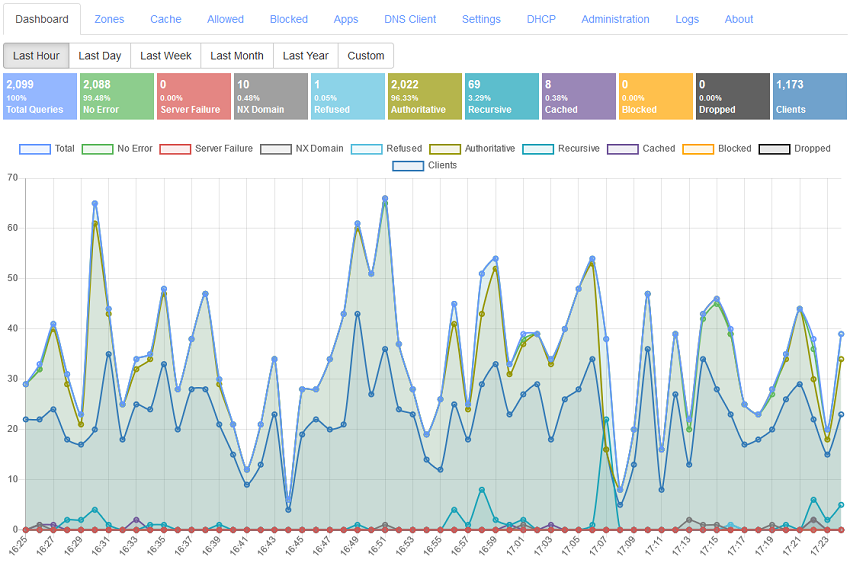
 Technitium DNS Server is an open source, self-hosted DNS server that works as both an authoritative server and a recursive resolver. Its headline use is blocking ads and malware at the DNS level for an entire home or organization network, with configuration done in a web console.
Technitium DNS Server is an open source, self-hosted DNS server that works as both an authoritative server and a recursive resolver. Its headline use is blocking ads and malware at the DNS level for an entire home or organization network, with configuration done in a web console.Is this something I install on every device, or run once for my whole network?You run it once on a machine serving your network — it works on Windows, Linux, macOS and Raspberry Pi, and a Docker image is also available — then point your devices' DNS at it. Everything is managed from a browser-based admin console.
You run it once on a machine serving your network — it works on Windows, Linux, macOS and Raspberry Pi, and a Docker image is also available — then point your devices' DNS at it. Everything is managed from a browser-based admin console.How do I get it running?Windows gets a setup installer, Linux and Raspberry Pi use an install script from the linked blog post, Docker users pull the official image from Docker Hub, and a portable build runs anywhere. It installs in about a minute and works out-of-the-box with zero configuration.
Windows gets a setup installer, Linux and Raspberry Pi use an install script from the linked blog post, Docker users pull the official image from Docker Hub, and a portable build runs anywhere. It installs in about a minute and works out-of-the-box with zero configuration.Do I need .NET installed first?Only for the portable cross-platform build, which runs on any platform that has .NET 10 installed. The Windows installer, the Linux install script and the Docker image are the routes without that requirement.
Only for the portable cross-platform build, which runs on any platform that has .NET 10 installed. The Windows installer, the Linux install script and the Docker image are the routes without that requirement.Will my ISP still see and control which sites I visit?Not if you forward queries over encrypted DNS: the server can use DNS-over-TLS, DNS-over-HTTPS or DNS-over-QUIC forwarders to public resolvers like Cloudflare, Google, Quad9 or AdGuard, and can even route DNS over Tor through a SOCKS5 proxy.
Not if you forward queries over encrypted DNS: the server can use DNS-over-TLS, DNS-over-HTTPS or DNS-over-QUIC forwarders to public resolvers like Cloudflare, Google, Quad9 or AdGuard, and can even route DNS over Tor through a SOCKS5 proxy.Will running my own DNS server slow my browsing down?The README claims the opposite: most repeat queries are answered from the DNS cache, so sites load faster. Caching includes Serve Stale, Prefetch and a persistent cache saved to disk across restarts, and it load-tested at more than 100,000 requests/second on an Intel i7-8700 over Gigabit Ethernet.
The README claims the opposite: most repeat queries are answered from the DNS cache, so sites load faster. Caching includes Serve Stale, Prefetch and a persistent cache saved to disk across restarts, and it load-tested at more than 100,000 requests/second on an Intel i7-8700 over Gigabit Ethernet.Can it block ads for devices that can't install ad blockers, like a TV?Yes — blocking happens at the DNS level, so every device using the server is covered. You add one or more block list URLs, the Advanced Blocking DNS App adds REGEX-based lists with different rules per client IP or subnet, and CNAME cloaking catches domains hiding behind blocked ones.
Yes — blocking happens at the DNS level, so every device using the server is covered. You add one or more block list URLs, the Advanced Blocking DNS App adds REGEX-based lists with different rules per client IP or subnet, and CNAME cloaking catches domains hiding behind blocked ones.Can I host my own domain names on it?Yes, it doubles as an authoritative nameserver: primary, secondary, stub and conditional forwarder zones, wildcard subdomains, DNSSEC signing with RSA, ECDSA and EdDSA, dynamic DNS updates, and zone transfers over TCP, TLS or QUIC. You can disable individual zones and records for testing.
Yes, it doubles as an authoritative nameserver: primary, secondary, stub and conditional forwarder zones, wildcard subdomains, DNSSEC signing with RSA, ECDSA and EdDSA, dynamic DNS updates, and zone transfers over TCP, TLS or QUIC. You can disable individual zones and records for testing.What else is built in besides DNS resolution?A built-in DHCP server that works across multiple networks, clustering to manage several DNS server instances from one admin console, multi-user role based access with TOTP two-factor auth plus SSO via OpenID Connect or LDAP, and pluggable DNS Apps for split horizon, geolocation answers, DNS64 and more.
A built-in DHCP server that works across multiple networks, clustering to manage several DNS server instances from one admin console, multi-user role based access with TOTP two-factor auth plus SSO via OpenID Connect or LDAP, and pluggable DNS Apps for split horizon, geolocation answers, DNS64 and more.What are similar projects?smartdns, xdp-dns-evadeproxy, AdGuardHome, coredns, pi-hole, portmaster, MasterDnsVPN, dnscrypt-proxy
smartdns, xdp-dns-evadeproxy, AdGuardHome, coredns, pi-hole, portmaster, MasterDnsVPN, dnscrypt-proxyWhich topics is it in?dns-over-tls, dns-server, dns-over-https, ipv6, 2fa, adblock, homelab, self-hosting, privacy-tools, caching, dns, raspberry-pi
dns-over-tls, dns-server, dns-over-https, ipv6, 2fa, adblock, homelab, self-hosting, privacy-tools, caching, dns, raspberry-pi