



AdGuardHome README

The project's README from github.com/AdguardTeam/AdGuardHome. As one markdown file: README.md.


AdGuard Home

Privacy protection center for you and your devices

Free and open source, powerful network-wide ads & trackers blocking DNS server.

AdGuard.com | Wiki | Reddit | Twitter | Telegram

Code Coverage Go Report Card Docker Pulls
Latest release adguard-home


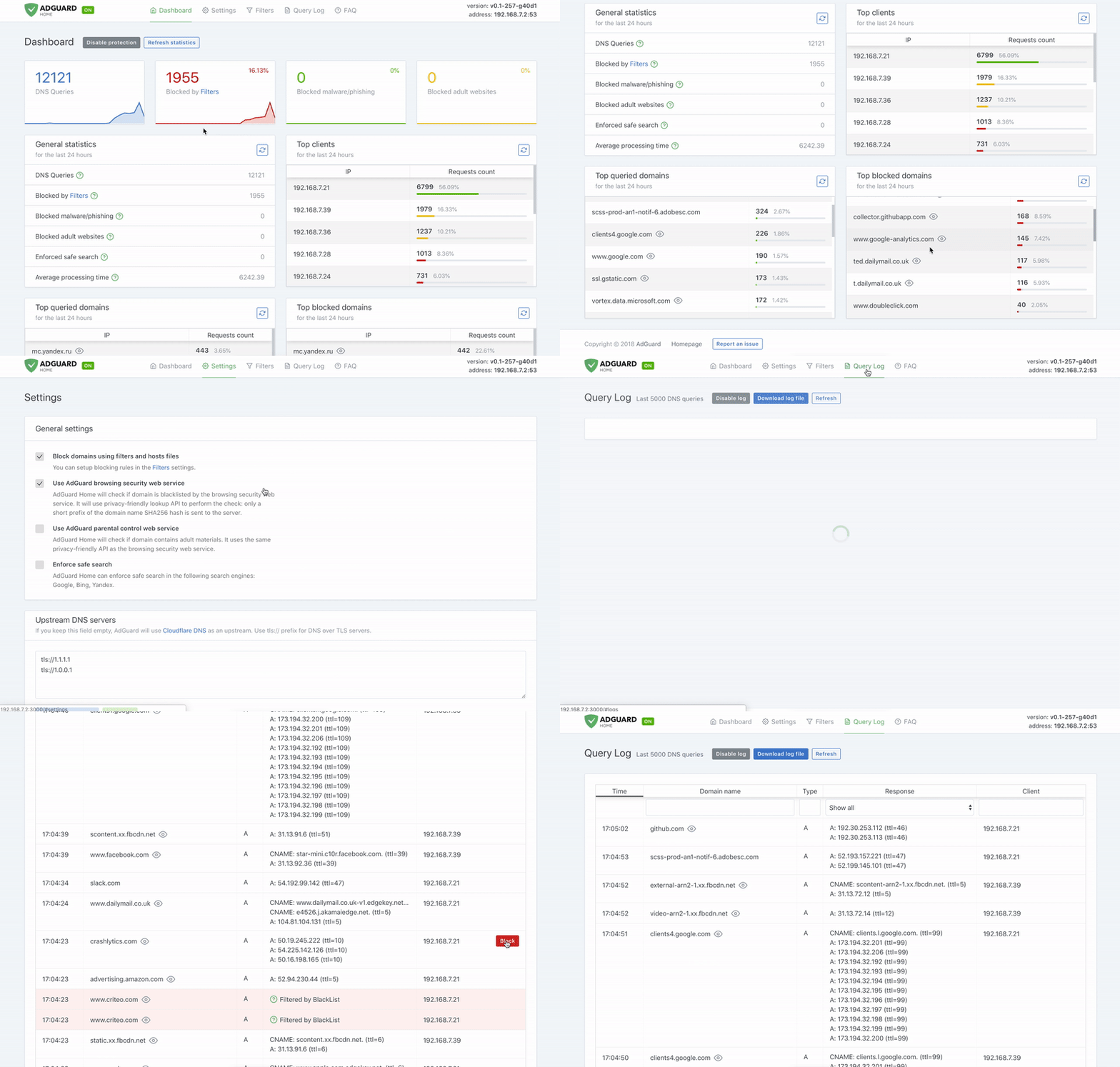
AdGuard Home is a network-wide software for blocking ads and tracking. After you set it up, it'll cover ALL your home devices, and you don't need any client-side software for that.

It operates as a DNS server that re-routes tracking domains to a “black hole”, thus preventing your devices from connecting to those servers. It's based on software we use for our public AdGuard DNS servers, and both share a lot of code.

Getting Started

Automated install (Linux/Unix/MacOS/FreeBSD/OpenBSD)

To install with curl run the following command:

curl -s -S -L https://raw.githubusercontent.com/AdguardTeam/AdGuardHome/master/scripts/install.sh | sh -s -- -v

To install with wget run the following command:

wget --no-verbose -O - https://raw.githubusercontent.com/AdguardTeam/AdGuardHome/master/scripts/install.sh | sh -s -- -v

To install with fetch run the following command:

fetch -o - https://raw.githubusercontent.com/AdguardTeam/AdGuardHome/master/scripts/install.sh | sh -s -- -v

The script also accepts some options:

Note that options -r and -u are mutually exclusive.

Alternative methods

Manual installation

Please read the Getting Started article on our Wiki to learn how to install AdGuard Home manually, and how to configure your devices to use it.

Docker

You can use our official Docker image on Docker Hub.

Snap Store

If you're running Linux, there's a secure and easy way to install AdGuard Home: get it from the Snap Store.

Guides

See our Wiki.

API

If you want to integrate with AdGuard Home, you can use our REST API. Alternatively, you can use this python client, which can be used to build the AdGuard Home Assistant integration.

Comparing AdGuard Home to other solutions

How is this different from public AdGuard DNS servers?

Running your own AdGuard Home server allows you to do much more than using a public DNS server. It's a completely different level. See for yourself:

How does AdGuard Home compare to Pi-Hole

At this point, AdGuard Home has a lot in common with Pi-Hole. Both block ads and trackers using the so-called “DNS sinkholing” method and both allow customizing what's blocked.

[!NOTE] We're not going to stop here. DNS sinkholing is not a bad starting point, but this is just the beginning.

AdGuard Home provides a lot of features out-of-the-box with no need to install and configure additional software. We want it to be simple to the point when even casual users can set it up with minimal effort.

[!NOTE] Some of the listed features can be added to Pi-Hole by installing additional software or by manually using SSH terminal and reconfiguring one of the utilities Pi-Hole consists of. However, in our opinion, this cannot be legitimately counted as a Pi-Hole's feature.

Feature AdGuard Home Pi-Hole
Blocking ads and trackers ✅ ✅
Customizing blocklists ✅ ✅
Built-in DHCP server ✅ ✅
HTTPS for the Admin interface ✅ Kind of, but you'll need to manually configure lighttpd
Encrypted DNS upstream servers (DNS-over-HTTPS, DNS-over-TLS, DNSCrypt) ✅ ❌ (requires additional software)
Cross-platform ✅ ❌ (not natively, only via Docker)
Running as a DNS-over-HTTPS or DNS-over-TLS server ✅ ❌ (requires additional software)
Blocking phishing and malware domains ✅ ❌ (requires non-default blocklists)
Parental control (blocking adult domains) ✅ ❌ (requires non-default blocklists)
Force Safe search on search engines ✅ ❌
Per-client (device) configuration ✅ ✅
Access settings (choose who can use AGH DNS) ✅ ❌
Running without root privileges ✅ ❌

How does AdGuard Home compare to traditional ad blockers

It depends.

DNS sinkholing is capable of blocking a big percentage of ads, but it lacks the flexibility and the power of traditional ad blockers. You can get a good impression about the difference between these methods by reading this article, which compares AdGuard for Android (a traditional ad blocker) to hosts-level ad blockers (which are almost identical to DNS-based blockers in their capabilities). This level of protection is enough for some users.

Additionally, using a DNS-based blocker can help to block ads, tracking and analytics requests on other types of devices, such as SmartTVs, smart speakers or other kinds of IoT devices (on which you can't install traditional ad blockers).

Known limitations

Here are some examples of what cannot be blocked by a DNS-level blocker:

Essentially, any advertising that shares a domain with content cannot be blocked by a DNS-level blocker.

Is there a chance to handle this in the future? DNS will never be enough to do this. Our only option is to use a content blocking proxy like what we do in the standalone AdGuard applications. We're going to bring this feature support to AdGuard Home in the future. Unfortunately, even in this case, there still will be cases when this won't be enough or would require quite a complicated configuration.

How to build from source

Prerequisites

Run make init to prepare the development environment.

You will need this to build AdGuard Home:

Building

Open your terminal and execute these commands:

git clone https://github.com/AdguardTeam/AdGuardHome
cd AdGuardHome
make

[!WARNING] The non-standard -j flag is currently not supported, so building with make -j 4 or setting your MAKEFLAGS to include, for example, -j 4 is likely to break the build. If you do have your MAKEFLAGS set to that, and you don't want to change it, you can override it by running make -j 1.

Check the Makefile to learn about other commands.

Building for a different platform

You can build AdGuard Home for any OS/ARCH that Go supports. In order to do this, specify GOOS and GOARCH environment variables as macros when running make.

For example:

env GOOS='linux' GOARCH='arm64' make

or:

make GOOS='linux' GOARCH='arm64'

Preparing releases

You'll need snapcraft to prepare a release build. Once installed, run the following command:

make build-release CHANNEL='...' VERSION='...'

See the build-release target documentation.

Docker image

Run make build-docker to build the Docker image locally (the one that we publish to DockerHub). Please note, that we're using Docker Buildx to build our official image.

You may need to prepare before using these builds:

See the build-docker target documentation.

Debugging the frontend

When you need to debug the frontend without recompiling the production version every time, for example to check how your labels would look on a form, you can run the frontend build a development environment.

  1. In a separate terminal, run:

    ( cd ./client/ && env NODE_ENV='development' npm run watch )
    
  2. Run your AdGuardHome binary with the --local-frontend flag, which instructs AdGuard Home to ignore the built-in frontend files and use those from the ./build/ directory.

  3. Now any changes you make in the ./client/ directory should be recompiled and become available on the web UI. Make sure that you disable the browser cache to make sure that you actually get the recompiled version.

End-to-End (E2E) Frontend Tests

AdGuard Home uses Playwright for E2E testing. Tests are located in tests/e2e.

Running Tests:

Setup:

  1. Run npm install to install dependencies.
  2. Run npx playwright install to set up required browsers.

Warning: Playwright will download and install its own browser binaries for testing, which may differ from the browsers installed on your system.

Contributing

You are welcome to fork this repository, make your changes and submit a pull request. Please make sure you follow our code guidelines though.

Please note that we don't expect people to contribute to both UI and backend parts of the program simultaneously. Ideally, the backend part is implemented first, i.e. configuration, API, and the functionality itself. The UI part can be implemented later in a different pull request by a different person.

Test unstable versions

There are two update channels that you can use:

There are three options how you can install an unstable version:

  1. Snap Store: look for the beta and edge channels.

  2. Docker Hub: look for the beta and edge tags.

  3. Standalone builds. Use the automated installation script or look for the available builds on the Wiki.

    Script to install a beta version:

    curl -s -S -L https://raw.githubusercontent.com/AdguardTeam/AdGuardHome/master/scripts/install.sh | sh -s -- -c beta
    

    Script to install an edge version:

    curl -s -S -L https://raw.githubusercontent.com/AdguardTeam/AdGuardHome/master/scripts/install.sh | sh -s -- -c edge
    

Report issues

If you run into any problem or have a suggestion, head to this page and click on the “New issue” button. Please follow the instructions in the issue form carefully and don't forget to start by searching for duplicates.

Help with translations

If you want to help with AdGuard Home translations, please learn more about translating AdGuard products in our Knowledge Base. You can contribute to the AdGuardHome project on CrowdIn.

Other

Another way you can contribute is by looking for issues marked as help wanted, asking if the issue is up for grabs, and sending a PR fixing the bug or implementing the feature.

Projects that use AdGuard Home

Please note that these projects are not affiliated with AdGuard, but are made by third-party developers and fans.

AdGuardHome (AdguardTeam/AdGuardHome)

Searching Database…

Что это такое?Бесплатный DNS-сервер с открытым исходным кодом, который блокирует рекламу и трекеры сразу на всех устройствах вашей домашней сети: он перенаправляет домены трекеров в «чёрную дыру», поэтому на самих устройствах не нужно ничего устанавливать.
То есть это один сервер на всю сеть, а не приложение на каждом устройстве?Именно так — это один самостоятельный DNS-сервер с веб-интерфейсом для администрирования, а не расширение для браузера или приложение на каждое устройство. Вы настраиваете его один раз на одной машине, и он работает для всех домашних устройств.
Как его запустить?Запустите автоматический скрипт установки с помощью curl, wget или fetch на Linux/Unix/macOS/FreeBSD/OpenBSD, либо используйте официальный образ Docker или Snap-пакет для Linux. Скрипт принимает параметры, например -c для выбора канала, -r для переустановки и -u для удаления.
Нужно ли дополнительное ПО, например для зашифрованных upstream-серверов DNS-over-HTTPS?Нет — такие функции, как зашифрованные upstream-серверы (DNS-over-HTTPS, DNS-over-TLS, DNSCrypt), работают сразу «из коробки» без дополнительного ПО. Только для сборки из исходников нужен набор инструментов: Go 1.25+, Node.js 24.10.0+ и npm 10.8+.
Что он не сможет заблокировать?Рекламу, которая находится на том же домене, что и контент: рекламу в YouTube и Twitch, а также рекламные посты в Facebook, Twitter и Instagram. В README прямо сказано, что один только DNS эту проблему никогда не решит — понадобился бы прокси, блокирующий контент, и такой планируется в будущем.
На каких системах он может работать?Нативно на Linux/Unix, macOS, FreeBSD и OpenBSD, плюс официальные пакеты для Docker и Snap. Также вы можете собрать его самостоятельно для любой ОС/архитектуры, которую поддерживает Go.
Чем он отличается от Pi-Hole?Оба используют блокировку доменов через DNS, собственные списки блокировки и встроенный DHCP-сервер. AdGuard Home подчёркивает, что многие функции, которые в Pi-Hole появляются только через дополнительное ПО или ручную настройку, встроены сразу: HTTPS для админ-интерфейса, нативная кроссплатформенность, работа самого как DNS-over-HTTPS/TLS-сервера, защита от фишинга и вредоносных сайтов, родительский контроль, принудительный SafeSearch, настройки доступа и запуск без прав root.
Зачем поднимать свой экземпляр, если есть публичные DNS-серверы AdGuard?Публичный сервер блокирует только то, что решил AdGuard. Свой экземпляр позволяет вам точно выбирать, что блокировать, а что разрешать, добавлять собственные правила фильтрации, следить за активностью в вашей сети — и контролировать всё только вам.
Можно ли интегрировать его с Home Assistant или автоматизировать работу?Да. AdGuard Home предоставляет REST API с документацией в виде спецификации OpenAPI, а также есть клиент для Python, на котором построена интеграция AdGuard Home для Home Assistant.
Size
33.6 MB
Stars
37.5K
Age
10y
Commits · 90 Days
