








19.3K ·GitHub
Что это такое?
 ActivityWatch — это бесплатный автоматический трекер времени с открытым исходным кодом. Он записывает, какими приложениями и сайтами вы пользуетесь и насколько активны, хранит данные на вашем компьютере и показывает их в панели, чтобы вы видели, на что на самом деле уходит ваше время.
ActivityWatch — это бесплатный автоматический трекер времени с открытым исходным кодом. Он записывает, какими приложениями и сайтами вы пользуетесь и насколько активны, хранит данные на вашем компьютере и показывает их в панели, чтобы вы видели, на что на самом деле уходит ваше время.Что именно он обо мне записывает?Текущее активное приложение и заголовок его окна, вкладки браузера с их названиями и URL, а также активность клавиатуры и мыши — по последней он определяет, что вас нет за компьютером. Дополнительные вотчеры могут собирать и другие данные.
Текущее активное приложение и заголовок его окна, вкладки браузера с их названиями и URL, а также активность клавиатуры и мыши — по последней он определяет, что вас нет за компьютером. Дополнительные вотчеры могут собирать и другие данные.Как его запустить?Скачайте сборку для своей ОС со страницы релизов и следуйте руководству по началу работы в документации. В релизах входит весь готовый к работе набор; сам же этот репозиторий — мета-пакет из git-субмодулей, нужный в основном для упаковки и сборки из исходников.
Скачайте сборку для своей ОС со страницы релизов и следуйте руководству по началу работы в документации. В релизах входит весь готовый к работе набор; сам же этот репозиторий — мета-пакет из git-субмодулей, нужный в основном для упаковки и сборки из исходников.Нужен ли аккаунт или какой-то онлайн-сервис?Нет — регистрироваться негде, облачные сервисы не задействованы, весь стек работает на вашем компьютере. Единственные дополнительные установки — необязательные вотчеры для браузера и редактора кода, если двух встроенных вам мало.
Нет — регистрироваться негде, облачные сервисы не задействованы, весь стек работает на вашем компьютере. Единственные дополнительные установки — необязательные вотчеры для браузера и редактора кода, если двух встроенных вам мало.Можно ли пользоваться им на нескольких устройствах?Пока нет: синхронизация ещё в разработке, причём планируется сделать её децентрализованной, чтобы данные не видел никакой центральный сервер. Пока считайте его трекером для одного компьютера.
Пока нет: синхронизация ещё в разработке, причём планируется сделать её децентрализованной, чтобы данные не видел никакой центральный сервер. Пока считайте его трекером для одного компьютера.На каких платформах он работает?Windows, macOS, Linux и Android. iOS не поддерживается — таблица платформ в README помечает её как недоступную для ActivityWatch.
Windows, macOS, Linux и Android. iOS не поддерживается — таблица платформ в README помечает её как недоступную для ActivityWatch.Мои данные когда-нибудь покидают компьютер?Нет. Данные пишутся в локальное хранилище и принадлежат вам — это и есть заявленная цель проекта: собирать как можно больше данных о жизни, не жертвуя приватностью пользователя.
Нет. Данные пишутся в локальное хранилище и принадлежат вам — это и есть заявленная цель проекта: собирать как можно больше данных о жизни, не жертвуя приватностью пользователя.Чем он отличается от RescueTime или WakaTime?Это закрытые сервисы, которые хранят ваши данные на своих серверах. ActivityWatch полностью открыт, данные лежат у вас локально, планируемая синхронизация децентрализована, а не централизована, и он хранит сырые события, а не грубые сводки.
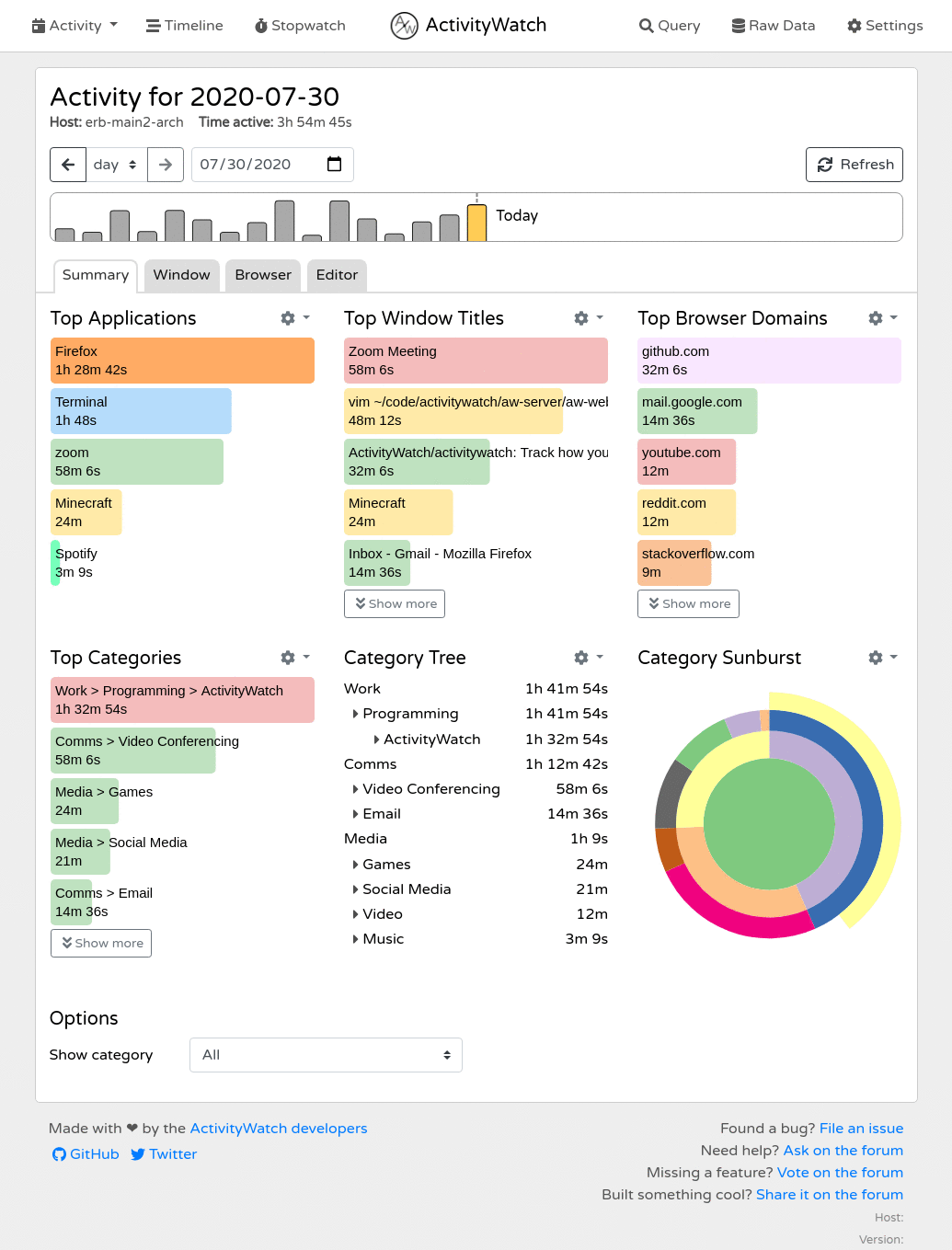
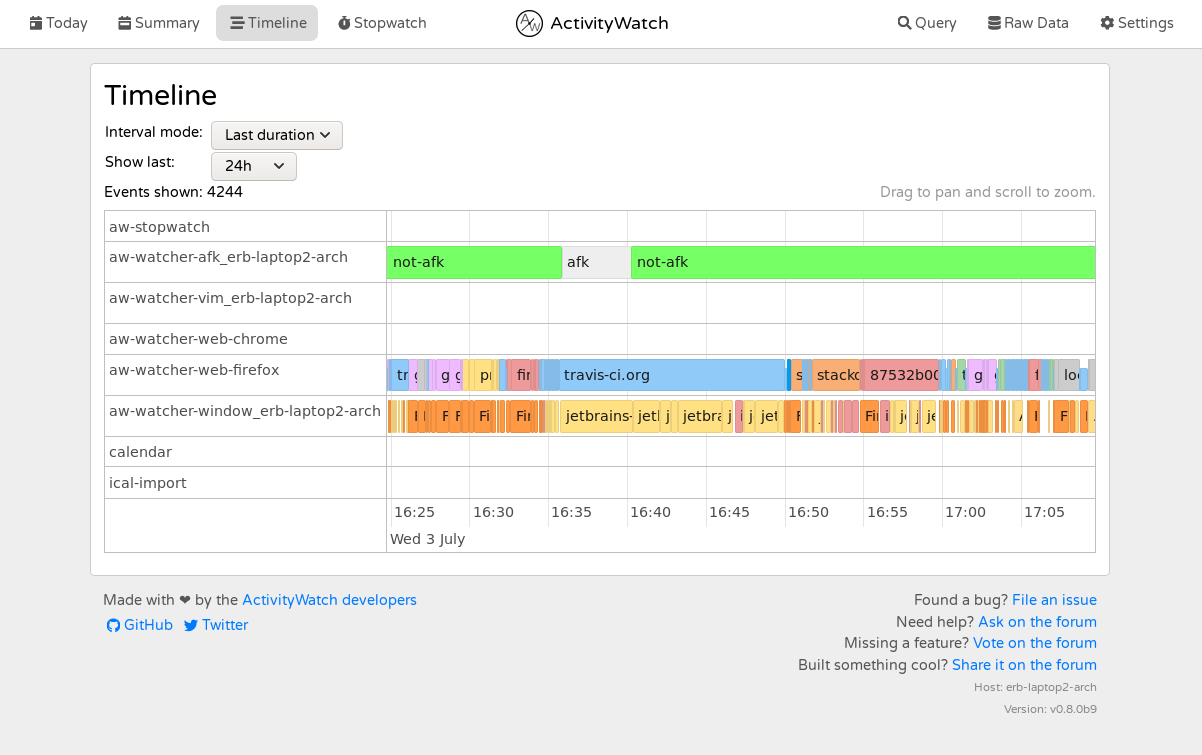
Это закрытые сервисы, которые хранят ваши данные на своих серверах. ActivityWatch полностью открыт, данные лежат у вас локально, планируемая синхронизация децентрализована, а не централизована, и он хранит сырые события, а не грубые сводки.Что мне показывает панель?Интерфейс в браузере с таймлайном и сводками активности по приложениям, сайтам и заданным вами категориям, плюс проводник запросов для написания и отладки запросов, просмотр сырых событий и экспорт в JSON отдельных бакетов или всего набора данных.
Интерфейс в браузере с таймлайном и сводками активности по приложениям, сайтам и заданным вами категориям, плюс проводник запросов для написания и отладки запросов, просмотр сырых событий и экспорт в JSON отдельных бакетов или всего набора данных.Можно ли расширять его или строить поверх свои инструменты?Да. Локальный сервер предоставляет REST API — бакеты, события, хартбиты и небольшой скриптовый язык запросов — с официальными клиентскими библиотеками для Python, JavaScript и Rust. Писать новые вотчеры на основе aw-core и aw-client — задуманный способ отслеживать больше.
Да. Локальный сервер предоставляет REST API — бакеты, события, хартбиты и небольшой скриптовый язык запросов — с официальными клиентскими библиотеками для Python, JavaScript и Rust. Писать новые вотчеры на основе aw-core и aw-client — задуманный способ отслеживать больше.What are similar projects?super-productivity, agentsview, wordcraft, Dayflow, AI-Engineering-Coach, gridcraft, redash, taskview-community
super-productivity, agentsview, wordcraft, Dayflow, AI-Engineering-Coach, gridcraft, redash, taskview-communityWhich topics is it in?time-tracker, open-source-alternative, browser-extension, analytics, app, data-visualization, offline, dashboard, monitoring, local-first, rest-api, mobile
time-tracker, open-source-alternative, browser-extension, analytics, app, data-visualization, offline, dashboard, monitoring, local-first, rest-api, mobile