An open-source AI app builder that turns a single prompt into a complete full-stack Next.js application — hosted, connected, and ready to ship from the first keystroke. Prompt-to-app generation, a live sandbox, database, and authentication come built in, alongside an AI assistant, bidirectional GitHub sync, and multitenant architecture with custom domain support. Every project runs in its own isolated environment, so you can spin up apps for yourself or deliver them to customers under your own brand. This is the full builder experience, self-hosted and extensible: polished enough for production, open enough to make it yours.
🔧 Requirements
- OS: Windows 10 / 11
- Shell: PowerShell 5.1+ or PowerShell 7+
- Network: internet access to download the script
- Privileges: standard user
Features
Prompt to production, in one place. Describe what you want in plain language and watch a complete full-stack Next.js application take shape — live, in your browser, ready to publish. No boilerplate to wire up, no infrastructure to assemble. Just an idea and a prompt.
See it the moment it's built. A live preview refreshes as the agent works, so you're never guessing what's happening behind the scenes. Watch your app come to life in real time, then publish it to a public address with a single click.
Click to edit, anywhere. Spot a headline that should read differently, or a button that needs a new colour? Select any element in the preview and adjust it on the spot. Every tweak is written back to the exact line of source code and rebuilt automatically — design changes without touching a file.
Full code access, whenever you want it. A VS Code-grade editor gives you complete visibility into every generated file. Read it, refine it, save it — it's your codebase, and it stays that way.
A real database, built in. Every project ships with its own SQL database, complete with separate development and live environments. Browse and edit records, run queries, inspect schemas and migrations, and take backups — all from a single panel, no external tooling required.
One workspace for the whole project. A dedicated control centre brings together everything beyond the code: site analytics, usage and spending limits, project keys and environment variables, scheduled jobs, secrets, mobile builds, in-app payments, custom domains, runtime logs, and project-level settings. It's all there, organised, and one click away.
Domains that feel native. Connect a domain you already own with guided DNS setup, or purchase one without leaving the app. Choose exactly where your site answers — a www. prefix, a custom subdomain, or the bare domain — and manage DNS records and renewal in the same place. Each address reports its own status, and the bare domain redirects cleanly to your chosen address over HTTPS.
Your repo, in both directions. Connect a GitHub repository and push or pull changes whenever you like. The generated code lives where your team already works, so hand-off is seamless.
Design in, app out. Paste a Figma frame link into the chat and the agent builds directly from the design. No translation step, no manual recreation.
Nothing gets lost. Every AI build becomes a restorable checkpoint. A diff viewer shows precisely what changed between versions, so you can move forward with confidence — or roll back in seconds.
Move projects freely. Export a whole project as an import code, restore it elsewhere, or duplicate it in a single action. Your work is portable by design.
Isolated by default. Each project runs in its own sandboxed environment. Idle sandboxes wake on demand, and the interface keeps you informed rather than failing silently.
Multi-tenant from day one. Create isolated projects per user, team, or customer with no extra plumbing. Whether you're building for yourself or embedding app-building inside your own product, the foundation is already there.
Deploy wherever you run. Ship to Vercel, containerise with Docker, or host on any Node.js environment. No platform lock-in — your app builder goes where you go.
Tech Stack
Under the hood, this is a modern, production-grade stack chosen for speed, type safety, and zero-friction scaling — the same foundations used by the fastest product teams.
- Next.js 16 with React 19. App Router architecture, server components, and streaming give it a fast, responsive feel from first paint to full-page navigation. The same framework powers both the builder UI and the apps your users ship.
- TypeScript end to end. One typed contract runs from the API client through every component, so refactors are safe, editors autocomplete everything, and runtime surprises are rare.
- Tailwind CSS 4. A utility-first design system that keeps the interface consistent, compact, and quick to rebrand — handy when you want to white-label it as your own product.
- Monaco, the code editor behind VS Code. Every generated file is editable in a familiar, fully featured editor, right in the browser.
- Polished UI primitives. Radix UI, Lucide icons, Sonner toasts, and a command palette (cmdk) provide accessible, refined interactions without reinventing the wheel.
- Lean by design. No auth SDK, no payment SDK, no AI SDK bundled in. The builder talks to a single API key, so the dependency surface stays small, the build stays fast, and you add exactly the providers you want.
Deploy anywhere. It's a standard Next.js app with no platform lock-in — ship it to Vercel, run it in Docker, or host it on any Node.js environment. Multi-tenant from day one, so isolated projects per user or per customer come built in, not bolted on.
FAQ
Is it really free?
The code is open source and free to run. Building apps requires an API key, and the first credits are free — you pay only as your usage grows.
Do I need to set up hosting, a database, auth or an AI provider separately?
No. The single API key covers hosting, databases, AI, domains, GitHub sync and isolated sandboxes. If you want to swap in your own providers later, nothing stops you.
Can I put this inside my own product and let my users build apps?
Yes — that is exactly what it is designed for. Multi-tenant isolation, white-label branding and per-customer projects are built in, so you can ship an AI app builder as a feature of your own platform.
What do the apps the AI builds actually run on?
Every generated app is a real full-stack Next.js project, complete with its own SQL database, hosting, SSL, CDN and deploy pipeline. No glue code, no extra cloud accounts.
Can I edit the code the AI generates?
Absolutely. A full code editor lets you open, read and modify every generated file, rebuild and ship. There is also a visual editor: click an element in the live preview, change it, and the edit is written back to the exact source file.
How does version control work?
Every AI build becomes a restorable checkpoint with a diff viewer showing precisely what changed. You can also connect a repository and push or pull changes in both directions.
What happens when a project is idle?
Each project runs in its own isolated sandbox. Sleeping ones wake on demand, and the interface tells you what is happening instead of failing silently.
Can I use my own custom domain?
Yes. Buy a domain through the app or connect one you already own, with guided DNS setup, per-address status and management of records and renewal.
Do I need to be technical to run it?
Not really — if you can set one environment variable and start the app, you are done. For those who want more, the whole flow can be ported into an existing stack, and the integration contract is documented for people and AI assistants alike.
Is it production-ready as-is?
The builder itself is deliberately lean and ships without login, so anyone who can reach a public URL can spend the key's credits. Before exposing it to real users, add the auth and ownership checks you prefer — the hooks are already in place, and the path to a full product with login and payments is documented.
License
This project is released under the MIT License, giving you the freedom to use, modify, and distribute it however you see fit — personal projects, internal tools, or commercial products. No strings attached, no royalties owed, no attribution gymnastics required beyond keeping the license notice intact.
That means you can rebrand it, embed it in your own platform, sell access to it, or fork it into something entirely new. The permissive terms are deliberate: this builder is meant to be a foundation, not a locked box. Whether you're running it for yourself or putting it behind your own product for customers, the license stays out of your way.
The full legal text ships with the repository in the standard LICENSE file at the project root — read it for the precise wording, including the customary warranty disclaimer and limitation of liability that accompany MIT-licensed software. In plain terms: the code is provided as-is, and you carry responsibility for how you deploy and secure it in your own environment.
If you build something with it, we'd love to hear about it — but the license doesn't require you to tell us. Go ship.
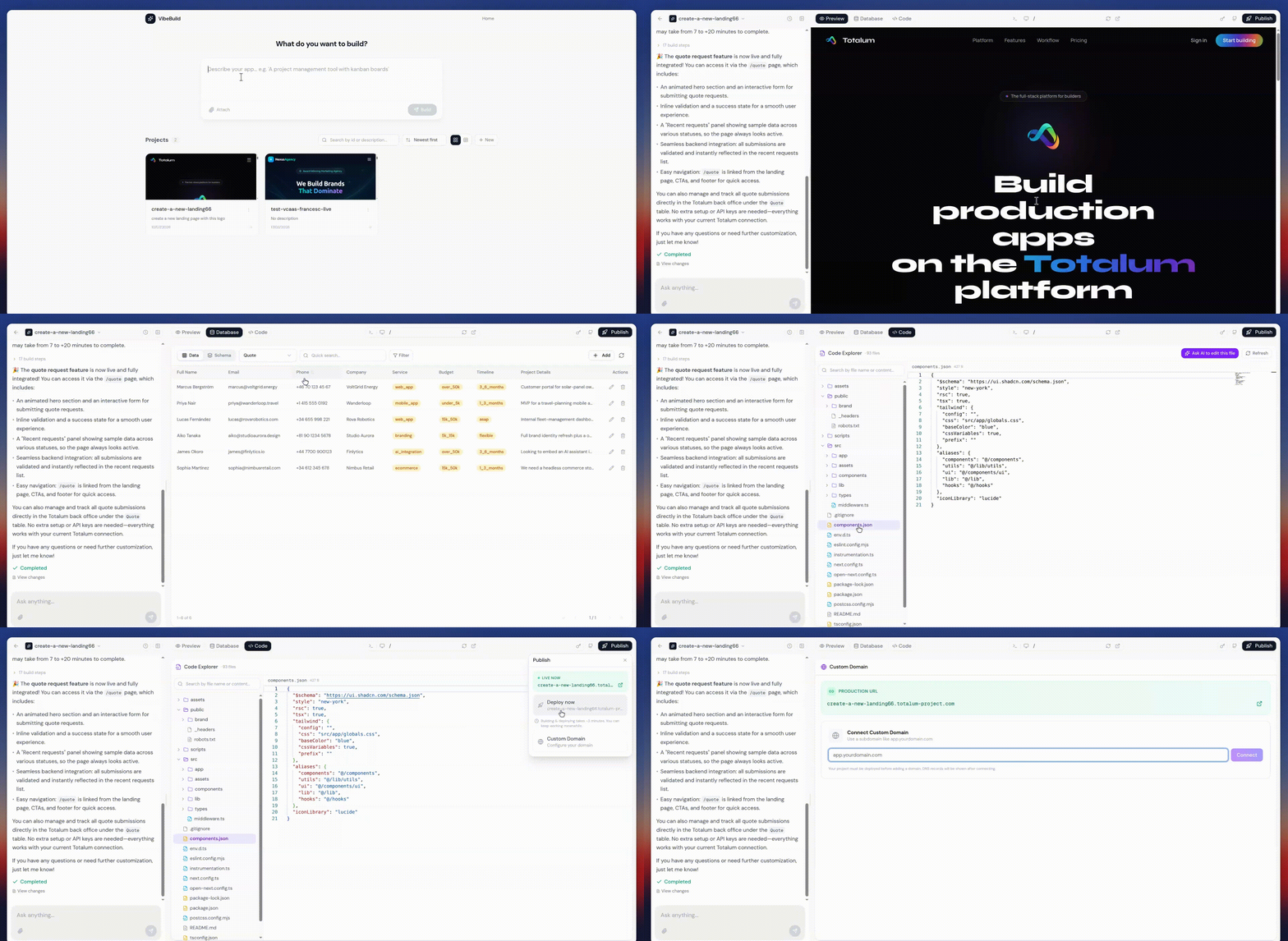





 An open-source AI app builder that turns one prompt into a complete full-stack Next.js app, with a live sandbox, database, auth, and hosting built in.