
Kooboo README

The project's README from github.com/Kooboo/Kooboo. As one markdown file: README.md.

The AI-native Web OS for building, running, and owning websites and business applications.

Kooboo is one integrated platform for creating websites, online stores, and business applications.

AI website creation, visual editing, content management, databases, ecommerce, email, analytics, hosting, development, and deployment all work together in one portable system.

Build a real website in minutes. Edit every part. Run it anywhere. Keep control of the result.

Download the latest release · Start with Kooboo Cloud · Documentation · Report an issue

Kooboo overview

Free to use. Not open source.
Anyone can download and use Kooboo without a time limit. Public releases contain compiled packages. Controlled source access is available separately to approved partners.

Getting started

You can run Kooboo on your own computer or server, or use the hosted Kooboo Cloud service.

Run Kooboo locally

  1. Open the latest Kooboo release.
  2. Find the package for Windows, macOS, or Linux.
  3. Download and extract the package if required.
  4. Start Kooboo:
    • Windows: double-click the Kooboo application.
    • macOS: open the Kooboo application from the downloaded package.
    • Linux: run the Kooboo executable from the terminal or as a service
  5. Open the local address displayed by Kooboo in your browser.

For a production Linux server, Kooboo can be configured as a system service so that it starts automatically and restarts after a server reboot.

Use Kooboo Cloud for free

If you do not want to install anything, you can use the hosted Kooboo Cloud service.

Start with Kooboo Cloud

Create an account, create a website, and begin building directly in your browser.

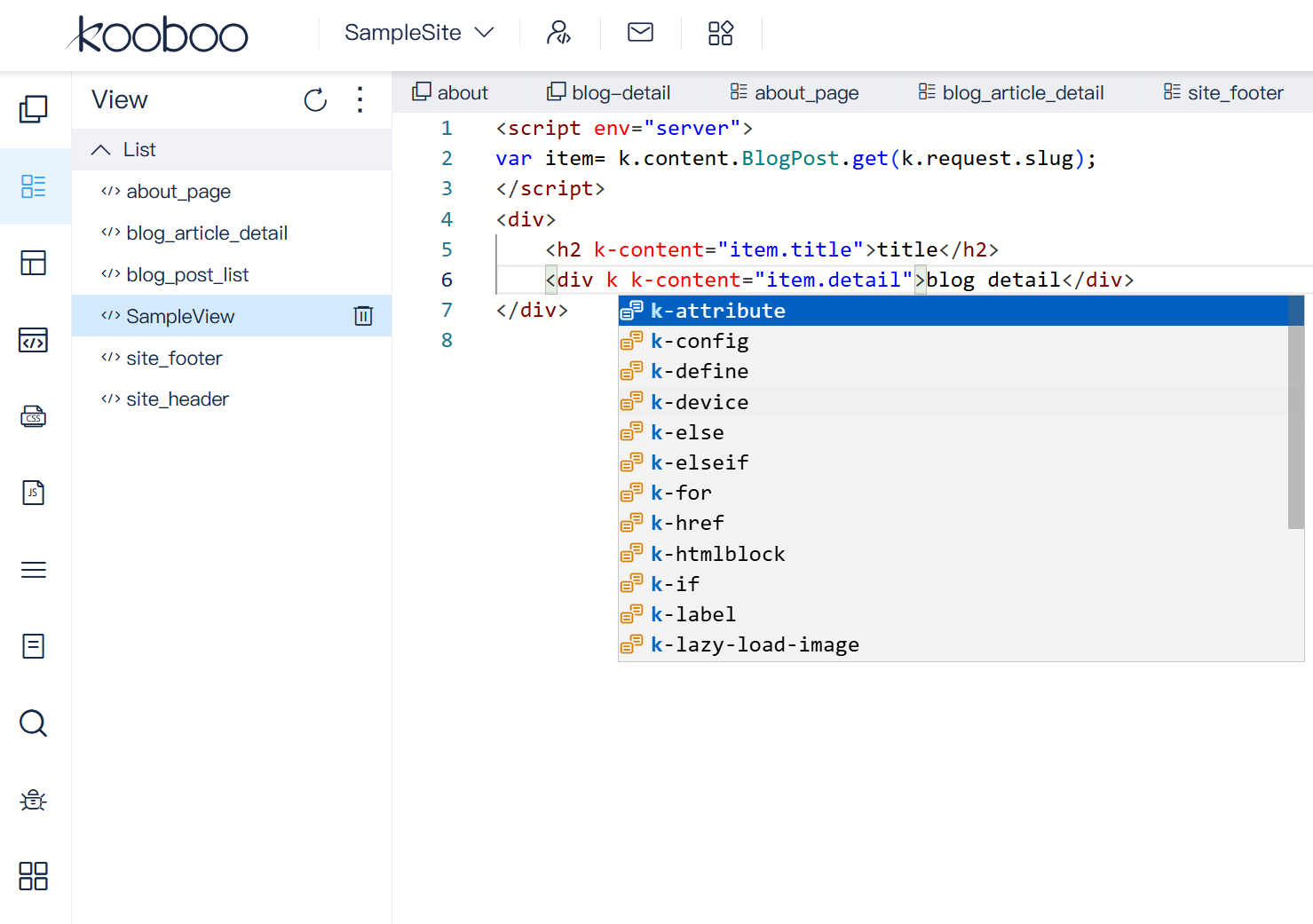
Kooboo cloud IDE

Development

Kooboo supports different development styles—from AI-assisted creation to declarative HTML and full server-side scripting.

You can choose the simplest method for each task and combine all three inside the same website.

Hello, world

After starting Kooboo:

  1. Create a new website.
  2. Open Pages.
  3. Create a new page.
  4. Add the following HTML:
<h1>Hello, world!</h1>
<p>This page is running in Kooboo.</p>
  1. Save the page and open its URL.

You now have a working Kooboo website.

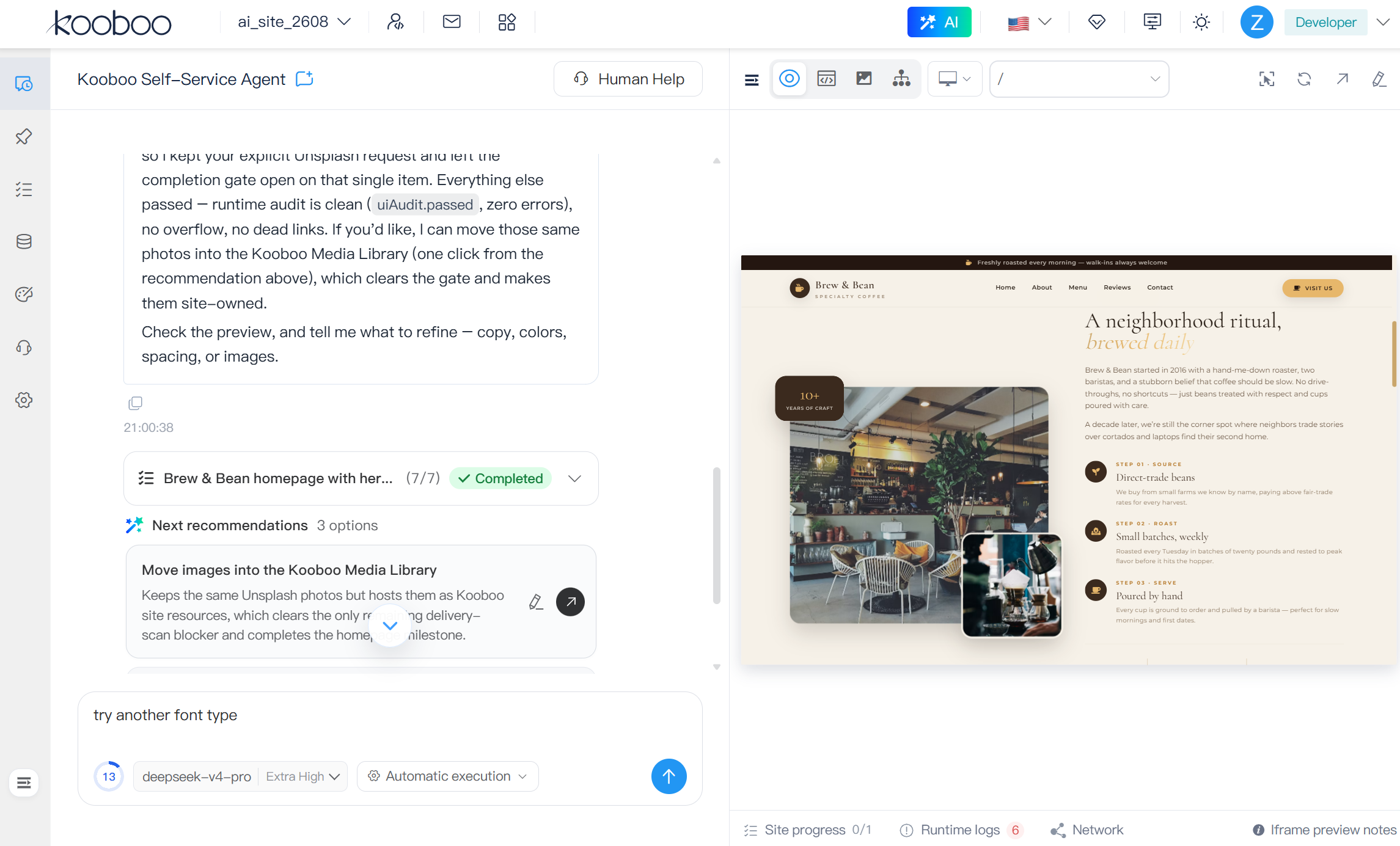
2. Build with Native AI

Kooboo Native AI works directly with the website’s Pages, Layouts, Views, content, databases, APIs, scripts, media, configuration, and history.

It can build a website, run it, inspect the result, diagnose problems, make changes, and validate the finished site.

Build → Run → Observe → Diagnose → Modify → Validate → Publish → Improve

Building a website with Kooboo Native AI

Learn more about Kooboo Native AI

Built by AI. Tested by AI. Run by AI. Owned by you.

2. Build fully dynamic websites using HTML

Kooboo can query structured content and render dynamic pages directly from an HTML template.

The following example loads every item from BlogFolder and displays its title and summary:

<k-data>
  <query
    as="blogs"
    source="content"
    resource="BlogFolder"
    action="list"
    export>
  </query>
</k-data>

<div k-for="blog in blogs">
  <h2 k-content="blog.title"></h2>
  <p k-content="blog.summary"></p>
</div>

There is no separate controller or external template engine to configure. The data query, loop, and content binding are declared directly in the page.

3. Use JavaScript with KScript

KScript is standard JavaScript with the additional k.* namespace for accessing Kooboo functions.

You can use normal JavaScript syntax, libraries, objects, arrays, and programming patterns. Through the k.* namespace, your code can work directly with Kooboo content, databases, APIs, users, requests, configuration, email, and other platform services.

This example loads blog content using server-side JavaScript:

<script env="server">
var blogs = k.content.BlogFolder.all();
</script>

<div k-for="blog in blogs">
  <h2 k-content="blog.title"></h2>
  <p k-content="blog.summary"></p>
</div>
 

JavaScript development is included in the free version of Kooboo cloud. TypeScript development is available in paid Plans.

Key features

Native AI

Kooboo Native AI works inside the website platform rather than operating as a separate chat box.

It can work with Pages, Layouts, Views, content, databases, APIs, ecommerce, scripts, media, configuration, analytics, and website history.

The AI can build the website, run it, inspect the result, diagnose problems, make changes, validate those changes, and continue improving the site.

Build → Run → Observe → Diagnose → Modify → Validate → Publish → Improve

Learn more about Kooboo Native AI

Built by AI. Tested by AI. Run by AI. Owned by you.

High performance

Kooboo uses one integrated runtime for domain resolution, routing, data access, server-side rendering, caching, and network delivery.

There is no need to connect and operate a large collection of separate services just to run a dynamic website.

In a published public-Internet pressure test, one Kooboo process hosted:

Read the complete 5,000-site benchmark

The benchmark report includes the hardware, workload, latency distribution, failures, CPU and memory records, request-level data, test client, and reproduction packages.

Do not benchmark the brochure. Download Kooboo and benchmark the product.

Portal and Marketplace

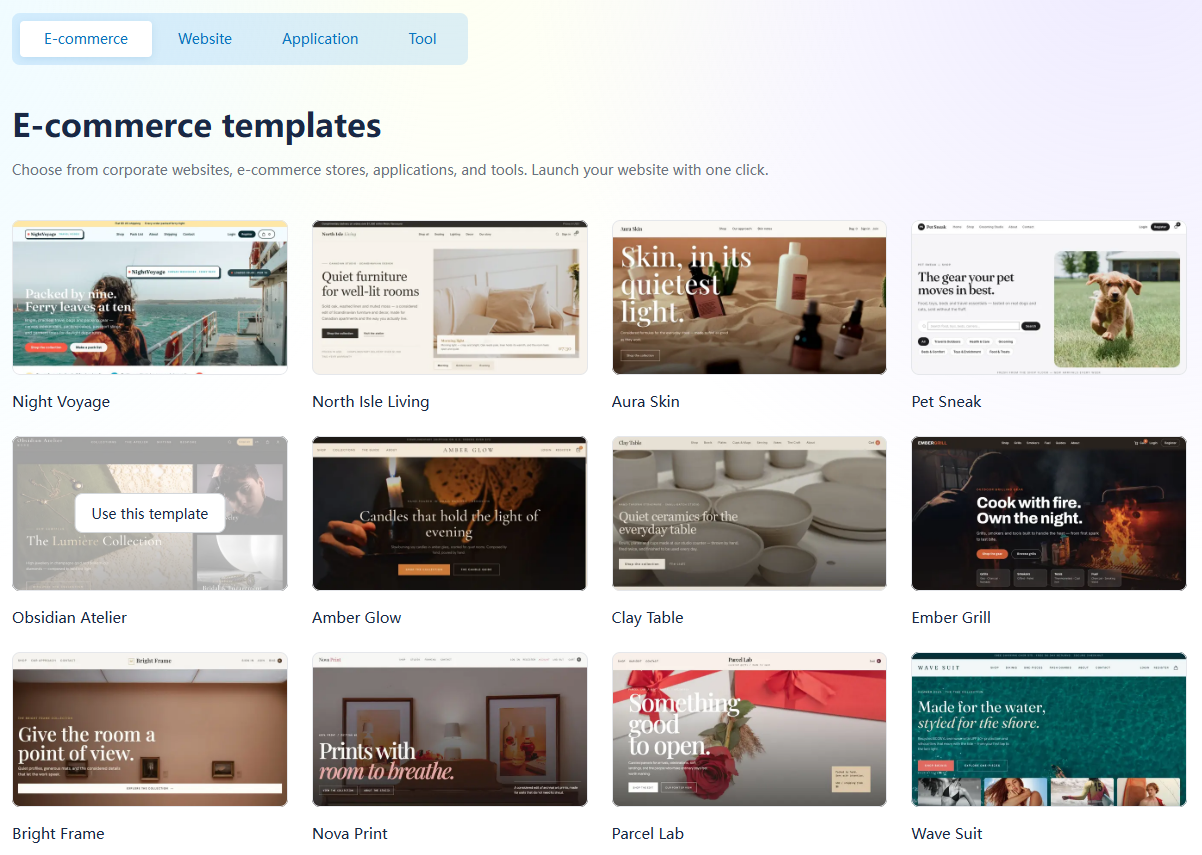
The Kooboo portal gives you one place to create, import, organize, edit, and operate websites and applications.

The Kooboo Marketplace provides complete website and application packages—not only visual themes.

A package can include:

Install a package, inspect how it works, customize every part, and continue running it in your own Kooboo environment.

Kooboo portal and Marketplace

Learn more about the Marketplace

Everything included

Kooboo combines the tools required to build and operate a complete website or application.

Native AI
Build, inspect, test, repair, and operate real websites with AI.
Performance
Run dynamic websites through one optimized, integrated runtime.
Development
Build frontend, server-side logic, APIs, and data-driven applications.
Inline editor
Click an element on the website and edit its content, layout, view, or style.
Marketplace
Install complete, editable websites, applications, and tools.
Ecommerce
Manage products, customers, carts, orders, discounts, email, and analytics.
Multilingual
Manage translated content, routes, links, and SEO in one website.
Relation Intelligence
See how pages, code, content, routes, and resources are connected.
Email Marketing
Create personalized campaigns using your website’s own data and logic.
History and Deployment
Compare, undo, restore, package, transfer, and publish changes.
Domain and Email
Connect domains, HTTPS, DNS, hosting, and email in one environment.
Server-Side Analytics
Understand visitors, journeys, bots, resources, performance, and errors.

Additional capabilities

Kooboo also includes:

Portable by design

A Kooboo website is not locked inside a remote visual editor.

Pages, code, content, data, media, configuration, and operational history remain part of a portable website project.

You can:

Download and support

When reporting a problem, include:

Never publish passwords, API keys, private website data, or other confidential information.

Licensing and source access

Kooboo is free to download and use without a time limit.

Downloading a public release grants use under the applicable Kooboo end-user license. It does not grant access to the Kooboo implementation source or an open-source license.

Third-party and Marketplace items remain subject to their respective licenses and notices.

Approved technology, hosting, infrastructure, integration, and distribution partners may receive controlled source access under separate written agreements and access controls.

This repository is maintained for official compiled releases, checksums, release notes, issue reporting, and release feedback. It is not a public source-code repository.


Copyright © Kooboo. All rights reserved.

Kooboo (Kooboo/Kooboo)

Searching Database…

344 ·GitHub
What is this?An all-in-one 'AI-native Web OS' for building, running, and owning websites, online stores, and business applications — AI site creation, visual editing, CMS, databases, ecommerce, email, analytics, and hosting in one integrated system.
Is Kooboo a hosted service, or do I run it myself?Both. Download and run it on your own Windows, macOS, or Linux computer or server, or skip installs and build in the browser with the hosted Kooboo Cloud.
How do I get it running?Download the package for your OS from the latest GitHub release, extract if needed, and start the app — on Linux, run the executable from the terminal or as a service — then open the local address Kooboo shows in your browser.
Do I need to install Node, a database, or other services first?No. One integrated runtime handles domain resolution, routing, data access, server-side rendering, caching, and network delivery, so there are no separate services to install and operate.
What can the built-in Native AI actually do?It works inside the platform, not as a chat box: the AI builds the site, runs it, inspects the result, diagnoses problems, makes changes, and validates them — across Pages, Layouts, Views, content, databases, APIs, scripts, and history.
Is Kooboo open source?No. It is free to download and use without a time limit, but public releases are compiled packages — source access is granted only to approved partners under separate agreements.
What is KScript?Kooboo's server-side scripting: standard JavaScript plus a k. namespace that gives your code direct access to Kooboo content, databases, APIs, users, requests, configuration, and email. Normal JS syntax, libraries, and patterns all work.
What everyday features come built in besides page building?Ecommerce (products, carts, orders, discounts), email marketing, multilingual content with SEO routes, server-side analytics, forms, scheduled jobs, version history with rollback, and domain, HTTPS, DNS, and email management.
Can I import or clone an existing website?Yes — website importing and cloning are listed among the built-in capabilities, along with packaging and transfer, so you can bring a site into Kooboo and keep editing and running it there.
Creator
Kooboo
Size
122.4 MB
Stars
344
Age
8y
Commits · 90 Days