





57.6K ·GitHub
What is this?
 PrivateGPT is an open-source API layer that turns any local, OpenAI-compatible model into a full production-ready AI application backend, covering RAG, tools, MCP, text-to-sql and more.
PrivateGPT is an open-source API layer that turns any local, OpenAI-compatible model into a full production-ready AI application backend, covering RAG, tools, MCP, text-to-sql and more.Is PrivateGPT a model runner like Ollama, or something else?It is not an inference engine — it does not run models itself. It connects to any OpenAI-compatible inference server (e.g. Ollama, vLLM, LocalAI) that exposes /v1/chat/completions and /v1/models, and builds a Claude-style API on top.
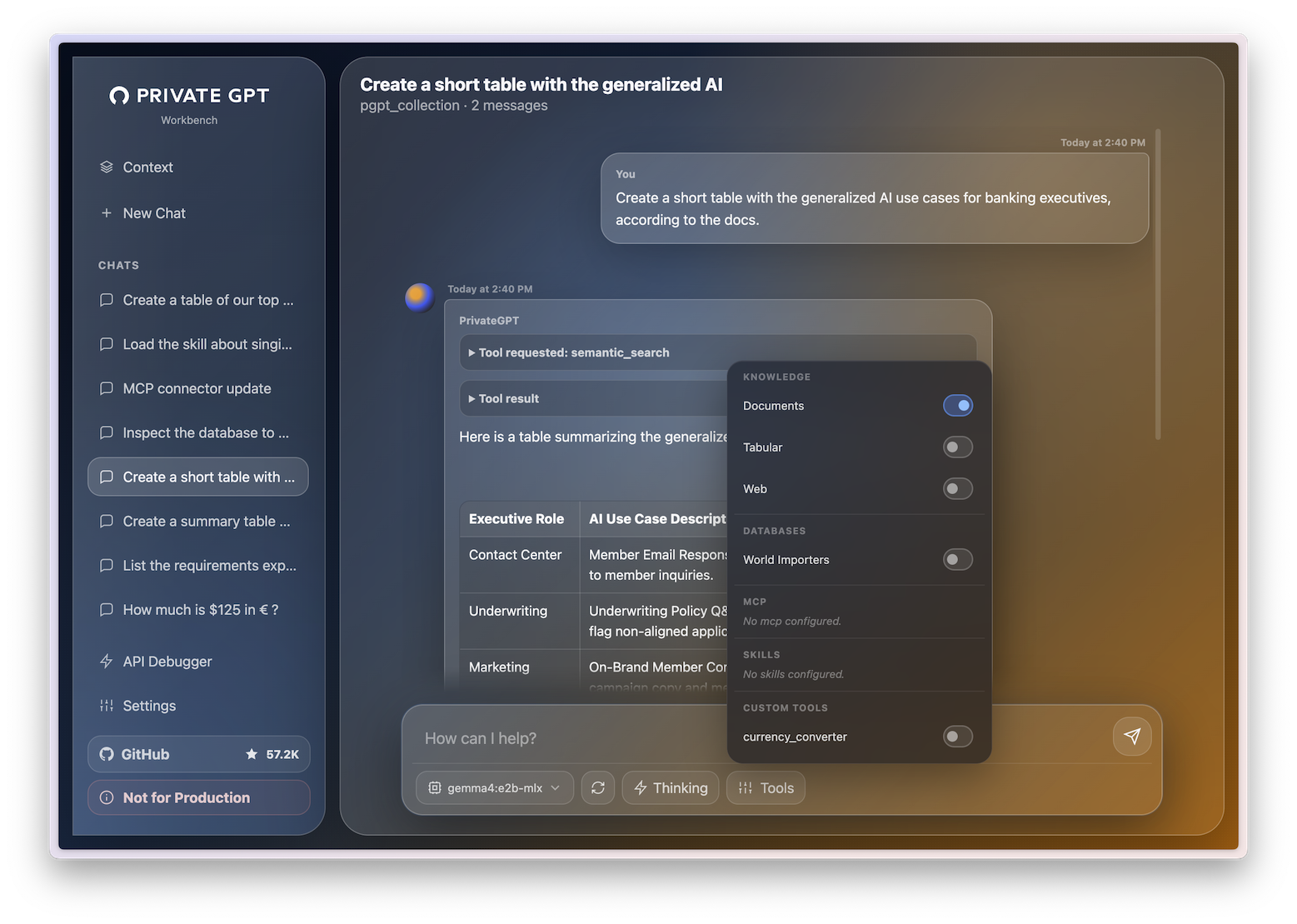
It is not an inference engine — it does not run models itself. It connects to any OpenAI-compatible inference server (e.g. Ollama, vLLM, LocalAI) that exposes /v1/chat/completions and /v1/models, and builds a Claude-style API on top.How do I get it running?Install PrivateGPT, start an OpenAI-compatible LLM server (Ollama is the easiest option), run PrivateGPT, then open the built-in workbench UI at /ui to send messages, upload documents and test retrieval.
Install PrivateGPT, start an OpenAI-compatible LLM server (Ollama is the easiest option), run PrivateGPT, then open the built-in workbench UI at /ui to send messages, upload documents and test retrieval.Do I need an inference server before I start?Yes — you need a separately running OpenAI-compatible LLM server; Ollama is recommended as the easiest starting point.
Yes — you need a separately running OpenAI-compatible LLM server; Ollama is recommended as the easiest starting point.Is it already at full Claude-API feature parity?Not entirely: Skills support is only basic/in progress, prompt caching is not supported yet, and there's no OAuth or organization-level auth — only token-based auth is available.
Not entirely: Skills support is only basic/in progress, prompt caching is not supported yet, and there's no OAuth or organization-level auth — only token-based auth is available.Does it run on any OS, or only Linux servers?It ships as a Python project with a Docker image, so it can be run on Linux, macOS, or Windows wherever Docker or Python is available; README quickstart and Docker instructions don't restrict it to one OS.
It ships as a Python project with a Docker image, so it can be run on Linux, macOS, or Windows wherever Docker or Python is available; README quickstart and Docker instructions don't restrict it to one OS.Does any of my data leave my machine?The project's origin is explicitly offline-first: the original PrivateGPT let you chat with your documents fully offline with no data leaving your machine, and this API layer keeps that same local-first model.
The project's origin is explicitly offline-first: the original PrivateGPT let you chat with your documents fully offline with no data leaving your machine, and this API layer keeps that same local-first model.How is PrivateGPT different from just running Ollama or vLLM?Ollama, vLLM, LocalAI, and llama.cpp answer 'how do I run a model?'. PrivateGPT answers the next question, 'how do I build an application on top of that model?' — you run the model with any of those tools and point PrivateGPT at it.
Ollama, vLLM, LocalAI, and llama.cpp answer 'how do I run a model?'. PrivateGPT answers the next question, 'how do I build an application on top of that model?' — you run the model with any of those tools and point PrivateGPT at it.What is the relationship between PrivateGPT and Zylon?PrivateGPT is the open-source API layer maintained by the Zylon team. Zylon is the commercial, end-to-end enterprise platform built on top of it, adding things like an integrated inference server, Kubernetes deployment, RBAC, SIEM audit logs, and air-gapped operation.
PrivateGPT is the open-source API layer maintained by the Zylon team. Zylon is the commercial, end-to-end enterprise platform built on top of it, adding things like an integrated inference server, Kubernetes deployment, RBAC, SIEM audit logs, and air-gapped operation.What was PrivateGPT before this rewrite?It started in 2023 as a simple proof-of-concept script for chatting with your documents fully offline, which went viral and crossed 50K GitHub stars; this version is a ground-up rebuild as a proper production API layer.
It started in 2023 as a simple proof-of-concept script for chatting with your documents fully offline, which went viral and crossed 50K GitHub stars; this version is a ground-up rebuild as a proper production API layer.What tools can plug into PrivateGPT as their local AI backend?Claude Desktop/Cowork, Claude for Microsoft 365 (Word/Excel/Outlook/PowerPoint), Claude Code, n8n, OpenCode, OpenClaw, Hermes Agent, VS Code, and Cline can all use PrivateGPT as a drop-in local OpenAI-compatible backend.
Claude Desktop/Cowork, Claude for Microsoft 365 (Word/Excel/Outlook/PowerPoint), Claude Code, n8n, OpenCode, OpenClaw, Hermes Agent, VS Code, and Cline can all use PrivateGPT as a drop-in local OpenAI-compatible backend.What are similar projects?SurfSense, OpenViking, unsloth, claude-context, DB-GPT, Baize, QAnything, LangBot
SurfSense, OpenViking, unsloth, claude-context, DB-GPT, Baize, QAnything, LangBotWhich topics is it in?on-premise, text-to-sql, agentic-rag, ai-tools, embeddings, openai-compatible, local-llm, knowledge-base, ollama, rag, mcp-server, agent
on-premise, text-to-sql, agentic-rag, ai-tools, embeddings, openai-compatible, local-llm, knowledge-base, ollama, rag, mcp-server, agent