
676 ·GitHub
这是什么?
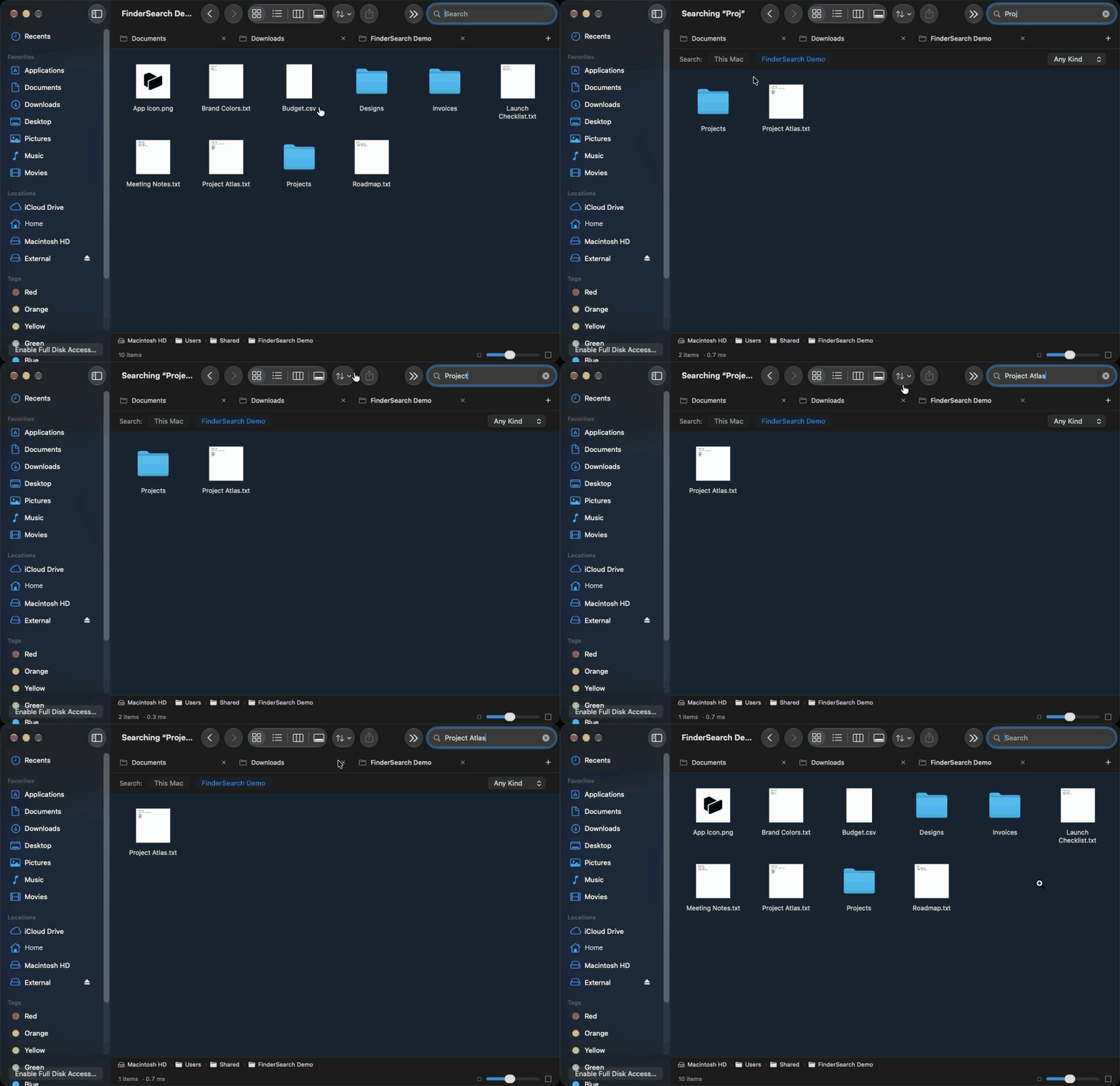
 FinderSearch 是一款原生 macOS 文件浏览器,具备快速的模糊文件名搜索,使用 SwiftUI 和 AppKit 构建,由 fsearch 搜索引擎驱动。它让你在熟悉的类 Finder 界面中浏览文件夹、预览文件并管理文件。
FinderSearch 是一款原生 macOS 文件浏览器,具备快速的模糊文件名搜索,使用 SwiftUI 和 AppKit 构建,由 fsearch 搜索引擎驱动。它让你在熟悉的类 Finder 界面中浏览文件夹、预览文件并管理文件。它能搜索文件内容,而不只是文件名吗?不能,只有带 ext:pdf、mtime:<7d 之类过滤器的模糊文件名匹配——内容搜索尚不支持,同样不支持的还有 AirDrop、Finder 扩展、保存的智能文件夹、文件夹合并以及持久的撤销历史。
不能,只有带 ext:pdf、mtime:<7d 之类过滤器的模糊文件名匹配——内容搜索尚不支持,同样不支持的还有 AirDrop、Finder 扩展、保存的智能文件夹、文件夹合并以及持久的撤销历史。使用它需要 Xcode 或 Rust 吗?不需要,下载 DMG 只要求 macOS 15+。从源码构建则需要 macOS 15+、Xcode 16+(或 Command Line Tools)以及 Rust 1.85+/Cargo,因为构建过程会自动打包 fsearch。
不需要,下载 DMG 只要求 macOS 15+。从源码构建则需要 macOS 15+、Xcode 16+(或 Command Line Tools)以及 Rust 1.85+/Cargo,因为构建过程会自动打包 fsearch。这个应用经过公证、可以立即运行吗?还没有——FinderSearch 没有做 Developer ID 签名或公证,因此 Gatekeeper 可能会拦截它,你需要在“隐私与安全性”设置中选择“仍要打开”。
还没有——FinderSearch 没有做 Developer ID 签名或公证,因此 Gatekeeper 可能会拦截它,你需要在“隐私与安全性”设置中选择“仍要打开”。它在 Intel Mac 上也能用吗?它面向 Apple Silicon,已验证可用;也有 Intel 构建,但作者尚未验证。
它面向 Apple Silicon,已验证可用;也有 Intel 构建,但作者尚未验证。我的数据会被上传到任何地方吗?不会,搜索完全在你的 Mac 上本地进行,你的文件不会被上传到任何地方。
不会,搜索完全在你的 Mac 上本地进行,你的文件不会被上传到任何地方。为什么 FinderSearch 比 Spotlight 快?它由 fsearch 驱动:在 Apple M4 上、跨 10,000 个测试文件的基准测试中,fsearch 返回精确文件名结果用时 0.49–1.14 毫秒,而 Spotlight 需要 7.06–7.30 毫秒。
它由 fsearch 驱动:在 Apple M4 上、跨 10,000 个测试文件的基准测试中,fsearch 返回精确文件名结果用时 0.49–1.14 毫秒,而 Spotlight 需要 7.06–7.30 毫秒。除了搜索,它还包含哪些文件管理功能?它提供框选、复制/移动、批量重命名、ZIP 工具、标签、分享、废纸篓和撤销,另外还有图标/列表/分栏/画廊视图、快速预览(Quick Look),以及重新打开时可恢复的标签页。
它提供框选、复制/移动、批量重命名、ZIP 工具、标签、分享、废纸篓和撤销,另外还有图标/列表/分栏/画廊视图、快速预览(Quick Look),以及重新打开时可恢复的标签页。fsearch 是什么?fsearch 是 Noah Dunnagan 开发的内置搜索引擎(MIT 许可),为快速模糊文件名搜索提供动力;FinderSearch 在它之上添加了原生 SwiftUI/AppKit 界面和文件工作流程。
fsearch 是 Noah Dunnagan 开发的内置搜索引擎(MIT 许可),为快速模糊文件名搜索提供动力;FinderSearch 在它之上添加了原生 SwiftUI/AppKit 界面和文件工作流程。Which topics is it in?appkit, file-manager, swiftui, native, search, macos-app, apple-silicon, swift, offline, utility, local-first, desktop
appkit, file-manager, swiftui, native, search, macos-app, apple-silicon, swift, offline, utility, local-first, desktop