What is this?
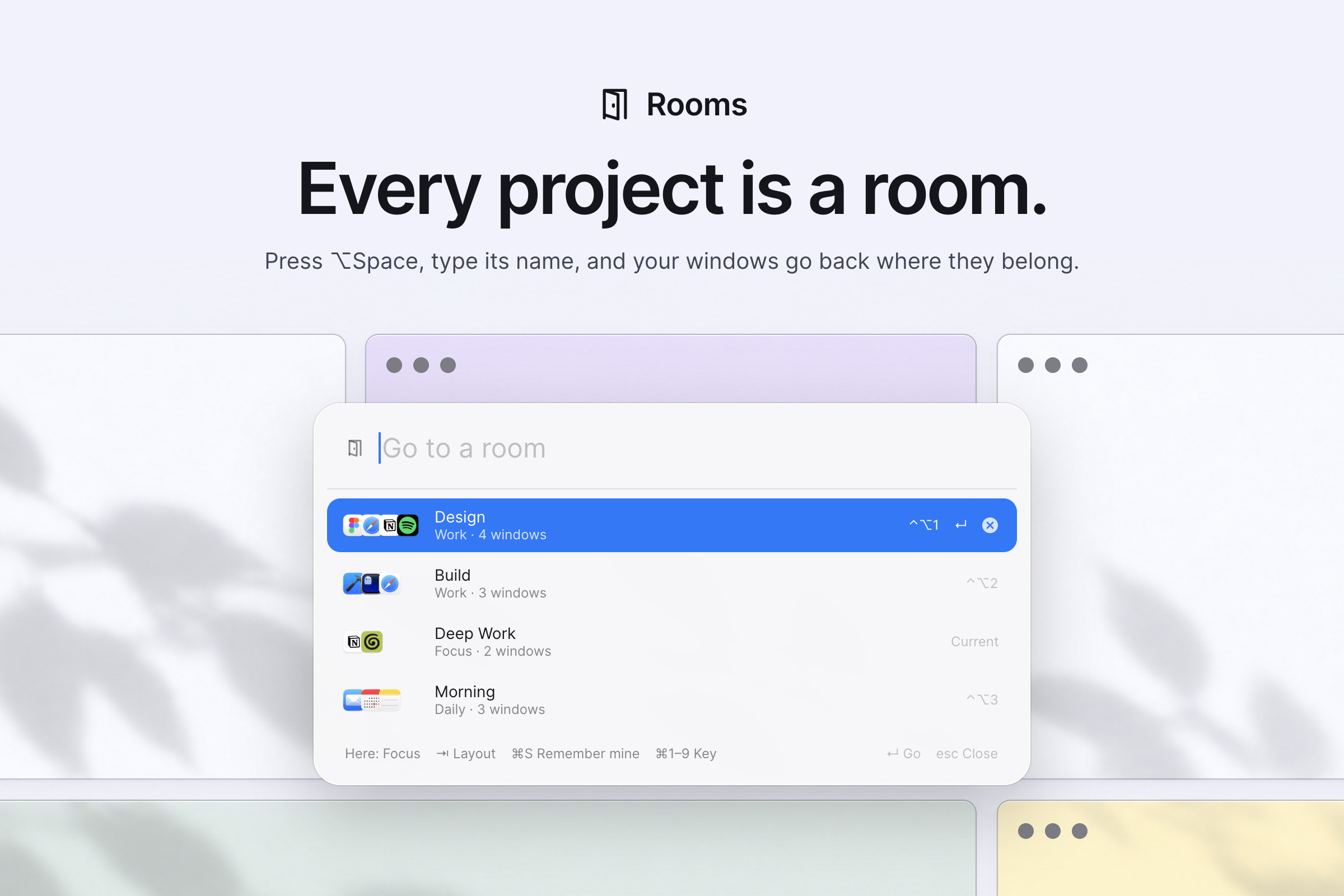
 Rooms is a macOS app for switching between projects: each 'room' is a saved set of windows with a layout, and one shortcut brings them all back arranged neatly while hiding everything else.
Rooms is a macOS app for switching between projects: each 'room' is a saved set of windows with a layout, and one shortcut brings them all back arranged neatly while hiding everything else.Is this a window manager or just a launcher?It's a window manager that also handles window layout and switching: it arranges windows in layouts like Focus, Columns, Grid, or Stack, and parks or hides windows outside the active room instead of closing them.
It's a window manager that also handles window layout and switching: it arranges windows in layouts like Focus, Columns, Grid, or Stack, and parks or hides windows outside the active room instead of closing them.How do I install and set up Rooms?Install via Homebrew, download the ZIP from Releases and drag Rooms.app into Applications, or ask a coding agent to install it for you. Then open the windows for a project, press ⌥Space, name the room, pick the windows that belong, and press Enter.
Install via Homebrew, download the ZIP from Releases and drag Rooms.app into Applications, or ask a coding agent to install it for you. Then open the windows for a project, press ⌥Space, name the room, pick the windows that belong, and press Enter.Do I need anything special before installing it, like Xcode?Just macOS and Homebrew (or manual ZIP install) to run it; Xcode 16 or its Command Line Tools are only needed if you want to build it yourself from source.
Just macOS and Homebrew (or manual ZIP install) to run it; Xcode 16 or its Command Line Tools are only needed if you want to build it yourself from source.Any rough edges I should know about?Rooms manages browser windows, not individual tabs; some apps won't shrink below a minimum size so Stack may be the only layout that fits; Spaces and full-screen windows aren't managed; and Stage Manager conflicts with it. The ZIP build also isn't notarized, so macOS blocks the first launch until you allow it manually.
Rooms manages browser windows, not individual tabs; some apps won't shrink below a minimum size so Stack may be the only layout that fits; Spaces and full-screen windows aren't managed; and Stage Manager conflicts with it. The ZIP build also isn't notarized, so macOS blocks the first launch until you allow it manually.Does it work on Intel Macs, or only Apple Silicon?It supports macOS 14+ on both Apple Silicon and Intel, though the author has only done hands-on testing on Apple Silicon with macOS 26, so Intel and older macOS versions are less tested.
It supports macOS 14+ on both Apple Silicon and Intel, though the author has only done hands-on testing on Apple Silicon with macOS 26, so Intel and older macOS versions are less tested.Does Rooms send any of my data anywhere?No. Rooms works entirely on your Mac and never makes network connections; room data and logs are stored locally in plain JSON and log files you can read yourself.
No. Rooms works entirely on your Mac and never makes network connections; room data and logs are stored locally in plain JSON and log files you can read yourself.How does switching rooms actually work day to day?Press ⌥Space, type or pick the room's name (or use ⌃⌥1-9), and Rooms brings that room's windows to the current screen in the saved layout while hiding or parking everything else.
Press ⌥Space, type or pick the room's name (or use ⌃⌥1-9), and Rooms brings that room's windows to the current screen in the saved layout while hiding or parking everything else.Can I change how windows are arranged in a room?Yes, press Tab in ⌥Space to cycle through layouts (Focus, Columns, Grid, My Layout, Stack) that fit your screen, or arrange windows by hand and press ⌘S to have Rooms remember that exact arrangement.
Yes, press Tab in ⌥Space to cycle through layouts (Focus, Columns, Grid, My Layout, Stack) that fit your screen, or arrange windows by hand and press ⌘S to have Rooms remember that exact arrangement.What happens to windows that aren't part of the active room?They are never closed, only hidden or parked just off-screen; Show Everything in the menu, quitting Rooms, or reopening it after a crash brings them all back.
They are never closed, only hidden or parked just off-screen; Show Everything in the menu, quitting Rooms, or reopening it after a crash brings them all back.Does uninstalling remove all my rooms and settings?If installed via Homebrew, running the uninstall with --zap also removes your rooms and settings; leaving that off, or dragging Rooms.app to the Trash manually, keeps them for later.
If installed via Homebrew, running the uninstall with --zap also removes your rooms and settings; leaving that off, or dragging Rooms.app to the Trash manually, keeps them for later.What are similar projects?macos-sysdata, tendedero, DockDoor, vorssaint-utils, OpenYoink, pliss, BetterDisplay, boring.notch
macos-sysdata, tendedero, DockDoor, vorssaint-utils, OpenYoink, pliss, BetterDisplay, boring.notchWhich topics is it in?window-management, menubar-app, menubar, window-manager, menu-bar, xcode, macos-app, homebrew, apple-silicon, swift, offline, utility
window-management, menubar-app, menubar, window-manager, menu-bar, xcode, macos-app, homebrew, apple-silicon, swift, offline, utility