Nitter
[!NOTE]
On 24 August 2026, cease and desist letters were sent by X Corp. demanding a permanent takedown of Nitter instances and the project's repository.
UPDATE: Following legal advice, the Nitter project will continue. More details will be announced soon.
A free and open source alternative Twitter front-end focused on privacy and
performance.
Inspired by the Invidious project.



Features
- No JavaScript required
- Zero ads
- All requests go through the backend, client never talks to Twitter
- Prevents Twitter from tracking your IP or JavaScript fingerprint
- Uses Twitter's unofficial API (no developer account required)
- Lightweight (for @nim_lang, 60KB vs 784KB from twitter.com)
- RSS feeds (instance-specific, often disabled due to abuse)
- Themes
- Mobile support (responsive design)
- AGPLv3 licensed, no proprietary instances permitted
Roadmap
Donations




BTC: bc1qpqpzjkcpgluhzf7x9yqe7jfe8gpfm5v08mdr55
ETH: 0x24a0DB59A923B588c7A5EBd0dBDFDD1bCe9c4460
XMR: 42hKayRoEAw4D6G6t8mQHPJHQcXqofjFuVfavqKeNMNUZfeJLJAcNU19i1bGdDvcdN6romiSscWGWJCczFLe9RFhM3d1zpL
SOL: FF5bheiD5AqPEdc3eyjymJ8AoMRF1hS78Ht6FiSZZF1t
$Nitter: 4fSxCKc91ELQYVdv3tmHW8R15KoALPwEngyoQe1Xpump
ZEC: u1vndfqtzyy6qkzhkapxelel7ams38wmfeccu3fdpy2wkuc4erxyjm8ncjhnyg747x6t0kf0faqhh2hxyplgaum08d2wnj4n7cyu9s6zhxkqw2aef4hgd4s6vh5hpqvfken98rg80kgtgn64ff70djy7s8f839z00hwhuzlcggvefhdlyszkvwy3c7yw623vw3rvar6q6evd3xcvveypt
Resources
The wiki contains
a list of instances and
browser extensions
maintained by the community.
Why?
It's impossible to use Twitter without JavaScript enabled, and as of 2024 you
need to sign up. For privacy-minded folks, preventing JavaScript analytics and
IP-based tracking is important, but apart from using a VPN and uBlock/uMatrix,
it's impossible. Despite being behind a VPN and using heavy-duty adblockers,
you can get accurately tracked with your browser's
fingerprint, no
JavaScript required. This all became
particularly important after Twitter removed the
ability
for users to control whether their data gets sent to advertisers.
Using an instance of Nitter (hosted on a VPS for example), you can browse
Twitter without JavaScript while retaining your privacy. In addition to
respecting your privacy, Nitter is on average around 15 times lighter than
Twitter, and in most cases serves pages faster (eg. timelines load 2-4x faster).
In the future a simple account system will be added that lets you follow Twitter
users, allowing you to have a clean chronological timeline without needing a
Twitter account.
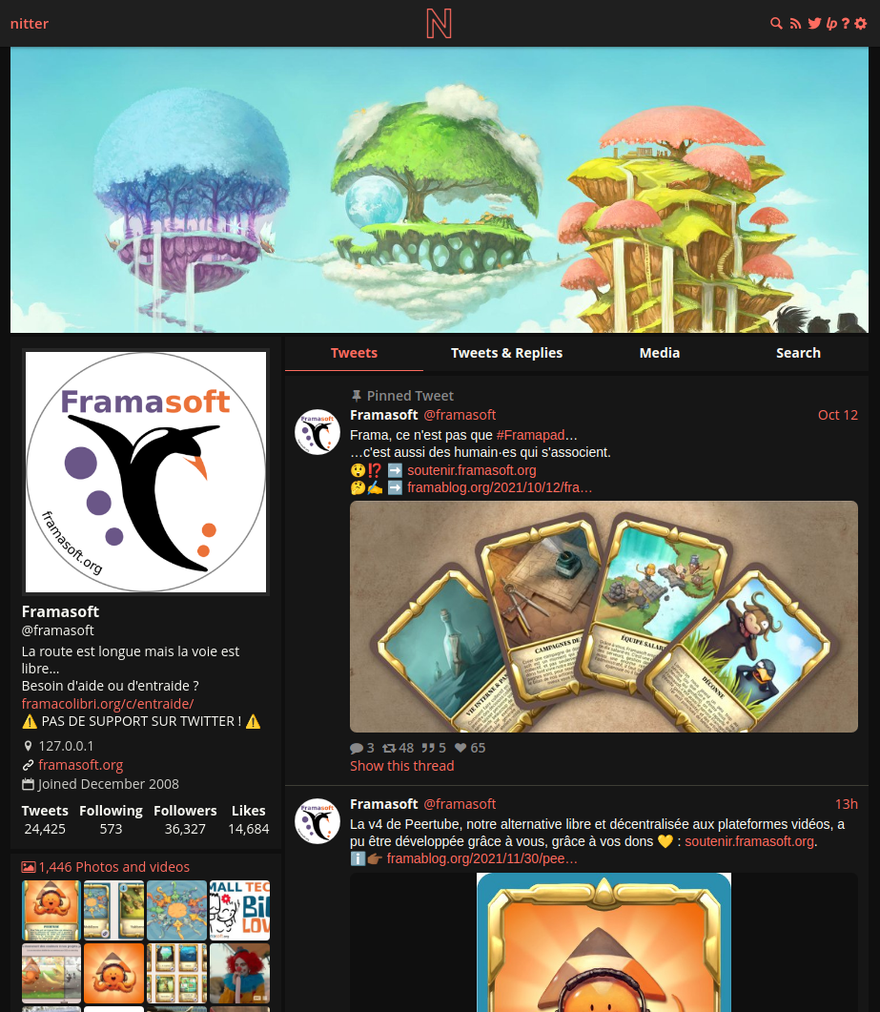
Screenshot
Installation
Dependencies
- libpcre
- libsass
- redis/valkey
To compile Nitter you need a Nim installation, see
nim-lang.org for details. It is possible
to install it system-wide or in the user directory you create below.
To compile the scss files, you need to install libsass. On Ubuntu and Debian,
you can use libsass-dev.
Redis is required for caching and in the future for account info. As of 2024
Redis is no longer open source, so using the fork Valkey is recommended. It
should be available on most distros as redis or redis-server
(Ubuntu/Debian), or valkey/valkey-server. Running it with the default
config is fine, Nitter's default config is set to use the default port and
localhost.
Here's how to create a nitter user, clone the repo, and build the project
along with the scss and md files.
# useradd -m nitter
# su nitter
$ git clone https://github.com/zedeus/nitter
$ cd nitter
$ nimble -l build -d:danger --mm:refc
$ nimble -l scss
$ nimble -l md
$ cp nitter.example.conf nitter.conf
Set your hostname, port, HMAC key, https (must be correct for cookies), and
Redis info in nitter.conf. To run Redis, either run
redis-server --daemonize yes, or systemctl enable --now redis (or
redis-server depending on the distro). Run Nitter by executing ./nitter or
using the systemd service below. You should run Nitter behind a reverse proxy
such as Nginx or
Apache for security and
performance reasons.
Docker
Page for the Docker image: https://hub.docker.com/r/zedeus/nitter
NOTE: The published image is multi-arch — zedeus/nitter:latest runs natively on both amd64 and arm64.
To run Nitter with Docker, you'll need to install and run Redis separately
before you can run the container. See below for how to also run Redis using
Docker.
First create your config file. The Docker commands mount it into the container,
so it has to exist on the host beforehand. If you've cloned the repo:
cp nitter.example.conf nitter.conf
If you're using the prebuilt image without a local clone, download
nitter.example.conf
and save it as nitter.conf instead.
To build and run Nitter in Docker:
docker build -t nitter:latest .
docker run -v $(pwd)/nitter.conf:/src/nitter.conf -d --network host nitter:latest
A prebuilt Docker image is provided as well:
docker run -v $(pwd)/nitter.conf:/src/nitter.conf -d --network host zedeus/nitter:latest
Using docker-compose to run both Nitter and Redis as different containers:
Change redisHost from localhost to nitter-redis in nitter.conf, then run:
docker-compose up -d
Note the Docker commands mount nitter.conf (and sessions.jsonl for
docker-compose) from the directory you run them in. If a mounted file doesn't
exist, Docker silently creates a directory in its place and the container fails
with not a directory: Are you trying to mount a directory onto a file. Remove
that directory and create the file as shown above.
systemd
To run Nitter via systemd you can use this service file:
[Unit]
Description=Nitter (An alternative Twitter front-end)
After=syslog.target
After=network.target

[Service]
Type=simple

# set user and group
User=nitter
Group=nitter

# configure location
WorkingDirectory=/home/nitter/nitter
ExecStart=/home/nitter/nitter/nitter

Restart=always
RestartSec=15

[Install]
WantedBy=multi-user.target
Then enable and run the service:
systemctl enable --now nitter.service
Logging
Nitter currently prints some errors to stdout, and there is no real logging
implemented. If you're running Nitter with systemd, you can check stdout like
this: journalctl -u nitter.service (add --follow to see just the last 15
lines). If you're running the Docker image, you can do this:
docker logs --follow *nitter container id*
Feel free to join our Matrix channel.
You can email me at [email protected] if you wish to contact me personally.
For legal inquiries and DMCA requests, contact [email protected]

 一个免费开源的 Twitter 替代前端,注重隐私和性能,灵感来自 Invidious 项目。你通过 Nitter 实例来浏览 Twitter,而不是直接访问 twitter.com。