 GoTTY - Share your terminal as a web application



GoTTY is a simple command line tool that turns your CLI tools into web applications.
Installation
Download the latest stable binary file from the Releases page. Note that the release marked Pre-release is built for testing purpose, which can include unstable or breaking changes. Download a release marked Latest release for a stabale build.
(Files named with darwin_amd64 are for Mac OS X users)
Homebrew Installation
You can install GoTTY with Homebrew as well.
$ brew install yudai/gotty/gotty
go get Installation (Development)
If you have a Go language environment, you can install GoTTY with the go get command. However, this command builds a binary file from the latest master branch, which can include unstable or breaking changes. GoTTY requires go1.9 or later.
$ go get github.com/yudai/gotty
Usage
Usage: gotty [options] <command> [<arguments...>]
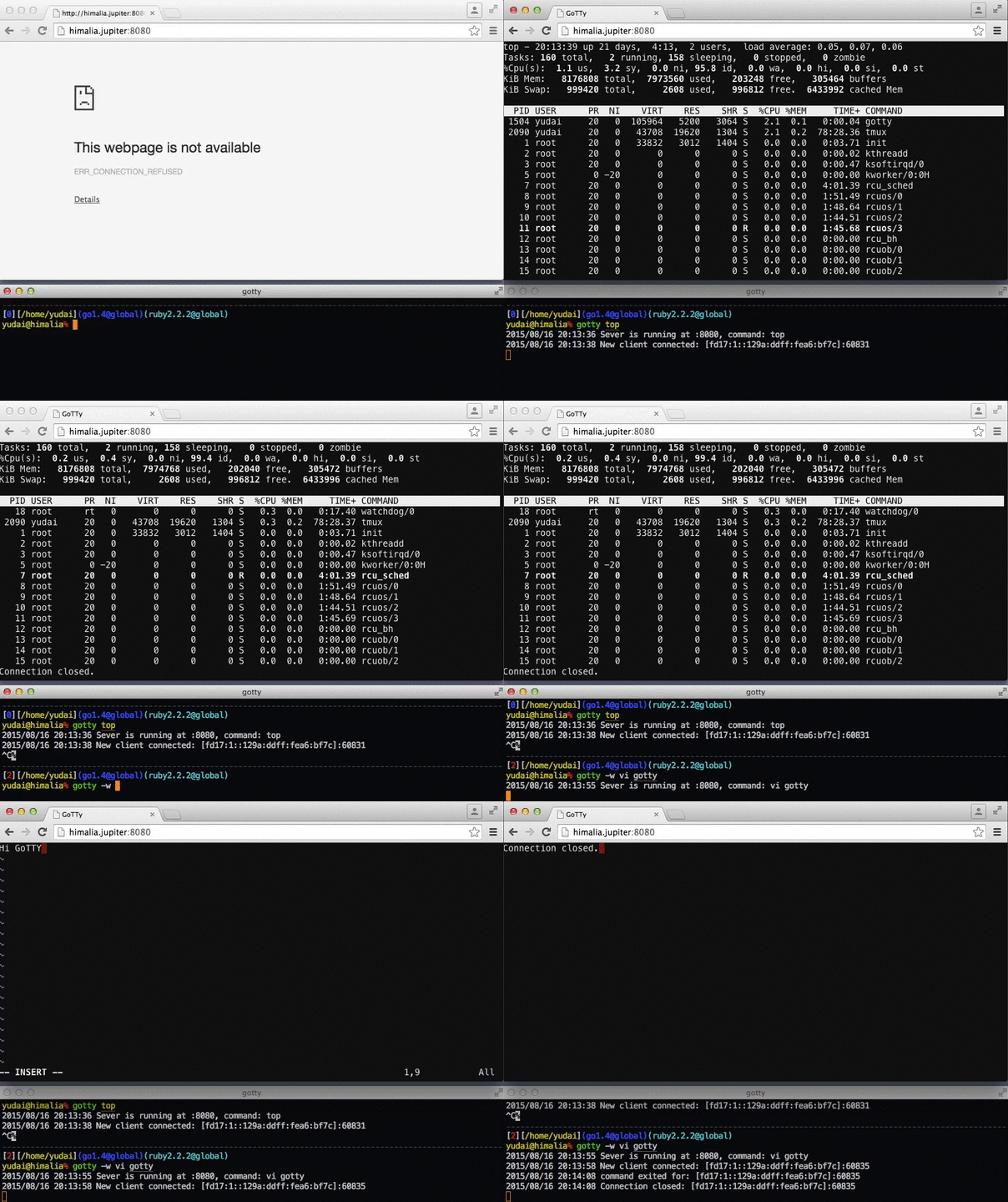
Run gotty with your preferred command as its arguments (e.g. gotty top).
By default, GoTTY starts a web server at port 8080. Open the URL on your web browser and you can see the running command as if it were running on your terminal.
Options
--address value, -a value     IP address to listen (default: "0.0.0.0") [$GOTTY_ADDRESS]
--port value, -p value        Port number to liten (default: "8080") [$GOTTY_PORT]
--permit-write, -w            Permit clients to write to the TTY (BE CAREFUL) [$GOTTY_PERMIT_WRITE]
--credential value, -c value  Credential for Basic Authentication (ex: user:pass, default disabled) [$GOTTY_CREDENTIAL]
--random-url, -r              Add a random string to the URL [$GOTTY_RANDOM_URL]
--random-url-length value     Random URL length (default: 8) [$GOTTY_RANDOM_URL_LENGTH]
--tls, -t                     Enable TLS/SSL [$GOTTY_TLS]
--tls-crt value               TLS/SSL certificate file path (default: "~/.gotty.crt") [$GOTTY_TLS_CRT]
--tls-key value               TLS/SSL key file path (default: "~/.gotty.key") [$GOTTY_TLS_KEY]
--tls-ca-crt value            TLS/SSL CA certificate file for client certifications (default: "~/.gotty.ca.crt") [$GOTTY_TLS_CA_CRT]
--index value                 Custom index.html file [$GOTTY_INDEX]
--title-format value          Title format of browser window (default: "{{ .command }}@{{ .hostname }}") [$GOTTY_TITLE_FORMAT]
--reconnect                   Enable reconnection [$GOTTY_RECONNECT]
--reconnect-time value        Time to reconnect (default: 10) [$GOTTY_RECONNECT_TIME]
--max-connection value        Maximum connection to gotty (default: 0) [$GOTTY_MAX_CONNECTION]
--once                        Accept only one client and exit on disconnection [$GOTTY_ONCE]
--timeout value               Timeout seconds for waiting a client(0 to disable) (default: 0) [$GOTTY_TIMEOUT]
--permit-arguments            Permit clients to send command line arguments in URL (e.g. http://example.com:8080/?arg=AAA&arg=BBB) [$GOTTY_PERMIT_ARGUMENTS]
--width value                 Static width of the screen, 0(default) means dynamically resize (default: 0) [$GOTTY_WIDTH]
--height value                Static height of the screen, 0(default) means dynamically resize (default: 0) [$GOTTY_HEIGHT]
--ws-origin value             A regular expression that matches origin URLs to be accepted by WebSocket. No cross origin requests are acceptable by default [$GOTTY_WS_ORIGIN]
--term value                  Terminal name to use on the browser, one of xterm or hterm. (default: "xterm") [$GOTTY_TERM]
--close-signal value          Signal sent to the command process when gotty close it (default: SIGHUP) (default: 1) [$GOTTY_CLOSE_SIGNAL]
--close-timeout value         Time in seconds to force kill process after client is disconnected (default: -1) (default: -1) [$GOTTY_CLOSE_TIMEOUT]
--config value                Config file path (default: "~/.gotty") [$GOTTY_CONFIG]
--version, -v                 print the version
Config File
You can customize default options and your terminal (hterm) by providing a config file to the gotty command. GoTTY loads a profile file at ~/.gotty by default when it exists.
// Listen at port 9000 by default
port = "9000"

// Enable TSL/SSL by default
enable_tls = true

// hterm preferences
// Smaller font and a little bit bluer background color
preferences {
    font_size = 5
    background_color = "rgb(16, 16, 32)"
}
See the .gotty file in this repository for the list of configuration options.
Security Options
By default, GoTTY doesn't allow clients to send any keystrokes or commands except terminal window resizing. When you want to permit clients to write input to the TTY, add the -w option. However, accepting input from remote clients is dangerous for most commands. When you need interaction with the TTY for some reasons, consider starting GoTTY with tmux or GNU Screen and run your command on it (see "Sharing with Multiple Clients" section for detail).
To restrict client access, you can use the -c option to enable the basic authentication. With this option, clients need to input the specified username and password to connect to the GoTTY server. Note that the credentical will be transmitted between the server and clients in plain text. For more strict authentication, consider the SSL/TLS client certificate authentication described below.
The -r option is a little bit casualer way to restrict access. With this option, GoTTY generates a random URL so that only people who know the URL can get access to the server.
All traffic between the server and clients are NOT encrypted by default. When you send secret information through GoTTY, we strongly recommend you use the -t option which enables TLS/SSL on the session. By default, GoTTY loads the crt and key files placed at ~/.gotty.crt and ~/.gotty.key. You can overwrite these file paths with the --tls-crt and --tls-key options. When you need to generate a self-signed certification file, you can use the openssl command.
openssl req -x509 -nodes -days 9999 -newkey rsa:2048 -keyout ~/.gotty.key -out ~/.gotty.crt
(NOTE: For Safari uses, see how to enable self-signed certificates for WebSockets when use self-signed certificates)
For additional security, you can use the SSL/TLS client certificate authentication by providing a CA certificate file to the --tls-ca-crt option (this option requires the -t or --tls to be set). This option requires all clients to send valid client certificates that are signed by the specified certification authority.
Sharing with Multiple Clients
GoTTY starts a new process with the given command when a new client connects to the server. This means users cannot share a single terminal with others by default. However, you can use terminal multiplexers for sharing a single process with multiple clients.
For example, you can start a new tmux session named gotty with top command by the command below.
$ gotty tmux new -A -s gotty top
This command doesn't allow clients to send keystrokes, however, you can attach the session from your local terminal and run operations like switching the mode of the top command. To connect to the tmux session from your terminal, you can use following command.
$ tmux new -A -s gotty
By using terminal multiplexers, you can have the control of your terminal and allow clients to just see your screen.
Quick Sharing on tmux
To share your current session with others by a shortcut key, you can add a line like below to your .tmux.conf.
# Start GoTTY in a new window with C-t
bind-key C-t new-window "gotty tmux attach -t `tmux display -p '#S'`"
Playing with Docker
When you want to create a jailed environment for each client, you can use Docker containers like following:
$ gotty -w docker run -it --rm busybox
Development
You can build a binary using the following commands. Windows is not supported now. go1.9 is required.
# Install tools
go get github.com/jteeuwen/go-bindata/...
go get github.com/tools/godep

# Build
make
To build the frontend part (JS files and other static files), you need npm.
Architecture
GoTTY uses xterm.js and hterm to run a JavaScript based terminal on web browsers. GoTTY itself provides a websocket server that simply relays output from the TTY to clients and receives input from clients and forwards it to the TTY. This hterm + websocket idea is inspired by Wetty.
Alternatives
Command line client
- gotty-client: If you want to connect to GoTTY server from your terminal
Terminal/SSH on Web Browsers
- Secure Shell (Chrome App): If you are a chrome user and need a "real" SSH client on your web browser, perhaps the Secure Shell app is what you want
- Wetty: Node based web terminal (SSH/login)
- ttyd: C port of GoTTY with CJK and IME support
Terminal Sharing
- tmate: Forked-Tmux based Terminal-Terminal sharing
- termshare: Terminal-Terminal sharing through a HTTP server
- tmux: Tmux itself also supports TTY sharing through SSH)
License
The MIT License

 GoTTY 是一个命令行工具,能把命令行程序变成网页应用:运行 'gotty top' 后,任何打开该网址的人都能在浏览器里实时看到这条命令的运行画面。