Что это такое?
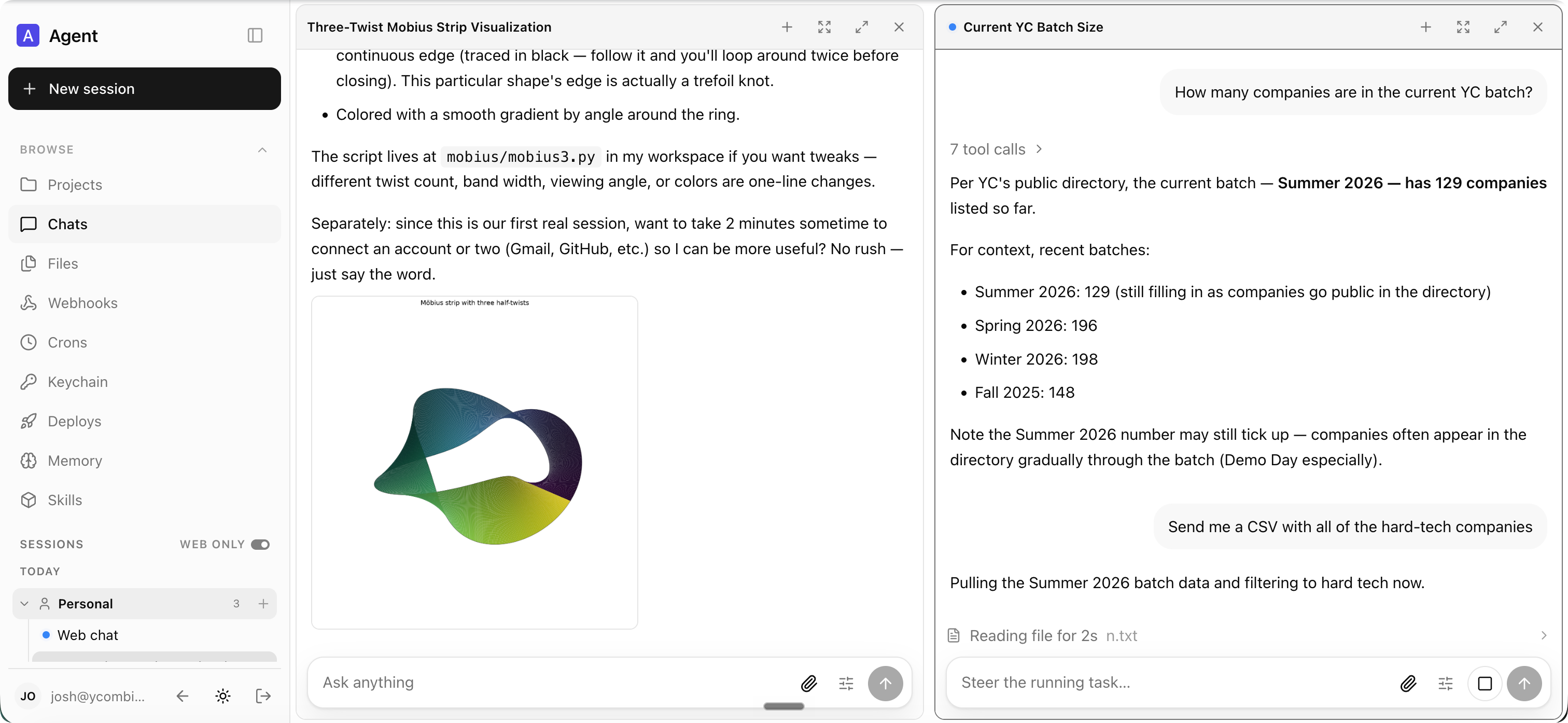
 Опенсорсный мультиплеерный агентский харнесс для работы: один AI-агент, которым пользуется вся компания, доступный из Slack и через веб-приложение. Он создан для команд людей, которые работают с агентом вместе, а не для одного человека.
Опенсорсный мультиплеерный агентский харнесс для работы: один AI-агент, которым пользуется вся компания, доступный из Slack и через веб-приложение. Он создан для команд людей, которые работают с агентом вместе, а не для одного человека.Мы запускаем его сами, или есть хостинговая версия?Вы хостите его сами: ваша организация создаёт репозиторий для деплоя, который зависит от пакета @yc-software/qm, и каждый деплой работает в вашем собственном облачном аккаунте. Есть и сторонняя хостинговая версия — её удобно использовать, чтобы попробовать.
Вы хостите его сами: ваша организация создаёт репозиторий для деплоя, который зависит от пакета @yc-software/qm, и каждый деплой работает в вашем собственном облачном аккаунте. Есть и сторонняя хостинговая версия — её удобно использовать, чтобы попробовать.Как нам его задеплоить?Скажите любому удобному кодинг-агенту 'Let's deploy', и он проследует по гайду по деплою. Инициализация проведёт вас через инфраструктуру, вход через веб, креды коннекторов, опциональный доступ через Slack и живую проверку — чекаут исходников не нужен.
Скажите любому удобному кодинг-агенту 'Let's deploy', и он проследует по гайду по деплою. Инициализация проведёт вас через инфраструктуру, вход через веб, креды коннекторов, опциональный доступ через Slack и живую проверку — чекаут исходников не нужен.Мы привязаны к одной AI-модели или кодинг-агенту?Нет — вы выбираете свой харнесс и модель и можете переключаться между ними. Pi, OpenCode, Codex и Claude Code работают с одним и тем же ядром, так что деплой не завязан на какого-то одного вендора.
Нет — вы выбираете свой харнесс и модель и можете переключаться между ними. Pi, OpenCode, Codex и Claude Code работают с одним и тем же ядром, так что деплой не завязан на какого-то одного вендора.Что нас подставит, если пропустить шаг настройки?Без DATABASEURL и SESSIONSTORE=postgres сессии живут в памяти процесса и пропадают при перезапуске, так что задайте эти переменные, чтобы всё сохранялось. Ядро также работает напрямую на Node, версия которой должна быть 24.15 или новее.
Без DATABASEURL и SESSIONSTORE=postgres сессии живут в памяти процесса и пропадают при перезапуске, так что задайте эти переменные, чтобы всё сохранялось. Ядро также работает напрямую на Node, версия которой должна быть 24.15 или новее.Это личный ассистент одного человека или им пользуется целая команда?Он рассчитан на стартапы: каждый сотрудник получает своё изолированное рабочее пространство и работает независимо, а люди могут ещё и взаимодействовать с агентом вместе — в Slack-каналах, групповых сообщениях и проектах.
Он рассчитан на стартапы: каждый сотрудник получает своё изолированное рабочее пространство и работает независимо, а люди могут ещё и взаимодействовать с агентом вместе — в Slack-каналах, групповых сообщениях и проектах.Агент и наши данные компании остаются на нашей собственной инфраструктуре?Да — каждый деплой работает в собственном облачном аккаунте оператора, где пользовательские данные, история сессий и другое постоянное состояние хранятся в слое персистентности на Postgres. При желании память можно дополнительно маршрутизировать по скоупам во внешние провайдеры.
Да — каждый деплой работает в собственном облачном аккаунте оператора, где пользовательские данные, история сессий и другое постоянное состояние хранятся в слое персистентности на Postgres. При желании память можно дополнительно маршрутизировать по скоупам во внешние провайдеры.Что агент реально может делать для команды изо дня в день?Он может искать по внутренним заметкам, почте, документам, базам данных и вебу одновременно; собирать и публиковать внутренние веб-приложения; разбирать ваш входящие по расписанию с ярлыками и черновиками ответов; работать в существующем репозитории — запускать тесты, открывать PR, следить за CI, проверять логи — и вести проект в общем канале.
Он может искать по внутренним заметкам, почте, документам, базам данных и вебу одновременно; собирать и публиковать внутренние веб-приложения; разбирать ваш входящие по расписанию с ярлыками и черновиками ответов; работать в существующем репозитории — запускать тесты, открывать PR, следить за CI, проверять логи — и вести проект в общем канале.Что за песочница, в которой работает агент?У каждого человека и каждой комнаты есть своя изолированная и персистентная песочница — собственный компьютер агента. Тул execute агента выполняет там команды, и установленные инструменты остаются установленными между сессиями.
У каждого человека и каждой комнаты есть своя изолированная и персистентная песочница — собственный компьютер агента. Тул execute агента выполняет там команды, и установленные инструменты остаются установленными между сессиями.Агент действует с нашими кредами — что помешает ему выполнить что-то разрушительное?Ваша организация выбирает один режим безопасности: Strict приостанавливает каждый вызов инструмента харнесса для подтверждения человеком, Auto (по умолчанию) проверяет внешний контент классификатором, прежде чем тот дойдёт до модели, а Dangerous отключает проверку. Жёсткие запреты на вещи вроде рекурсивного удаления и разрушительного SQL действуют в любом режиме.
Ваша организация выбирает один режим безопасности: Strict приостанавливает каждый вызов инструмента харнесса для подтверждения человеком, Auto (по умолчанию) проверяет внешний контент классификатором, прежде чем тот дойдёт до модели, а Dangerous отключает проверку. Жёсткие запреты на вещи вроде рекурсивного удаления и разрушительного SQL действуют в любом режиме.Может ли он продолжать работать, когда никто не онлайн?Да — кроны, watches и входящие вебхуки выполняют фоновую работу, пока никто не смотрит, например разбор входящих по расписанию с расстановкой ярлыков и черновиками ответов.
Да — кроны, watches и входящие вебхуки выполняют фоновую работу, пока никто не смотрит, например разбор входящих по расписанию с расстановкой ярлыков и черновиками ответов.Which topics is it in?assistant, cron, webhooks, slack, collaboration, harness, opencode, agent-memory, sandbox, agent-orchestration, skills, postgresql
assistant, cron, webhooks, slack, collaboration, harness, opencode, agent-memory, sandbox, agent-orchestration, skills, postgresql