















What is this?
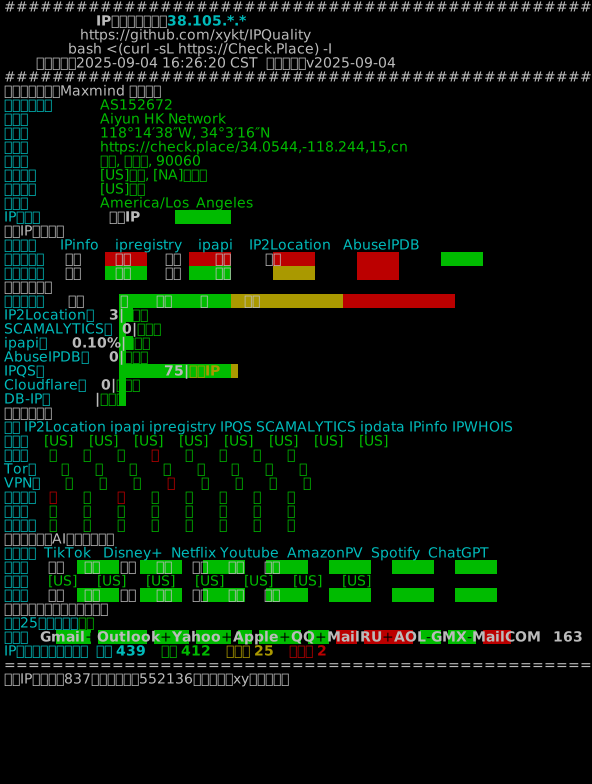
 IPQuality is a shell script that checks the quality of a server or VPS IP address: geolocation, risk score, blacklist status, streaming unlock status, and mail provider connectivity, all in one report.
IPQuality is a shell script that checks the quality of a server or VPS IP address: geolocation, risk score, blacklist status, streaming unlock status, and mail provider connectivity, all in one report.Is this a standalone script or does it need a framework?It is a standalone bash script you run directly on a server, or via Docker if you are on Windows or do not want to install dependencies locally.
It is a standalone bash script you run directly on a server, or via Docker if you are on Windows or do not want to install dependencies locally.How do I run it?Run it in bash via the convenient interactive menu, or use the advanced mode with command-line flags for things like IPv4/IPv6-only checks, a specific network interface, or a proxy server.
Run it in bash via the convenient interactive menu, or use the advanced mode with command-line flags for things like IPv4/IPv6-only checks, a specific network interface, or a proxy server.Do I need to install anything first?The script checks your OS and installs its own dependencies (it will ask before doing so), or you can pass a flag to auto-install or skip the OS/dependency check entirely.
The script checks your OS and installs its own dependencies (it will ask before doing so), or you can pass a flag to auto-install or skip the OS/dependency check entirely.Does it detect everything reliably on every platform?Windows is only supported through Docker, not natively, and the project's changelog shows a long history of bug fixes for edge cases like gateway ports blocking mail checks or inaccurate Netflix/TikTok region detection.
Windows is only supported through Docker, not natively, and the project's changelog shows a long history of bug fixes for edge cases like gateway ports blocking mail checks or inaccurate Netflix/TikTok region detection.Can it run without internet access?No, it needs internet access to query external risk databases (Maxmind, AbuseIPDB, IP2Location, etc.) and streaming/mail services.
No, it needs internet access to query external risk databases (Maxmind, AbuseIPDB, IP2Location, etc.) and streaming/mail services.Which streaming and AI services can it check for unlock status?TikTok, Disney+, Netflix, YouTube, Amazon Prime Video, Reddit, and ChatGPT, each with unlock-type detection.
TikTok, Disney+, Netflix, YouTube, Amazon Prime Video, Reddit, and ChatGPT, each with unlock-type detection.Which mail providers does it test connectivity for?Gmail, Outlook, Yahoo, Apple, QQ, Mail.ru, AOL, GMX, Mail.com, 163, Sohu, and Sina.
Gmail, Outlook, Yahoo, Apple, QQ, Mail.ru, AOL, GMX, Mail.com, 163, Sohu, and Sina.Can I get the output in JSON instead of a visual report?Yes, a flag outputs the result as JSON, and another option lets you save the report as ANSI, JSON, or plain text to a file.
Yes, a flag outputs the result as JSON, and another option lets you save the report as ANSI, JSON, or plain text to a file.Which risk databases does it combine for the risk score?It merges data from IPinfo, ipregistry, ipapi, AbuseIPDB, IP2Location, IPQS, DB-IP, and Scamalytics, plus a 400+ source IP blacklist check.
It merges data from IPinfo, ipregistry, ipapi, AbuseIPDB, IP2Location, IPQS, DB-IP, and Scamalytics, plus a 400+ source IP blacklist check.What are similar projects?vps-security-enhancement-scripts, clashctl, shadowsocks-c, brook, wireguard-install, trojan, sing-box, v2ray
vps-security-enhancement-scripts, clashctl, shadowsocks-c, brook, wireguard-install, trojan, sing-box, v2rayWhich topics is it in?network-security, vpn, sysadmin, shell, proxy, monitoring, china, networking, command-line-tool, privacy, security, terminal
network-security, vpn, sysadmin, shell, proxy, monitoring, china, networking, command-line-tool, privacy, security, terminal